
PYTH-102 · Lesson 9 of 12 · 25 min
Working with dates and times
▶ Video coming soon A video version of this lesson is on the way.
Coffee is a fresh product. Every bag Ridgeline sells is stamped with its roast date, and Rosa's rule is that a bag should be sold within 30 days of roasting; after that it moves to the discount shelf. Theo needs to know which bags are close to that date, Anita closes the books by month and reports sales by week, Kai schedules roasts for particular days, and the online shop records the exact time of every order, including those placed late at night in other time zones. Each of these jobs depends on handling dates and times correctly.
Dates look simple and are not. Months have different lengths, leap years add a day, weeks cross month boundaries, the clocks change twice a year in most of Canada and the United States, and the same moment has different local times in Kelowna and Halifax, or Boise and Boston. Python's datetime module handles these details. This lesson covers its main types, date arithmetic with timedelta, comparing and sorting dates, formatting and parsing dates as text, and the difference between naive and time-zone-aware datetimes.
The datetime module's types
The datetime module provides four main types. A date holds a year, month and day. A time holds hours, minutes, seconds and microseconds, with no date. A datetime holds both a date and a time. A timedelta holds a duration, a length of time such as 30 days or 90 minutes. You create the first three by giving their parts in order from largest to smallest.
from datetime import date, time, datetime, timedelta

roasted = date(2026, 10, 14)
opening = time(7, 30)
order_at = datetime(2026, 11, 3, 21, 45, 10)
shelf_life = timedelta(days=30)

print(roasted, opening, order_at, shelf_life)
print(roasted.year, roasted.month, roasted.day)
print(order_at.date(), order_at.time(), order_at.hour)
print(roasted.isoformat(), roasted.weekday(), roasted.strftime("%A"))2026-10-14 07:30:00 2026-11-03 21:45:10 30 days, 0:00:00 2026 10 14 2026-11-03 21:45:10 21 2026-10-14 2 Wednesday
Printing a date shows it in the ISO 8601 format, year-month-day, which sorts correctly as text and is understood worldwide. weekday() numbers the days from Monday as 0 to Sunday as 6, and strftime("%A") gives the day's name. Python checks that dates are valid as they are created: date(2026, 2, 30) raises a ValueError, because February 2026 has 28 days. Using the class rather than handling the numbers yourself means such mistakes are caught immediately.
To get the current date or time, use date.today() and datetime.now(). Because the result changes every time the program runs, the listings in this lesson use fixed dates so that their output can be checked; in your own programs, today() and now() are what you will normally start from.
from datetime import date, datetime
print("Today is", date.today())
print("Right now it is", datetime.now().strftime("%H:%M"))
Date arithmetic with timedelta
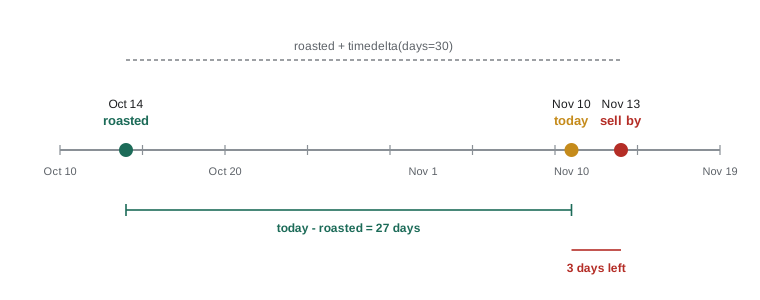
Adding a timedelta to a date or datetime gives a new date or datetime, and subtracting one date from another gives a timedelta. Python handles month lengths and leap years for you, which is exactly the kind of detail that goes wrong in hand-written date code. Theo's sell-by date is the roast date plus 30 days.
from datetime import date, timedelta

roasted = date(2026, 10, 14)
sell_by = roasted + timedelta(days=30)
print("sell by", sell_by)

today = date(2026, 11, 10)
age = today - roasted
print("age:", age, "|", age.days, "days")
print("days left:", (sell_by - today).days)

print(date(2028, 2, 28) + timedelta(days=1), date(2026, 2, 28) + timedelta(days=1))
print(date(2026, 12, 31) + timedelta(weeks=1))sell by 2026-11-13 age: 27 days, 0:00:00 | 27 days days left: 3 2028-02-29 2026-03-01 2027-01-07
Subtracting two dates gives a timedelta, and its days attribute is the number you usually want. A timedelta can be built from days, seconds, microseconds, milliseconds, minutes, hours and weeks, and it stores everything as days, seconds and microseconds internally. There is no months argument, because a month is not a fixed length: one month after January 31 has no obvious answer. When you need month arithmetic, such as "the same day next month", you have to decide what it means and write it explicitly, as the worked example later in this lesson shows.
Comparing and sorting dates
Dates and datetimes compare in time order with the usual operators, so an earlier date is less than a later one. That means they can be sorted, and min and max find the oldest and newest. A list of roast batches sorted by roast date puts the bags that must be sold first at the top.
from datetime import date

batches = [("B-0430", date(2026, 11, 2)), ("B-0412", date(2026, 10, 14)),
           ("B-0421", date(2026, 10, 24)), ("B-0436", date(2026, 11, 7))]
today = date(2026, 11, 10)

for batch_id, roasted in sorted(batches, key=lambda b: b[1]):
    age = (today - roasted).days
    flag = "  DISCOUNT SOON" if age >= 25 else ""
    print(batch_id, roasted, f"{age:>2} days{flag}")

print("oldest:", min(batches, key=lambda b: b[1])[0])
print(date(2026, 10, 31) < date(2026, 11, 1))B-0412 2026-10-14 27 days DISCOUNT SOON B-0421 2026-10-24 17 days B-0430 2026-11-02 8 days B-0436 2026-11-07 3 days oldest: B-0412 True
Formatting dates as text
strftime, string format time, turns a date or datetime into text using format codes that start with the % character. %Y is the four-digit year, %m the month number, %d the day, %B the month's name, %b its abbreviation, %A the weekday's name, %H the hour on a 24-hour clock, %I the hour on a 12-hour clock with %p for AM or PM, and %M the minutes. The same codes work inside f-strings after a colon.
from datetime import datetime

order_at = datetime(2026, 11, 3, 21, 45)
print(order_at.strftime("%Y-%m-%d %H:%M"))
print(order_at.strftime("%A, %B %d, %Y"))
print(order_at.strftime("%m/%d/%Y"))
print(f"{order_at:%b %d at %I:%M %p}")2026-11-03 21:45 Tuesday, November 03, 2026 11/03/2026 Nov 03 at 09:45 PM
Numeric formats such as 11/03/2026 are ambiguous: in the United States that is November 3, but Canadians and Europeans often read it as the 11th of March. For anything stored, sorted or exchanged between programs, use the ISO format 2026-11-03, which nobody misreads and which sorts correctly as text. Keep friendlier formats, such as Tuesday, November 03, 2026, for displays that people read.
Parsing text into dates
The reverse operation, parsing, turns text into a date or datetime. For ISO-format text, date.fromisoformat and datetime.fromisoformat are simple and fast. For other formats, datetime.strptime, string parse time, takes the text and a format string made of the same codes as strftime. If the text does not match the format, it raises a ValueError, which you can catch to report bad input.
from datetime import date, datetime

print(date.fromisoformat("2026-10-14"))
print(datetime.fromisoformat("2026-11-03T21:45:10"))
print(datetime.strptime("03 Nov 2026 9:45 PM", "%d %b %Y %I:%M %p"))

for text in ["2026-10-14", "14/10/2026", "2026-13-01"]:
    try:
        print("ok:", date.fromisoformat(text))
    except ValueError:
print("not a valid ISO date:", text)2026-10-14 2026-11-03 21:45:10 2026-11-03 21:45:00 ok: 2026-10-14 not a valid ISO date: 14/10/2026 not a valid ISO date: 2026-13-01
Parsing is where date handling usually breaks, because data from outside a program comes in every possible format. A good practice is to parse dates as early as possible, at the point where data enters the program, convert them to date or datetime objects, and work only with those objects from then on. Text dates belong at the edges of a program: when reading input and when writing output.
Try it yourself
Sell-by dates
Write sell_by(roasted, days=30) that takes a roast date as an ISO string such as "2026-10-14" and returns the sell-by date as a date object.
Then write days_left(roasted, today) that takes two ISO strings and returns the number of days until the sell-by date, which is negative if it has passed.
from datetime import date, timedelta

def sell_by(roasted, days=30):
    return roasted + days

def days_left(roasted, today):
    return 0

print(sell_by('2026-10-14'))
Weeks, months and calendars
Anita's reports group sales by week and by month. isocalendar() returns the ISO year, week number and weekday of a date, which is the standard way to number weeks for reports; ISO weeks start on Monday, and week 1 is the week containing the first Thursday of the year. The calendar module gives the number of days in a month and whether a year is a leap year, which is what month-end calculations need.
import calendar
from datetime import date, timedelta

d = date(2026, 11, 10)
print(d.isocalendar().week, d.isocalendar().weekday)

monday = d - timedelta(days=d.weekday())
print("week starts", monday, "ends", monday + timedelta(days=6))

print(calendar.monthrange(2026, 2)[1], calendar.monthrange(2028, 2)[1], calendar.isleap(2028))
first = d.replace(day=1)
last = d.replace(day=calendar.monthrange(d.year, d.month)[1])
print("November runs", first, "to", last)46 2 week starts 2026-11-09 ends 2026-11-15 28 29 True November runs 2026-11-01 to 2026-11-30
replace returns a copy of a date with some parts changed, which is the easiest way to get the first day of a month. Dates, like strings, are immutable: methods such as replace and operations such as adding a timedelta always return a new object and never change the original.
Times and time zones
A datetime without time-zone information is called naive. It records a wall-clock time but not where, so it cannot be compared reliably with times from other places. An aware datetime carries a tzinfo object that says how far it is from Coordinated Universal Time, UTC. The online shop's server records orders in UTC, which is the professional standard for storing times, and converts to local time only for display.
from datetime import datetime, timezone, timedelta

order_utc = datetime(2026, 11, 4, 5, 45, tzinfo=timezone.utc)
mountain = timezone(timedelta(hours=-7), "MST")       # Boise in November
eastern = timezone(timedelta(hours=-5), "EST")        # Boston in November

print(order_utc.isoformat())
print(order_utc.astimezone(mountain).strftime("%Y-%m-%d %H:%M %Z"))
print(order_utc.astimezone(eastern).strftime("%Y-%m-%d %H:%M %Z"))
print(order_utc.astimezone(mountain) == order_utc) # the same moment2026-11-04T05:45:00+00:00 2026-11-03 22:45 MST 2026-11-04 00:45 EST True
The order placed at 05:45 UTC on November 4 was still November 3 in the shop's own time zone, which matters for a daily sales report. The fixed offsets used above are correct for November but not for summer, when daylight saving time moves most clocks forward an hour. Real programs use named time zones from the zoneinfo module, which knows the rules for every region, including past and future clock changes. zoneinfo reads the time-zone database installed on the computer, or the tzdata package from PyPI on systems without one.
from datetime import datetime
from zoneinfo import ZoneInfo

boise = ZoneInfo("America/Boise")
summer = datetime(2026, 7, 1, 12, 0, tzinfo=boise)
winter = datetime(2026, 12, 1, 12, 0, tzinfo=boise)
print(summer.utcoffset(), winter.utcoffset())   # -6 hours in summer, -7 in winter
Three rules prevent most time-zone bugs. Store and compare times in UTC. Convert to local time only when showing times to people. And never compare a naive datetime with an aware one; Python refuses to do it, raising a TypeError, precisely because the answer would be meaningless.
Worked problem
The same day next month
Mei's subscription customers are billed on the same day each month. A customer who signed up on January 31 must be billed in February, which has no 31st. Design next_billing(d) for a date d.
Show solution
- Work out the next month and year: month 12 rolls over to month 1 of the next year.
- Find the last day of that month with calendar.monthrange(year, month)[1].
- Use the original day, or the last day of the month if the original day does not exist: min(d.day, last).
- Return d.replace(year=y, month=m, day=day).
- Tests: January 31, 2026 gives February 28, 2026; January 31, 2028 gives February 29, 2028; December 15 gives January 15 of the next year.
Answer: Month arithmetic needs an explicit rule; here, "the same day, or the last day of a shorter month".
import calendar
from datetime import date

def next_billing(d):
    year, month = (d.year + 1, 1) if d.month == 12 else (d.year, d.month + 1)
    last = calendar.monthrange(year, month)[1]
    return d.replace(year=year, month=month, day=min(d.day, last))

for d in (date(2026, 1, 31), date(2028, 1, 31), date(2026, 12, 15), date(2026, 3, 31)):
print(d, "->", next_billing(d))2026-01-31 -> 2026-02-28 2028-01-31 -> 2028-02-29 2026-12-15 -> 2027-01-15 2026-03-31 -> 2026-04-30
Try it yourself
A weekly sales report
The setup defines SALES, a list of (iso_datetime_text, amount) pairs. Write week_totals(sales) that returns a dictionary mapping each Monday, as an ISO date string, to the total of the sales in the week starting that Monday, rounded to 2 decimals.
For example, a sale at "2026-11-04T09:15" (a Wednesday) belongs to the week starting "2026-11-02".
from datetime import datetime, timedelta

def week_totals(sales):
    totals = {}
    for text, amount in sales:
        totals[text[:10]] = amount
    return totals

print(week_totals(SALES))
Common mistakes
MistakeDoing date arithmetic on numbers or strings, such as adding 30 to the day.
InsteadUse date objects and timedelta, which handle month lengths and leap years.
MistakeStoring dates in local formats like 03/11/2026.
InsteadStore and exchange dates in ISO format, 2026-11-03.
MistakeComparing naive and aware datetimes, or local times from different places.
InsteadStore times in UTC as aware datetimes and convert for display.
MistakeExpecting timedelta to accept months.
InsteadWrite month logic explicitly with calendar.monthrange and replace.
MistakeParsing dates deep inside the program, in many places.
InsteadParse once where data enters the program and work with date objects afterwards.
MistakeHard-coding fixed time-zone offsets for places with daylight saving time.
InsteadUse named zones from zoneinfo, such as America/Vancouver or America/Boise.
Summary and key terms
- datetime provides date, time, datetime and timedelta; invalid dates raise ValueError when created.
- Adding a timedelta to a date gives a new date; subtracting two dates gives a timedelta whose days attribute counts the days.
- Dates compare and sort in time order, so min, max and sorted work on them.
- strftime formats dates as text with % codes; fromisoformat and strptime parse text into dates.
- ISO 8601 format (2026-11-03) is unambiguous and sorts correctly; use it for storage and exchange.
- isocalendar gives week numbers, and calendar.monthrange gives month lengths for month-end and month arithmetic.
- Store times in UTC as aware datetimes, convert to local time only for display, and use zoneinfo for real time zones.
- date
- A calendar date: year, month and day.
- datetime
- A date combined with a time of day.
- timedelta
- A duration, such as 30 days or 90 minutes.
- ISO 8601
- The international standard date format, year-month-day.
- strftime
- The method that formats a date or time as text.
- strptime
- The function that parses text into a datetime using a format.
- naive datetime
- A datetime with no time-zone information.
- aware datetime
- A datetime that carries its offset from UTC.
- UTC
- Coordinated Universal Time, the reference for all time zones.
- zoneinfo
- The standard module providing named time zones with daylight saving rules.
Practice problems
Work each problem on paper first, then reveal the answer to check.
What is date(2026, 12, 25) - date(2026, 11, 10), and how do you get the number of days?
Show answer
timedelta(days=45); use .days.
Write the expression for the date 2 weeks after date(2026, 11, 10).
Show answer
date(2026, 11, 10) + timedelta(weeks=2), which is 2026-11-24.
Format datetime(2026, 11, 3, 21, 45) as "Nov 03, 21:45".
Show answer
d.strftime("%b %d, %H:%M")
Parse "14.10.2026" into a date.
Show answer
datetime.strptime("14.10.2026", "%d.%m.%Y").date()
How do you find the Monday of the week containing a date d?
Show answer
d - timedelta(days=d.weekday())
Why store order times in UTC?
Show answer
UTC has no daylight saving changes and lets times from anywhere be compared and sorted.
Lesson quiz · 5 questions
Score 60% or more to complete this lesson.
Create a free account to save your progress, take quizzes and earn a certificate.