
PYTH-102 · Lesson 7 of 12 · 24 min
Iterators and generators
▶ Video coming soon A video version of this lesson is on the way.
Since the first loops of PYTH-101, Jordan has written for line in file, for code in stock and for n in range(10) without thinking about how a for loop actually gets its items. That question becomes practical when the data gets big. Ridgeline's online shop has written a sales log line by line for years, and Anita wants totals by month. Reading the whole file into a list first would work today and fail on the day the file outgrows memory. Kai's roaster produces a temperature reading every second, a stream with no natural end. Both problems are solved by producing items one at a time, only when they are needed.
This lesson explains the iteration protocol that every for loop uses, the difference between iterables and iterators, how to write your own iterator class, and the much simpler way to get the same effect with generator functions and the yield statement. You will build generator pipelines that process data lazily, one item at a time, and meet the itertools module, which provides ready-made building blocks for working with streams of data.
The iteration protocol
A for loop works with any iterable: an object that can produce its items one after another. The loop first calls the built-in iter() on the iterable to get an iterator, an object that remembers its position. It then calls next() on the iterator repeatedly, running the loop body once for each item, until next() raises the StopIteration exception, which the loop catches quietly as the signal to stop. You can perform the same steps by hand.
menu = ["latte", "mocha", "tea"]
it = iter(menu)              # what for does first
print(next(it))
print(next(it))
print(next(it))
try:
    next(it)
except StopIteration:
    print("StopIteration: the iterator is used up")

for drink in menu:           # the same protocol, done for you
print(drink.upper())latte mocha tea StopIteration: the iterator is used up LATTE MOCHA TEA
Lists, tuples, strings, dictionaries, sets, files and ranges are all iterables. The distinction between an iterable and an iterator matters: a list can be looped over as often as you like, because each loop asks it for a fresh iterator. An iterator, on the other hand, can be used only once. When it is exhausted, it stays exhausted, and looping over it again produces nothing.
codes = ["RC-101", "RC-102", "RC-103"]
pairs = zip(codes, [42, 15, 27])     # zip returns an iterator
print(list(pairs))
print(list(pairs))                   # already used up

print(list(codes), list(codes))      # a list can be iterated again and again
print(iter(codes) is iter(codes)) # each call gives a new iterator[('RC-101', 42), ('RC-102', 15), ('RC-103', 27)]
[]
['RC-101', 'RC-102', 'RC-103'] ['RC-101', 'RC-102', 'RC-103']
Falsezip, enumerate, map, filter, reversed and the file objects returned by open are all iterators. This catches people out: if you convert a zip to a list once to inspect it, the zip is then empty for the code that follows. When you need the data more than once, store it in a list.
Writing an iterator class
To make an iterator of your own, a class needs two special methods. __iter__ returns the iterator object itself, and __next__ returns the next item or raises StopIteration when there are no more. Kai wants to step through the roaster's temperature checkpoints, from the charge temperature up to the drop temperature in fixed steps.
class Checkpoints:
    """Iterate over temperatures from start up to stop, in steps."""
    def __init__(self, start, stop, step):
        self.current, self.stop, self.step = start, stop, step

    def __iter__(self):
        return self

    def __next__(self):
        if self.current > self.stop:
            raise StopIteration
        value = self.current
        self.current += self.step
        return value

for t in Checkpoints(180, 220, 10):
    print(t, end=" ")
print()
print(list(Checkpoints(196, 205, 3)))180 190 200 210 220 [196, 199, 202, 205]
This works, but there is a lot of machinery for a simple idea: the class has to store its position in attributes and restore it on every call to __next__. Python has a far shorter way to write the same thing.
Generator functions
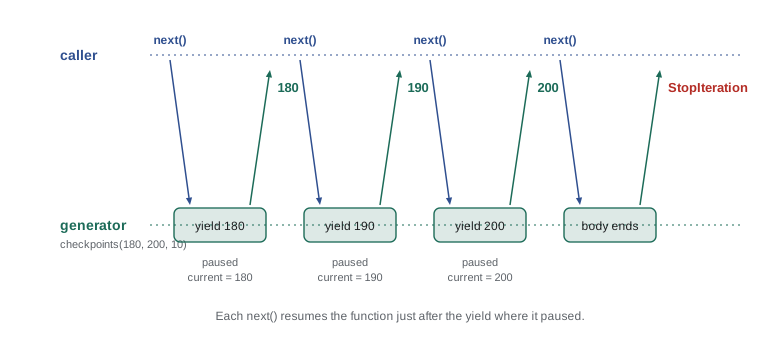
A generator function looks like an ordinary function but contains the keyword yield. Calling it does not run the body. Instead it returns a generator, a kind of iterator. Each time next() is called on the generator, the body runs until it reaches a yield, hands that value out, and pauses, keeping all its local variables. The next call resumes right after the yield. When the function body finishes, the generator raises StopIteration automatically.
def checkpoints(start, stop, step):
    current = start
    while current <= stop:
        yield current
        current += step

print(list(checkpoints(180, 220, 10)))

def noisy():
    print("  starting")
    yield 1
    print("  resumed after the first yield")
    yield 2
    print("  finishing")

gen = noisy()
print("created, nothing has run yet")
print(next(gen))
print(next(gen))
print(next(gen, "no more"))[180, 190, 200, 210, 220] created, nothing has run yet starting 1 resumed after the first yield 2 finishing no more
The generator version of checkpoints is four lines, and its state is just ordinary local variables. The second example shows the pausing clearly: nothing runs when the generator is created, each next() runs to the following yield, and the final next() lets the function finish. Passing a default to next(), as in next(gen, "no more"), returns that value instead of raising StopIteration.
Laziness: one item at a time
Generators are lazy: they compute each item only when it is requested, and they never hold more than one item at a time. This is what makes them suitable for large files and endless streams. A generator can represent a sequence that would be far too big to store, or one with no end at all, as long as the code using it stops asking at some point.
import itertools

def batch_ids(start):
    n = start
    while True:                       # an endless generator
        yield f"B-{n:04d}"
        n += 1

ids = batch_ids(412)
print(next(ids), next(ids))
print(list(itertools.islice(ids, 3)))   # take just three more

squares = (n * n for n in range(1_000_000_000))   # a generator expression
print(next(squares), next(squares), next(squares))B-0412 B-0413 ['B-0414', 'B-0415', 'B-0416'] 0 1 4
The generator expression in the last lines, written with parentheses, describes a billion squares, but it computes only the three that are asked for. A list comprehension with square brackets would try to build all billion at once and run out of memory. Lesson 8 covers comprehensions and generator expressions side by side. itertools.islice takes a slice of any iterator, the way list slicing takes part of a list, which is the standard way to take the first few items of an endless generator.
Try it yourself
A countdown generator
Write a generator function countdown(n) that yields n, n - 1, and so on down to 1, then stops. list(countdown(3)) is [3, 2, 1].
Then write every_tenth(start, stop) that yields the drink numbers from start to stop inclusive that earn a free drink on the stamp card, that is, the multiples of 10.
def countdown(n):
    return list(range(n, 0, -1))

def every_tenth(start, stop):
    return []

print(list(countdown(3)))
Generator pipelines
Because each generator produces items one at a time, generators can be chained: the output of one becomes the input of the next, and items flow through the whole chain one by one. This style, called a pipeline, splits a data-processing job into small, testable stages without ever building large intermediate lists. Anita's monthly totals are a natural example.
import io

SALES_LOG = io.StringIO("""2026-09-28,RC-101,2,18.50
2026-09-30,RC-104,1,20.25
# till restarted
2026-10-01,RC-102,1,22.00
bad line
2026-10-15,RC-101,3,18.50
2026-11-02,RC-106,2,21.50
""")

def lines(f):
    for line in f:
        yield line.strip()

def records(rows):
    for row in rows:
        if not row or row.startswith("#"):
            continue
        parts = row.split(",")
        if len(parts) != 4:
            continue                       # skip lines that cannot be parsed
        date, sku, qty, price = parts
        yield date[:7], int(qty) * float(price)

def monthly_totals(recs):
    totals = {}
    for month, amount in recs:
        totals[month] = round(totals.get(month, 0) + amount, 2)
    return totals

print(monthly_totals(records(lines(SALES_LOG)))){'2026-09': 57.25, '2026-10': 77.5, '2026-11': 43.0}io.StringIO wraps a string so it behaves like an open file, which keeps this listing self-contained; with a real file you would pass the object returned by open. The pipeline never holds more than one line in memory at a time, so it works the same for a five-line sample and a five-gigabyte log. Each stage can be tested on its own with a short list of strings, and stages can be reused in other pipelines. Pipelines like this are the heart of many data-processing scripts.
yield from
A generator sometimes needs to hand out all the items of another iterable. Writing for item in other: yield item works, and yield from other says the same thing in one line. It is especially handy for generators that walk nested structures.
def all_skus(groups):
    for group, skus in groups.items():
        yield f"[{group}]"
        yield from skus

groups = {"blends": ["RC-101", "RC-106"], "single origins": ["RC-102", "RC-103"]}
print(list(all_skus(groups)))['[blends]', 'RC-101', 'RC-106', '[single origins]', 'RC-102', 'RC-103']
The itertools module
The standard library's itertools module provides fast, memory-efficient building blocks for iterators. A few appear again and again: count for endless counting, islice for taking part of an iterator, chain for joining iterables end to end, accumulate for running totals, and groupby for grouping consecutive items that share a key. All of them are lazy, so they combine naturally with your own generators.
import itertools

week = [312.50, 287.25, 401.00, 365.75, 512.30, 688.10, 590.40]
running = [round(x, 2) for x in itertools.accumulate(week)]
print(running[:3], "... week total", running[-1])

print(list(itertools.chain(["latte", "mocha"], ("tea",), "ab")))

sales = [("RC-101", 2), ("RC-101", 1), ("RC-104", 1), ("RC-101", 4)]
for sku, group in itertools.groupby(sorted(sales), key=lambda s: s[0]):
    print(sku, sum(qty for _, qty in group))

for n, drink in zip(itertools.count(1), ["drip", "latte", "tea"]):
print(n, drink)[312.5, 599.75, 1000.75] ... week total 3157.3 ['latte', 'mocha', 'tea', 'a', 'b'] RC-101 7 RC-104 1 1 drip 2 latte 3 tea
groupby only groups items that are next to each other, which is why the sales are sorted first; without sorting, the two runs of RC-101 would come out as separate groups. This is the most common mistake with groupby. The itertools documentation also includes recipes, short functions built from these tools, which are worth browsing once you are comfortable with generators.
Worked problem
Reading a temperature stream
Kai's roaster sends one temperature reading per second. Kai wants the first time, in seconds, at which the bean temperature reaches 196 degrees, the first crack, without storing the readings. Design a solution with generators.
Show solution
- A generator readings() yields temperatures one per second; in production it would read from the roaster, here it yields from a sample list.
- enumerate(readings(), start=1) pairs each reading with its second number, lazily.
- A generator expression keeps only the pairs where the temperature is at least 196.
- next() takes the first such pair and stops the whole chain immediately, so no later readings are read.
- next(..., None) returns None if the temperature never gets there.
Answer: first = next(((s, t) for s, t in enumerate(readings(), 1) if t >= 196), None)
def readings():
    for t in [150, 162, 171, 179, 186, 191, 194, 196.5, 199, 203, 207]:
        print("  read", t)
        yield t

first = next(((sec, t) for sec, t in enumerate(readings(), start=1) if t >= 196), None)
print("first crack at", first)read 150 read 162 read 171 read 179 read 186 read 191 read 194 read 196.5 first crack at (8, 196.5)
The printed reads show that the generator stopped after the eighth reading: nothing after 196.5 was requested, so nothing after it was read. With a real roaster stream, that is the difference between answering at once and waiting for the roast to finish.
Try it yourself
A clean-lines pipeline
Write two generator functions. clean(lines) yields each line with surrounding whitespace removed, skipping blank lines and lines that start with #.
amounts(lines) takes the cleaned lines, each like "RC-101,2,18.50", and yields the sale amount qty * price rounded to 2 decimals. The test runs sum(amounts(clean(LOG))) on a sample log from the setup.
def clean(lines):
    return [l.strip() for l in lines]

def amounts(lines):
    for line in lines:
        sku, qty, price = line.split(',')
        yield qty * price

print(list(clean(LOG)))
Common mistakes
MistakeLooping over the same iterator twice and getting nothing the second time.
InsteadStore the items in a list if you need them more than once.
MistakeCalling a generator function and expecting it to run.
InsteadCalling it creates a generator; iterate over it or call next() to run it.
MistakeUsing return value instead of yield in a function meant to produce several items.
Insteadyield each item; return ends the generator.
MistakeConverting a huge or endless generator to a list.
InsteadProcess it in a loop, or take a fixed number with itertools.islice.
MistakeUsing itertools.groupby on unsorted data.
InsteadSort by the same key first so equal keys are next to each other.
MistakeReading a whole large file into memory before processing it.
InsteadIterate over the file object line by line, or build a generator pipeline.
Summary and key terms
- A for loop calls iter() on an iterable to get an iterator, then next() until StopIteration.
- Iterables such as lists can be looped over repeatedly; iterators such as zip, map and files are used up after one pass.
- An iterator class defines __iter__ returning itself and __next__ returning items or raising StopIteration.
- A generator function uses yield; calling it returns a generator that runs to each yield and pauses there.
- Generators are lazy, producing items on demand, so they handle large files and endless streams.
- Generators can be chained into pipelines; yield from hands out all items of another iterable.
- itertools provides lazy tools such as count, islice, chain, accumulate and groupby.
- iterable
- An object that can produce an iterator, such as a list, string or file.
- iterator
- An object with __next__ that produces items one at a time and remembers its position.
- StopIteration
- The exception an iterator raises when it has no more items.
- generator function
- A function containing yield, which returns a generator when called.
- generator
- An iterator produced by a generator function or generator expression.
- yield
- A statement that hands out a value from a generator and pauses it.
- lazy evaluation
- Computing values only when they are needed.
- pipeline
- A chain of generators, each consuming the output of the previous one.
- yield from
- A statement that yields every item of another iterable.
- itertools
- A standard module of fast building blocks for iterators.
Practice problems
Work each problem on paper first, then reveal the answer to check.
What does next(iter("ab")) return?
Show answer
'a'
Why does print(list(z), list(z)) print one full list and one empty list when z = zip(...)?
Show answer
zip returns an iterator, which is used up by the first list().
Write a generator evens(n) yielding the even numbers from 0 up to n inclusive.
Show answer
def evens(n): for k in range(0, n + 1, 2): yield k
How do you take the first five items of an endless generator g?
Show answer
list(itertools.islice(g, 5))
What is the difference between [x * 2 for x in data] and (x * 2 for x in data)?
Show answer
The first builds a list at once; the second is a lazy generator.
Why must data be sorted before itertools.groupby?
Show answer
groupby only groups consecutive items with equal keys.
Lesson quiz · 5 questions
Score 60% or more to complete this lesson.
Create a free account to save your progress, take quizzes and earn a certificate.