
PYTH-102 · Lesson 10 of 12 · 24 min
The standard library tour
▶ Video coming soon A video version of this lesson is on the way.
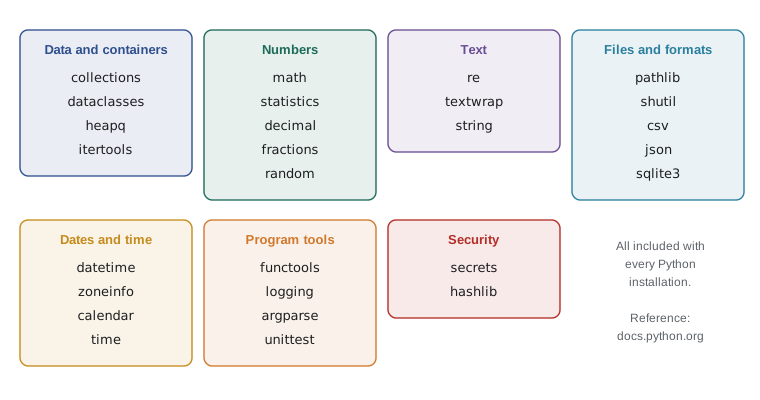
Python is often described as coming with batteries included. Every installation of Python ships with the standard library, a collection of more than two hundred modules for jobs that programs need again and again: counting things, doing exact decimal arithmetic, working with files and folders, matching patterns in text, generating random samples, computing statistics, and much more. Before Jordan writes a helper function for Ridgeline, the first question is now whether the standard library already has one. Usually it does, and the library version is faster, better tested and already understood by other Python programmers.
This lesson is a guided tour of the modules you are most likely to need: collections for specialized containers, math and statistics, decimal for exact money, random for simulations and samples, pathlib for files and folders, re for text patterns, and a handful of smaller modules worth knowing. It is not a complete reference. The goal is to know what exists, so that you recognize when to reach for it and where to look in the documentation.
collections: specialized containers
The collections module extends the built-in containers with types designed for common jobs. Counter counts things, defaultdict creates missing values automatically, namedtuple gives tuple fields readable names, and deque is a list-like sequence that adds and removes items quickly at both ends.
from collections import Counter

orders = ["latte", "drip", "latte", "mocha", "tea", "latte", "drip", "muffin", "latte"]
counts = Counter(orders)
print(counts["latte"], counts["chai"])          # missing items count as 0
print(counts.most_common(2))

sales = [("RC-101", 2), ("RC-104", 1), ("RC-101", 3), ("RC-102", 1)]
bags = Counter()
for sku, qty in sales:
    bags[sku] += qty
print(bags)
print(bags + Counter({"RC-104": 5}), sum(bags.values()))4 0
[('latte', 4), ('drip', 2)]
Counter({'RC-101': 5, 'RC-104': 1, 'RC-102': 1})
Counter({'RC-104': 6, 'RC-101': 5, 'RC-102': 1}) 7A Counter is a dictionary whose values are counts. Looking up an item that is not there gives 0 instead of raising KeyError, most_common returns the top items in order, and Counters can be added together. The counting loops that took several lines in PYTH-101 become one line.
from collections import defaultdict, namedtuple, deque

by_customer = defaultdict(list)
for name, item in [("Priya", "latte"), ("Sam", "drip"), ("Priya", "muffin")]:
    by_customer[name].append(item)          # no need to check whether the key exists
print(dict(by_customer))

Coffee = namedtuple("Coffee", ["sku", "name", "price"])
c = Coffee("RC-102", "Ethiopia Guji", 22.00)
print(c.name, c[2], c)

recent = deque(maxlen=3)                    # keeps only the last 3 items
for batch in ["B-0410", "B-0411", "B-0412", "B-0413"]:
    recent.append(batch)
print(list(recent)){'Priya': ['latte', 'muffin'], 'Sam': ['drip']}
Ethiopia Guji 22.0 Coffee(sku='RC-102', name='Ethiopia Guji', price=22.0)
['B-0411', 'B-0412', 'B-0413']defaultdict(list) creates an empty list the first time a key is used, which makes grouping effortless. A namedtuple is a tuple whose items also have names, lighter than a class when you only need a fixed record; for records with methods or defaults, the dataclasses of lesson 4 are usually better. A deque with maxlen discards the oldest item when a new one arrives, perfect for keeping the last few readings or log lines.
math and statistics
The math module provides mathematical functions and constants: square roots, rounding up and down, logarithms, trigonometry, pi and e, and helpful extras such as isclose for comparing floats and prod for multiplying a list of numbers. The statistics module computes averages and spread: mean, median, mode, standard deviation and more, using careful methods that avoid some of the rounding problems of doing it yourself.
import math, statistics

print(math.ceil(10.2 * 1000 / 340), math.floor(10.2 * 1000 / 340))
print(math.isclose(0.1 + 0.2, 0.3), 0.1 + 0.2 == 0.3)
print(round(math.pi * 0.09 ** 2, 4))           # area of a mug base 18 cm across, in m2

week = [312.50, 287.25, 401.00, 365.75, 512.30, 688.10, 590.40]
print(round(statistics.mean(week), 2), statistics.median(week))
print(round(statistics.stdev(week), 2))
print(statistics.mode(["latte", "drip", "latte", "tea"]))30 30 True False 0.0254 451.04 401.0 150.09 latte
math.isclose is the right way to compare floats: as you saw in PYTH-101, 0.1 + 0.2 is not exactly 0.3, so == can fail on values that are equal for all practical purposes. statistics.stdev measures how much the daily sales vary around the average; a large value relative to the mean means sales are unpredictable from day to day, which matters for Theo's staffing.
decimal: exact decimal arithmetic
Lesson 6 built a Money class on whole cents. The decimal module provides a complete exact decimal type, Decimal, used in financial software. Decimals represent numbers like 0.10 exactly, and you control the rounding rule, which matters because sales tax rules usually require rounding half up, while Python's round function rounds half to even.
from decimal import Decimal, ROUND_HALF_UP

print(Decimal("0.1") + Decimal("0.2"), 0.1 + 0.2)
print(Decimal(0.1))                            # built from a float: inexact already

CENT = Decimal("0.01")
subtotal = Decimal("10.50")
tax = (subtotal * Decimal("0.05")).quantize(CENT, rounding=ROUND_HALF_UP)
print(tax, subtotal + tax)
print(round(2.675, 2), Decimal("2.675").quantize(CENT, rounding=ROUND_HALF_UP))0.3 0.30000000000000004 0.1000000000000000055511151231257827021181583404541015625 0.53 11.03 2.67 2.68
Always create Decimals from strings, not floats: Decimal(0.1) faithfully copies the float's tiny error, as the second line shows. quantize rounds to a given number of places, here cents, using the rule you pass. The last line shows why it matters: round(2.675, 2) gives 2.67, because the float 2.675 is really slightly less than 2.675, while the Decimal rounds to 2.68 as an accountant would expect. The capstone in lesson 12 uses Decimal for prices.
Try it yourself
Counting with Counter
The setup defines ORDERS, a list of drink names for one morning. Using collections.Counter, write top_drinks(orders, n) that returns a list of the n most common drinks as (drink, count) pairs, and never_ordered(orders, menu) that returns a sorted list of the menu items nobody ordered.
from collections import Counter

def top_drinks(orders, n):
    return orders[:n]

def never_ordered(orders, menu):
    return []

print(top_drinks(ORDERS, 2))
random: samples and simulations
The random module generates pseudo-random numbers: random() for a float between 0 and 1, randint for a whole number in a range, choice for one item from a sequence, sample for several different items, and shuffle to reorder a list in place. Mei uses it to pick a weekly prize draw winner from the loyalty members. Passing a seed to random.Random makes the sequence repeatable, which is essential for tests and for listings like these whose output must be the same every time.
import random

rng = random.Random(2026)                 # seeded: the same results every run
members = ["Priya", "Sam", "Lee", "Ana", "Omar", "Jun", "Kim"]
print(rng.choice(members))
print(rng.sample(members, 3))
deck = list(range(1, 11))
rng.shuffle(deck)
print(deck)
print([rng.randint(1, 6) for _ in range(5)])Priya ['Lee', 'Omar', 'Jun'] [1, 10, 3, 9, 6, 5, 8, 7, 4, 2] [2, 1, 5, 1, 1]
Pseudo-random numbers come from a formula, so they are predictable to anyone who knows the seed. That is fine for games, simulations and sampling, and never acceptable for passwords, tokens or anything security-related. For those, use the secrets module, which draws on the operating system's secure source of randomness, as in secrets.token_hex(16) for a password-reset token.
pathlib: files and folders
pathlib represents file system paths as objects rather than strings. A Path can be joined with the / operator, asked for its name, suffix or parent folder, checked for existence, and used to read or write a whole file in one call. It works the same on Windows, macOS and Linux, taking care of the different path separators for you, and it is the modern replacement for most of the older os.path functions.
from pathlib import Path

reports = Path("rc_reports")
reports.mkdir(exist_ok=True)
for month in ("2026-09", "2026-10", "2026-11"):
    (reports / f"sales-{month}.csv").write_text("sku,qty\nRC-101,2\n")

path = reports / "sales-2026-11.csv"
print(path.name, path.stem, path.suffix, path.parent)
print(path.exists(), path.read_text().splitlines()[0])
print(sorted(p.name for p in reports.glob("sales-*.csv")))sales-2026-11.csv sales-2026-11 .csv rc_reports True sku,qty ['sales-2026-09.csv', 'sales-2026-10.csv', 'sales-2026-11.csv']
write_text and read_text open, write or read, and close the file in one step, which is ideal for small files. For large files, or line-by-line processing, path.open() returns a file object to use in a with statement as before. glob finds files whose names match a pattern, where * matches any characters; rglob does the same through every subfolder.
re: regular expressions
A regular expression is a small pattern language for matching text. The re module uses it to find, check, extract and replace text that follows a pattern, which simple string methods cannot do. Ridgeline's SKUs follow the pattern RC- followed by three digits, and batch ids are B- followed by four digits. A regular expression can find every one in a block of notes, or check that a typed code is valid.
import re

notes = "Roasted B-0412 for RC-101 and RC-106. B-0413 (RC-102) delayed; rc-104 misspelled."
print(re.findall(r"RC-\d{3}", notes))
print(re.findall(r"B-(\d{4})", notes))

for code in ["RC-101", "RC-12", "rc-104", "RC-1012"]:
    print(code, bool(re.fullmatch(r"RC-\d{3}", code)))

print(re.sub(r"(?i)rc-(\d{3})", r"RC-\1", notes)[-30:])['RC-101', 'RC-106', 'RC-102'] ['0412', '0413'] RC-101 True RC-12 False rc-104 False RC-1012 False 2) delayed; RC-104 misspelled.
In a pattern, \d matches a digit, {3} means exactly three of the previous item, and round brackets capture part of the match, so findall returns just the digits for the batch ids. fullmatch requires the whole string to match, which is what validation needs. (?i) makes the match case-insensitive, and \1 in the replacement refers to the first captured group. Patterns are written as raw strings, with an r before the quote, so that backslashes reach the re module unchanged. Regular expressions are powerful but can become cryptic; for anything beyond simple patterns, add a comment explaining what the pattern matches.
Other modules worth knowing
A few more modules come up often enough to know by name. textwrap wraps long text to a given width, useful for receipts and terminal output. json and csv, which you used in PYTH-101, read and write the two most common data-exchange formats. itertools and functools, from lessons 7 and 2, provide iteration tools and function helpers. shutil copies and moves whole files and folders. hashlib computes checksums such as SHA-256, used to check that a downloaded file is intact. uuid creates unique identifiers. And sqlite3 is a complete database engine, the subject of PYTH-215.
import textwrap, hashlib, json

desc = ("A bright, floral coffee from the Guji zone of southern Ethiopia, washed and dried "
        "on raised beds, with notes of jasmine, bergamot and stone fruit.")
print(textwrap.fill(desc, width=40))
print(textwrap.shorten(desc, width=45, placeholder=" ..."))

record = {"sku": "RC-102", "price": "22.00"}
text = json.dumps(record, sort_keys=True)
print(hashlib.sha256(text.encode()).hexdigest()[:16])A bright, floral coffee from the Guji zone of southern Ethiopia, washed and dried on raised beds, with notes of jasmine, bergamot and stone fruit. A bright, floral coffee from the Guji ... db5d83665b09eae9
The official Python documentation, at docs.python.org, has a page for every standard module with explanations and examples, and the Python Module of the Week site has friendly tutorials for many of them. A good habit when starting any new task is to spend five minutes checking whether the standard library already covers it.
Worked problem
Choosing the right module
For each of Ridgeline's tasks, name the standard module to use: (a) group loyalty members by tier; (b) calculate tax so it rounds exactly like the till; (c) pick 5 survey participants fairly; (d) find every file in a folder ending in .csv; (e) check that typed phone numbers look like 250-555-0147; (f) produce a reset token for the online shop.
Show solution
- (a) collections.defaultdict(list), appending each member to its tier.
- (b) decimal.Decimal with quantize and ROUND_HALF_UP.
- (c) random.sample, seeded only in tests.
- (d) pathlib.Path(folder).glob("*.csv").
- (e) re.fullmatch(r"\d{3}-\d{3}-\d{4}", text).
- (f) secrets.token_urlsafe(), never random.
Answer: Each task is one or two lines with the right module.
Try it yourself
Exact tax with Decimal
Write till_total(prices, rate) that takes a list of price strings such as "5.25" and a tax rate string such as "0.05". It returns a tuple (subtotal, tax, total) of Decimal values, where the tax is rounded to the cent with ROUND_HALF_UP.
For ["5.25", "3.75", "1.50"] at "0.05", the subtotal is 10.50, the tax 0.53 and the total 11.03.
from decimal import Decimal, ROUND_HALF_UP

def till_total(prices, rate):
    subtotal = sum(float(p) for p in prices)
    tax = round(subtotal * float(rate), 2)
    return subtotal, tax, subtotal + tax

print(till_total(['5.25', '3.75', '1.50'], '0.05'))
Common mistakes
MistakeWriting your own counting, grouping or averaging code.
InsteadUse Counter, defaultdict and statistics.
MistakeCreating Decimals from floats, such as Decimal(18.5 * 1.05).
InsteadCreate them from strings and do the arithmetic in Decimal.
MistakeUsing random for passwords or tokens.
InsteadUse the secrets module for anything security-related.
MistakeBuilding file paths by gluing strings with slashes.
InsteadJoin paths with pathlib's / operator.
MistakeWriting regular expression patterns without the r prefix.
InsteadUse raw strings, r"RC-\d{3}", so backslashes are kept.
MistakeComparing floats with ==.
InsteadUse math.isclose, or Decimal for money.
Summary and key terms
- The standard library ships with Python; check it before writing a helper of your own.
- collections provides Counter, defaultdict, namedtuple and deque for counting, grouping, records and queues.
- math gives functions and isclose for floats; statistics computes mean, median, mode and spread.
- decimal.Decimal gives exact decimal arithmetic with chosen rounding, made from strings.
- random gives repeatable pseudo-random samples when seeded; secrets is for security.
- pathlib handles paths as objects: join with /, inspect parts, read and write text, find files with glob.
- re matches text patterns to find, validate, extract and replace; write patterns as raw strings.
- standard library
- The modules that come with every Python installation.
- Counter
- A dictionary subclass that counts items.
- defaultdict
- A dictionary that creates a default value for a missing key.
- namedtuple
- A tuple whose fields can also be reached by name.
- deque
- A double-ended queue, fast at adding and removing at both ends.
- Decimal
- An exact decimal number type from the decimal module.
- seed
- A starting value that makes a pseudo-random sequence repeatable.
- Path
- A pathlib object representing a file system path.
- regular expression
- A pattern that describes a set of strings.
- raw string
- A string literal prefixed with r, in which backslashes are not special.
Practice problems
Work each problem on paper first, then reveal the answer to check.
What does Counter("latte")["t"] return?
Show answer
2
Group a list of (tier, name) pairs into a dictionary of lists in two lines.
Show answer
d = defaultdict(list); for tier, name in pairs: d[tier].append(name)
Why is Decimal("2.675").quantize(Decimal("0.01"), rounding=ROUND_HALF_UP) different from round(2.675, 2)?
Show answer
The float 2.675 is slightly below 2.675, so round gives 2.67; the Decimal is exact and rounds up to 2.68.
Write a pathlib expression for the file week-45.csv inside the folder reports.
Show answer
Path("reports") / "week-45.csv"
Which regular expression matches exactly B- followed by four digits?
Show answer
r"B-\d{4}" used with re.fullmatch.
Which module should create a session token, and why not random?
Show answer
secrets, because random is predictable.
Lesson quiz · 5 questions
Score 60% or more to complete this lesson.
Create a free account to save your progress, take quizzes and earn a certificate.