
PYTH-102 · Lesson 3 of 12 · 27 min
Modules and packages
▶ Video coming soon A video version of this lesson is on the way.
By the end of PYTH-101, ridgeline.py had grown to more than two hundred lines in a single file: price formatting, stock rules, the loyalty program, saving and loading, and the command loop, all side by side. Every change meant scrolling through code that had nothing to do with it, and when Mei wanted to use the loyalty functions in a separate till script, the only option was to copy them. Real programs are not written as one long file. They are split into modules, files that each hold one area of the program, and modules are grouped into packages.
This lesson shows how to write your own modules and import them, the different forms of the import statement and when to use each, how Python finds modules on the module search path, what the if __name__ == "__main__" test is for, and how to organize modules into a package with an __init__.py file. It also introduces the Python Package Index and pip, which give you access to hundreds of thousands of modules written by other people.
What a module is
A module is simply a file of Python code whose name ends in .py. Any such file can be imported by another file, which runs it once and gives access to the names it defines. You have used modules from the standard library since PYTH-101: import math, import csv, import json and import random each load a module that ships with Python. A module you write yourself works exactly the same way. If Jordan moves the pricing functions into a file named rc_pricing.py, any other file in the same folder can write import rc_pricing and call rc_pricing.fmt(18.5).
The first lines of each listing below only prepare this page's in-browser Python: they let the listing write a module file next to itself, find it, and pick up your edits when you run it again. In a normal project the module files already exist, and you would simply write the import line.
import importlib, os, sys
sys.dont_write_bytecode = True
sys.path.insert(0, os.getcwd())

with open("rc_pricing.py", "w") as f:
    f.write("""# Price helpers for Ridgeline Coffee Roasters
BAG_G = 340

def fmt(amount):
    return f"{amount:.2f}"

def per_100g(price, bag_g=BAG_G):
    return price / bag_g * 100
""")
sys.modules.pop("rc_pricing", None)
importlib.invalidate_caches()

import rc_pricing
print(rc_pricing.fmt(18.5))
print(rc_pricing.fmt(rc_pricing.per_100g(18.50)))
print(rc_pricing.BAG_G, rc_pricing.__name__)18.50 5.44 340 rc_pricing
After import rc_pricing, the name rc_pricing refers to a module object, and everything the file defined at its top level is available as an attribute: functions, and constants such as BAG_G. The module also knows its own name, and a docstring at the top of the file would be available as rc_pricing.__doc__. The module has its own global namespace, so a variable called total inside rc_pricing never clashes with a total in the file that imports it. This separation is the main benefit of modules: each file can be read, tested and changed on its own.
The forms of import
Python offers several ways to import. import module binds the module's name, and you reach its contents with a dot: math.sqrt, rc_pricing.fmt. from module import name copies particular names into your namespace so you can use them without the prefix. import module as alias gives the module a shorter or clearer name. from module import name as alias renames one item.
import math
from statistics import mean, median
import datetime as dt
from json import dumps as to_json

prices = [18.50, 22.00, 19.75, 20.25, 19.00, 21.50]
print(math.ceil(mean(prices) * 100) / 100, median(prices))
print(dt.date(2026, 11, 10).isoformat())
print(to_json({"RC-101": 42}))20.17 20.0
2026-11-10
{"RC-101": 42}Each form has its place. import math keeps the origin of every name visible at the point of use, which is why most style guides prefer it for modules you use in many places. from statistics import mean is convenient when you use a few names often and they are not likely to clash with your own. Aliases are conventional for some libraries, such as import numpy as np, and useful when two modules have similar names.
One form to avoid is from module import *, which copies every public name from the module into your namespace. It saves typing but makes it impossible to tell where a name came from, and it can silently replace your own names, or built-ins, with the module's. PEP 8 discourages it in all but a few special cases.
Importing runs the module, once
Importing a module runs its code from top to bottom, exactly as if it were a script. Definitions create functions and constants, but any other statement at the top level, such as a print call, also runs. Python then stores the module object in a dictionary called sys.modules. If the same module is imported again, anywhere in the program, Python finds it there and hands back the same object without running the file a second time.
The first lines of each listing below only prepare this page's in-browser Python: they let the listing write a module file next to itself, find it, and pick up your edits when you run it again. In a normal project the module files already exist, and you would simply write the import line.
import importlib, os, sys
sys.dont_write_bytecode = True
sys.path.insert(0, os.getcwd())

with open("rc_hello.py", "w") as f:
    f.write('print("rc_hello is running its top-level code")\nGREETING = "Welcome to Ridgeline"\n')
sys.modules.pop("rc_hello", None)
importlib.invalidate_caches()

import rc_hello
import rc_hello                      # already loaded: nothing runs
from rc_hello import GREETING        # also uses the stored module
print(GREETING)
print("rc_hello" in sys.modules)rc_hello is running its top-level code Welcome to Ridgeline True
This explains a common puzzle: if you edit a module while a program is running and import it again, nothing changes, because the old module object is reused. Restarting the program is the simple fix. It also explains why modules should normally contain only definitions at the top level. A module that prints, reads files or starts a loop when imported is a nuisance to anyone who just wants one of its functions.
if __name__ == "__main__"
Every module has a variable called __name__. When a file is imported, __name__ is set to the module's name, such as "rc_pricing". When the same file is run directly as a script, __name__ is set to the string "__main__" instead. Testing this lets one file act as both: a module others can import, and a script that does something when run.
def bags_from_batch(roasted_kg, bag_g=340):
    return int(roasted_kg * 1000 // bag_g)

def main():
    for kg in (10.2, 9.8, 10.5):
        print(kg, "kg ->", bags_from_batch(kg), "bags")

print("__name__ is", repr(__name__))
if __name__ == "__main__":
main()__name__ is '__main__' 10.2 kg -> 30 bags 9.8 kg -> 28 bags 10.5 kg -> 30 bags
Run directly, this file calls main and prints the batch table. Imported by another module, it defines bags_from_batch and main but runs neither, so the importer gets the function without any unwanted output. Putting the script's work in a function called main and calling it from the guard is the standard layout for a Python program, and it keeps the top level of every file clean. The PYTH-101 capstone already used this layout; from now on every program in the course will.
Try it yourself
A module of stock rules
The setup has already written a module file rc_stock.py with a constant REORDER_POINT = 10 and a function is_low(bags). Import it and write a function low_codes(stock) that takes a dictionary of {code: bags} and returns a sorted list of the codes whose stock is low according to rc_stock.is_low.
Use the module rather than copying its rule, so a change to REORDER_POINT changes your result too.
def low_codes(stock):
    return sorted(code for code, bags in stock.items() if bags < 5)

print(low_codes({'RC-104': 9, 'RC-101': 42, 'RC-105': 12}))
How Python finds modules
When you write import rc_pricing, Python looks through a list of folders called the module search path, stored in sys.path, and loads the first file named rc_pricing.py it finds. The list begins with the folder of the script being run, followed by the folders in the PYTHONPATH environment variable if it is set, the standard library, and finally the site-packages folder where installed third-party packages live. You can print sys.path to see it on your own computer.
Because the script's own folder comes first, a file of yours can hide a standard library module by accident. If Jordan saves a practice script as random.py, then any import random in that folder, including one inside another library, loads Jordan's file instead of the real module, with confusing results. The rule is simple: never name your files after modules you use. Names such as rc_random.py or shuffle_menu.py are safe.
import sys, math, json
print(type(sys.path).__name__, "with", len(sys.path) > 0 and "at least one folder")
print(math.__name__, json.__name__)
print("math" in sys.builtin_module_names or hasattr(math, "__file__"))list with at least one folder math json True
Packages
When a program has more than a handful of modules, they are grouped into a package: a folder that contains modules and a file called __init__.py. The package name is the folder name, and the modules inside are reached with dots: import ridgeline.pricing, or from ridgeline.pricing import fmt. Packages can contain sub-packages to any depth. The standard library itself is organized this way, with packages such as json, email and urllib.
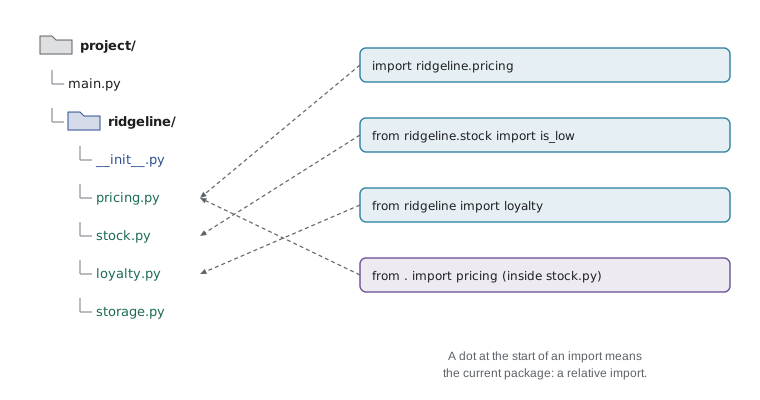
The __init__.py file runs when the package is first imported. It is often empty, which is enough to mark the folder as a package. It can also import the most useful names from the modules inside, so that users can write from ridgeline import fmt instead of remembering which module fmt lives in. A package's __init__.py is its front door.
The first lines of each listing below only prepare this page's in-browser Python: they let the listing write a module file next to itself, find it, and pick up your edits when you run it again. In a normal project the module files already exist, and you would simply write the import line.
import importlib, os, sys
sys.dont_write_bytecode = True
sys.path.insert(0, os.getcwd())

files = {
    "ridgeline/__init__.py": '"""Ridgeline Coffee Roasters tools."""\nfrom .pricing import fmt\n',
    "ridgeline/pricing.py": 'def fmt(amount):\n    return f"{amount:.2f}"\n',
    "ridgeline/stock.py": 'from . import pricing\nREORDER_POINT = 10\n\ndef line(code, bags, price):\n    flag = " LOW" if bags < REORDER_POINT else ""\n    return f"{code} {bags:>3} bags {pricing.fmt(bags * price):>8}{flag}"\n',
}
for path, text in files.items():
    os.makedirs(os.path.dirname(path), exist_ok=True)
    with open(path, "w") as f:
        f.write(text)
for name in [n for n in sys.modules if n == "ridgeline" or n.startswith("ridgeline.")]:
    del sys.modules[name]
importlib.invalidate_caches()

import ridgeline
from ridgeline import stock
print(ridgeline.fmt(777))
print(stock.line("RC-101", 42, 18.50))
print(stock.line("RC-104", 9, 20.25))777.00 RC-101 42 bags 777.00 RC-104 9 bags 182.25 LOW
Inside stock.py, from . import pricing is a relative import: the dot means the package this module belongs to. Relative imports keep a package working if it is renamed or moved, and they make it clear that pricing is a sibling module, not a library from elsewhere. Two dots reach the parent package. Relative imports only work inside packages, not in a script run directly.
A design rule keeps packages healthy: dependencies should point one way. In the ridgeline package, stock may import pricing, but pricing should not import stock. If two modules import each other, Python can end up running one before the other has finished defining its names, and you get an ImportError about a partially initialized module. Such a circular import is a sign that some shared code belongs in a third module that both can import.
Third-party packages and pip
The standard library is large, but the Python Package Index, PyPI, holds hundreds of thousands of packages written by others: requests for web APIs, pandas for data tables, Flask and Django for websites, pytest for testing. They are installed with pip, the package installer that comes with Python, normally inside a virtual environment so that each project has its own set of packages. PYTH-110 covers virtual environments in detail; here is what installing and using a package looks like in a terminal.
> python -m venv .venv
> .venv\Scripts\activate          (Windows; on macOS or Linux: source .venv/bin/activate)
> python -m pip install requests
> python -m pip list
> python -m pip freeze > requirements.txt
After installation, a third-party package is imported exactly like a standard library module: import requests. Before adding a dependency, it is worth a quick check that the package is actively maintained, widely used and has a license that suits the project, because every dependency is code you are trusting. A requirements.txt file records the exact versions a project uses, so that anyone can recreate the same environment with pip install -r requirements.txt.
Worked problem
Splitting ridgeline.py into modules
Plan how to split the PYTH-101 capstone into a package. It contains price formatting, loyalty rules, stock rules, loading and saving the JSON file, and the command loop. Decide the modules, what each holds, and which may import which.
Show solution
- pricing.py: fmt and tax helpers. It imports nothing from the package.
- loyalty.py: points_earned and loyalty_tier. It imports nothing from the package.
- stock.py: REORDER_POINT, is_low, sell and restock rules. It may import pricing for formatting.
- storage.py: load_state and save_state for ridgeline.json. It imports only json and the standard library.
- cli.py: the command loop and the COMMANDS table. It imports from all the others, and nothing imports it.
- __init__.py exposes the most used names, and main.py outside the package holds the main guard that calls cli.main().
Answer: Five modules with dependencies flowing toward cli.py, so there are no circular imports. Lesson 12 builds this package.
Try it yourself
The main guard
This module prints a roast table whenever it is imported, which annoys anyone who only wants bags_from_batch. Move the printing loop into a function main() and call main() only when __name__ == "__main__".
Here your code runs as if it had been imported as a module named roasting (the setup sets __name__ to that), so a correct answer prints nothing when you run it. The checker then calls main() itself.
def bags_from_batch(roasted_kg):
    return int(roasted_kg * 1000 // 340)

for kg in (10.2, 9.8):
    print(kg, bags_from_batch(kg))
Common mistakes
MistakeNaming your own file after a standard module, such as random.py or json.py.
InsteadGive your files distinctive names so they never hide a library module.
MistakeUsing from module import *, so nobody can tell where names come from.
InsteadImport the module, or import the specific names you need.
MistakePutting prints, file reads or loops at the top level of a module.
InsteadKeep only definitions at the top level and put script work in main() behind the main guard.
MistakeExpecting a second import to pick up changes to a module.
InsteadImports are cached in sys.modules; restart the program after editing a module.
MistakeLetting two modules import each other.
InsteadMove the shared code into a third module so dependencies point one way.
MistakeInstalling packages into the system Python for every project.
InsteadCreate a virtual environment per project and record versions in requirements.txt.
Summary and key terms
- A module is a .py file; importing it runs it once and gives access to its top-level names as attributes.
- import module, from module import name and the as forms each bind names differently; avoid import *.
- Imported modules are cached in sys.modules, so a module's code runs only on the first import.
- __name__ is "__main__" when a file is run directly, so the main guard lets a file be both script and module.
- Python searches the folders in sys.path for modules, starting with the script's own folder.
- A package is a folder of modules with an __init__.py; relative imports use dots to reach sibling modules.
- pip installs third-party packages from PyPI, normally into a per-project virtual environment.
- module
- A file of Python code that can be imported.
- import statement
- A statement that loads a module and binds names to it or to its contents.
- sys.modules
- The dictionary of modules already loaded in the running program.
- __name__
- A module variable holding its name, or "__main__" when run as a script.
- main guard
- The test if __name__ == "__main__" around a script's entry point.
- module search path
- The list of folders in sys.path that Python searches for modules.
- package
- A folder of modules marked by an __init__.py file.
- relative import
- An import that uses dots to refer to modules in the same package.
- circular import
- Two modules that import each other, which can fail during loading.
- PyPI
- The Python Package Index, the public repository of third-party packages.
Practice problems
Work each problem on paper first, then reveal the answer to check.
What is the difference between import math and from math import sqrt?
Show answer
The first binds math and needs math.sqrt; the second binds sqrt directly.
A module prints "loaded" at its top level. How many times is it printed if two files both import it?
Show answer
Once; the second import reuses the cached module.
What is __name__ inside a module that has been imported as rc_pricing?
Show answer
The string "rc_pricing".
Why can a file called json.py in your project break your program?
Show answer
It comes first in sys.path and hides the standard json module.
Write the import that loads fmt from pricing.py, a sibling module, inside a package.
Show answer
from .pricing import fmt
What does python -m pip freeze > requirements.txt do?
Show answer
It writes the installed packages and their exact versions to requirements.txt.
Lesson quiz · 5 questions
Score 60% or more to complete this lesson.
Create a free account to save your progress, take quizzes and earn a certificate.