
PYTH-102 · Lesson 6 of 12 · 25 min
Special methods
▶ Video coming soon A video version of this lesson is on the way.
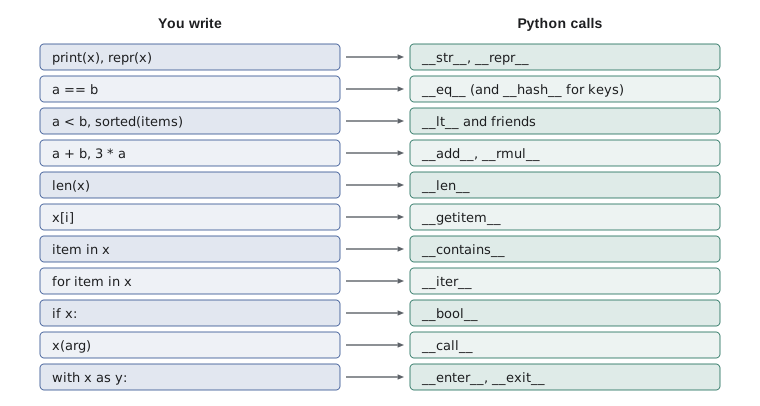
Python's built-in types feel natural to use. You add numbers with +, compare strings with <, ask for the length of a list with len, test membership with in, print anything with print, and loop over a dictionary with for. None of this is reserved for built-in types. Behind every one of these operations is a method with a name that starts and ends with two underscores, such as __add__, __lt__, __len__ and __repr__. Define those methods in your own class and your objects work with the same operators and functions.
These special methods, often called dunder methods (short for double underscore), are how Python's data model works. This lesson shows the most useful ones: __repr__ and __str__ for printing, __eq__ and __hash__ for equality and use in sets and dictionaries, the comparison methods for sorting, arithmetic methods for a Money class that keeps prices exact, container methods such as __len__, __getitem__ and __contains__, and the __enter__ and __exit__ pair behind the with statement. Ridgeline's code becomes noticeably easier to read when its objects behave like built-in values.
How operators become method calls
When Python evaluates a + b, it actually calls a.__add__(b). len(stock) calls stock.__len__(), x in order calls order.__contains__(x), and str(coffee) calls coffee.__str__(). You almost never call these methods directly; you define them, and Python calls them when your objects are used with the matching syntax. The full list is long, but a handful covers nearly everything ordinary programs need.
print((3).__add__(4), 3 + 4)
print("Ridge".__len__(), len("Ridge"))
print([42, 15].__contains__(15), 15 in [42, 15])
print("tea".__lt__("latte"), "tea" < "latte")7 7 5 5 True True False False
__repr__ and __str__
Printing an object of your own class gives something like <__main__.Coffee object at 0x7f3a...>: the class name and a memory address, which tells you almost nothing. Two methods fix this. __repr__ should return an unambiguous description for programmers, ideally one that looks like the code to recreate the object. __str__ should return a friendly description for users. print and str use __str__ if it exists and fall back to __repr__; the interactive prompt, debuggers and containers such as lists always use __repr__.
class Coffee:
    def __init__(self, sku, name, price):
        self.sku, self.name, self.price = sku, name, price

    def __repr__(self):
        return f"Coffee({self.sku!r}, {self.name!r}, {self.price!r})"

    def __str__(self):
        return f"{self.name} ({self.price:.2f})"

c = Coffee("RC-103", "Colombia Huila", 19.75)
print(c)                 # __str__
print(repr(c))           # __repr__
print([c])               # containers show their items with __repr__
print(f"Today: {c}")Colombia Huila (19.75)
Coffee('RC-103', 'Colombia Huila', 19.75)
[Coffee('RC-103', 'Colombia Huila', 19.75)]
Today: Colombia Huila (19.75)The !r inside the f-string applies repr to each value, which puts quotes around strings so the result reads like Python code. If you write only one of the two methods, write __repr__: it is used everywhere str is missing, and a good representation makes every debugging session shorter. Dataclasses, as you saw in lesson 4, generate a __repr__ automatically.
Equality and hashing
By default, == between two objects of your class is the same as is: two objects are equal only if they are the very same object. Two Coffee objects built from the same data are not equal, which is rarely what you want for value-like objects. Defining __eq__ changes that. Return NotImplemented, a special built-in value, when the other object is of a type you do not know how to compare; Python then tries the other side or falls back to identity.
class Sku:
    def __init__(self, code):
        self.code = code.strip().upper()
    def __repr__(self):
        return f"Sku({self.code!r})"
    def __eq__(self, other):
        if not isinstance(other, Sku):
            return NotImplemented
        return self.code == other.code
    def __hash__(self):
        return hash(self.code)

a, b = Sku("rc-101"), Sku(" RC-101 ")
print(a == b, a is b, a == "RC-101")
stock = {a: 42}
print(stock[b])                    # b finds the entry stored under a
print(len({a, b, Sku("RC-102")}))True False False 42 2
Sets and dictionaries find items by their hash, an integer computed from the object, and then confirm a match with ==. Objects that compare equal must have equal hashes, so whenever you define __eq__ you must also define __hash__ based on the same data, or Python makes the objects unhashable so they cannot be used as keys at all. Only make an object hashable if the data its hash depends on never changes after creation; changing a key after it has been stored in a dictionary makes the entry impossible to find.
Ordering
sorted, min, max and the < operator rely on the comparison methods __lt__, __le__, __gt__ and __ge__. Writing all four is tedious, so the functools.total_ordering decorator fills in the rest from __eq__ and one of them. Once objects can be compared, they can be sorted without a key function.
import functools

@functools.total_ordering
class RoastBatch:
    def __init__(self, batch_id, roast_minutes):
        self.batch_id, self.roast_minutes = batch_id, roast_minutes
    def __repr__(self):
        return f"{self.batch_id}({self.roast_minutes} min)"
    def __eq__(self, other):
        return self.roast_minutes == other.roast_minutes
    def __lt__(self, other):
        return self.roast_minutes < other.roast_minutes

batches = [RoastBatch("B-0412", 13.5), RoastBatch("B-0413", 11.75), RoastBatch("B-0414", 14.0)]
print(sorted(batches))
print(max(batches), batches[0] >= batches[1])[B-0413(11.75 min), B-0412(13.5 min), B-0414(14.0 min)] B-0414(14.0 min) True
Natural ordering suits objects that have one obvious way to be ordered, such as dates, versions or money amounts. When there are several sensible orders, such as coffees by name, by price or by stock, it is clearer to leave the class without comparison methods and pass a key function to sorted each time, as in lesson 1.
Arithmetic: an exact Money class
Prices stored as floats are convenient but inexact: 0.1 + 0.2 is 0.30000000000000004, and adding thousands of sales can drift by a cent or more. Anita wants the books to balance exactly. A common solution is to store money as a whole number of cents, and a small class with arithmetic methods makes that as easy to use as a float. __add__ and __sub__ handle + and -, __mul__ handles multiplying by a quantity, and __rmul__ handles the quantity written first, as in 3 * price.
import functools

@functools.total_ordering
class Money:
    def __init__(self, cents):
        if not isinstance(cents, int):
            raise TypeError("Money needs whole cents")
        self.cents = cents
    @classmethod
    def of(cls, text):                       # Money.of("18.50") -> 1850 cents
        whole, _, frac = text.partition(".")
        return cls(int(whole) * 100 + int((frac + "00")[:2]))
    def __repr__(self):
        return f"Money({self.cents})"
    def __str__(self):
        return f"{self.cents // 100}.{self.cents % 100:02d}"
    def __add__(self, other):
        if not isinstance(other, Money):
            return NotImplemented
        return Money(self.cents + other.cents)
    def __sub__(self, other):
        if not isinstance(other, Money):
            return NotImplemented
        return Money(self.cents - other.cents)
    def __mul__(self, qty):
        if not isinstance(qty, int):
            return NotImplemented
        return Money(self.cents * qty)
    __rmul__ = __mul__
    def __eq__(self, other):
        return isinstance(other, Money) and self.cents == other.cents
    def __lt__(self, other):
        return self.cents < other.cents
    def __hash__(self):
        return hash(self.cents)

latte, muffin = Money.of("5.25"), Money.of("3.75")
bill = 2 * latte + muffin
print(bill, repr(bill), bill > Money.of("14"))
print(sum([Money.of("0.10")] * 3, Money(0)), 0.1 + 0.1 + 0.1)14.25 Money(1425) True 0.30 0.30000000000000004
Two details deserve attention. First, Money.of is a class method, marked with @classmethod: it receives the class itself as cls instead of an instance, and is the usual way to write an alternative constructor, here one that builds Money from text. Second, sum needs a starting value, Money(0), because its default start is the integer 0, and 0 + Money(...) would need an __radd__ method. Python's decimal module offers a full-featured exact decimal type, which lesson 10 introduces; a class like Money shows how such types are built.
Try it yourself
Printing and comparing a Version
Ridgeline's tools are released as versions such as 1.4.2. Write a class Version whose __init__(self, text) splits the text on dots and stores a tuple of three ints as self.parts.
Add __repr__ returning Version('1.4.2'), __eq__ and __lt__ that compare the parts tuples, so that Version("1.10.0") > Version("1.9.3") is true. Use functools.total_ordering for the other comparisons.
class Version:
    def __init__(self, text):
        self.text = text

    def __lt__(self, other):
        return self.text < other.text

print(Version('1.10.0') > Version('1.9.3'))
Container methods
A class that holds a collection can behave like a built-in container. __len__ supports len(), __getitem__ supports indexing with square brackets, __contains__ supports in, and __iter__ supports for loops (lesson 7 explains iteration fully). __bool__ decides whether an object counts as true or false in an if statement; if it is missing, Python uses __len__, so an empty container is false.
class Order:
    def __init__(self, customer):
        self.customer = customer
        self._lines = []                     # list of (sku, qty)
    def add(self, sku, qty):
        self._lines.append((sku, qty))
    def __len__(self):
        return sum(qty for _, qty in self._lines)
    def __getitem__(self, index):
        return self._lines[index]
    def __contains__(self, sku):
        return any(s == sku for s, _ in self._lines)
    def __iter__(self):
        return iter(self._lines)

order = Order("Priya")
print(bool(order), len(order))
order.add("RC-101", 2)
order.add("MG-01", 1)
print(bool(order), len(order), order[0], order[-1])
print("MG-01" in order, "RC-999" in order)
for sku, qty in order:
print(sku, qty)False 0
True 3 ('RC-101', 2) ('MG-01', 1)
True False
RC-101 2
MG-01 1Because __getitem__ simply passes the index to the internal list, negative indexes and even slices work for free. Note that len(order) counts items rather than lines, a design decision that belongs to the class. Special methods let a class choose what the familiar operations mean for it, which is powerful, but the meaning should match what a reader would expect. An Order whose len returned its total price would be legal and confusing.
Callable objects and context managers
__call__ makes an object callable like a function, which is useful for objects that hold settings and are used repeatedly, much like the closures of lesson 2. __enter__ and __exit__ make an object usable in a with statement. Python calls __enter__ at the start of the block, binds its return value to the name after as, and calls __exit__ at the end, even if an exception was raised inside the block. That is how files close themselves, and you can use the same mechanism for anything that must be undone, such as Theo's stock count, which must be marked finished even if a scan fails.
class TaxRate:
    def __init__(self, rate):
        self.rate = rate
    def __call__(self, amount):
        return round(amount * (1 + self.rate), 2)

class StockCount:
    def __init__(self, log):
        self.log = log
    def __enter__(self):
        self.log.append("count started")
        return self
    def __exit__(self, exc_type, exc, tb):
        self.log.append("count finished" + (" after an error" if exc_type else ""))
        return False                    # do not hide the exception

gst = TaxRate(0.05)
print(gst(10.00), callable(gst))

log = []
with StockCount(log):
    log.append("scanned RC-101")
try:
    with StockCount(log):
        raise ValueError("barcode unreadable")
except ValueError:
    pass
print(log)10.5 True ['count started', 'scanned RC-101', 'count finished', 'count started', 'count finished after an error']
__exit__ receives details of any exception raised in the block. Returning False, or nothing, lets the exception continue after clean-up, which is almost always right; returning True would silently swallow it. For simple cases, the contextlib module's contextmanager decorator lets you write a context manager as a generator function, a technique you will be able to read after lesson 7.
Worked problem
Choosing special methods for a StockLevel
Theo wants a StockLevel object for one coffee that prints as "RC-104: 9 bags", can be increased with += 30, is false when empty, and can be compared with a number of bags, as in if level < 10. Which special methods does it need?
Show solution
- Printing: __str__ returns f"{sku}: {bags} bags"; __repr__ returns StockLevel(...) for debugging.
- level += 30: Python tries __iadd__ first, then __add__; define __iadd__ to add to self.bags and return self.
- False when empty: __bool__ returns self.bags > 0.
- level < 10: __lt__ compares self.bags with an int and returns NotImplemented for other types.
- Equality with another StockLevel: __eq__ compares sku and bags; with no need to use it as a key, leave it unhashable.
Answer: __str__, __repr__, __iadd__, __bool__, __lt__ and __eq__.
Try it yourself
A shopping basket container
Write a class Basket that stores items in an internal list. Give it add(item), and the special methods __len__ (number of items), __contains__ (is an item in the basket), and __bool__ (true when the basket is not empty).
Also give it __str__ that returns the items joined by ", ", or "(empty)" for an empty basket.
class Basket:
    def __init__(self):
        self.items = []

    def add(self, item):
        self.items.append(item)

b = Basket()
b.add('latte')
print(len(b), b)
Common mistakes
MistakeDefining __eq__ without __hash__, then trying to use the objects as dictionary keys.
InsteadDefine __hash__ from the same fields as __eq__, or leave the class unhashable on purpose.
MistakeWriting only __str__, so lists and debuggers still show <... object at 0x...>.
InsteadAlways write __repr__; add __str__ when users need a friendlier form.
MistakeRaising an error in __eq__ or __add__ for an unknown type.
InsteadReturn NotImplemented so Python can try the other operand or fall back sensibly.
MistakeCalling special methods directly, as in order.__len__().
InsteadUse the syntax they support: len(order).
MistakeGiving an operator a surprising meaning, such as + removing items.
InsteadUse special methods only where the meaning matches what readers expect.
MistakeStoring money as floats where exact totals matter.
InsteadUse whole cents or the decimal module, wrapped in a class if helpful.
Summary and key terms
- Special methods, named with double underscores, let objects work with Python's operators and built-in functions.
- __repr__ gives an unambiguous representation for programmers; __str__ gives a friendly one for print.
- __eq__ defines equality; objects that are equal must have equal hashes, so define __hash__ too if they are keys.
- Comparison methods enable sorting; functools.total_ordering fills them in from __eq__ and one other.
- Arithmetic methods such as __add__ and __mul__ make value classes like Money behave like numbers; return NotImplemented for unknown types.
- __len__, __getitem__, __contains__, __iter__ and __bool__ make a class behave like a container.
- __call__ makes objects callable, and __enter__ and __exit__ make them context managers for with.
- special method
- A method with a double-underscore name that Python calls for built-in operations.
- dunder
- Short for double underscore, as in __init__.
- __repr__
- The method returning an unambiguous string representation of an object.
- __str__
- The method returning a readable string for users.
- hash
- An integer computed from an object, used by sets and dictionaries to find it.
- NotImplemented
- A value returned by an operator method to say it cannot handle the other operand.
- total_ordering
- A functools decorator that derives all comparisons from __eq__ and one other.
- class method
- A method that receives the class as cls, often used as an alternative constructor.
- context manager
- An object with __enter__ and __exit__, used in a with statement.
- callable
- An object that can be called like a function.
Practice problems
Work each problem on paper first, then reveal the answer to check.
Which method does Python call for a < b, and for b in collection?
Show answer
a.__lt__(b) and collection.__contains__(b).
Why should __eq__ return NotImplemented for an unknown type rather than False?
Show answer
It lets Python try the other operand's method before deciding.
A class defines __eq__ but not __hash__. What happens when you put an instance in a set?
Show answer
TypeError: the instance is unhashable.
Write __repr__ for a class Tea with a name attribute so repr(Tea("Chai")) gives Tea('Chai').
Show answer
def __repr__(self): return f'Tea({self.name!r})'
Why does sum(moneys) fail for a list of Money objects without a start value?
Show answer
sum starts from 0, and 0 + Money needs __radd__; pass Money(0) as the start.
What must __exit__ return to let an exception raised in the with block continue?
Show answer
False or None.
Lesson quiz · 5 questions
Score 60% or more to complete this lesson.
Create a free account to save your progress, take quizzes and earn a certificate.