
PYTH-102 · Lesson 1 of 12 · 27 min
Functions in depth
▶ Video coming soon A video version of this lesson is on the way.
In PYTH-101, Jordan Reyes turned Ridgeline Coffee Roasters' copied-and-pasted calculations into functions: stock_value, loyalty_tier, total_with_tax and the command functions of the ridgeline.py tool. Those functions used the basics: positional parameters, a default value here and there, and a single return. As the shop's code grows, Jordan keeps running into situations the basics do not handle well. Rosa wants a report function that can take any number of coffees. Theo wants a shipping-label function with a dozen optional settings, most of which he never changes. Anita keeps calling a rounding function with its arguments in the wrong order. And a function that was supposed to start each order with an empty list somehow remembers items from the previous order.
This lesson goes deeper into how Python functions work. You will see exactly how arguments are matched to parameters, how to accept a variable number of arguments with *args and **kwargs, how to force callers to name certain arguments, why a list must never be a default value, and how functions are themselves values that can be stored, passed to other functions and created on the spot with lambda. These are the tools that let one well-designed function serve many callers.
How Python matches arguments to parameters
When you call a function, Python builds the local variables for that call by matching the arguments you supplied to the parameters in the definition. It works in a fixed order. First, positional arguments fill parameters from left to right. Next, keyword arguments fill the parameters they name. Then any parameter still empty takes its default value. If a parameter is still empty after that, or an argument has nowhere to go, Python raises a TypeError before the body runs at all. Knowing this order explains almost every error message you will see when calling functions.
def label(name, sku, price, bag_g=340):
    return f"{sku}  {name}  {bag_g} g  {price:.2f}"

print(label("Sunrise Blend", "RC-101", 18.50))
print(label("Ethiopia Guji", price=22.00, sku="RC-102"))
print(label("Espresso Ridge", "RC-106", 21.50, bag_g=1000))

try:
    label("Sumatra Dark", "RC-104")
except TypeError as err:
print("TypeError:", err)RC-101 Sunrise Blend 340 g 18.50 RC-102 Ethiopia Guji 340 g 22.00 RC-106 Espresso Ridge 1000 g 21.50 TypeError: label() missing 1 required positional argument: 'price'
In the second call, the first argument fills name by position, and the keywords fill price and sku in whatever order they are written. In the last call, Python cannot find a value for price, so it stops with a TypeError that names the missing parameter. Two further rules complete the picture: positional arguments must come before keyword arguments in a call, and no parameter may receive two values. A call such as label("Decaf", "RC-105", 19.00, name="Decaf") fails because name is filled twice.
Keyword arguments are worth using even when they are not required. A call such as round_price(19.333, 2) makes the reader guess what the 2 means; round_price(19.333, places=2) does not. The extra characters pay for themselves the first time someone reads the code without the definition in front of them, which is most of the time.
The mutable default trap
A default value is created once, when Python runs the def statement, not each time the function is called. For immutable values such as numbers, strings and None this makes no difference. For a mutable value such as a list or dictionary, it is a well-known source of bugs: every call that uses the default shares the same object, so changes made in one call are still there in the next. This is exactly the bug Mei found in the cafe order code.
def start_order(item, order=[]):
    order.append(item)
    return order

print(start_order("latte"))
print(start_order("muffin"))      # a new order... or is it?
print(start_order("tea"))['latte'] ['latte', 'muffin'] ['latte', 'muffin', 'tea']
The second and third calls were meant to start fresh orders, but each one adds to the same list that the first call created. The fix is a pattern you will see throughout professional Python code: use None as the default, and create the new list inside the function, where it is created again on every call.
def start_order(item, order=None):
    if order is None:
        order = []
    order.append(item)
    return order

print(start_order("latte"))
print(start_order("muffin"))
table_4 = start_order("mocha")
start_order("muffin", table_4)    # add to an existing order on purpose
print(table_4)['latte'] ['muffin'] ['mocha', 'muffin']
The test is order is None rather than if not order, because an empty list passed in on purpose is falsy and should still be used. Code linters flag mutable defaults for this reason, and the habit of reaching for None is worth building now.
Any number of positional arguments: *args
Some functions naturally take any number of values. print and max are examples: print(1, 2, 3) and max(4, 9, 2, 7) work with as many arguments as you give them. You can write your own by putting a star before a parameter name. Inside the function, that parameter is a tuple holding all the extra positional arguments. By convention it is called args, but the star is what matters, not the name.
def total_bags(*counts):
    """Return the total of any number of bag counts."""
    print("counts is", counts)
    return sum(counts)

print(total_bags(42, 15, 27))
print(total_bags(9))
print(total_bags())counts is (42, 15, 27) 84 counts is (9,) 9 counts is () 0
A star parameter can follow ordinary ones. Rosa's report function takes a title first and then any number of coffee codes. The ordinary parameter takes the first argument, and the star parameter collects the rest.
STOCK = {"RC-101": 42, "RC-102": 15, "RC-103": 27, "RC-104": 9}

def report(title, *codes):
    lines = [title, "-" * len(title)]
    for code in codes:
        lines.append(f"{code}: {STOCK.get(code, 0)} bags")
    return "\n".join(lines)

print(report("Single origins", "RC-102", "RC-103"))
print(report("Low stock check", "RC-104"))Single origins -------------- RC-102: 15 bags RC-103: 27 bags Low stock check --------------- RC-104: 9 bags
The star also works the other way, in a call. If you already have the values in a list or tuple, a star in front of it unpacks the sequence into separate positional arguments. total_bags(*[42, 15, 27]) is the same call as total_bags(42, 15, 27). Without the star, the function would receive one argument, the list itself.
Any number of keyword arguments: **kwargs
Two stars before a parameter name collect any extra keyword arguments into a dictionary, with the parameter names as keys. The conventional name is kwargs, short for keyword arguments. This suits functions that accept optional settings, or that pass settings through to another function without needing to know what they all are.
def make_label(sku, **options):
    """Return a shipping label line with any extra fields the caller gives."""
    parts = [sku]
    for key, value in sorted(options.items()):
        parts.append(f"{key}={value}")
    return " | ".join(parts)

print(make_label("RC-101"))
print(make_label("RC-102", grind="espresso", gift=True))
print(make_label("RC-106", bag_g=1000, ship="express"))RC-101 RC-102 | gift=True | grind=espresso RC-106 | bag_g=1000 | ship=express
In a call, two stars unpack a dictionary into keyword arguments, so settings stored in a dictionary can be handed straight to a function: make_label("RC-104", **{"grind": "drip"}). The keys must be strings that match parameter names, or be collected by a **kwargs parameter.
Keyword-only and positional-only parameters
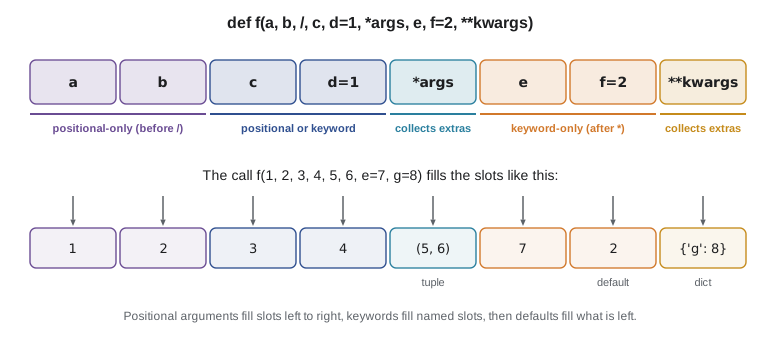
A bare star in a parameter list, or a *args parameter, means that every parameter after it can only be given by keyword. This is how you force callers to name arguments whose meaning would not be obvious from their position. Anita's rounding bug came from round_cash(amount, places, up) being called as round_cash(19.335, True, 2). Making places and up keyword-only turns that mistake into an immediate, clear error.
def round_cash(amount, *, places=2, up=False):
    """Round an amount to the given places; with up=True, round half up."""
    factor = 10 ** places
    cents = amount * factor
    whole = int(cents + 0.5) if up else round(cents)
    return whole / factor

print(round_cash(19.335))
print(round_cash(19.335, up=True))
print(round_cash(1234.5, places=0))
try:
    round_cash(19.335, 2)
except TypeError as err:
print("TypeError:", err)19.34 19.34 1234.0 TypeError: round_cash() takes 1 positional argument but 2 were given
The opposite marker is a slash. Parameters before a / can only be given by position, never by keyword. Library authors use this when a parameter name is an implementation detail they want to be free to change, and you will see it in the built-in help, for example in len(obj, /). You will rarely need it in your own code, but recognizing it saves confusion when reading documentation. The full order of a parameter list is: positional-only, slash, ordinary parameters, *args or a bare star, keyword-only parameters, and finally **kwargs.
Try it yourself
Total of any number of sales
Write a function day_total(*amounts) that returns the total of any number of sale amounts, rounded to 2 decimal places. day_total(5.25, 3.75, 4.95) returns 13.95 and day_total() returns 0.
Then write order_total(*amounts, tip=0) that returns the same rounded total plus a keyword-only tip.
def day_total(amounts):
    return sum(amounts)

def order_total(amounts, tip):
    return sum(amounts) + tip

print(day_total(5.25, 3.75, 4.95))
Functions are values
In Python a function is an object like any other. The def statement creates a function object and binds it to a name, exactly as an assignment binds a value to a variable. That means a function can be assigned to another name, stored in a list or dictionary, passed as an argument to another function, and returned as a result. You already used this idea in the PYTH-101 capstone, where a dictionary mapped command words such as "sell" to the functions that carry them out.
def to_grams(kg):
    return kg * 1000

convert = to_grams            # no parentheses: the function itself
print(convert(10.2))
print(convert is to_grams)

conversions = {"grams": to_grams, "bags": lambda kg: int(kg * 1000 // 340)}
for name, fn in conversions.items():
print(name, fn(10.2))10200.0 True grams 10200.0 bags 30
The most common use is passing a function to another function. sorted, min and max accept a key argument: a function that is called on each item to produce the value to compare. To sort Ridgeline's coffees by price, you pass a function that takes one coffee and returns its price. The function is not called by you; sorted calls it once per item.
coffees = [("Sunrise Blend", 18.50, 42), ("Ethiopia Guji", 22.00, 15),
           ("Colombia Huila", 19.75, 27), ("Sumatra Dark", 20.25, 9)]

def by_price(coffee):
    return coffee[1]

for name, price, stock in sorted(coffees, key=by_price):
    print(f"{name:<16}{price:>6.2f}")

print(max(coffees, key=lambda c: c[2])[0], "has the most bags")Sunrise Blend 18.50 Colombia Huila 19.75 Sumatra Dark 20.25 Ethiopia Guji 22.00 Sunrise Blend has the most bags
lambda: small functions without a name
A lambda expression creates a small function in a single expression: lambda parameters: expression. It is handy exactly where a short function is needed only once, such as a key for sorting. lambda c: c[2] is the same as a def that takes c and returns c[2], but it can be written inline. A lambda can contain only one expression, with no statements, loops or assignments, and its result is returned automatically.
Use lambda for short, obvious throwaway functions and def for everything else. If a lambda needs a comment to explain it, or is assigned to a name with an equals sign, it should be a def with a proper name and docstring. PEP 8 says the same thing. Readability matters more than saving a line.
Try it yourself
Sort the coffee list
Each coffee is a tuple (sku, name, price, stock). Write a function cheapest_first(coffees) that returns a new list sorted by price, lowest first, and best_stocked(coffees) that returns the name of the coffee with the most bags. Use the key argument.
def cheapest_first(coffees):
    return sorted(coffees)

def best_stocked(coffees):
    return coffees[0][1]

print(cheapest_first(COFFEES)[0])
print(best_stocked(COFFEES))
Docstrings and help
Functions that other people call, or that you will call months from now, need documentation. A docstring is a string literal written as the first statement in the body. Python stores it on the function as __doc__, and help() displays it with the function's signature. A good docstring starts with one line that says what the function returns or does, written as a command. If needed, a blank line follows and then details about the parameters, the return value and any exceptions.
def bags_from_batch(roasted_kg, *, bag_g=340):
    """Return the number of full bags a roasted weight fills.

    roasted_kg is the roasted weight in kilograms; bag_g is the bag size
    in grams (340 by default). Raises ValueError for a negative weight.
    """
    if roasted_kg < 0:
        raise ValueError("weight cannot be negative")
    return int(roasted_kg * 1000 // bag_g)

print(bags_from_batch.__doc__.splitlines()[0])
print(bags_from_batch.__name__, "takes", bags_from_batch.__code__.co_argcount, "positional parameter")
print(bags_from_batch(10.2), bags_from_batch(10.2, bag_g=250))Return the number of full bags a roasted weight fills. bags_from_batch takes 1 positional parameter 30 40
Worked problem
Designing a flexible price formatter
Mei needs one function for menu boards, receipts and the online shop. Usually she wants a price with two decimals, like 18.50. The online shop wants a currency code after it, and the menu board wants no decimals for whole-dollar prices. Design the signature so that the common case is a one-argument call and nothing can be passed in the wrong order.
Show solution
- The amount is always needed, so it is the only positional parameter.
- Options go after a bare star so they must be named: currency=None and trim=False.
- currency defaults to None rather than a string, so no code is added unless asked for.
- trim=True drops .00 from whole amounts; other amounts keep two decimals.
- Tests: fmt(18.5) gives '18.50'; fmt(18.0, trim=True) gives '18'; fmt(22, currency='CAD') gives '22.00 CAD'.
Answer: def fmt(amount, *, currency=None, trim=False) keeps the common call short and makes every option explicit.
def fmt(amount, *, currency=None, trim=False):
    """Return a price as text, optionally trimmed and with a currency code."""
    text = f"{amount:.2f}"
    if trim and text.endswith(".00"):
        text = text[:-3]
    if currency:
        text += " " + currency
    return text

print(fmt(18.5))
print(fmt(18.0, trim=True))
print(fmt(22, currency="USD"))18.50 18 22.00 USD
Try it yourself
Fix the shared order list
This function is meant to start a new order list each time it is called without one, but it remembers items from earlier calls. Fix it with the None pattern so that add_item("latte") and then add_item("tea") each return a one-item list, while passing an existing list still adds to it.
def add_item(item, order=[]):
    order.append(item)
    return order

print(add_item('latte'))
print(add_item('tea'))
Common mistakes
MistakeUsing a list or dictionary as a default value, so every call shares it.
InsteadDefault to None and create the list or dictionary inside the function.
MistakePassing a list where the function expects separate arguments: total_bags([42, 15]).
InsteadUnpack it with a star: total_bags(*[42, 15]), or change the function to take a list.
MistakeWriting a keyword argument before a positional one in a call.
InsteadGive all positional arguments first, then the keywords.
MistakeCalling the key function yourself: sorted(coffees, key=by_price(coffee)).
InsteadPass the function without parentheses: key=by_price. sorted calls it.
MistakeAssigning a lambda to a name with an equals sign.
InsteadWrite a def with a proper name and docstring instead.
MistakeHiding the meaning of arguments behind position, as in round_cash(19.335, 2, True).
InsteadMake the options keyword-only with a bare star so calls must name them.
Summary and key terms
- Python fills parameters from positional arguments first, then keywords, then defaults, and raises TypeError if anything is missing or doubled.
- Default values are created once; use None for defaults that should be new lists or dictionaries.
- *args collects extra positional arguments into a tuple and **kwargs collects extra keyword arguments into a dictionary.
- A star or two stars in a call unpack a sequence or a dictionary into separate arguments.
- Parameters after a bare star or *args are keyword-only; parameters before a slash are positional-only.
- Functions are objects: they can be named, stored, passed to other functions and returned.
- lambda creates a small one-expression function, best used inline as a key; docstrings document functions for help().
- positional argument
- An argument matched to a parameter by its position in the call.
- keyword argument
- An argument matched to a parameter by name, as in places=2.
- mutable default
- A list, dictionary or other changeable object used as a default value and shared between calls.
- *args
- A parameter that collects any extra positional arguments into a tuple.
- **kwargs
- A parameter that collects any extra keyword arguments into a dictionary.
- unpacking
- Spreading a sequence or dictionary into separate arguments with * or ** in a call.
- keyword-only parameter
- A parameter that can only be given by name, placed after * or *args.
- first-class function
- A function that can be treated like any other value.
- key function
- A function passed to sorted, min or max to compute the value each item is compared by.
- lambda
- An expression that creates a small anonymous function.
Practice problems
Work each problem on paper first, then reveal the answer to check.
def f(a, b=2, *c, d, **e): ... In the call f(1, 5, 6, 7, d=8, z=9), what are a, b, c, d and e?
Show answer
a = 1, b = 5, c = (6, 7), d = 8 and e = {"z": 9}.
Why does def log(msg, seen=[]) behave strangely when called repeatedly?
Show answer
The same list is created once and shared by every call that uses the default, so it keeps growing.
Write the call that passes the list counts = [3, 4, 5] to total_bags(*counts) as separate arguments.
Show answer
total_bags(*counts)
Rewrite lambda s: s.strip().lower() as a def named clean.
Show answer
def clean(s): return s.strip().lower()
How do you sort a list of names by their length, longest first?
Show answer
sorted(names, key=len, reverse=True)
What error does calling def f(*, size) as f(340) raise, and why?
Show answer
TypeError, because size is keyword-only and must be given as size=340.
Lesson quiz · 5 questions
Score 60% or more to complete this lesson.
Create a free account to save your progress, take quizzes and earn a certificate.