
MSBA-303 · Lesson 8 of 12 · 22 min
Data handling and privacy
▶ Video coming soon A video version of this lesson is on the way.
On June 23 Rosa took over again, because the question that most often stops companies from using AI coding tools is not cost but data. What exactly leaves an employee's computer when they use Copilot? Where does it go? Is it stored, and for how long? Could it end up training a model that suggests Tidewater's code to someone else? "I am not going to approve something I cannot explain to the owners in two minutes," she said. This lesson gives that two-minute explanation and the detail behind it, following the GH-300 domain on data handling and flow.
What leaves the computer
From lesson 7, every request carries a prompt made of context: code around the cursor, snippets of open files, your chat message and attachments, chat history, instructions files and, for agents, tool output. That prompt is sent over an encrypted connection to GitHub's Copilot service, and from there to a model. The response comes back the same way. So the honest answer to Rosa's first question is: the parts of your code and text that Copilot uses as context, plus your requests, plus some information about how you use the product.
It helps to separate three kinds of data. Prompts are what is sent to the model for a request. Suggestions or responses are what comes back. User engagement data, sometimes called usage telemetry, is information about how the product is used: which features, whether a suggestion was accepted or dismissed, error reports, timings and similar events. Each is handled differently.
Retention on business plans
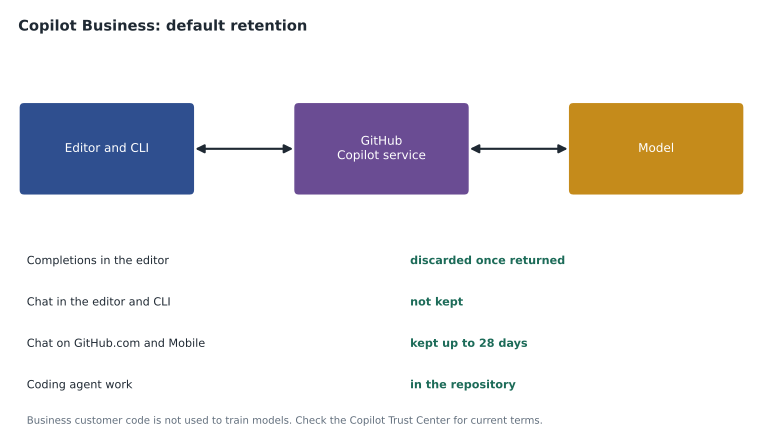
GitHub documents its data practices for Copilot Business and Enterprise in its Copilot Trust Center and its product terms, and the defaults at the time of writing depended on where Copilot was used. In the code editor, prompts for completions are discarded once the suggestion is returned, and editor chat and Copilot CLI conversations are not kept by default. Chat on GitHub.com and in GitHub Mobile is kept for up to 28 days by default, which is what lets you return to a recent conversation. User engagement data is kept longer, because GitHub uses it to operate the service, provide usage metrics and investigate abuse. These defaults have changed before and will change again, so the practical rule is to read the current Trust Center page before making a commitment to anyone.
| Surface | Prompts and responses, business plans, by default |
|---|---|
| Code completions in the editor | Discarded once the suggestion is returned |
| Chat in the editor | Not kept |
| Copilot CLI | Not kept |
| Chat on GitHub.com | Kept up to 28 days |
| Chat in GitHub Mobile | Kept up to 28 days |
| Coding agent | Session logs and pull requests are kept in the repository like other work |
The coding agent deserves its own line. Its work produces ordinary repository content, branches, commits, pull request comments and session logs, which stay in the repository under the organization's control and retention, like anything a person writes there.
Training
The worry that sounds most serious is that a company's code might train a model that then offers it to others. For Copilot Business and Enterprise, GitHub states that it does not use customer code, prompts or suggestions to train the models that power Copilot. Individual plans have historically been different: individual users have settings that control whether GitHub may use their data for product improvement, and those settings and their defaults have changed over time. This is one of the clearest reasons, alongside policy control, why a company should not let staff use personal plans for company code. Exam questions on this topic usually turn on that business-versus-individual difference.
Worked problem
Explaining the difference to the owners
Rosa needs one paragraph for the owners. What should it say about training, retention and the choice of plan?
Show solution
- State the plan: Copilot Business, assigned by the company.
- State training: GitHub says Business customer code, prompts and suggestions are not used to train Copilot's models.
- State retention: editor prompts are not kept; web and mobile chats are kept up to 28 days; usage data is kept to run the service.
- State the control: personal plans for company work are not allowed, because their data terms and settings differ and the company cannot manage them.
Answer: A short paragraph covering plan, training, retention and the ban on personal plans for company code, with a link to GitHub's Trust Center page for the current terms.
Security of data in transit and at rest
Prompts and responses travel over encrypted connections, and data GitHub stores, such as web chat history and engagement data, is encrypted at rest. GitHub's security certifications and reports, available through its trust and compliance pages, cover Copilot as part of its services. Model providers that GitHub uses process prompts under agreements with GitHub; GitHub publishes which providers are used for which models. For a small company like Tidewater, Rosa's concern was less about GitHub's infrastructure and more about what employees put into prompts, which the next sections cover.
What you should never put in a prompt
Copilot can only send what is in context, so the best data protection is to keep sensitive material out of context. That means not pasting passwords, keys or personal data into chat; not opening files of secrets while asking Copilot for help; and using content exclusion, lesson 9, so that sensitive paths are never used as context at all. Secrets do not belong in code in the first place: MSBA-161's secret scanning and push protection exist to keep them out of repositories, and environment variables or a secrets manager are where they belong.
| Material | Why it should stay out of prompts | What to do instead |
|---|---|---|
| Passwords, keys and tokens | Anything in a prompt leaves the machine | Keep secrets in a secrets manager; use content exclusion for config files that hold them |
| Personal information about customers or staff | Privacy law and company policy limit its use | Use made-up sample data; never paste real records |
| Confidential business documents | They are outside the code Copilot is meant to help with | Keep them out of the workspace when using chat |
| Code under a confidentiality agreement with a partner | The agreement may forbid sending it to third parties | Exclude the repository or path; ask the partner |
Rosa checked Tidewater's obligations under Maine's privacy and data breach laws and the company's own privacy notice for any personal information in the volunteers' trail reports, which include names and email addresses. The decision was simple: real reports never go into a prompt; the team uses an invented sample file for any Copilot work on the report format.
Ownership of output
Who owns what Copilot produces? GitHub's terms say that suggestions are yours to use, and GitHub does not claim ownership of them. But "yours to use" is not the same as "free of anyone else's rights". A suggestion can occasionally match public code that is under a license, which is why the public code filter and code referencing in lesson 10 exist, and copyright protection for machine-generated material is unsettled in many countries. GitHub offers an intellectual property indemnity for business customers, under which it defends customers against certain claims about unmodified suggestions, subject to conditions in its terms, including that the filter blocking suggestions matching public code is turned on. Companies should read the current terms rather than rely on summaries, and the exam expects you to know that ownership and limitations of output are part of responsible use.
Worked problem
Checking the indemnity condition
Tidewater wants the protection of GitHub's indemnity. Rosa's notes say it applies to unmodified suggestions when the public code filter is set to block. What setting should the organization choose, and what does that cost the team?
Show solution
- Set "suggestions matching public code" to blocked for the organization's Business seats.
- Matching suggestions will not be shown, which happens in only a small share of suggestions.
- The team loses very little and keeps the condition for the indemnity.
Answer: Block matching suggestions. GitHub reports matches in fewer than 1 in 100 suggestions, so the cost is small; Rosa still asked the company's lawyer to read the current terms.
Data residency and regulated work
Some organizations must keep data in a particular country or region. GitHub offers GitHub Enterprise Cloud with data residency, which stores repository data in a chosen region, and Copilot availability and data flow for those accounts are documented separately; model processing may still happen outside the region. Regulated industries such as health and finance often need a review by their own security and legal teams before using Copilot. Tidewater had no such requirement, but Rosa recorded the question in the decision record so that it would be asked again if the company ever took on regulated work.
A data checklist for the pilot
Rosa ended the session with a checklist that went into the admin repository alongside the plan decision.
## Copilot data checklist (pilot)

- [x] Plan is Copilot Business; personal plans not used for company code
- [x] Read the current Copilot Trust Center page; link saved here
- [x] Content exclusion set for trailcheck-admin and config/secrets paths (lesson 9)
- [x] Suggestions matching public code: blocked
- [x] Real volunteer reports never used in prompts; sample file in tests/fixtures
- [x] Staff briefed: no passwords, keys or personal data in chat
- [ ] Review again if the company takes on regulated or partner-confidential work
What GitHub can see in practice
Rosa found it useful to describe the data in plain terms for staff. When you use completions, the code around your cursor travels to GitHub's service and a model, a suggestion comes back, and on business plans the prompt is not kept once the suggestion is returned. When you chat in your editor, your question and the attached context travel the same way and are not kept by default. When you chat on GitHub.com, the conversation is kept for a few weeks so you can return to it. When you use the coding agent, its work lives in your repository like anyone else's. And in every case, GitHub records that you used a feature, which is what powers the usage metrics in lesson 11.
Staff asked whether their manager could read their Copilot conversations. On business plans, organization owners see seat activity, usage metrics and audit log events, which show that and how much people used Copilot, not what they asked. That mattered for trust. Rosa wrote it into the rules page so nobody had to wonder.
Privacy laws and AI tools
Privacy law does not usually forbid AI coding tools, but it governs personal information wherever it goes, including into prompts. The safest practice is the one Tidewater adopted: design so that personal information never needs to be in a prompt. Code that handles personal data can be written and tested against invented sample data, and Copilot can help write that code without ever seeing a real record. Where a company does need to process personal data with an AI service, its privacy officer should review the provider's terms, where data is processed and how long it is kept, just as for any other service provider.
Worked problem
Building a sample data file
Owen needs test data for the volunteer report importer: 20 reports with names, email addresses, dates and trail conditions. How should he create it without using real volunteer data?
Show solution
- Ask Copilot to generate 20 rows of invented data in the report format, with clearly fake names and email addresses on an example domain.
- Check that no row matches a real volunteer by scanning the names against the volunteer list, or simply use obviously fictional names.
- Save the file under tests/fixtures and use it for all Copilot work on the importer.
Answer: Generate an invented sample file, check it contains no real people, and keep it in the test fixtures. Copilot is good at producing sample data, which removes any need to paste real records.
Common mistakes
MistakeAssuming nothing leaves the computer when using Copilot.
InsteadPrompts built from your code and messages are sent to GitHub's service and a model.
MistakeTreating personal plans as equivalent to Business for company code.
InsteadBusiness plans have different data terms and central control.
MistakePasting secrets or personal data into chat to get help.
InsteadKeep them out of prompts; use sample data and content exclusion.
MistakeRelying on a summary of retention or indemnity terms.
InsteadRead the current Trust Center and product terms.
Summary and key terms
- Copilot sends prompts built from context to GitHub's service and a model over encrypted connections.
- On business plans by default, editor completion prompts are discarded, editor chat and CLI are not kept, and web and mobile chat are kept up to 28 days.
- GitHub states that business customer code, prompts and suggestions are not used to train its models.
- Keep secrets and personal data out of prompts; use content exclusion for sensitive paths.
- Suggestions are yours to use, but may match licensed public code; GitHub's indemnity for business customers has conditions.
- Check the Copilot Trust Center for current data practices before making commitments.
- User engagement data
- Information about how Copilot is used, such as accepted or dismissed suggestions and feature use.
- Retention
- How long data is kept before it is deleted.
- Copilot Trust Center
- GitHub's published information about Copilot's security, privacy and data practices.
- Intellectual property indemnity
- A promise by GitHub, under conditions, to defend business customers against certain claims about suggestions.
- Data residency
- Keeping stored data in a chosen country or region.
Practice problems
Work each problem on paper first, then reveal the answer to check.
By default on business plans, how long is chat on GitHub.com kept?
Show answer
Up to 28 days.
Does GitHub use Copilot Business customers' code to train its models?
Show answer
GitHub states that it does not use business customer code, prompts or suggestions for training.
What is the best way to keep a sensitive file out of Copilot's context?
Show answer
Use content exclusion for its path, and keep secrets out of code entirely.
Lesson quiz · 5 questions
Score 60% or more to complete this lesson.
Create a free account to save your progress, take quizzes and earn a certificate.