
MSBA-303 · Lesson 5 of 12 · 22 min
Agent mode and the coding agent
▶ Video coming soon A video version of this lesson is on the way.
The June 2 session was the one Rosa had been waiting for, because it was the one that worried her. Agents are the parts of Copilot that act: they read files, make edits across a project, run commands and tests, and keep going until a goal is met. "A suggestion I can ignore," she said. "Something that changes twenty files and opens a pull request while I am at lunch is a different kind of tool." Priya agreed, and organized the session around two questions: what each agent does, and what keeps a person in control.
Two kinds of agent
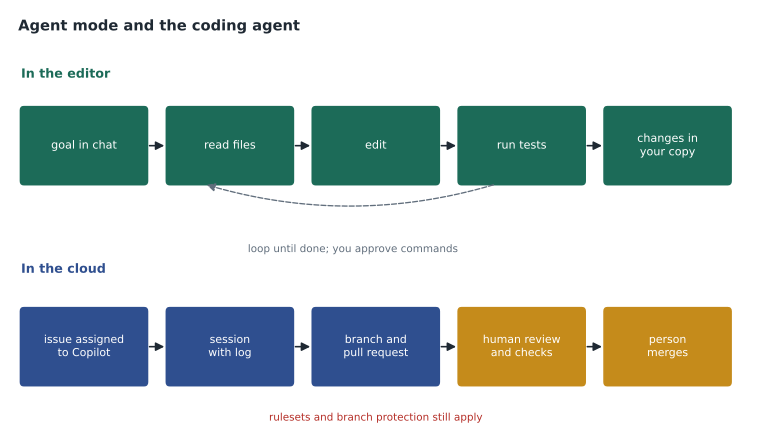
Copilot offers agents in two main places. Agent mode runs in your editor, on your machine, while you watch. You give it a goal in chat; it decides which files to read, proposes and makes edits, runs terminal commands such as tests, reads the results and tries again, asking for your approval at points you choose. The coding agent runs in the cloud, on GitHub's infrastructure, without your editor. You assign it a task, for example by assigning an issue to Copilot; it works in its own environment, and its results come back as a branch and a pull request for people to review. GitHub has been renaming and extending the cloud side, which recent documentation calls Copilot in the cloud or the cloud agent, but the model is the same: a task in, a pull request out.
| Agent mode in the editor | Coding agent in the cloud | |
|---|---|---|
| Where it runs | Your editor and your machine | GitHub's cloud, on Actions or a cloud sandbox |
| How you start it | A request in the chat panel in agent mode | Assigning an issue, or a request from the Agents tab, chat or the Copilot home page |
| What it can touch | Files in your workspace; commands in your terminal | A branch in the repository it was given |
| How you follow it | Watch each step; approve commands and edits | Read its session log; review its pull request |
| What it produces | Changes in your working copy | A branch and a pull request |
| Best for | Changes you want to steer closely | Well-defined, self-contained tasks |
Agent mode: the loop and its tools
Agent mode works in a loop. It reads the request, gathers context by searching and opening files, plans a change, edits files, and then uses tools to check its work, such as running the test command or a linter, reading compiler errors or terminal output. If something fails, it reads the failure and tries again. Tools come from the editor itself, from extensions and from MCP servers. MCP, the Model Context Protocol, is an open standard that lets Copilot use outside tools and data in a consistent way, for example a server that can query an issue tracker or a database. MSBA-304 shows how to add MCP servers; here the point is that each tool is a new capability, and capabilities need limits.
The editor gives you those limits. You can choose which tools agent mode may use, require approval before it runs terminal commands, review each file it changes as a set of differences, and keep or undo the changes. Editors also keep checkpoints so a session's changes can be rolled back. Priya's advice was to start with every approval on and loosen nothing until the team had seen the agent work on their own code.
Worked problem
Scoping an agent mode task
Dmitri wants agent mode to "improve the TrailCheck site." Priya suggests rewriting the request. What would a well-scoped request look like?
Show solution
- Name one outcome: show a "last updated" date on each trail page.
- Name the files likely involved: the page template and the report loader.
- Say how success is checked: the existing tests pass and a new test checks the date format.
- Set limits: do not change the data files or the build configuration.
Answer: A request like "Add a last-updated date to each trail page using the newest report date; change only the template and loader; add a test; run the test suite." A small, checkable goal gives the agent a clear finish line and gives you a small review.
The coding agent: from task to pull request
The coding agent is designed for tasks you would hand to a capable colleague: fix this bug, add this small feature, write these tests, update this documentation. When it starts a task it works on a branch in the repository it was given, opens a pull request (or proposes changes for you to turn into one), and records a session log that shows what it read, what it changed and which commands it ran. You can leave comments on its pull request asking for changes, and it will work on them. Its environment can be customized with a setup workflow so it has the tools the project needs, and it can use MCP servers that the repository allows.
Several protections apply. The coding agent works on one branch and one pull request per task and cannot push to the default branch directly. Rulesets and branch protection from MSBA-161 still apply to its work; administrators can choose whether it may bypass a ruleset, and the safe default is no. People with write access can assign it work; for someone without write access a session is read-only. Its pull requests go through the same required reviews and checks as anyone else's, and a person must merge them. GitHub also requires a person to approve before workflows run on its pull requests, so an agent change cannot quietly trigger automation. Check the current documentation for the exact rules, which GitHub has adjusted as the feature has developed.
| Protection | What it prevents |
|---|---|
| One branch, one pull request per task | Changes landing directly on the default branch |
| Rulesets and branch protection still apply | Skipping required reviews, checks or signed commits |
| Write access needed to assign work | People outside the team directing the agent |
| Human approval before workflows run | Agent changes triggering automation unchecked |
| Session logs | Not knowing what the agent read, changed or ran |
| Organization and enterprise policies | Use in repositories where the agent is not wanted |
Agent sessions run on compute: either GitHub Actions minutes or a cloud sandbox, which draws on the account's Actions or compute allowance and is billed separately from AI credits. Sessions on Actions have a time limit of a little under an hour. The model usage inside a session uses AI credits like other heavier features. Lesson 11 covers budgets.
Worked problem
What an agent task costs
A coding agent session runs for 24 minutes on a standard Actions runner and uses about 300 AI credits of model time. If the organization's free Actions minutes are used up and extra minutes cost 0.008 US dollars each, what is the cost of the session?
Show solution
- Model use: 300 credits x 1 cent = 300 cents = 3.00 US dollars.
- Compute: 24 minutes x 0.008 = 0.192 US dollars.
- Total: 3.00 + 0.192 = about 3.19 US dollars.
Answer: About 3.19 US dollars, mostly model time. Inside the included allowances it would cost nothing extra, but budgets should assume heavier months.
Sessions and delegation
The study guide asks candidates to manage agent sessions and to understand delegating tasks, including to sub-agents. A session is one run of an agent on a task, with its own log and status. In the editor and on GitHub.com you can see running and finished sessions, stop one, continue one with new instructions, or hand a task from an editor conversation to the cloud agent when it would take too long to watch. Larger agent setups can split work: a main agent delegates a narrow job, such as searching a codebase or writing tests, to a sub-agent with its own context, and combines the results. Delegation saves time but multiplies what must be reviewed, so the team agreed to delegate one task at a time during the pilot.
Priya assigned the coding agent a real issue at the end of the session: "Show trail distances in miles with one decimal place on the summary page." It opened a pull request 18 minutes later with a template change and a test. Dmitri reviewed it as he would any pull request and asked for one change: the summary page also needed the unit label. The agent pushed a second commit, the checks passed, and Dmitri merged it.
Choosing tasks for agents
Not every task suits an agent. Good tasks are small, well described and checkable: a bug with a clear reproduction, a feature that touches a few known files, tests for existing code, documentation updates, dependency upgrades with good test coverage. Poor tasks are vague, cross many systems, need judgment about users or business rules, depend on secrets or production access, or cannot be tested automatically. Priya wrote a checklist for issues the team would assign to the coding agent.
| Ready for an agent if | Keep for a person if |
|---|---|
| The issue states the expected result | The goal is "make it better" |
| It names the files or area involved | It touches many systems or teams |
| Tests exist or can be written | It cannot be checked automatically |
| It needs no secrets or production access | It needs credentials or live data |
| A reviewer can read the result in under 30 minutes | The result will be hundreds of lines |
Reviewing agent work
Agent output arrives with a confident description and passing tests, which can lull a reviewer. Priya listed what to check in every agent pull request beyond the usual review: that the change does only what the issue asked, that tests actually test the new behavior rather than just passing, that no files outside the expected area changed, that no dependencies were added without reason, and that the session log shows no surprising commands. "Passing tests prove the tests pass," she said. "They do not prove the tests are right."
Worked problem
Sizing a review
Dmitri can review about 200 changed lines carefully in 30 minutes. An agent pull request changes 140 lines of code and adds 220 lines of tests. Roughly how long should he set aside?
Show solution
- Total changed lines: 140 + 220 = 360.
- Time: 360 / 200 x 30 = 54 minutes.
- Tests deserve real reading, not a skim, because they decide whether future changes are safe.
Answer: About 54 minutes, close to an hour. Large agent changes are cheap to produce and expensive to review; asking for smaller tasks keeps reviews honest.
Watching an agent mode session
Priya ran a short agent mode session on the projector so everyone could see the loop. She asked it to add the newest report date to each trail page. It searched for the page template, opened the report loader, proposed edits to both files and asked to run the test command. The first run failed because an older trail had no reports at all. The agent read the error, added a check for trails without reports, ran the tests again and stopped when they passed, listing the files it had changed. Priya then reviewed the differences, noticed that it had formatted the date differently from the rest of the site, and asked it to use the existing date helper. That small correction was the point of the demonstration: the agent did useful work quickly, and a person who knew the codebase still had to look.
She also showed what happens when approvals are turned off. With automatic approval for terminal commands, the agent ran the tests and a formatting tool without asking. That was fine for those two commands, but it would have run any command it chose. The team agreed to keep approval on for every command except the test command, which they added to an allowed list.
Common mistakes
MistakeGiving agents vague goals such as "clean up the code".
InsteadGive one checkable outcome, the likely files, how success is tested and what not to touch.
MistakeTurning off every approval prompt in agent mode on day one.
InsteadStart with approvals on and loosen them only with experience.
MistakeLetting the coding agent bypass rulesets to save time.
InsteadKeep required reviews and checks; a person reviews and merges.
MistakeTreating passing tests as proof the change is right.
InsteadReview the tests themselves and the session log.
Summary and key terms
- Agent mode works in your editor in a loop of reading, editing and running tools, with approvals you control.
- The coding agent works in the cloud on an assigned task and returns a branch and a pull request with a session log.
- MCP servers add tools and data to agents through an open standard.
- Protections include one branch and pull request per task, rulesets, write access to assign, human approval of workflows and human merge.
- Agent sessions use AI credits for models and Actions or cloud compute for the environment.
- Good agent tasks are small, well described and testable; agent pull requests need careful review.
- Agent mode
- An editor chat mode in which Copilot edits files and runs tools in a loop toward a goal.
- Coding agent
- Copilot working in the cloud on an assigned task and returning a pull request.
- Session log
- The record of what an agent read, changed and ran during a task.
- Model Context Protocol (MCP)
- An open standard for giving AI tools access to outside tools and data.
- Sub-agent
- An agent given a narrow part of a larger task by another agent.
Practice problems
Work each problem on paper first, then reveal the answer to check.
Where does the coding agent do its work, and what does it produce?
Show answer
In the cloud on GitHub's infrastructure; it produces a branch and a pull request with a session log.
Do rulesets and branch protection apply to the coding agent's work?
Show answer
Yes; its pull requests go through the same rules unless an administrator allows a bypass.
Name two signs that an issue is not ready for an agent.
Show answer
Any two of: a vague goal, many systems involved, no way to test, need for secrets or production access, a very large expected change.
Lesson quiz · 5 questions
Score 60% or more to complete this lesson.
Create a free account to save your progress, take quizzes and earn a certificate.