
MSBA-303 · Lesson 7 of 12 · 20 min
How Copilot works: context and models
▶ Video coming soon A video version of this lesson is on the way.
By mid-June the web team was using Copilot every day, and Dmitri had a list of puzzles. Why did the same question give different answers on different days? Why did Copilot know about one helper file and not another? Why did a model choice in the chat menu change the answer so much? The June 16 session opened the lid. Priya explained how Copilot builds a prompt from context, what GitHub's service does before and after the model runs, how models are chosen, and the limits that follow from the way language models work. The GH-300 study guide calls this "data and architecture", and the questions in that domain are much easier once the flow is clear.
The journey of a request
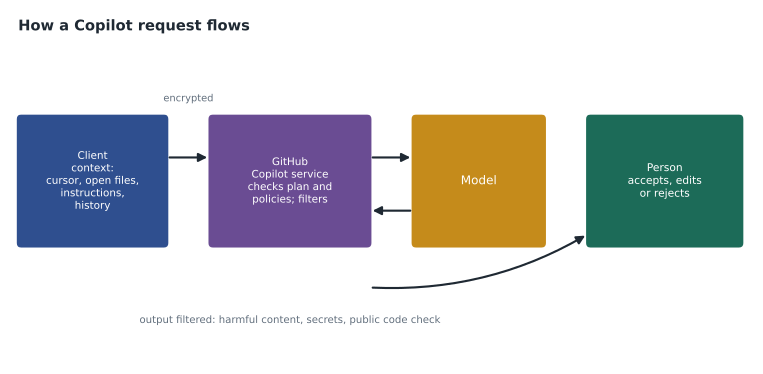
Every Copilot request, whether a completion, a chat message or an agent step, follows the same basic route. The client, meaning your editor, GitHub.com, the CLI or the cloud agent, gathers context and builds a prompt. The prompt goes over an encrypted connection to GitHub's Copilot service, which checks that you have access and which policies apply, and applies pre-processing filters. The service sends the prompt to a model hosted by GitHub or one of its model providers. The model generates a response, which comes back through GitHub's service for post-processing: filters for harmful or offensive content, checks for patterns such as secrets, and, where the policy calls for it, a check against public code. Finally the client shows the result as ghost text, a chat answer or an agent action.
Where context comes from
The model only knows what is in the prompt. Everything Copilot appears to "know" about your project arrives as context, chosen by the client within a size limit. Different features gather different context.
| Feature | Context it usually gathers |
|---|---|
| Inline completions | Code before and after the cursor, the file's name and language, snippets from related open files and imported files |
| Chat in the editor | Your message, the current file or selection, references you add, chat history, and results of project searches when you ask about the workspace |
| Chat on GitHub.com | The page you are on (a file, issue or pull request), repository search results, a Copilot Space's sources |
| Agents | Everything above, plus files the agent opens, tool and command output, and MCP server results |
| All features | Custom instructions files that apply to the repository or the person |
Two kinds of retrieval are worth naming. For questions about a whole project, Copilot may use an index of the repository, sometimes called semantic or code search, to find relevant files rather than reading everything. For completions, it prefers what is near: the open file and neighboring tabs, the other files open in the editor. That is why opening the right file before asking helps, and why closing unrelated tabs can make suggestions sharper.
Context windows and choosing what fits
Every model has a context window, the maximum number of tokens it can read in one request, including the instructions, the context and room for the reply. Windows have grown large, but they are never infinite, and larger prompts cost more and can be slower. So the client ranks candidate context and fills the window with the most useful pieces first. Priya demonstrated the idea with a small model of it.
budget = 4000  # tokens available for context
candidates = [
    ("instructions file", 300, 10),
    ("code around the cursor", 1500, 9),
    ("open file: loader.py", 1200, 7),
    ("open file: styles.css", 900, 2),
    ("chat history", 800, 5),
]
used = 0
for name, tokens, priority in sorted(candidates, key=lambda c: -c[2]):
    if used + tokens <= budget:
        used += tokens
        print("include", name, tokens)
    else:
        print("skip   ", name, tokens)
print("tokens used:", used)include instructions file 300 include code around the cursor 1500 include open file: loader.py 1200 include chat history 800 skip open file: styles.css 900 tokens used: 3800
What this code does
The example starts with a budget of 4,000 tokens and five possible pieces of context, each with a size and an importance score. It goes through them from most to least important and keeps each piece only if it still fits in what is left of the budget. The output shows that the four most important pieces fit, using 3,800 tokens, and that the style sheet is left out because it is the least important and would push the total over the limit. The point is that Copilot never sees everything; something always decides what is left out.
In the example, if the style sheet had been the file that mattered, Copilot would have answered without it. That is the practical lesson: when an answer seems to ignore something obvious, the likely cause is that the obvious thing was not in the prompt. Attach it with a context reference, open it, or name it.
Instructions files as standing context
Lesson 6 introduced .github/copilot-instructions.md for reviews. The same file, and path-specific instruction files, are added to chat and agent requests in that repository, so they act as standing context: facts and rules Copilot should always have. People can also set personal instructions, and organizations on business plans can set organization-wide instructions. Because instructions take up part of the window and apply to every request, they should be short and useful. MSBA-304 covers writing them well; here the architectural point is that instructions are simply more context, not a change to the model.
Models and model choice
Copilot does not use one model. GitHub offers a range of models from several providers, including OpenAI, Anthropic, Google and others, and the list changes as models are released and retired. In chat and agent features you can usually pick a model from a menu, or choose automatic selection, where GitHub picks a suitable model for the request; Copilot Free uses automatic selection only. Completions use models chosen and tuned by GitHub for speed. Organizations on business plans set model policies that decide which models members may use, for example allowing only models from providers the company has approved.
| Choice | Effect |
|---|---|
| Automatic model selection | GitHub chooses a suitable model; simplest and usually economical |
| A faster, lighter model | Quick answers for simple tasks; fewer credits |
| A larger reasoning model | Better at complex, multi-step problems; more credits and slower |
| Model policies (business plans) | Organization decides which models members can use |
Worked problem
Comparing model cost for a task
A chat request processes about 20,000 tokens. On a lighter model it uses about 4 credits; on a larger reasoning model the same request uses about 9 times as many. If Dmitri makes 30 such requests a day for 20 working days, how many credits does each choice use in a month?
Show solution
- Lighter model: 30 x 20 x 4 = 2,400 credits.
- Larger model per request: 4 x 9 = 36 credits.
- Larger model per month: 30 x 20 x 36 = 21,600 credits.
- Difference: 21,600 - 2,400 = 19,200 credits, about 192 US dollars at one cent a credit.
Answer: 2,400 credits against 21,600. Use the larger model when the task needs it, not by habit.
Filters and post-processing
GitHub's service does more than pass messages to a model. Before the model runs, it can filter prompts, for example to block attempts to make Copilot produce harmful content. After the model runs, it filters output for offensive or harmful language, checks for things that look like secrets such as keys and passwords, and, for completions, runs the public code check from lesson 10 when the organization has chosen to block suggestions that match public code. Code referencing, also in lesson 10, works at this stage too. Filters reduce risk but do not remove it: they are pattern checks, and some problems, such as a subtle logic error, are not patterns any filter can catch.
Why the same question gives different answers
Dmitri's first puzzle has a simple answer. Language models generate text by choosing among likely next tokens, and that choice includes some randomness, so two runs of the same prompt can differ. In practice the prompt itself also changes: different open files, more chat history, an updated index, a different model chosen automatically. Variation is normal. It is one more reason to treat Copilot's output as a draft to check rather than a fixed answer.
Limits that follow from the design
| Limit | Why it happens | What to do |
|---|---|---|
| Invented functions, packages or facts ("hallucinations") | The model produces likely text, not checked facts | Check names exist; run the code; open official docs |
| Outdated knowledge | Models are trained up to a date and may not know newer libraries | Give current docs as context; check versions |
| Missing project knowledge | Only what fits in the prompt is seen | Attach files, use instructions, open related tabs |
| Inconsistent answers | Generation includes randomness and changing context | Review each answer; prefer tests over trust |
| Weakness on rare languages or patterns | Less training data for them | Expect more errors; review more closely |
| Biased or unsuitable wording | Training data contains human bias | Review names, comments and text; lesson 10 |
Dmitri tested the outdated-knowledge limit with a question about a mapping library the team had adopted that spring. Copilot's first answer used an option the library had renamed. When he attached the library's current documentation page as context, the answer was correct.
Seeing what Copilot used
Editors increasingly show which context a chat answer used, for example a list of the files and references attached to the request, so you can check whether the right material was included. When an answer looks wrong, Priya's first step was always to look at that list. More often than not the problem was missing context rather than a weak model: the relevant file had not been opened, the question named the wrong function, or an old chat history pointed in the wrong direction. Fixing the context was cheaper and more reliable than switching to a bigger model.
Pre-processing in more detail
The study guide mentions input processing and prompt building and proxy filtering and post-processing explicitly, so it is worth being precise. Input processing happens partly in the client, which collects and trims context, adds instructions and formats the request, and partly in GitHub's service, which checks the user's plan and the policies that apply and screens the prompt before passing it on. The model itself sees only the finished prompt. Post-processing then screens the output. The service in the middle, sometimes described as a proxy because every request passes through it, is where GitHub enforces policy consistently, whatever editor or model is in use. That design is why an organization can change a policy once and have it apply across every surface, subject to the limits noted in lesson 9.
Worked problem
Diagnosing a weak answer
Dmitri asks chat why the trail page shows the wrong date. The answer talks about the server's time zone, which TrailCheck does not use. The list of references shows only the template file. What should he do first?
Show solution
- Notice that the loader file, where dates are read, was not in the context.
- Attach the loader and the failing test output, then ask again.
- Only if the answer is still weak, try a larger model.
Answer: Fix the context first by attaching the loader and the test output. Most weak answers come from missing context, not from the model.
Keeping the architecture in mind on the exam
Exam questions in this domain often describe a symptom and ask for the cause or the fix. Thinking through the flow, client, service, model, service, person, usually leads to the answer: if Copilot ignores a file, look at context; if a feature is missing for one user, look at policies; if suggestions that match public code never appear, look at the privacy policy; if answers vary, remember that generation varies. Dmitri made a one-page sketch of the flow and pinned it above his desk for the rest of the series.
Common mistakes
MistakeAssuming Copilot can see the whole repository for every request.
InsteadOnly what fits in the prompt is seen; attach or open what matters.
MistakeAlways choosing the largest model.
InsteadMatch the model to the task; larger models use more credits and time.
MistakeTreating filters as a guarantee of safe or correct output.
InsteadFilters catch patterns, not logic errors; review is still needed.
MistakeExpecting identical answers to identical questions.
InsteadGeneration varies; check each answer.
Summary and key terms
- A request goes from the client to GitHub's Copilot service, through filters, to a model, and back through filters to the person.
- Context depends on the feature: code near the cursor and open files for completions, references, history and project search for chat, tool output for agents.
- Every model has a context window, so clients rank context and leave some out.
- Instructions files are standing context added to requests in a repository.
- Copilot offers models from several providers; organizations can restrict them with model policies.
- Limits include invented facts, outdated knowledge, missing context and variable answers.
- Context window
- The maximum number of tokens a model can read in one request.
- Neighboring tabs
- Other files open in the editor that completions may draw context from.
- Copilot service
- GitHub's service between clients and models that checks access and applies filters.
- Automatic model selection
- Letting GitHub choose a suitable model for each request.
- Hallucination
- Plausible but invented output, such as a function or fact that does not exist.
Practice problems
Work each problem on paper first, then reveal the answer to check.
What does the Copilot service do between the client and the model?
Show answer
Checks access and policies and filters prompts and responses.
Why can closing unrelated tabs improve completions?
Show answer
Open files are used as context, so unrelated files take up room and add noise.
Name two reasons the same question can get different answers.
Show answer
Randomness in generation, and changes in the context such as history, open files or model choice.
Lesson quiz · 5 questions
Score 60% or more to complete this lesson.
Create a free account to save your progress, take quizzes and earn a certificate.