
MSBA-303 · Lesson 2 of 12 · 22 min
Plans: Free, Pro, Business and Enterprise
▶ Video coming soon A video version of this lesson is on the way.
Rosa Delgado led the second session on May 12, because the first practical question was money. Priya had been paying for a personal Copilot plan herself for a year. Dmitri had used the free plan at his previous job. Tidewater now needed to decide whether to buy seats for its web team and, if so, which plan. "Before anyone tells me which plan is best," Rosa said, "tell me what each one includes, who it is for, and what happens when people use more than the plan includes." This lesson covers the Copilot plans, how usage of the heavier features is measured and billed, and how to choose a plan from requirements.
Two families of plans
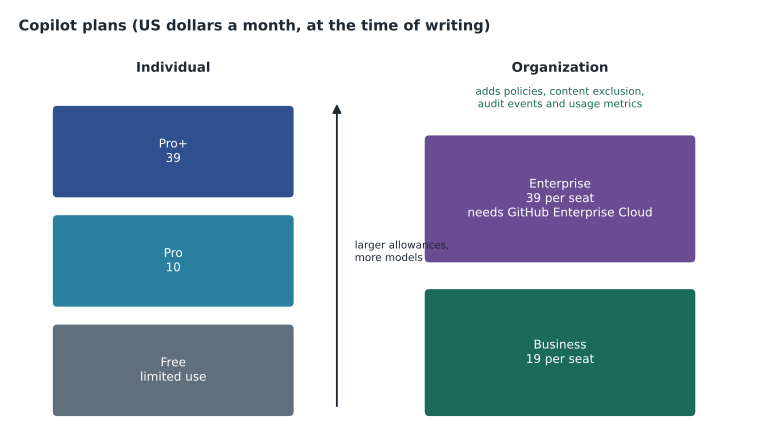
Copilot plans come in two families. Individual plans are bought by, or given to, one person for their own GitHub account. Organization and enterprise plans are bought by an organization or enterprise, which assigns seats to its members and controls how Copilot is used through policies. The difference matters more than the price. With an individual plan the person decides the settings; with a business plan the organization does, and features such as content exclusion, audit log events and usage policies exist only there.
| Plan | Family | Price at the time of writing | Who it is for |
|---|---|---|---|
| Copilot Free | Individual | Free | Anyone with a personal account and no Copilot through an organization; limited monthly use |
| Copilot Student | Individual | Free for verified students | Students verified through GitHub Education |
| Copilot Pro | Individual | 10 US dollars a month | Individual developers who want fuller use and more models; free for some verified teachers and maintainers of popular open source projects |
| Copilot Pro+ | Individual | 39 US dollars a month | Heavy individual users who want larger allowances and premium models |
| Copilot Business | Organization | 19 US dollars per seat a month | Organizations that want central management, policies and data protections |
| Copilot Enterprise | Enterprise | 39 US dollars per seat a month | Enterprises on GitHub Enterprise Cloud that want the fullest feature set |
GitHub has also offered a higher individual tier for very heavy users and an enterprise option that gives Copilot access with no included usage, billed only for what is used. The exam focuses on the core plans named in the study guide: Free, Pro, Pro+, Business and Enterprise. Note that Copilot Enterprise requires the organization to be on GitHub Enterprise Cloud, the enterprise plan for GitHub itself from MSBA-161; Copilot Business works on any organization plan, including Free and Team.
What every plan includes, and what differs
All plans include the core experience: inline code suggestions, Copilot Chat in supported editors and on GitHub.com, Copilot CLI, and support for custom instructions and MCP servers, which lesson 7 and MSBA-304 explain. What differs is how much you can use, which models you can choose, and what the organization can control.
| Feature or control | Free | Pro and Pro+ | Business | Enterprise |
|---|---|---|---|---|
| Inline suggestions | Up to 2,000 a month | Included | Included | Included |
| Chat in the editor and on GitHub.com | Limited monthly allowance | Included, with allowances for heavier models | Included | Included |
| Choice of models | Automatic selection only | A range of models; Pro+ adds premium ones | A range of models, set by policy | The widest range, set by policy |
| Coding agent and code review | Not included | Included | Included, if policies allow | Included, if policies allow |
| Central policies and seat management | No | No | Yes | Yes |
| Content exclusion | No | No | Yes | Yes |
| Audit log events and usage metrics | No | No | Yes | Yes |
| Enterprise-wide controls across organizations | No | No | No | Yes |
How heavier features are measured
Inline suggestions are cheap to serve, so on paid plans they are simply included. Chat with large models, agent sessions and code reviews use far more computing, so GitHub measures them. Until mid-2026 GitHub counted premium requests, a monthly number of requests to more expensive models, with each model given a multiplier. From June 1, 2026 GitHub moved Copilot to usage-based billing measured in GitHub AI Credits. A credit is worth one cent of US currency, and each request uses credits according to the number of tokens it processes and the published rate of the model it uses. Inline suggestions and next edit suggestions do not use credits on paid plans.
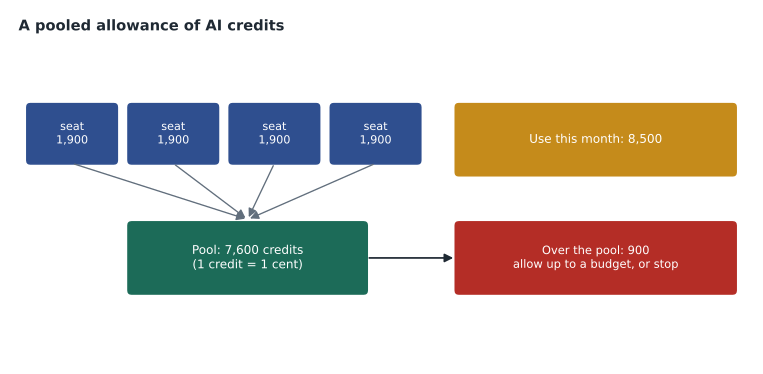
Each paid plan includes a monthly allowance of credits. For Business and Enterprise the allowance is pooled: every seat adds its share to one organization pool that everyone draws from, so a light user's unused share is available to a heavy user. At the time of writing a Business seat added 1,900 credits a month to the pool, matching its 19-dollar price, and an Enterprise seat 3,900. When the pool runs out, an administrator decides what happens: allow extra use at the published rate, or stop the heavier features until next month. Individual plans have their own allowances and limits.
Worked problem
Sizing a pooled allowance
Tidewater is considering 4 Business seats. Each seat adds 1,900 credits a month to the pool, and a credit is worth one cent. If the team expects about 30 code reviews a month at roughly 150 credits each, plus chat and agent use of about 4,000 credits, will the pool cover it?
Show solution
- Pool: 4 seats x 1,900 credits = 7,600 credits a month.
- Code reviews: 30 x 150 = 4,500 credits.
- Total expected use: 4,500 + 4,000 = 8,500 credits.
- Shortfall: 8,500 - 7,600 = 900 credits, which is 900 cents, or 9 US dollars, if extra use is allowed.
Answer: Not quite: the team would use about 900 credits more than the pool, roughly 9 US dollars a month at one cent a credit. Rosa can allow that overage with a budget cap or reduce automatic reviews.
Because usage is now measured in money, administrators set budgets. A budget can be set for the enterprise, for a cost center or for a single user, with an alert as it fills and an option to stop use when it is reached. Rosa liked this: it turned an open-ended cost into a number she could put in the monthly accounts.
Copilot prices are in US dollars, which is how Tidewater is billed. Rosa records the plan cost next to the other tools in the admin repository so the monthly tools budget can be checked against the GitHub bill quickly.
Seats and who pays
A seat is one person's right to use Copilot through an organization. Organization owners, or people with the right custom permission, assign seats to individual members or to whole teams. The organization pays for each assigned seat for the part of the month it is assigned; removing a seat takes effect at the end of the billing cycle, so assigning and removing seats daily does not save money. A person who already pays for an individual plan and is then given a Business seat has the individual plan canceled, which prevents personal settings from conflicting with organization policies.
Worked problem
Monthly and annual seat cost
Tidewater assigns Business seats to Priya, Dmitri and Lena, and to Owen for documentation work. What is the monthly and annual seat cost in US dollars, before any extra usage?
Show solution
- Monthly: 4 seats x 19 = 76 US dollars.
- Annual: 76 x 12 = 912 US dollars.
- Priya cancels nothing herself: her personal Pro plan is canceled automatically when the seat is assigned, saving her 10 US dollars a month.
Answer: 76 US dollars a month and 912 a year for seats.
Comparing plans for a real team
Dmitri asked why not simply give the four people Copilot Pro at 10 dollars each, which is cheaper than Business. Rosa answered with a list of what the company would lose. With individual plans, Tidewater could not set policies for which features or models are allowed, could not exclude sensitive files such as the private trailcheck-admin repository, would have no audit log of Copilot settings changes, would have no usage metrics for its own code, and could not take a seat back when someone left. The data protections in GitHub's business terms, covered in lesson 8, also apply to Business and Enterprise, not to individual plans used for work. For a company handling its own code, those controls were the point.
| Requirement | Pro for each person | Copilot Business | Copilot Enterprise |
|---|---|---|---|
| Lowest seat price | Yes, 10 dollars | No, 19 dollars | No, 39 dollars |
| Central policies and seat control | No | Yes | Yes |
| Exclude sensitive repositories and files | No | Yes | Yes |
| Audit log and usage metrics | No | Yes | Yes |
| Requires GitHub Enterprise Cloud | No | No | Yes |
| Fits a Team-plan organization of 18 people | Possible, but unmanaged | Yes | Only after an upgrade to Enterprise Cloud |
Worked problem
The cost of moving to Enterprise
If Tidewater wanted Copilot Enterprise for the same 4 people, it would first need GitHub Enterprise Cloud for all 18 members at 21 US dollars per user a month instead of the Team plan at 4. What would the monthly increase be compared with Team plus Copilot Business?
Show solution
- Current GitHub cost on Team: 18 x 4 = 72 dollars.
- Enterprise Cloud: 18 x 21 = 378 dollars, an increase of 306.
- Copilot: Enterprise 4 x 39 = 156 dollars instead of Business 4 x 19 = 76, an increase of 80.
- Total increase: 306 + 80 = 386 US dollars a month.
Answer: About 386 US dollars a month more, for features a four-person web team did not need. Business was the clear choice.
Trials, education and open source
GitHub periodically offers trials of the paid plans, and offers Copilot Pro free to verified students, teachers and maintainers of popular open source projects through GitHub Education and its open source programs; eligibility is checked by GitHub and renewed periodically. Malik Osei, who maintains the open-trail-report project, checked whether he qualified; his project was too small, so he used Copilot Free for it. Organizations can also run a short pilot by assigning Business seats to a few people for a month and reviewing the usage metrics before buying more, which is what Tidewater planned to do in lesson 12.
Turning requirements into a choice
Rosa ended the session by writing the decision record that went into the admin repository. It is a useful template for any plan question on the exam: list the requirements, find the cheapest plan that meets every one, and note what would change the answer.
# Decision: Copilot plan for the web team

Date: 2027-05-12
Owner: Rosa Delgado

Requirements
- Seats for 4 people (web team and documentation)
- Organization policies for features and models
- Content exclusion for trailcheck-admin
- Audit log events and usage metrics
- Budget cap on extra usage

Options considered
- Pro for each person: cheapest, but no central control
- Copilot Business: meets every requirement
- Copilot Enterprise: needs GitHub Enterprise Cloud for all members

Decision
- Copilot Business, 4 seats, pilot from 2027-05-17, reviewed monthly
- Extra usage allowed up to a budget of 20 US dollars a month

Revisit if
- The organization moves to GitHub Enterprise Cloud
- More than 10 people need seats
Reading the bill
Rosa wanted to know what the first invoice would look like before signing up. A Copilot bill for a business plan has two parts. The first is the seat charge: the number of seats assigned during the month multiplied by the seat price, prorated for seats assigned part-way through. The second is metered usage: AI credits used beyond the pooled allowance, shown by feature, by model and, where cost centers are set up, by group. Organization owners and billing managers can see both on the billing pages and download a usage report. Rosa planned to look at the usage report weekly during the pilot so that the first full month held no surprises, and to compare it with the usage metrics dashboard from lesson 11, which shows how the seats were actually used rather than what they cost.
Common mistakes
MistakeChoosing individual plans for company work because they are cheaper.
InsteadBusiness and Enterprise add the policies, exclusions, metrics and data terms an organization needs.
MistakeThinking Copilot Enterprise works on any organization plan.
InsteadCopilot Enterprise requires GitHub Enterprise Cloud; Business works on any plan.
MistakeAssuming every request costs the same.
InsteadHeavier features use AI credits according to tokens and model rates; inline suggestions on paid plans do not.
MistakeLeaving extra usage uncapped.
InsteadSet budgets and alerts so a busy month does not produce a surprise bill.
Summary and key terms
- Individual plans are Free, Student, Pro and Pro+; organization plans are Business and Enterprise.
- Copilot Enterprise requires GitHub Enterprise Cloud; Business works with any organization plan.
- Business and Enterprise add seat management, policies, content exclusion, audit log events and usage metrics.
- Since June 2026 heavier features are measured in GitHub AI Credits worth one cent each; business allowances are pooled.
- Choose the cheapest plan that meets every requirement and record what would change the decision.
- Seat
- One person's right to use Copilot through an organization or enterprise.
- GitHub AI Credits
- The unit used since June 2026 to measure heavier Copilot use, worth one cent of US currency each.
- Premium requests
- The earlier way of counting requests to more expensive models, replaced by AI credits.
- Pooled allowance
- Included credits from every seat combined into one organization pool.
- Budget
- A spending limit with alerts for Copilot usage beyond what plans include.
Practice problems
Work each problem on paper first, then reveal the answer to check.
Which Copilot plan requires GitHub Enterprise Cloud?
Show answer
Copilot Enterprise.
What does a pooled allowance mean for a light user's unused credits?
Show answer
They stay in the organization pool for other users that month.
Name two controls an organization gets with Business that it does not get with individual plans.
Show answer
Any two of: policies for features and models, content exclusion, audit log events, usage metrics, seat management.
Lesson quiz · 5 questions
Score 60% or more to complete this lesson.
Create a free account to save your progress, take quizzes and earn a certificate.