
MSBA-303 · Lesson 3 of 12 · 21 min
Code completions
▶ Video coming soon A video version of this lesson is on the way.
With four Business seats assigned for a pilot that had started on May 17, Priya spent the May 19 session on the feature people use most: code completions, the inline suggestions that appear as you type. Dmitri had used them for years without thinking about how they work. "I press Tab a hundred times a day," he said. "I could not tell you what decides what I see." This lesson covers how completions are triggered and accepted, what next edit suggestions add, how to steer completions with comments and names, the settings that control them, and how to judge a suggestion before keeping it.
Ghost text and how to accept it
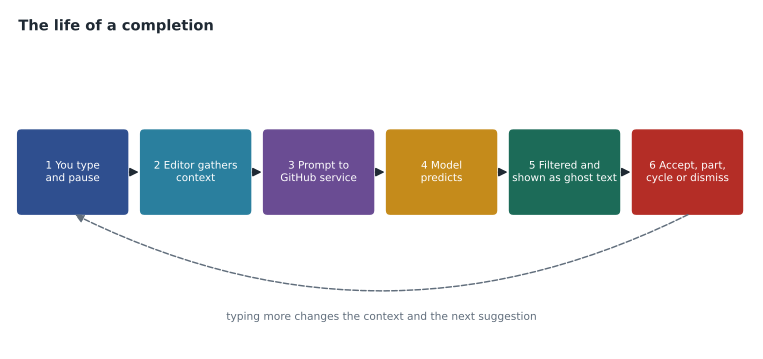
When Copilot is enabled in an editor, it watches where your cursor is and, after a short pause in typing, may offer a suggestion shown as faint ghost text after the cursor. The suggestion might finish the current line, write a whole block such as a function body, or continue a pattern such as a list of similar entries. Nothing changes in your file until you accept it.
| Action | Usual key in VS Code | Effect |
|---|---|---|
| Accept the whole suggestion | Tab | Inserts all the ghost text |
| Accept the next word | Ctrl+Right arrow (Cmd+Right arrow on a Mac) | Inserts only the next word, so you can take part of a suggestion |
| Dismiss | Esc | Removes the ghost text |
| See other suggestions | Alt+] and Alt+[ (Option on a Mac) | Cycles through alternatives when Copilot has more than one |
| Ask for a suggestion now | Alt+\ (Option+\ on a Mac) | Triggers a suggestion without waiting |
| Open several suggestions side by side | Ctrl+Enter | Shows a panel of alternatives to compare |
Accepting a word at a time is underused. A suggestion is often right for its first half and wrong for its second, for example when it guesses a variable name you have not created yet. Taking only the part you want keeps you in control without retyping.
What decides the suggestion
A completion is the model's prediction of what comes next, given a prompt that the editor builds from context. The most important context is the code immediately before and after your cursor. The editor also sends the file name and language, and short snippets from other files that seem related, especially other files open in your editor. Lesson 7 explains context in depth; for now the practical rule is that Copilot sees far less than you do, and what it sees is chosen automatically. If the useful information is in a file it did not pick up, it will guess.
Three things in your own code steer completions strongly. Comments that state intent, such as a sentence describing what a function must do, give the model a target. Names of functions, variables and parameters carry meaning: a function called parse_trail_report with a parameter called line invites a very different body from one called f with x. Examples earlier in the file set a pattern that Copilot continues: write one test in the style you want and the next suggested test usually follows it.
Worked problem
Steering with a comment and a name
Dmitri wants a function that turns a trail report line such as "2027-05-18|Headland Loop Trail|muddy" into its three parts. What should he write before asking for a suggestion?
Show solution
- Write a comment that states the input format and the output: one line, three fields separated by a vertical bar, returned as date, trail name and condition.
- Give the function a descriptive name and typed parameters, such as parse_report(line: str).
- If the file already has a similar parser, keep it open or nearby so Copilot can follow its pattern.
- Pause and read the ghost text; accept it only after checking how it splits the line and what happens with bad input.
Answer: A clear comment, a descriptive name with types, and a nearby example. Then read the suggestion before accepting.
Next edit suggestions
Next edit suggestions extend completions beyond the cursor. When you make a change, Copilot predicts the next related change you are likely to make, which may be somewhere else in the file. If you rename a parameter, for instance, it may suggest updating every place the parameter is used. The suggestion is shown with an arrow or marker in the margin; pressing Tab jumps to it and pressing Tab again accepts it. Next edit suggestions are included with inline suggestions on paid plans and do not use AI credits. They are especially useful for repetitive edits that follow from one change, and they need the same reading as any other suggestion, because a predicted edit can be wrong in a place you were not looking.
A completion you can check
Priya asked Dmitri to write the trail report parser in the session and read the suggestion aloud. Copilot proposed the function below, including a check for the wrong number of fields that Dmitri had not thought to ask for. He kept it after testing it on a good line and a bad one.
def parse_report(line: str):
    """Split a trail report line 'date|trail|condition' into three parts."""
    parts = [p.strip() for p in line.split("|")]
    if len(parts) != 3:
        raise ValueError(f"expected 3 fields, got {len(parts)}")
    date_text, trail, condition = parts
    return date_text, trail, condition.lower()

print(parse_report("2027-05-18 | Headland Loop Trail | Muddy"))
try:
    parse_report("2027-05-18 | Headland Loop Trail")
except ValueError as e:
print("rejected:", e)('2027-05-18', 'Headland Loop Trail', 'muddy')
rejected: expected 3 fields, got 2What this code does
The function takes one line of text from a trail report and cuts it into pieces wherever there is a vertical bar, trimming spaces from each piece. If there are not exactly three pieces it refuses the line with a clear message; otherwise it returns the date, the trail name and the condition in lower case. The first printed line shows a good report split correctly, and the second shows a report with a missing field being rejected, which is the behavior Dmitri wanted to confirm before keeping the code.
The check for three fields is a good example of Copilot adding value: it is a common pattern in parsers, so the model offered it. It is also an example of why review matters. Dmitri noticed that the suggestion lowercased the condition but not the trail name, which was right for TrailCheck's data, and that it did nothing to check the date, which was a gap he filled himself.
Settings that control completions
Completions can be turned on or off globally, per language and per workspace. In VS Code the status bar shows a Copilot icon that opens a menu to snooze or disable completions; the settings let you disable them for specific languages, for example plain text or Markdown, where suggestions can be distracting. Organizations add a layer above personal settings: an owner can decide which features members with Business seats may use, and content exclusion, covered in lesson 9, can stop completions in specified files entirely. A setting called suggestions matching public code, controlled by the organization for Business seats, decides whether Copilot shows suggestions that match public code on GitHub; lesson 10 covers it.
| Control | Who sets it | Example |
|---|---|---|
| Enable or disable completions | The person, in the editor | Snooze while writing an email in Markdown |
| Disable for a language | The person, in editor settings | Turn off for plaintext and YAML |
| Feature policies | Organization owners | Allow completions and chat; review agent features later |
| Content exclusion | Repository admins and organization owners | No suggestions in files under trailcheck-admin/secrets |
| Suggestions matching public code | Organization owners, for Business seats | Block matching suggestions |
Priya turned completions off for Markdown in the trail-notes repository on her own machine. Guidebook prose was the editors' work, and the team had agreed in lesson 1 not to use Copilot for published text until the US copyright question was answered.
Judging a suggestion
Speed is the danger with completions. A suggestion appears, looks plausible, and Tab is one key away. Priya taught a habit she called "read before Tab": before accepting anything longer than a line, read it as you would a colleague's code. She gave Dmitri five questions to ask.
| Question | What to look for |
|---|---|
| Does it do what I meant? | Compare with your comment or intent, not with what looks tidy |
| Does every name exist? | Functions, methods, imports and fields can be invented |
| What happens with bad or unusual input? | Empty values, missing fields, very large numbers, other languages |
| Is anything unsafe? | Secrets in code, unescaped input, disabled checks, broad permissions |
| Would I be able to explain it in review? | If not, rewrite it or ask chat to explain it first |
Worked problem
Counting what was kept
In one afternoon Dmitri saw 120 suggestions. He accepted 42 in full and 18 in part, and dismissed the rest. What share of suggestions did he accept in some form, and why is that number not a measure of quality?
Show solution
- Accepted in some form: 42 + 18 = 60.
- Share: 60 / 120 = 0.5, or 50 in 100.
- Acceptance shows what looked useful at the moment, not whether it was correct or kept after review.
Answer: About half. Acceptance rate is a useful adoption signal, but it says nothing about how much accepted code survived review; lesson 11 returns to this.
Completions for tests and repetitive code
Completions shine when there is a clear pattern to follow. After Dmitri wrote one test for parse_report checking a good line, Copilot suggested the next test for a missing field, then one for extra spaces, each in the same style. He accepted them after reading, and added one it did not suggest: a line with an empty condition. That is typical. Copilot extends patterns well and finds common cases, while unusual cases that come from knowing the data still need a person. MSBA-304 covers test writing with Copilot in more depth.
When completions get in the way
Completions are not always welcome. They can interrupt thinking when you are working out a design, they can suggest code in a style the team does not use, and they can tempt newer developers to accept code they do not understand. Lena Fischer, who had joined in March, said that for her first week she accepted almost everything and then spent a day finding out why a page was slow. The team agreed she would use chat to ask for explanations of any suggestion she did not understand, and keep completions on but snooze them while designing. That balance, using the tool while keeping your own understanding growing, is a theme of lesson 10.
Completions in other editors
Tidewater's team did not all use the same editor. Priya and Lena worked in Visual Studio Code, Dmitri preferred a JetBrains editor for some projects, and Owen edited data files in whatever was open. Completions work in all the main editors GitHub supports, including Visual Studio, the JetBrains family, Xcode, Eclipse, Vim and Neovim, but the keys, menus and timing of new features differ. A feature announced for VS Code may arrive in other editors weeks or months later, and some editors show next edit suggestions or multiple alternatives differently or not at all. The safe exam habit is to learn the concepts, accept, partial accept, dismiss, cycle and trigger, and to treat specific keys as editor details. The safe working habit is to check the GitHub Docs page for your editor before assuming a feature is there.
Owen asked whether completions were worth turning on for someone who mostly edits data files rather than writes programs. Priya suggested a trial: keep them on for a week in the trailcheck data folder, where entries follow a strict pattern, and count how often a suggestion saved typing compared with how often it put a wrong trail name or date in front of him. At the end of the week Owen found that suggestions helped with the repetitive field names but guessed wrong values often enough that he read every one. He kept completions on for structure and checked every value, which is the right balance for data entry.
Common mistakes
MistakeAccepting long suggestions with Tab without reading them.
InsteadRead before Tab; accept word by word when only part is right.
MistakeExpecting Copilot to know about files it cannot see.
InsteadOpen related files, write clear comments and descriptive names.
MistakeTreating acceptance rate as a quality score.
InsteadIt shows what looked useful, not what was correct.
MistakeLeaving completions on in contexts where they distract or are not allowed.
InsteadSnooze or disable them per language or workspace.
Summary and key terms
- Code completions appear as ghost text after a pause in typing and are accepted with Tab, word by word, or dismissed.
- The suggestion depends on context: code around the cursor, file name and language, and snippets from related open files.
- Comments, descriptive names and earlier examples steer completions strongly.
- Next edit suggestions predict the next related change elsewhere in the file.
- Personal settings, organization policies and content exclusion control where completions appear.
- Read before Tab: check intent, invented names, unusual input and safety before accepting.
- Code completion
- An inline suggestion offered as you type.
- Ghost text
- The faint text showing a suggestion before it is accepted.
- Next edit suggestion
- A predicted follow-up change elsewhere in the file.
- Acceptance rate
- The share of shown suggestions that are accepted, an adoption signal rather than a quality measure.
- Context
- The code and information the editor sends with a request.
Practice problems
Work each problem on paper first, then reveal the answer to check.
How do you take only part of a suggestion in VS Code?
Show answer
Accept it a word at a time, with Ctrl+Right arrow (Cmd+Right arrow on a Mac).
Name three things in your code that steer completions.
Show answer
Comments stating intent, descriptive names, and earlier examples that set a pattern.
Why can a suggestion call a function that does not exist?
Show answer
Because the model predicts likely code and cannot always see the real codebase.
Lesson quiz · 5 questions
Score 60% or more to complete this lesson.
Create a free account to save your progress, take quizzes and earn a certificate.