
MSBA-303 · Lesson 6 of 12 · 24 min
Copilot code review
▶ Video coming soon A video version of this lesson is on the way.
Tidewater's web team is three people, so every pull request waits for one of the other two to review it. On June 9 Priya introduced Copilot code review, which reviews a pull request and leaves comments with suggested changes, often within a few minutes. Grace, who had sat in on the session, asked the obvious question: "If a machine reviews the code, do we still need people to?" The answer, the team decided by the end of the hour, was yes, and the session explains why, as well as how Copilot code review is requested, configured, guided with instructions and paid for.
What Copilot code review does
When Copilot reviews a pull request, it reads the changes and the surrounding code and posts a review: an overview comment that summarizes what it looked at and gives its assessment of whether the change looks ready, plus individual comments on specific lines. Many comments include a suggested change that the author can apply with a couple of clicks, just like a suggestion from a human reviewer in MSBA-160. It works with any language, and it can look beyond the changed lines to understand context. In editors such as VS Code, a lighter version can review a selection or your uncommitted changes before you even open a pull request; that version is the only one included in Copilot Free.
Requesting a review
There are three ways to get a Copilot review. Manually, by choosing Copilot from the Reviewers menu on a pull request, just as you would choose a teammate. Automatically for your own pull requests, through a personal setting available to people with a paid plan. Automatically for a repository or organization, through a ruleset that requests a Copilot review on every pull request that matches it, optionally again on every new push and for draft pull requests. Personal settings and rulesets are separate: if either asks for a review, Copilot reviews. Without the push option, Copilot reviews once; to have it look again after changes you request a re-review.
| How | Who sets it up | When Copilot reviews |
|---|---|---|
| Reviewers menu | Anyone who can request reviewers | When requested |
| Personal automatic review setting | The pull request author | Each of the author's new pull requests |
| Ruleset rule for Copilot review | Repository or organization administrators | Every matching pull request, and optionally on each push and for drafts |
Does Copilot's review count?
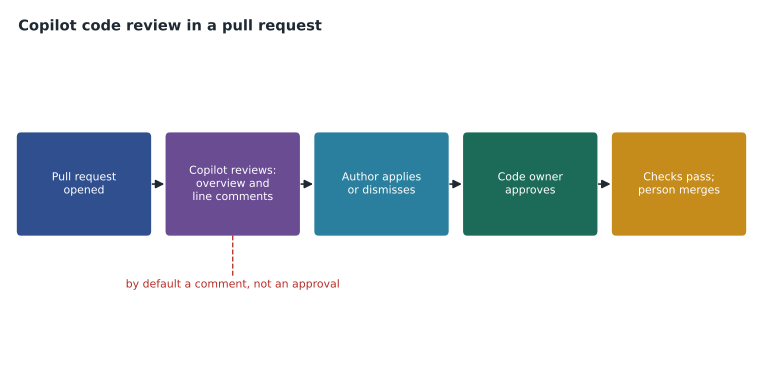
By default, Copilot's review is a comment, not an approval, and it does not count toward the number of approvals a branch protection rule or ruleset requires. That default is the safe one: required approvals exist so that a person who understands the project agrees with the change. GitHub has added an option for administrators to let Copilot submit an approving review that satisfies an approval requirement, which must be turned on in repository, organization and enterprise settings, and any new commit dismisses that approval. Tidewater left it off. Its protect-main ruleset from MSBA-161 required one approval from a code owner, and all code owners were people.
Worked problem
Counting approvals
Tidewater's ruleset on trailcheck requires 1 approval from a code owner. A pull request has a Copilot review saying it looks ready and an approval from Lena, who is not a code owner. Can it merge?
Show solution
- Copilot's review is a comment by default, so it counts as zero approvals.
- Lena's approval counts as an approval, but not as a code owner's.
- The rule needs a code owner, Priya or Dmitri, to approve.
Answer: No. It needs an approval from Priya or Dmitri. Copilot's review helps the author fix problems early; it does not replace the code owner.
Guiding reviews with instructions
Copilot code review reads custom instructions from the repository, which is how a team teaches it the house rules. A file called .github/copilot-instructions.md holds repository-wide instructions that apply to Copilot's reviews and also to chat and agents in that repository. Files in .github/instructions/ ending in .instructions.md hold path-specific instructions that apply only when matching files change, for example rules for files under data/. Copilot also reads an AGENTS.md file if present, a convention shared by several AI tools. Instructions are read from the pull request's head branch, so you can test a change to the instructions in the same pull request that makes it.
# Copilot instructions for trailcheck

## Reviews
- Flag any change to files under data/ that does not keep the date|trail|condition format.
- Dates are ISO 8601 (YYYY-MM-DD). Flag other date formats.
- Prefer clear names over comments that explain unclear names.
- Do not suggest new dependencies; we keep the site dependency-free.
- Accessibility: every image needs alt text; flag missing alt.

## Not our concern
- Do not comment on the formatting of Markdown in docs/; a linter handles it.
Priya kept the file short and concrete. Long, general instructions such as "write good code" add nothing; specific rules such as "dates are ISO 8601" give the reviewer something to check. The final section, listing what not to comment on, cut down noise from comments the team would ignore.
What Copilot code review does not do
The documentation is plain about limits, and so is the exam. Copilot code review can miss problems and can be wrong, so its comments need checking and human review is still needed. Some files are skipped: dependency manifests such as package.json, log files and SVG images are not reviewed. You cannot choose the model it uses. If GitHub Actions is unavailable or hosted runners are turned off, reviews still run but without the agent-style tools that let Copilot explore the wider project. Content excluded under lesson 9's rules is not reviewed. And it is not a security scanner: code scanning, secret scanning and Dependabot from MSBA-161 remain the tools for those jobs.
| Job | Best tool |
|---|---|
| Spotting logic slips, unclear names and missed cases in a change | Copilot code review, then a person |
| Deciding whether a change fits the product and the team's plans | A person |
| Finding known vulnerability patterns across the code | Code scanning |
| Finding committed passwords and keys | Secret scanning and push protection |
| Finding vulnerable dependencies | Dependabot alerts and dependency review |
What reviews cost
Each Copilot review uses AI credits, and the amount depends on the size of the pull request, the instructions it reads and the review setting. GitHub publishes rough averages per review for its settings, from well under a dollar for a light review to around a dollar and a half for the default and much more for the deepest option, and says that real costs vary. Automatic reviews are charged to the pull request author's usage, manual ones to the person who requested them, and pull requests opened by bots to the organization. If a budget is used up, reviews stop along with the other credit-based features. Reviews that use Actions runners for their tools use Actions minutes too.
Worked problem
Budgeting for automatic reviews
The web team opens about 40 pull requests a month. A ruleset requests a Copilot review on each pull request and again on each push, and the average pull request gets 2.5 pushes after opening. At roughly 150 credits per review, how many credits is that per month, and what would it cost beyond the pool at one cent a credit?
Show solution
- Reviews per pull request: 1 on opening + 2.5 on pushes = 3.5.
- Reviews per month: 40 x 3.5 = 140.
- Credits: 140 x 150 = 21,000 credits.
- Cost if none is covered by the pool: 21,000 cents = 210 US dollars.
Answer: About 21,000 credits, which would be 210 US dollars if none were covered. Reviewing only on opening would cut that to 40 x 150 = 6,000 credits, so Tidewater turned the on-push option off and re-requests reviews when a change is large.
Rosa added a line to the decision record: automatic Copilot review on opening for trailcheck and open-trail-report, no re-review on every push, and a budget alert at 15 US dollars of extra usage, reported each month to the managing editor.
Reviewing the reviewer
For the first two weeks the team tracked what happened to Copilot's comments: applied, discussed, or dismissed as wrong or unhelpful. That gave them a fair picture without relying on impressions. Lena noted that Copilot was good at spotting missing alt text and inconsistent dates, and poor at judging whether a design change suited TrailCheck's readers. Malik, reviewing outside contributions to open-trail-report, found its comments helpful for first-time contributors, who often fixed simple problems before he looked.
Worked problem
Scoring review comments
Over two weeks Copilot left 64 comments. The team applied 29, discussed 11 and dismissed 24. What share was applied, and what does the dismissed share suggest?
Show solution
- Applied: 29 / 64 = about 0.45, or 45 in 100.
- Dismissed: 24 / 64 = 0.375, or about 38 in 100.
- A high dismissal rate suggests noise; the team added "not our concern" rules to the instructions file.
Answer: About 45 in 100 applied. The dismissed comments pointed to topics the instructions file should rule out, which is cheaper than ignoring them every week.
Members without a seat
An organization can let members who do not have a Copilot seat receive Copilot reviews on GitHub.com, if an administrator enables the policies that allow it, including paying for the extra usage. Tidewater considered this for Owen's data pull requests and decided it was simpler to give him a seat in the pilot. The option matters for larger organizations where many people open occasional pull requests.
Reading Copilot's comments well
A Copilot review comment is a suggestion from a fast, tireless and sometimes wrong colleague. Priya taught the team to read each one with a simple question: is it right about this code, in this project? Comments about clear problems, such as a missing check for an empty list, a variable used before it is set or an image without alt text, are usually worth applying after a quick check. Comments about style or structure deserve more thought, because Copilot does not know the team's reasons for its choices unless the instructions file says so. Comments that claim a bug where the author knows there is none should be dismissed with a short reply, so a human reviewer can see the question was considered.
Applying a suggested change creates a commit on the pull request branch. That is convenient, but it means the change is now part of the pull request and must pass the same checks and human review. Several applied suggestions can be batched into one commit, which keeps the history tidy. Dmitri found that reading Copilot's overview comment first helped him decide where to look closely, because it listed the files and behaviors it had examined.
Where Copilot review fits in the process
Tidewater settled on an order of work for every pull request. The author opens the pull request and reads Copilot's review within the hour, applying or dismissing each comment. The required checks run. Then a code owner reviews the change and Copilot's comments together and approves or asks for changes. That order meant human reviewers spent their time on design and on what the change was for, rather than on simple slips Copilot had already caught. In the first two weeks, Priya found her review comments per pull request fell by about a third, mostly the small ones, while the conversations about design stayed the same.
Worked problem
Time saved in human review
Before Copilot review, Priya spent about 20 minutes per pull request on 40 pull requests a month. If Copilot's comments cut her review time by a quarter, how many hours a month does she save?
Show solution
- Time before: 40 x 20 = 800 minutes.
- Saved: 800 x 1/4 = 200 minutes.
- In hours: 200 / 60 = about 3.3 hours.
Answer: About 3.3 hours a month. The team weighed that against the cost of reviews from the earlier example when choosing the on-opening setting.
Owen asked whether Copilot reviews would help with data pull requests, which change trail report files rather than code. The path-specific instructions file for data/ answered that: it told Copilot to check that each line kept the date, trail and condition format and that dates were real calendar dates. Copilot caught two malformed lines in the first week that the automated check had missed because they had the right number of fields but an impossible date.
Common mistakes
MistakeTreating a Copilot review as an approval.
InsteadBy default it is a comment; required approvals still come from people.
MistakeWriting long, vague review instructions.
InsteadKeep .github/copilot-instructions.md short and specific, and list what not to comment on.
MistakeTurning on review for every push without estimating cost.
InsteadEstimate credits per month and set a budget alert.
MistakeReplacing code scanning and secret scanning with Copilot review.
InsteadUse each tool for its job; Copilot review complements them.
Summary and key terms
- Copilot code review posts an overview and line comments with suggested changes on a pull request.
- It can be requested manually, by a personal automatic setting or by a ruleset, optionally on each push.
- By default its review does not count toward required approvals; people still approve and merge.
- Custom instructions in .github/copilot-instructions.md, path-specific .instructions.md files and AGENTS.md guide reviews.
- It can miss problems, skips some file types and is not a security scanner.
- Each review uses AI credits; estimate monthly volume and set budgets.
- Copilot code review
- A Copilot feature that reviews pull requests and suggests changes.
- Suggested change
- A proposed edit in a review comment that the author can apply directly.
- copilot-instructions.md
- A repository file of instructions that guide Copilot's reviews, chat and agents.
- Path-specific instructions
- Instruction files in .github/instructions/ that apply to matching paths.
- Re-review
- A new review requested after changes are pushed.
Practice problems
Work each problem on paper first, then reveal the answer to check.
Name the three ways a Copilot review can be requested.
Show answer
Manually from the Reviewers menu, by a personal automatic setting, and by a ruleset.
Where do repository-wide instructions for Copilot live?
Show answer
In .github/copilot-instructions.md.
Why is Copilot code review not a replacement for secret scanning?
Show answer
It can miss problems and is not designed to find committed secrets; secret scanning and push protection are.
Lesson quiz · 5 questions
Score 60% or more to complete this lesson.
Create a free account to save your progress, take quizzes and earn a certificate.