
MSBA-253 · Lesson 8 of 12 · 19 min
Tenant settings and capacity
▶ Video coming soon A video version of this lesson is on the way.
Every Monday morning Rupert opens the same two pages in the Power Platform admin center before anything else: the tenant settings and the Dataverse capacity summary. The first tells him whether the rules for the whole tenant are still what Lumenvale decided. The second tells him whether the college is about to run out of the storage its apps depend on. In October 2026 the second page gave him a scare, and this lesson explains why.
Tenant settings
Tenant settings apply to every environment in the tenant. They live in the Power Platform admin center and are managed by people with the Power Platform administrator or a higher Microsoft Entra role. Most of them decide who can do what across the whole platform, and many organizations never look at them until something goes wrong. Microsoft adds settings over time, especially for Copilot and AI features, so the list should be reviewed at least once a term.
| Setting area | What it controls | Lumenvale's choice |
|---|---|---|
| Environment creation | Who can create production and sandbox environments, and trial environments | Only Power Platform administrators |
| Developer environment assignment | Whether makers can create their own developer environments | Allowed, combined with default environment routing |
| Trial environments | Whether users can sign up for trials | Limited to administrators |
| Copilot and generative AI | Whether AI features, data movement across regions and preview features are allowed | Allowed for supported features in the governed environments; cross-region data movement off |
| Tenant isolation | Whether connectors can reach other tenants, with an allow list | On, with an allow list for one partner tenant |
| Analytics | Tenant-level analytics used by Monitor and reporting | On |
| Weekly digest and notifications | Which administrators receive summaries | Rupert and his deputy |
Two of those deserve more explanation. Tenant isolation stops connectors that use Microsoft Entra authentication, such as SharePoint or Outlook, from connecting to other tenants unless the tenant is on an allow list. Without it, a maker could build a flow that copies data from a Lumenvale SharePoint site into a SharePoint site in another organization's tenant, using an account there. Tenant isolation complements data policies: policies control which connectors can be combined, and isolation controls which tenants those connectors can reach. Lumenvale allowed outbound connections to one partner college's tenant for a joint program and blocked everything else.
Copilot and generative AI settings are newer and more numerous. Some are tenant-wide, such as whether data can move across geographies for AI features that are not available in the local region, and some are set per environment or through environment group rules. Lumenvale's privacy officer required that student data stay in the country, so Rupert left cross-geography data movement off and accepted that some AI features would arrive later in the United States region than elsewhere. Lesson 2 described how environment groups can enforce generative AI settings across a group.
Administrative roles
Who can change tenant settings is itself a governance decision. The Power Platform administrator role in Microsoft Entra ID can manage all Power Platform environments, settings and policies; Dynamics 365 administrator has similar powers for environments with Dynamics 365 apps; Global Administrators can do everything. At environment level, the System Administrator security role in Dataverse controls a single environment. Lumenvale gave the Power Platform administrator role to two people, both through Privileged Identity Management so that it had to be activated when needed, and gave environment-level system administrator roles to the champions who supported each area.
What Dataverse capacity is
Dataverse stores data in three kinds of capacity, each measured in gigabytes and pooled across the tenant. Microsoft's capacity documentation, updated on November 2, 2026, defines them.
| Capacity type | What uses it |
|---|---|
| Database | Table rows, metadata and relational data, including indexes |
| File | Files and attachments, including image and file columns |
| Log | Audit logs, plug-in trace logs and elastic tables |
The tenant receives capacity from its licenses: a base amount plus accruals from many Power Platform and Dynamics 365 licenses, and administrators can buy capacity add-ons. Microsoft's capacity page points to the licensing guide for the amounts, which change over time. Every production and sandbox environment consumes at least 1 gigabyte of database capacity even if nearly empty, while trial, preview, support, developer and Dataverse for Teams environments do not count toward capacity at all. That is one more reason to use developer environments for experiments.
Viewing capacity
Administrators view capacity under Licensing in the admin center: the Dataverse page shows usage by storage type and by environment and has a Manage capacity view, and the capacity add-ons page shows purchased add-ons, which can be assigned to particular environments. Only tenant-level administrators can see the summary by default, although environment administrators can be given access through tenant settings. Rupert reviewed the per-environment breakdown monthly at the hub and kept a small chart of the trend.
When capacity runs short
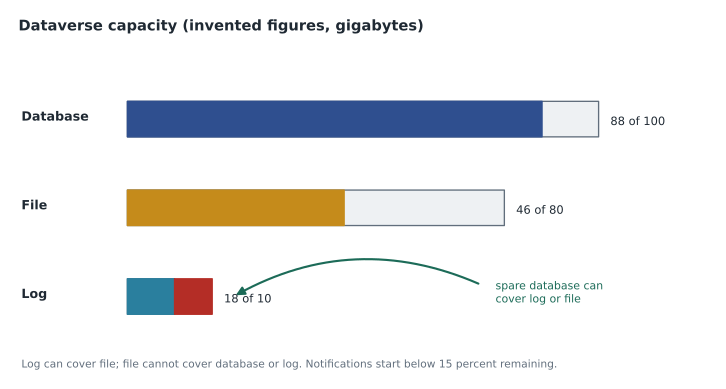
Microsoft's documentation describes how the three types interact when one runs short. Spare database capacity can cover overages in log and file, and spare log capacity can cover file, but file capacity cannot cover database or log. This borrowing affects notifications and whether the tenant is in overage; it does not change how much is actually used or bought.
Notifications go to administrators and makers by email and banner, weekly, when remaining capacity drops below 15 percent, below 5 percent, and when the tenant goes over its entitlement, all measured after borrowing; there is no opt-out. Microsoft's page also describes a storage validation experience being rolled out for sandbox environments. When effective consumption passes 85 percent, early warnings appear. Over 100 percent, operations such as creating, copying, restoring and converting environments are blocked. After 30 days in overage, affected sandboxes move to administration mode, open only to administrators, and after 90 days users cannot sign in and data is available only through export and recovery support. Production environments do not enter administration mode or become disabled, and sandboxes billed pay-as-you-go are exempt. Because Microsoft describes this as an upcoming experience, administrators should check the Message center for its rollout status.
Lumenvale's October scare
In October the capacity page showed log capacity over its entitlement and database at 88 percent of its own. The cause was the registrar's decision to turn on auditing for transcript requests and the finance team's flows writing run history into Dataverse, both good decisions that nobody had sized. Database capacity was covering the log overage, but with database at 88 percent the margin was thin. Rupert took four steps. He shortened the retention of the finance flows' run history from 28 to 14 days, which the setting allows. He set an audit retention period for the less important tables. He deleted two old sandbox environments that held copies of production data from the spring migration. And he asked finance for a quote for a database capacity add-on in case the transcript rollout in January pushed usage up again.
Microsoft offers a temporary safety valve too. A capacity extension can be requested once overall consumption exceeds 80 percent; it grants extra capacity equal to 25 percent of consumption for up to 45 days, up to three times in 365 days. It does not fix the underlying problem, but it buys time to clean up or buy more. Environments can also be linked to a pay-as-you-go billing policy, so that capacity use beyond the tenant's entitlement is charged to an Azure subscription.
Things that quietly use capacity
Some capacity use surprises administrators. Dataverse search builds an index stored in a table that counts toward database capacity, but Microsoft advises against turning it off: turning it off deletes the index after 12 hours and degrades Copilot and search experiences. Audit logs grow steadily once auditing is on, which is why retention periods matter. Attachments and notes used to be stored in database capacity, and Microsoft is moving file-type data such as attachments and notes from database to file storage, which lowers database use and raises file use. Copies of environments made for testing hold full copies of production data and should be deleted, or have data removed, when no longer needed.
Worked problem
Reading a capacity alert
The weekly email says the tenant is below 15 percent remaining for database capacity after borrowing. File capacity is half used, log capacity is fine. Which of these actions will help: (a) buying a file capacity add-on, (b) reducing audit retention, (c) deleting an unused sandbox with a copy of production data, (d) turning off Dataverse search?
Show solution
- File capacity cannot cover database shortfalls, so a file add-on does not help with the database warning.
- Audit logs use log capacity; if log is fine, reducing audit retention mainly helps if database has been covering a log overage. It is worth checking but may not help here.
- Deleting an unused sandbox frees its database use, at least 1 gigabyte and often much more for a copy of production. This helps directly.
- Turning off Dataverse search would free some database space but harms Copilot and search, and Microsoft advises against it.
Answer: Delete or clean up unused sandboxes and large tables, and buy database capacity if needed. File add-ons do not cover database, and turning off Dataverse search is not recommended.
Capacity and the exam
AB-410 asks candidates to recommend environment types and to configure tables, prompt columns and data models. Knowing how capacity works explains several design choices that appear in scenarios: using developer environments for experiments, storing documents as files rather than in text columns, using elastic tables for high-volume logs, and keeping audit retention sensible. Administrators will thank the app builder who designs with capacity in mind.
Planning capacity for growth
Capacity problems are easier to prevent than to fix. When a new solution is proposed, the hub's intake form asks for a rough estimate of its data: how many rows a year, whether it stores files or images, whether auditing is needed and for how long. A transcript request with its deliveries and history uses a few kilobytes; a facilities inspection with photographs uses far more, which is why Signe stored inspection photos as file columns, which use file capacity, rather than in notes or text columns. Rupert adds each estimate to a simple forecast in the hub's capacity chart.
The forecast for 2027 showed that the January rollout of the transcript solution to all three campuses and the planned bursary solution would push database use past 95 percent by spring. That gave the college time to budget for a capacity add-on in the next financial year rather than finding the money in a hurry. It also showed that log capacity would be the first to run out if auditing stayed as broad as it was, which led to the retention changes described above.
Long-term data and retention
Not all data needs to stay in Dataverse forever. Microsoft offers long-term data retention for Dataverse, which moves inactive rows out of the live database into retained storage that is read-only but still accessible for compliance. The registrar's records schedule says transcript requests must be kept for seven years, but only the last two are used day to day. Rupert and Dr. Ondaatje-Ruiz agreed to evaluate long-term retention for requests older than two years in 2027, which would keep the live database smaller and searches faster.
Capacity and licenses are also linked to cost reporting. The hub's monthly report shows capacity use per environment next to the department that owns it, so that departments see the storage consequences of their designs. When the finance office saw that its flow run history used more database capacity than the whole registrar solution, it agreed to the shorter retention period without argument.
Common mistakes
MistakeNever looking at tenant settings after the platform is first set up.
InsteadReview them at least each term, especially as Microsoft adds Copilot and AI settings.
MistakeLeaving tenant isolation off.
InsteadTurn it on and allow only the tenants your organization works with.
MistakeTurning on auditing everywhere without retention periods.
InsteadAudit what matters and set retention so log capacity stays under control.
MistakeKeeping test copies of production data indefinitely.
InsteadDelete or clean environment copies when testing ends.
Summary and key terms
- Tenant settings apply across all environments and control environment creation, trials, AI features, tenant isolation and analytics.
- Tenant isolation stops connectors from reaching other tenants unless they are on an allow list.
- Dataverse capacity has three pooled types: database, file and log.
- Production and sandbox environments consume at least 1 gigabyte of database; developer, trial and Teams environments do not count.
- Database can cover log and file overages and log can cover file, but file cannot cover the others; notifications start below 15 percent remaining.
- Capacity extensions, pay-as-you-go billing, clean-up and add-ons are the ways to respond to shortages.
- Tenant setting
- A Power Platform setting that applies to every environment in the tenant.
- Tenant isolation
- A setting that restricts connections to and from other Microsoft Entra tenants.
- Database capacity
- Dataverse storage for table rows, metadata and indexes.
- File capacity
- Dataverse storage for files, attachments and image or file columns.
- Log capacity
- Dataverse storage for audit logs, plug-in traces and elastic tables.
- Capacity extension
- A temporary grant of extra capacity while an organization resolves an overage.
Practice problems
Work each problem on paper first, then reveal the answer to check.
Which capacity type do audit logs use?
Show answer
Log capacity.
Can spare file capacity cover a database overage?
Show answer
No; database can cover log and file, and log can cover file, but file cannot cover the others.
Why should Dataverse search usually be left on?
Show answer
Turning it off deletes the index and degrades Copilot and search experiences.
What does tenant isolation prevent?
Show answer
Connectors using Entra authentication from connecting to other tenants that are not on the allow list.
Lesson quiz · 5 questions
Score 60% or more to complete this lesson.
Create a free account to save your progress, take quizzes and earn a certificate.