
MSBA-253 · Lesson 6 of 12 · 19 min
Source control integration
▶ Video coming soon A video version of this lesson is on the way.
Pipelines told Lumenvale what had been deployed and when. They did not answer the question Signe asked in October after a change to the facilities inspection form went wrong: what exactly changed between version 1.2 and version 1.3, and who changed it? Solution artifacts are zip files of XML and YAML, and comparing two of them by hand is miserable. The answer the software world settled on long ago is source control: every change is recorded as a commit, with an author, a time and a message, and any two versions can be compared line by line. Since April 2025 Power Platform has had it built in.
Why source control matters for low-code
Professional developers take source control for granted. Low-code makers often have never used it, and for a single maker building a personal app it may not be worth the effort. For shared business solutions it brings four benefits that pipelines alone do not. History: every change is recorded, so a team can see when a column was added or a flow condition changed, and by whom. Comparison: two versions can be compared to see exactly what differs. Recovery: an earlier state can be restored if a change goes wrong. Collaboration: several makers can work on the same solution in separate environments and combine their changes.
Git integration in Power Platform
Microsoft announced Git integration in Power Platform as generally available on April 22, 2025, in all public geographies, with sovereign clouds to follow. It connects Dataverse environments and solutions to a Git repository in a supported provider, such as Azure DevOps or GitHub, and lets makers commit and pull changes from the maker portals, including Power Apps and Copilot Studio. Microsoft's announcement was candid that general availability did not mean the feature was complete: most solution components are supported, the remaining legacy components are being added over time, and code-first editing of the new file format was described as a next step.
Solutions are stored in the repository in a human-readable, Git-friendly format. Canvas apps are stored as pa.yaml files, whose schema Microsoft has published, and other solution objects in a new YAML format. A design choice worth understanding is that each solution object is stored once in a repository folder and can be shared by several solutions in that folder, rather than being duplicated inside each solution's files. That mirrors how Dataverse works: a table belongs to the environment and may appear in more than one solution.
Where to connect
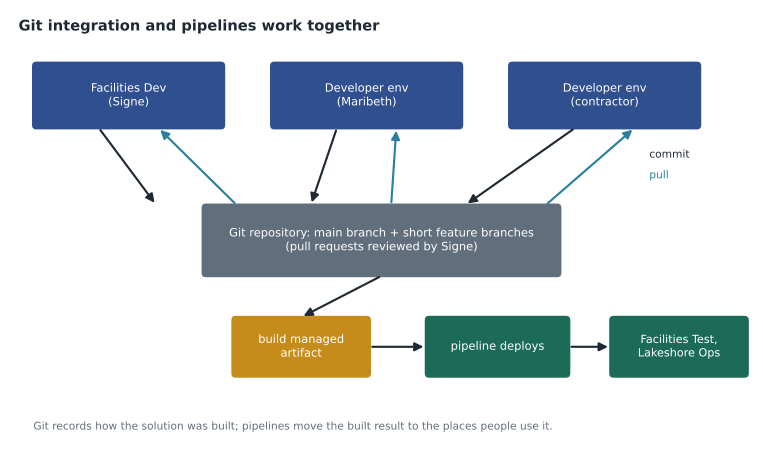
Microsoft's guidance is clear about where Git integration belongs: in development environments, not test or production. Source control holds the unmanaged source of a solution. Managed solutions are built from that source and deployed downstream with pipelines, where they are not edited. So the repository and the pipeline do different jobs: Git records how the solution was built; pipelines move the built result to the places people use it.
Connecting an environment or a solution
An administrator or maker with the right permissions connects either an environment or an individual solution to a repository location, a project, a repository, a branch and a folder. Once connected, the maker portal's source control pane shows which components have changed since the last commit, lets the maker commit them with a message, and lets the maker pull changes that others have committed. Microsoft's announcement notes that pulls can delete objects from the environment, or remove them from the solution, when they have been deleted in Git, so a pull is a real change to the environment and should be done deliberately. An environment or solution can later be disconnected and reconnected to a different location or branch.
Lumenvale chose GitHub, because the college's IT department already used it for web projects, and a private repository called lumenvale-power-platform with one folder per solution family: registrar, facilities and finance. Signe connected Facilities Dev to the facilities folder on the main branch. The college's IT security team required that the repository use the college's single sign-on and that branch protection stop anyone committing directly to main without review, which lesson 11 returns to.
A working rhythm
Git rewards small, frequent commits with clear messages. Signe's rule for the facilities makers was to commit at the end of each logical change, not at the end of the week, and to write messages that say why as well as what: "Add Location table so work orders can reference rooms and grounds" rather than "changes". Before starting work each morning, makers pull to get others' changes. Before a release, the lead maker checks that the branch has no uncommitted changes in any development environment, so that the repository really does hold the full source.
| Step | Where | Why |
|---|---|---|
| Pull latest changes | Maker portal, source control pane | Start from the team's current state |
| Build and test in development | Developer environment | Changes stay out of shared environments until ready |
| Commit with a clear message | Maker portal | Record the change and its reason |
| Review and merge | Git provider (pull request) | A second person checks the change before it joins main |
| Deploy | Pipelines | The managed artifact reaches test and production |
Branches and several makers
When two makers work on the same solution, each can use their own developer environment connected to the same repository. If both change different components, their commits combine easily. If both change the same component, such as the same form, Git reports a conflict that a person must resolve by choosing or combining the changes. Microsoft's design of storing objects once and using a readable format makes conflicts easier to understand than they were with raw solution files, but they still need care, and makers new to Git should practice on a test repository first.
Many teams use branches to keep work apart until it is ready. A maker creates a feature branch, connects a developer environment to it, builds and commits there, and opens a pull request to merge into main when finished. Branch strategy can become elaborate in professional software teams; for most Power Platform teams a main branch plus short-lived feature branches is enough. Lumenvale's facilities team used exactly that, with Signe reviewing every pull request.
Code-first components
Some components are built in code: Power Apps component framework (PCF) controls written in TypeScript, Dataverse plug-ins written in C#, and custom workflow activities. Microsoft's guidance is that these are best built by a solution build process from source code, with the source code as the single source of truth. Committing only compiled outputs, such as a plug-in DLL or a bundled PCF JavaScript file, is discouraged because it causes sync conflicts and hides what changed. Signe's PCF control for the inspection checklist lives in its own folder in the repository with its TypeScript source, and the build adds the compiled control to the solution.
Git integration and the older tools
Before built-in Git integration, teams put Power Platform solutions in source control with command line tools: export the solution, unpack it into folders of files with the Power Platform CLI, commit the files, and later pack them back into a solution for import. Many organizations still run that approach in Azure DevOps or GitHub Actions, and it remains the way to automate builds with tests and approvals in a DevOps pipeline. Built-in Git integration makes source control accessible to makers who will never write a build script, and the two approaches can coexist: makers commit from the portal, and developers' build pipelines produce artifacts from the same repository.
pac solution unpack --zipfile ./out/LumenvaleFacilities.zip --folder ./src/LumenvaleFacilities
git add ./src/LumenvaleFacilities
git commit -m "Unpack Lumenvale Facilities 1.3.0.0 for review"
Worked problem
Finding out what changed
After Facilities Work Orders 1.3.0.0 reaches test, technicians report that the Priority column no longer defaults to Normal. Signe needs to know what changed and when. The solution is connected to Git. What should she do?
Show solution
- Open the repository's history for the work order table's files and compare the last commit before 1.3.0.0 with the commit that produced it.
- The comparison shows that the Priority column's default value was removed in a commit by a contractor with the message "tidy up columns".
- Restore the default in Facilities Dev, commit with a message that explains the fix and the original intent, and open a pull request for review.
- Deploy 1.3.1.0 through the pipeline, and add a review rule so that changes to column defaults on shared tables need Signe's approval in pull requests.
Answer: Source control turns "something changed" into a specific commit, author and reason, and makes the fix itself reviewable.
Governance of the repository
A repository full of solution source is valuable and, sometimes, sensitive: it can contain environment variable defaults, flow logic and table designs. Treat it like any other code repository. Restrict access to the people who build the solutions, use the organization's identity provider, protect the main branch, and keep secrets out of it entirely: secrets belong in Azure Key Vault, referenced by secret environment variables. Rupert added the repository to Lumenvale's register of systems and asked the security team to include it in their quarterly access reviews.
AB-410 does not itemize source control. Its ALM strategy skill and the audience profile's mention of ALM, solutions and pipelines make it worth knowing how the pieces fit, and teams that use it report far fewer "what changed?" mysteries.
Commit messages and release notes
Good commit messages pay off at release time. When Signe prepares a release of Facilities Work Orders, she reads the commit history since the previous release and turns it into release notes for the pipeline deployment: what changed, why, and anything testers should check. Because the messages explain the reason for each change, the notes take ten minutes instead of an afternoon of trying to remember. The pipeline's deployment notes then record the same summary in the run history, linking the two systems.
Lumenvale's convention for messages is a short first line in the imperative, such as "Add Location table for rooms and grounds", followed, if needed, by a sentence of explanation and a reference to the request or incident that prompted the change. Makers new to Git find this strange for a week and then rely on it.
Starting with Git
For a team that has never used source control, the hub recommends a gentle start. Connect one development environment for one solution, with one maker committing, for a month. Learn to read the history and compare versions. Then add a second maker with their own developer environment and practice a conflict on purpose with something unimportant, such as a view's column order. Only after that, introduce branches and pull requests. Signe ran this sequence with the facilities makers over October, and by November the contractor working on the work orders solution was opening pull requests without help.
Source control also supports audit and compliance. The college's auditors asked in November how Lumenvale could show who changed the finance solution's approval thresholds and when. The answer came from two places: the pipeline run history showed which version was deployed and who approved it, and the repository history showed which commit changed the environment variable's default value and why. Together they formed a complete trail from change to production that would have been impossible to reconstruct from solution files alone.
Finally, source control is a safety net for the platform itself. If a development environment is accidentally reset or deleted, the solution can be rebuilt from the repository into a fresh environment by connecting it and pulling. Signe tested this in October by creating a new developer environment, connecting it to the facilities folder and pulling; within minutes she had a working copy of both facilities solutions to develop in.
Common mistakes
MistakeConnecting test or production environments to Git.
InsteadConnect development environments; build managed artifacts from source and deploy them with pipelines.
MistakeCommitting once a week with vague messages.
InsteadCommit each logical change with a message that explains what and why.
MistakeCommitting only compiled plug-in DLLs or bundled PCF files.
InsteadCommit the source code and build the compiled components in a build process.
MistakePulling without thinking because it is only a sync.
InsteadRemember that a pull changes the environment and can delete objects removed in Git.
Summary and key terms
- Source control records every change with author, time and message, enabling history, comparison, recovery and collaboration.
- Git integration in Power Platform became generally available on April 22, 2025, connecting development environments and solutions to providers such as Azure DevOps or GitHub.
- Solutions are stored in a readable format, with canvas apps as pa.yaml files and each object stored once per folder.
- Use Git in development environments; build managed artifacts from source and deploy them with pipelines.
- Commit small changes with clear messages, review changes through pull requests and handle conflicts carefully.
- Keep code-first components as source, protect the repository and keep secrets out of it.
- Source control
- A system that records changes to files over time so versions can be compared and restored.
- Git
- A distributed source control system used by Azure DevOps, GitHub and others.
- Commit
- A recorded set of changes with an author, time and message.
- Pull
- Bringing changes committed by others from the repository into an environment.
- Branch
- A separate line of development in a repository that can later be merged.
- Pull request
- A request to merge changes from one branch into another, usually with review.
Practice problems
Work each problem on paper first, then reveal the answer to check.
In which environments should Git integration be used?
Show answer
Development environments; test and production receive managed solutions through pipelines.
How are canvas apps stored in a repository with Git integration?
Show answer
As pa.yaml files in a published, human-readable schema.
Why is committing only a compiled plug-in DLL discouraged?
Show answer
It hides what changed and causes sync conflicts; the source code should be the source of truth.
What can happen to environment objects during a pull?
Show answer
Objects deleted in Git can be deleted from the environment or removed from the solution.
Lesson quiz · 5 questions
Score 60% or more to complete this lesson.
Create a free account to save your progress, take quizzes and earn a certificate.