
MSBA-253 · Lesson 5 of 12 · 19 min
Pipelines in Power Platform
▶ Video coming soon A video version of this lesson is on the way.
Before this autumn, a release at Lumenvale meant Signe exporting a solution file from development, saving it to her desktop, opening the test environment, importing it, fixing connections, and repeating the whole thing for production on a quiet evening. It worked because Signe was careful. It would not survive her going on holiday, and it left no record of who had deployed what, when. In September 2026 Rupert set up pipelines in Power Platform for the registrar, and by November every governed solution at the college moved through one.
What pipelines are
Pipelines in Power Platform bring ALM automation into the platform itself. Microsoft describes them as a way for makers, administrators and developers to use ALM and continuous integration and delivery without deep ALM expertise. Makers deploy from their development environment in a few clicks; administrators configure the pipelines and govern who can use them; developers can drive them from the Power Platform command line or extend them. A pipeline defines a development environment where solutions are built and an ordered series of stages, each targeting an environment, such as Test and then Production.
When a maker selects Deploy on a solution in the development environment, the pipeline exports the solution once, as managed and unmanaged artifacts, stores them, and then deploys the managed artifact through the stages in order. Because the export happens only at the start, the same artifact moves through every stage: it cannot be altered between test and production, and it cannot skip a stage or an approval. Microsoft's documentation, updated in November 2026, is explicit about this.
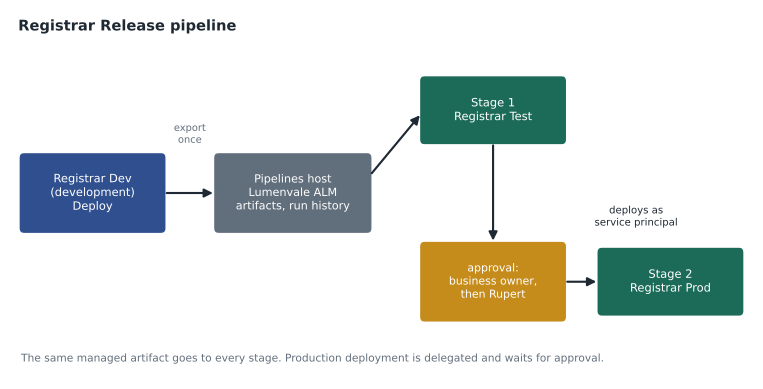
The pipelines host
Pipelines are configured and stored in a pipelines host, an environment that holds the pipeline definitions, the solution artifacts from every deployment and the run history. Microsoft's guidance is that the host should be a production environment, although it does not have to be managed. The same environment cannot be both the host and a development or target environment, and an environment can be linked to several pipelines in one host but not to more than one host.
There are two ways to get a host. The platform host is provided by Microsoft and is the quickest way to start. A custom host is an environment the organization creates and installs the pipelines application into, which gives administrators more control, such as extending pipelines with their own flows. To configure pipelines, administrators open the Deployment Pipeline Configuration app in the host, which requires the Deployment Pipeline Administrator security role. Lumenvale created a custom host, Lumenvale ALM, a small production environment with no business data, so that pipelines, artifacts and the extension flows lived together and were backed up.
Requirements for target environments
Development environments used in pipelines do not have to be managed and can be developer environments. All other environments in a pipeline must be managed environments, and their users need licenses with premium use rights. Microsoft's documentation includes a table that summarizes the licensing.
| Environment purpose | Typical type | Standalone license required for users |
|---|---|---|
| Host | Production | No |
| Development | Developer | No |
| QA or test | Developer or sandbox | No (per Microsoft's example) |
| Production | Production | Yes |
Microsoft has also started enforcing the managed requirement. From October 2026 the admin center's deployments page tells administrators when a pipeline deploys to an unmanaged target. They then have 30 days to enable Managed Environments before future deployments to that target are blocked, with one further 30-day extension allowed per environment. Tenant administrators can also turn on a setting under Deployments, Settings in the admin center that automatically makes targets of a pipeline host managed.
Setting up a pipeline
Rupert's setup for the registrar followed Microsoft's steps in outline. First he registered the environments in the Deployment Pipeline Configuration app as environment records: Registrar Dev as a development environment, Registrar Test and Registrar Prod as targets. Then he created a pipeline called Registrar Release, linked Registrar Dev to it, and added two stages, Test then Production, with Production depending on Test. Finally he decided who could use it: the Registrar champions security group received access to deploy, and only Rupert and his deputy could change the pipeline definition.
Makers see a pipeline in the maker portal when they open a solution in a development environment linked to it. They choose the pipeline and stage, review the solution, supply values for environment variables and select connections for connection references, add deployment notes, and deploy. Pipelines validate the connections and variables before the deployment begins, which catches most errors before anything changes in the target.
Delegated deployments and approvals
In a standard deployment, the deployment runs as the maker who requested it, and that maker becomes the owner of the deployed objects in the target. That is fine for test environments but undesirable in production: production flows owned by individual makers stop working when they leave. Delegated deployments solve this. A stage can be configured to deploy as a service principal or as a designated pipeline owner, so that the deployed objects are owned by that identity rather than by the requesting maker. Different service principals can be used for different pipelines and stages.
Delegated deployments are also how pipelines implement approvals. When a maker requests a delegated deployment, the request waits until it is approved. Approval can be handled by a cloud flow in the host that responds to the pipeline's events, for example by sending an approval to the solution's business owner and then to an administrator. At Lumenvale, deployments to Registrar Prod required approval from the registrar's business owner and then from Rupert, through a flow in Lumenvale ALM. The flow also posts the deployment notes and the solution version in the CoE hub's Teams channel.
Extending pipelines
Pipelines can be extended in several ways. Gated extensions let a flow intervene at defined points, such as before a deployment starts, to run checks or wait for an approval. Pipelines raise events that cloud flows, Azure DevOps or GitHub can respond to. The first-party application and its tables cannot be customized directly, but administrators can build around them. Lumenvale's pre-deployment extension checks three things before production deployments: that solution checker found no critical issues, that the solution version is higher than the one in production, and that the deployment notes mention the change request number.
Limits worth knowing
Microsoft's documentation lists several things pipelines do not do, and each has caught out organizations.
| Limit | What to do instead |
|---|---|
| Pipelines deploy solutions and configuration, not data in Dataverse tables | Move reference data with configuration migration tools, dataflows or a data import |
| Pipelines cannot deploy to another tenant | Use Azure DevOps or GitHub with the Power Platform build tools |
| One deployment request deploys one solution | Deploy dependent solutions one after another, base solution first |
| Unmanaged customizations are not published before export | Publish components as you save them in development |
| Import uses upgrade without overwriting customizations; other behaviors are not configurable | Use the command line or developer tools for unusual imports |
| Cross-geography deployments need a host setting | Turn on cross-geo solution deployments in the host, or keep host and environments in one geography |
| Power BI dashboards and datasets in solutions are not supported (preview components) | Deploy Power BI content with Power BI deployment pipelines |
Rollback is a special case. If the host's setting for redeploying earlier versions is turned on, an administrator can redeploy a previous version from the run history. If it is off, only higher versions can be imported. Microsoft's documentation describes a manual workaround: download the earlier artifact, increase the version number in its solution.xml file and import it. Rupert turned the setting on for the registrar, because the transcript pilot was too important to leave without a quick way back.
Worked problem
Planning a release with two solutions
Facilities is ready to release Lumenvale Facilities 1.3.0.0, which adds a Location table, and Facilities Work Orders 1.2.0.0, which uses it. The production target is Lakeshore Ops, which is managed. The Facilities pipeline has stages Test and Production, with delegated deployment to Production as the service principal lv-pp-deploy. How should Signe run the release?
Show solution
- Deploy Lumenvale Facilities 1.3.0.0 to Test first, because Facilities Work Orders depends on it, and then Facilities Work Orders 1.2.0.0 to Test. Each is a separate deployment request.
- After testing, request deployment of Lumenvale Facilities to Production. The request waits for approval from the facilities business owner and Rupert, then deploys as lv-pp-deploy, which becomes the owner of the new components.
- Repeat for Facilities Work Orders, supplying connection references and environment variable values for Lakeshore Ops when prompted.
- If the work orders release causes problems, redeploy version 1.1.0.0 from the run history, which is possible because the redeploy setting is on.
Answer: Deploy the base solution before its dependant at every stage, use delegated deployment so production objects are owned by a service principal, and keep the redeploy setting on so an earlier version can be restored.
Pipelines and other ALM tools
Pipelines are not the only way to deploy. Larger development teams often use Azure DevOps or GitHub Actions with Microsoft's Power Platform build tools, which run the same export and import operations from a build pipeline and suit organizations that already have DevOps practices, need cross-tenant deployments or want to run automated tests. The Power Platform command line, pac, can export, unpack, pack and import solutions and drive pipelines from scripts. Microsoft's guidance is that pipelines suit most makers and fusion teams, and that the developer tools are for scenarios pipelines do not cover. Lumenvale's plan is to keep pipelines for every governed solution and add GitHub-based builds only if Signe's code components grow.
pac auth create --environment https://lumenvale-registrar-dev.crm3.dynamics.com
pac solution export --name RegistrarTranscripts --path ./out/RegistrarTranscripts.zip
pac pipeline list
Testing between stages
A pipeline moves the artifact; it does not test it. Lumenvale's Test stage is followed by a short test plan for each release: the business owner or a champion runs through the main scenarios, checks anything the release notes say has changed, and confirms in the pipeline's approval that testing passed. For the registrar's releases that means submitting a transcript request, moving it through each status and checking that the right emails arrive in the test mailbox, which an environment variable ensures is never a real student's address.
Some teams add automated tests. Power Apps has a test studio for canvas apps, and developers can run tests from build pipelines. Lumenvale has not needed them yet, but Signe expects to add automated tests for the facilities solutions as they grow, triggered from a pipeline extension.
Who can deploy
Access to pipelines is itself governance. In the Deployment Pipeline Configuration app, administrators decide which makers can run which pipelines and who can change pipeline definitions. Lumenvale's rule is that champions can deploy their own area's solutions to test at any time, deployments to production need the approvals described earlier, and only the hub can create or change pipelines. The pipelines host's run history then shows exactly who requested and approved every production change, which the college's auditors found reassuring when they reviewed IT change management in November.
Pipelines also change the conversation with business owners. Before pipelines, a release date at Lumenvale depended on when Signe had a free evening. Now a business owner can see in the run history that a version passed test, approve it in Teams, and know that production will match what was tested. Ysaline said the approval step was the first time she had felt responsible for a system change rather than informed about it afterwards, which is exactly the shift the hub wanted: the people who own the process decide when changes reach it.
Common mistakes
MistakeUsing unmanaged environments as pipeline targets.
InsteadMake every non-development stage a managed environment, or deployments will be blocked after the notice period.
MistakeLetting production objects be owned by the maker who deployed them.
InsteadUse delegated deployments as a service principal or pipeline owner for production.
MistakeExpecting pipelines to move Dataverse data or deploy to another tenant.
InsteadMove data separately and use Azure DevOps or GitHub for cross-tenant deployments.
MistakeLeaving rollback to chance.
InsteadTurn on redeployment of earlier versions in the host, or know the manual workaround.
Summary and key terms
- Pipelines in Power Platform automate deployment from a development environment through ordered stages such as test and production.
- The solution is exported once at the start, so the same managed artifact moves through every stage.
- A pipelines host stores pipelines, artifacts and run history; it can be the platform host or a custom host.
- Every environment in a pipeline except development must be managed, and Microsoft began enforcing this from October 2026.
- Delegated deployments run as a service principal or pipeline owner and provide approvals before production.
- Pipelines do not move data, deploy across tenants or deploy several solutions in one request.
- Pipeline
- A definition of a development environment and ordered stages that deploy solutions to target environments.
- Stage
- One step of a pipeline that deploys to a specific target environment.
- Pipelines host
- The environment that stores pipeline configuration, solution artifacts and run history.
- Delegated deployment
- A deployment that runs as a service principal or pipeline owner and can require approval.
- Gated extension
- A point in a pipeline where a flow can run checks or wait for an approval before continuing.
- Artifact
- The exported solution file a pipeline stores and deploys.
Practice problems
Work each problem on paper first, then reveal the answer to check.
Why can a solution not be changed between the test and production stages of a pipeline?
Show answer
It is exported once when deployment starts, and the same artifact moves through every stage.
Which environments in a pipeline may be unmanaged?
Show answer
The development environment and the host.
Who owns objects deployed by a delegated deployment?
Show answer
The delegated service principal or pipeline owner, not the requesting maker.
How can an organization deploy a solution to a different tenant?
Show answer
With Azure DevOps or GitHub and the Power Platform build tools, because pipelines cannot deploy across tenants.
Lesson quiz · 5 questions
Score 60% or more to complete this lesson.
Create a free account to save your progress, take quizzes and earn a certificate.