
MSBA-253 · Lesson 1 of 12 · 20 min
Environment strategy
▶ Video coming soon A video version of this lesson is on the way.
On the first Thursday of September 2026, Rupert Ellingsworth opened the Center of Excellence hub meeting at Lumenvale Community Colleges with a screenshot nobody in the room enjoyed. It was the environment list from the Power Platform admin center as it had looked in the spring: the default environment, called simply Lumenvale, held 63 apps and 141 flows, most built by people who had since changed jobs, and three trial environments had quietly expired with work still in them. The internal audit that started the college's Power Platform program had counted 214 spreadsheets full of student and staff records. Moving that work into proper apps was the right goal, but Rupert knew that without a plan for where things were built, tested and run, Lumenvale would simply swap spreadsheet sprawl for app sprawl.
This course follows Rupert, the college's IT governance lead and Power Platform administrator, through the autumn of 2026 as the maker community grows. Maribeth Ferreira-Quon's Registrar Transcripts solution went into its pilot in November, Signe Tavernier-Mbeki's facilities solutions were heading for production, and the finance office's invoice automation went live on November 2. Each of those projects raised governance questions, and this course answers them in the order an administrator meets them: where to build, how to control the environments, how to package and move work, how to protect data, how to watch what happens, and how to help makers succeed.
A note on the exam. This course belongs to the AB-410 program, Microsoft's Building Intelligent Applications exam. Its study guide, with skills measured as of December 18, 2026, does not give environments and application lifecycle management a domain of their own. They appear inside the first domain, Create a foundation for intelligent applications (25 to 30 percent of the exam), as two skills: recommend environment types, and deploy a Microsoft Power Platform solution and ALM strategy. The guide's audience profile also expects candidates to work with administrators on policies and with governance teams on ALM, solutions, pipelines and monitoring. This course covers those skills in depth and goes further, into the administration work that makes them possible. Where a lesson goes beyond the exam, it says so.
What an environment is
An environment is a container for Power Platform resources. It holds apps, flows, agents, connections, solutions and, if one is added, a Dataverse database. Every environment belongs to one tenant, sits in one geographic region, and has its own security: who can make things in it, who can use what is made, and which roles apply. Environments are also the boundary for many settings, such as whether audit logging is on, which data policies apply and how long backups are kept.
Because so much hangs on the environment, the decision about where something is built shapes everything that follows. A flow built in the default environment is visible to the whole organization's makers and governed by the default environment's rules. The same flow built inside a solution in a development environment can be tested, versioned and deployed to production without anyone editing production directly. Environment strategy is the set of decisions an organization makes about which environments exist, what each is for, who can create them, and how work moves between them.
Environment types
Power Platform offers several environment types, and recommending the right one is an AB-410 skill. Each type has a purpose and limits.
| Type | Purpose | Points to remember |
|---|---|---|
| Default | Created automatically for every tenant; personal productivity | Every licensed user is a maker here and cannot be removed from that role; it cannot be deleted; treat it as a place for personal tools, not shared business solutions |
| Production | Running solutions people depend on | Full support and backups; counts against tenant capacity; should receive work only through deployments |
| Sandbox | Testing, training and staging | Can be reset or copied; not for live business use; counts against capacity |
| Developer | An individual maker building and experimenting | Owned by one maker; does not count against database capacity; unmanaged developer environments are being retired (see lesson 2) |
| Trial | Short-term evaluation | Expires after a period unless converted; a common place for work to be lost |
| Microsoft Dataverse for Teams | Apps and agents built inside a team in Microsoft Teams | Created automatically with the first app in a team; limited capacity and features; can be upgraded to a full environment |
The table hides one important asymmetry. Production and sandbox environments consume the tenant's Dataverse capacity, which lesson 8 explains, while developer, trial and Dataverse for Teams environments do not. That makes developer environments cheap places to build, but it also means an organization can end up with hundreds of them unless it decides who may create them and what happens to them.
The default environment
Every tenant has exactly one default environment, created with the tenant and named after the organization. Every licensed user in the tenant has the Environment Maker role there, which cannot be taken away. That is why it fills up: anyone who opens Power Apps or Power Automate for the first time lands in it and starts building. At Lumenvale it had become the home of a parking permit list, three versions of a room booking app and a flow that copied every email from a shared mailbox into a spreadsheet.
The common advice, and the approach Rupert took, is to rename the default environment's purpose rather than fight it. Microsoft's guidance describes it as a place for personal productivity: a maker's own flows that save attachments to OneDrive, a quick app used by one or two people. Shared, business-critical work belongs elsewhere. Rupert's clean-up in the spring had moved the important items into proper environments, deleted orphaned items after contacting their owners, and set a stricter data policy on the default environment than on the governed ones. Lesson 7 returns to that policy. Some organizations also rename the default environment to make its purpose plain, for example Personal Productivity, which changes the display name without changing what it is.
Dev, test and production
For any solution that more than a handful of people rely on, the standard pattern is at least three environments: one for development, where makers build and change things; one for test, where changes are checked by testers and business owners before release; and one for production, where people use the finished solution. Work moves forward only by deployment, never by editing production directly. That one rule prevents most of the incidents that hit small organizations, such as a well-meaning fix made directly in the live app that breaks a flow nobody knew depended on it.
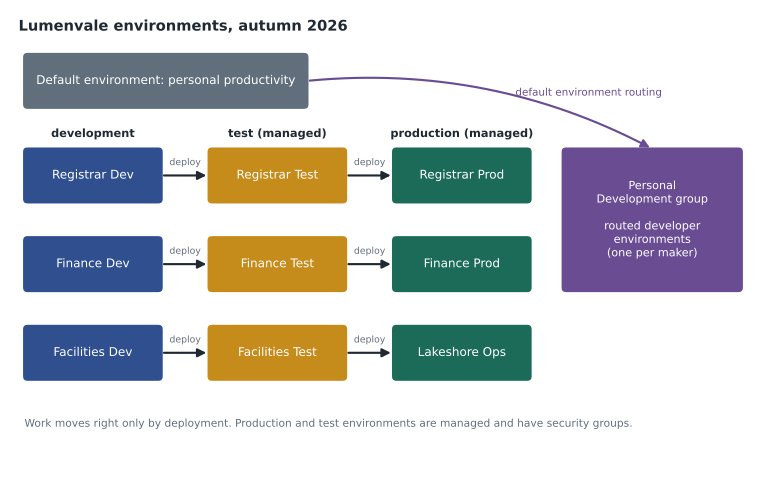
Lumenvale's environments, by the start of term, showed how the pattern scales. The registrar's office had Registrar Dev, Registrar Test and Registrar Prod. Finance had Finance Dev, Finance Test and Finance Prod. Facilities built in Facilities Dev, a developer environment, tested in Facilities Test, a sandbox, and deployed into Lakeshore Ops, an existing production environment for the Lakeshore campus. The college did not create a separate trio for every app: the media services equipment system lived in its own solution inside the registrar's environments for a while, because it was small and the same people supported it.
How many environments?
There is no single right number. The question is how to group work, and organizations usually choose one of three patterns. By business area: each department or division gets its own set, which suits organizations where departments own their solutions. By project or application: each significant solution gets its own set, which gives the cleanest separation but multiplies environments. By purpose: a few shared environments for, say, all low-risk departmental apps, plus dedicated sets for critical systems. Lumenvale mixed the first and third: departments with several solutions and their own champion, such as the registrar and finance, got their own set, and campus operations work went into Lakeshore Ops and its siblings.
Several factors push toward more environments. Data separation: student records and finance data have different audiences, and keeping them in separate environments makes security simpler. Release cadence: if two solutions are released on different schedules by different teams, sharing a test environment causes clashes. Different rules: one area may need a stricter data policy, longer backup retention or IP restrictions. Region: environments sit in one region, so data residency requirements can force a separate environment. Lumenvale's environments are all in the United States region because its privacy officer, Dr. Philippa Ondaatje-Ruiz, required student data to stay in the country.
Other factors push toward fewer. Each production or sandbox environment uses at least 1 gigabyte of database capacity even when nearly empty. Each needs administrators, security groups, data policies and monitoring. And solutions that need to share data across environments become harder to build. A reasonable test is to ask, for each proposed environment, what would go wrong if this work lived in an existing one. If the answer is nothing serious, it should.
Who can create environments
Left alone, Power Platform lets many users create certain environment types. Administrators control this in the tenant settings, which lesson 8 covers, by restricting who can create production and sandbox environments and how developer environments are assigned. Lumenvale limited production and sandbox creation to the Power Platform administrators and handled requests through a simple form reviewed at the fortnightly hub meeting. A request had to name the business owner, the purpose, the data involved and the people who would support it.
Developer environments are handled differently because they are meant to be self-service. Lumenvale allowed any maker to create one for learning, and used default environment routing, a Managed Environments feature covered in the next lesson, to send makers who open Power Apps to a personal developer environment in an environment group called Personal Development instead of to the default environment. That one change redirected new makers' experiments away from the crowded default environment without any training effort.
Worked problem
Recommending environments for three requests
Three requests reach the hub in September. (1) Library staff want a study room booking app for students at all three campuses. (2) An instructor at Ridgeview wants to learn Power Apps by building a quiz for her class. (3) The bursary office wants an agent that answers questions about awards and checks a student's application status. What environments should Rupert recommend?
Show solution
- Library bookings: a shared, student-facing solution with its own owner and moderate risk. It could get its own set, but the library is small and expects one solution. Rupert recommends building it in a solution inside the existing Campus Operations environments, with the library's own security roles.
- Instructor learning: personal experimentation with no shared data. Default environment routing already sends her to a personal developer environment, which is the right place. If her quiz becomes something other instructors use, it moves into a solution in a governed environment.
- Bursary agent: it reads financial and personal data about students and will be used by the public-facing student portal. It needs a dedicated Bursary Dev, Test and Prod set with its own data policy and the privacy officer's review.
Answer: Shared but low-risk work can join an existing governed environment as its own solution; personal learning belongs in developer environments; sensitive, high-impact work justifies a dedicated dev, test and production set.
Naming and documenting environments
A consistent naming convention saves time every week. Lumenvale's convention is the area, then the stage: Registrar Dev, Registrar Test, Registrar Prod. The environment's description in the admin center names the business owner and the support contact, and every environment has a security group, such as PP-Registrar-Prod-Users, that limits who can open it. Without a security group, any licensed user can be added to an environment's resources; with one, only members can access it, which is a simple and strong control.
Rupert also kept a one-page register in the hub's SharePoint site listing every non-personal environment: type, region, purpose, owner, security group, environment group, Dataverse yes or no, and the date of the last review. Each environment was reviewed twice a year. The register took an afternoon to create and turned the environment list from a mystery into something anyone could read.
Environments in the ALM strategy
Environment strategy is the foundation of application lifecycle management (ALM), the practices for moving a solution from idea to production and keeping it healthy afterwards. The rest of this course builds on it. Solutions package the work (lesson 3). Environment variables and connection references let the same package behave correctly in each environment (lesson 4). Pipelines move packages between environments (lesson 5), and source control keeps a history of every change (lesson 6). Data policies and tenant settings set the rules (lessons 7 and 8), and monitoring and the Center of Excellence keep the whole system healthy (lessons 9 to 11).
Common mistakes
MistakeBuilding shared business solutions in the default environment because it is already there.
InsteadKeep the default environment for personal productivity and build shared work in solutions in governed environments.
MistakeCreating a new environment set for every small app.
InsteadGroup related, low-risk solutions in shared environments and reserve dedicated sets for sensitive or independently released work.
MistakeLeaving environments open to every licensed user.
InsteadAssign a security group to each environment so that only intended users can access it.
MistakeDoing serious work in trial environments.
InsteadUse developer environments for experiments and convert or move anything worth keeping before a trial expires.
Summary and key terms
- An environment is a container for apps, flows, agents, connections, solutions and an optional Dataverse database, with its own region, security and settings.
- The main types are default, production, sandbox, developer, trial and Dataverse for Teams; recommending the right type is an AB-410 skill.
- The default environment cannot be deleted and every licensed user can make things in it, so keep it for personal productivity.
- Business solutions follow a dev, test and production pattern, and work reaches production only by deployment.
- Group environments by business area, project or purpose, balancing data separation and release independence against capacity and administration costs.
- Control who can create production and sandbox environments, route new makers to developer environments, and secure each environment with a security group.
- Environment
- A container for Power Platform resources with its own region, security and settings.
- Default environment
- The environment created with every tenant, in which every licensed user is a maker.
- Sandbox environment
- A non-production environment for testing and staging that can be reset or copied.
- Developer environment
- A personal environment for one maker to build and experiment in.
- Application lifecycle management (ALM)
- The practices for building, testing, deploying and maintaining a solution over its life.
- Environment security group
- A Microsoft Entra security group that limits which users can access an environment.
Practice problems
Work each problem on paper first, then reveal the answer to check.
Why should shared business solutions not be built in the default environment?
Show answer
Every licensed user is a maker there, it cannot be locked down in the same way, and its purpose is personal productivity.
Which environment types do not count against Dataverse database capacity?
Show answer
Developer, trial and Dataverse for Teams environments.
What is the single most important rule of the dev, test and production pattern?
Show answer
Work reaches production only by deployment, never by editing production directly.
Name two reasons to create a separate environment.
Show answer
Any two of: data separation, a different release cadence, different rules or policies, or a data residency region requirement.
Lesson quiz · 5 questions
Score 60% or more to complete this lesson.
Create a free account to save your progress, take quizzes and earn a certificate.