
MSBA-253 · Lesson 2 of 12 · 20 min
Managed environments
▶ Video coming soon A video version of this lesson is on the way.
When Rupert's spring clean-up finished, he could list every environment at Lumenvale but he still could not answer simple questions about them. Which apps had been shared with the whole college? Which makers had built something nobody used? Was anyone importing solutions that had never been checked? The answer to all three turned out to be the same feature, and the second hub meeting of the term, on the third Thursday of September 2026, was about turning it on.
What Managed Environments are
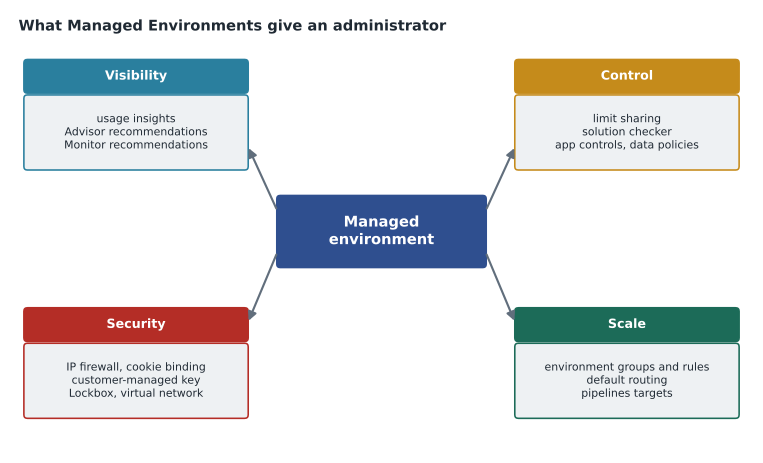
Managed Environments is a suite of premium governance capabilities that an administrator switches on for an environment. Microsoft describes it as a way to manage environments at scale with more control, less effort and more insight. Turning it on does not change what makers can build; it changes what administrators can see and enforce. It can be enabled on any environment type, including developer environments, and once enabled it unlocks a set of features across the platform.
Microsoft's overview page, updated in October 2026, lists the capabilities and notes that the list is not exhaustive. The ones most administrators use first are these.
| Capability | What it does |
|---|---|
| Environment groups and rules | Organize managed environments into groups and enforce settings across a group |
| Limit sharing | Restrict how widely canvas apps, flows and agents can be shared, for example no sharing with security groups or a maximum number of people |
| Weekly usage insights | A weekly email digest to administrators about popular and unused resources |
| Data policies | Data policies, including data policies for desktop flows, with extra controls in managed environments |
| Pipelines in Power Platform | Target environments of pipelines must be managed (lesson 5) |
| Maker welcome content | Custom guidance shown to makers when they first open Power Apps in the environment |
| Solution checker enforcement | Run solution checker automatically on import and warn or block if it finds serious problems |
| IP firewall and IP cookie binding | Allow access only from defined IP ranges and stop session cookies being replayed from elsewhere |
| Customer-managed key and Lockbox | Encrypt data with the organization's own key and control Microsoft support access to data |
| Extended backup | Keep system backups for longer than the default period |
| Export to Application Insights | Send telemetry to Azure Application Insights for detailed monitoring |
| Default environment routing | Send new makers to their own developer environment instead of the default environment |
| Catalog administration and app controls | Administer the catalog of reusable components and control which apps are allowed in the environment |
Licensing
Managed Environments are an entitlement of standalone licenses. Microsoft's page states that they are included with standalone Power Apps, Power Automate, Microsoft Copilot Studio, Power Pages and Dynamics 365 licenses, and that trial licenses can be used in managed environments within the limits of those trials. They are not included under the Power Apps Developer Plan when users run assets. The practical meaning is that people who use apps and flows in a managed environment should hold premium licenses, or be covered by pay-as-you-go, which Lumenvale used for its occasional transcript advisers.
That licensing rule shapes which environments are managed. Production environments where staff already hold premium licenses are obvious candidates. At Lumenvale the registrar's six staff had Power Apps Premium licenses and the forty advisers were covered by pay-as-you-go through a billing policy, so Registrar Prod could be managed without new purchases. The default environment, used by thousands of staff who hold only the Power Platform rights included in Microsoft 365, was a different matter; Rupert left it unmanaged and governed it with a strict data policy instead.
A deadline for developer environments
One recent change affects every organization that uses developer environments. Microsoft has announced that unmanaged developer environments are deprecated, and its overview page says that to keep an existing developer environment, an administrator must enable Managed Environments on it before December 15, 2026. Developer environments that makers create through default environment routing are already managed, because routing creates them that way. Lumenvale had eleven older developer environments created before routing was turned on. Rupert listed them in October, asked each owner whether they still needed it, deleted five, and enabled Managed Environments on the other six.
Turning it on
Administrators enable Managed Environments for an environment in the Power Platform admin center, from the environment's settings, or as part of adding the environment to an environment group. They can also enable it from the Actions page when a recommendation needs it. A non-managed environment that has Dataverse can be upgraded to managed as it is added to a group. Turning the feature off later is possible but removes the controls, so organizations usually treat it as a one-way step for production environments.
Before enabling it, Rupert checked three things for each environment: that the people using it were licensed appropriately, that the owner understood the new sharing limits, and that any existing app shared with a large audience would still work. He found one: a Lakeshore lab safety checklist shared with the whole college as a test. The owner agreed to share it with the Lakeshore Staff security group instead before the sharing limit took effect.
Limiting sharing
Sharing limits are often the first control administrators set. For canvas apps, an administrator can stop makers sharing with security groups, or cap the number of individuals an app can be shared with. Microsoft has added similar sharing controls for other resources, such as agents and solution-aware cloud flows, and the admin center shows which apply in each environment. Lumenvale's rule in managed production environments was that apps are shared only with named security groups that the business owner manages, never with individuals or with everyone, so that access follows staff changes automatically. In development and test environments, sharing was limited to ten individuals, which was enough for a few testers.
Sharing limits matter because sharing is how data leaks in low-code platforms. An app built on a Dataverse table shared with Everyone gives every user in the tenant a way to read whatever the app and its security roles allow. A cap on sharing does not replace security roles, which still decide what each user sees in Dataverse, but it limits the blast radius when a maker makes a mistake.
Usage insights and Advisor
Every week, managed environments send administrators a usage insights digest that lists the most popular apps and flows and the ones nobody has used. Rupert's first digest after enabling Managed Environments on Registrar Prod showed the Transcript Office model-driven app at the top and two abandoned test flows at the bottom, which he removed.
The Actions page in the admin center, also called Power Platform Advisor, turns this kind of insight into recommendations. Microsoft groups recommendations into four categories: security, operational efficiency, licensing and capacity, and performance. Full recommendations, the affected resources and the actions to fix them are available only for managed environments; for non-managed environments the page shows a summary with a lock icon. An administrator can act inline, snooze a non-security recommendation for up to two months, dismiss a security recommendation that does not apply, or automate responses with the Power Platform for Admins V2 connector. Lesson 9 returns to monitoring in more detail.
Solution checker enforcement
Solution checker examines a solution for performance, reliability and upgrade problems, such as deprecated JavaScript calls or plug-ins that do unnecessary work. In a managed environment, an administrator can enforce it on import. In warn mode, the import continues but administrators and the importer are told about critical issues; in block mode, a solution with critical issues cannot be imported. Rupert set warn mode first, watched for two weeks to see what it found, and then switched production to block once the teams had fixed what it had flagged.
Environment groups and rules
As managed environments multiply, setting each one by hand becomes tedious and error-prone. Environment groups solve that. An environment group is like a folder of managed environments, organized by business unit, project, region or purpose, with rules applied to every environment in the group. Microsoft's documentation sets out how they behave:
| Behavior | Detail |
|---|---|
| Membership | Only managed environments can be in a group; each environment can be in only one group; groups cannot overlap or be nested |
| Rules | Examples include sharing limits, maker welcome content, solution checker, usage insights, backup retention and generative AI settings |
| Publishing | Rules take effect only when published; changed rules show as unpublished until then |
| Locking | A published rule is read-only in member environments; local environment administrators cannot override it |
| Exceptions | Per-environment exceptions are not supported; untouched rules stay managed at environment level |
| Leaving a group | The environment keeps the last applied settings but becomes unlocked for local administrators |
| Routing | Default environment routing can send new developer environments into a chosen group |
One behavior catches people out. When an environment joins a group, the group's published rules override the environment's existing values. If an environment had custom maker welcome content and joins a group with different welcome content, its own content is replaced. Rupert learned this when Lakeshore Ops joined the Campus Operations group and its carefully written welcome message for Lakeshore makers disappeared. He rewrote the group's welcome content to cover all three campuses.
Lumenvale ended the term with three groups. Registrar held Registrar Dev, Test and Prod, with sharing limited to security groups in production and backup retention extended. Campus Operations held Lakeshore Ops, Facilities Test and the finance environments, with similar rules and solution checker in block mode. Personal Development held the routed developer environments, with generous sharing limits for testing, solution checker in warn mode, and welcome content pointing makers to the hub's learning resources.
Worked problem
Choosing between a group rule and an environment setting
The registrar wants production backups kept for longer than the default. The finance office wants a different maker welcome message from the registrar. Both environments are managed. Should these be group rules or environment settings?
Show solution
- Backup retention for all registrar environments is a policy that should not drift, so it belongs in the Registrar group's rules, where it is locked.
- Finance is in the Campus Operations group, not the Registrar group, so it can have its own group welcome content. If finance needed a message different from the rest of Campus Operations, the group could leave welcome content unset and each environment would manage its own, because per-environment exceptions are not supported.
- Rupert checks that no other rule in Campus Operations conflicts with the finance team's needs before deciding.
Answer: Use group rules for settings that must be the same across a set of environments, and leave a rule untouched at group level when environments genuinely need different values.
Beyond the exam
AB-410 asks candidates to recommend environment types and an ALM strategy; it does not itemize Managed Environments features. The exam guide does say related topics may be covered beyond the bullets, and an app builder who understands what administrators can enforce designs apps that pass solution checker, respect sharing limits and deploy cleanly. That is reason enough to know these controls.
Reviewing managed environments each term
Turning on Managed Environments is not a one-off task. Rupert reviews each managed environment at the start of term against a short list: are the sharing limits still right for how the solutions are used; is solution checker still in the intended mode; are usage insights going to someone who reads them; are the environment's licenses still adequate for its users; and does it still belong in its environment group. The review takes about ten minutes per environment and has caught real problems, such as a test environment whose sharing limit had been relaxed for a demonstration and never restored.
The same review is a chance to look at what Microsoft has added. Managed Environments gains capabilities regularly, and some arrive turned off. In 2026 the overview page listed newer items such as conditional access on individual apps (in preview), control over which apps are allowed in an environment and masking rules. Rupert's habit is to read the list each term and decide, feature by feature, whether Lumenvale needs it yet.
Common mistakes
MistakeTurning on Managed Environments everywhere without checking licenses.
InsteadConfirm that users of a managed environment have premium licenses or pay-as-you-go coverage before enabling it.
MistakeIgnoring old unmanaged developer environments.
InsteadReview them and enable Managed Environments on those worth keeping before the December 15, 2026 deadline.
MistakeSetting solution checker to block on day one.
InsteadStart in warn mode, fix what it finds, then move to block.
MistakeExpecting an environment to keep its own settings after joining a group.
InsteadRemember that published group rules override existing values and lock them.
Summary and key terms
- Managed Environments is a suite of premium governance capabilities enabled per environment.
- Key capabilities include environment groups, sharing limits, usage insights, data policies, pipelines, solution checker enforcement, IP firewall and default routing.
- Managed Environments are an entitlement of standalone Power Platform and Dynamics 365 licenses, not of the Developer Plan.
- Unmanaged developer environments are deprecated; enable Managed Environments on any you want to keep before December 15, 2026.
- Environment groups apply locked rules to every managed environment in the group, with no per-environment exceptions.
- Advisor recommendations and actions are fully available only for managed environments.
- Managed Environments
- A suite of premium governance capabilities that administrators enable on an environment.
- Sharing limit
- A rule restricting how widely apps, flows or agents can be shared.
- Usage insights
- A weekly digest to administrators about used and unused resources.
- Solution checker
- A tool that examines solutions for performance, reliability and upgrade problems.
- Environment group
- A collection of managed environments to which rules are applied together.
- Default environment routing
- A setting that sends new makers to their own developer environment instead of the default environment.
Practice problems
Work each problem on paper first, then reveal the answer to check.
What happens to a published environment group rule in a member environment?
Show answer
It is locked and cannot be changed by local environment administrators.
Which license does not include Managed Environments when users run assets?
Show answer
The Power Apps Developer Plan.
What must be done to keep an existing unmanaged developer environment?
Show answer
Enable Managed Environments on it before December 15, 2026.
What is the difference between warn and block modes for solution checker?
Show answer
Warn lets the import continue and reports critical issues; block stops a solution with critical issues from being imported.
Lesson quiz · 5 questions
Score 60% or more to complete this lesson.
Create a free account to save your progress, take quizzes and earn a certificate.