
MSBA-240 · Lesson 9 of 12 · 19 min
Licensing and capacity
▶ Video coming soon A video version of this lesson is on the way.
When Celestine asked what the HR Leave Assistant would cost to run, Yusra gave the answer most makers give the first time: "It's included, isn't it? We already pay for Copilot." Part of that was true. Bram spent an afternoon with Hamish working out which parts, and the answer surprised everyone in both directions: the agent would cost far less than Celestine feared, but more than nothing, and the difference depended almost entirely on who used it and how it was built.
Copilot Studio licensing has changed several times since the product launched, and it may change again, so the most useful skill is understanding the model: what is measured, who pays, how capacity reaches an environment, and what happens when it runs out. This lesson describes the model as of November 2026, using the figures Microsoft publishes on Microsoft Learn and its pricing pages; always check the current versions before quoting a price to a customer.
Copilot Credits
Copilot Studio usage is measured in Copilot Credits. Before September 1, 2025, the unit was called messages; Microsoft renamed it to Copilot Credits without changing the quantity in each prepaid pack or the pay-as-you-go rate. Every time an agent does something billable, it consumes credits at a published billing rate that depends on the kind of work: a simple scripted reply costs less than a generated answer, and calling a tool costs more than either.
| Agent feature | Billing rate (Copilot Credits) |
|---|---|
| Classic answer (scripted reply from a topic) | 1 |
| Generative answer | 2 |
| Agent action (for example, calling a tool) | 5 |
| Tenant graph grounding for a message | 10 |
| Agent flow actions | 13 per 100 actions |
| Text and generative AI tools, basic | 1 per 10 responses |
| Text and generative AI tools, standard | 15 per 10 responses |
| Text and generative AI tools, premium | 10 per 1,000 tokens |
| Content processing tools | 8 per page |
| Voice, per minute | 10 classic, 35 generative, 75 premium generative |
Reading the table takes some care. A classic answer is a message the agent sends from a designed topic path. A generative answer is a reply composed by the model, usually from knowledge. An agent action covers the agent choosing and running a tool, a topic step that triggers an action, or an autonomous trigger. Tenant graph grounding is the richer search of Microsoft 365 content through Microsoft Graph, charged per message that uses it. Agent flows, the workflows an agent calls, are charged per batch of actions they run, and every trigger evaluation counts as an action. The AI tools rows cover prompts and other model calls inside the agent, priced by model tier.
How credits are bought
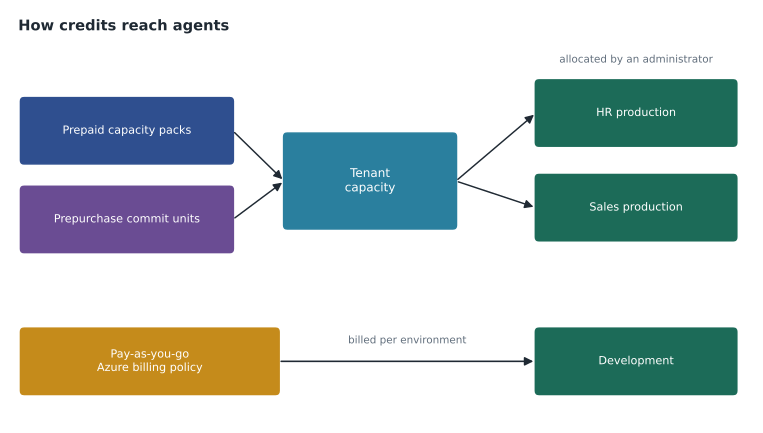
Organizations obtain credits in three ways. Prepaid capacity packs are monthly subscriptions; Microsoft's pricing page lists a Copilot Studio capacity pack at 200 US dollars a month for 25,000 Copilot Credits. Capacity is tenant-wide and enforced monthly, and unused credits do not carry over to the next month. Pay-as-you-go bills actual usage at the end of each month through an Azure subscription: an administrator creates a billing policy in the Power Platform admin center that links environments to the subscription. Prepurchase plans let organizations buy Copilot Credit Commit Units for a year in advance, usable across eligible Microsoft products, and Microsoft says these can save up to 20 percent compared with paying as you go. Many organizations combine methods: a pack for predictable base use, with pay-as-you-go as overflow.
Microsoft lists Copilot Studio prices in US dollars. Quillfield buys through a Microsoft partner, so Hamish checked the published figures with the partner before budgeting, because partner agreements can include discounts.
Allocation to environments
Prepaid credits belong to the tenant until an administrator allocates them to environments in the Power Platform admin center. An environment with no allocation and no billing policy cannot use prepaid capacity. This gives administrators a way to budget per environment and to protect important agents: Quillfield allocated a fixed monthly amount to the HR production environment and linked the development environment to pay-as-you-go with a small budget alert, so experiments could not quietly use the HR agent's capacity. Administrators can also set monthly limits per agent to stop a single agent consuming more than intended.
The Microsoft 365 Copilot inclusion
The most important cost rule for internal agents concerns Microsoft 365 Copilot licenses. When a user with a Microsoft 365 Copilot license uses an employee-facing agent in Microsoft 365 Copilot Chat, Teams or SharePoint, and the agent runs under that user's authenticated identity, classic answers, generative answers and tenant graph grounding are not charged against the organization's credits. They appear in reports as non-billed usage. Microsoft's footnotes extend this to the agent's tools under the same conditions, subject to fair use limits. The inclusion has limits that matter for planning. It applies only to licensed users, only under their own identity, only for internal agents, and only on the standard harness, not agents powered by the Microsoft Copilot harness. Computer-using agents are not included. Agent flows are included only when triggered by the agent while a licensed user is interacting; autonomous flow runs are billed normally.
| Situation | Charged to the organization's credits? |
|---|---|
| Licensed employee asks the HR agent a policy question in Teams | No, included |
| Unlicensed employee asks the same question | Yes |
| Public website visitor uses a candidate agent | Yes |
| Autonomous agent flow runs overnight from an event | Yes |
| Agent uses a computer-using agent tool | Yes |
Estimating the HR agent's cost
Worked problem
A monthly credit estimate
Hamish expects 400 HR agent conversations a month. Licensed Copilot users have 160 of them, which are included. Each of the other 240 conversations averages 4 classic answers and 3 generative answers, and 30 percent of them create a leave case (one agent action). Estimate the monthly credits, and the cost at the capacity-pack rate of 200 US dollars for 25,000 credits.
Show solution
- Classic answers: 240 x 4 = 960 answers x 1 credit = 960 credits.
- Generative answers: 240 x 3 = 720 answers x 2 credits = 1,440 credits.
- Agent actions: 30 percent of 240 = 72 actions x 5 credits = 360 credits.
- Total: 960 + 1,440 + 360 = 2,760 credits a month.
- Cost at the pack rate: 200 / 25,000 = 0.008 US dollars per credit; 2,760 x 0.008 = about 22 US dollars.
Answer: About 2,760 credits, roughly 22 US dollars a month at the pack rate. One capacity pack would cover the HR agent many times over, so Quillfield shared the pack across several agents with allocations per environment.
Estimates like this are rough, and their value is in the comparison. Hamish ran the same numbers for a version that searched SharePoint with tenant graph grounding on every message and found the cost would roughly triple for unlicensed users. He also showed that if Quillfield bought Copilot licenses for the HR advisers' most frequent internal users, the billable share would fall further. The estimate became a design input: Yusra kept classic answers for the fixed parts of the leave topic, which are cheaper than generated text, and used generative answers where flexibility helped.
When credits run out
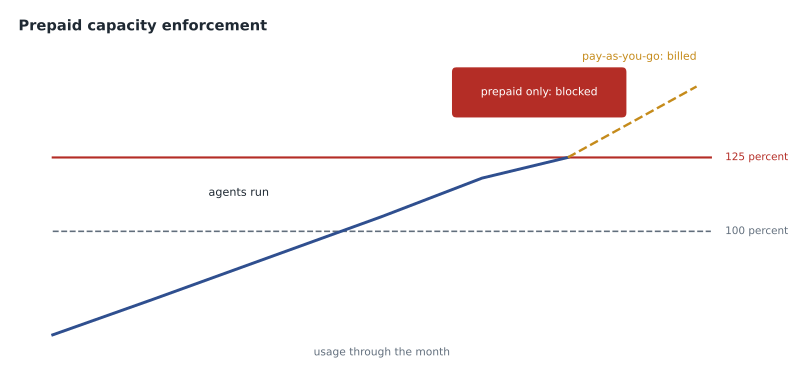
Capacity is enforced. For prepaid capacity, when an environment's usage reaches 125 percent of its allocated credits, its agents are blocked, including in conversations already in progress, and most users see a message that the agent has reached its usage limit. The tenant administrator gets an email and a notice in the Power Platform admin center. Some users with Microsoft 365 Copilot licenses may not be blocked. Environments linked to pay-as-you-go are not blocked when prepaid credits run out; the extra usage is billed instead, unless an administrator has set a monthly limit to stop usage. Agent flow enforcement is separate: when no credits are available, new flow runs are blocked while the agent itself may still answer questions that do not need the flow. Test runs in the Copilot Studio test pane are not charged.
Licenses for makers and users
Apart from credits, people need the right to build. Makers need a Copilot Studio user license, which is free but requires the tenant to have purchased a prepaid pack first, or membership of a Copilot Studio authors security group, depending on how the organization configures it. A trial license lets someone build and test but not publish. Users who only chat with an agent do not need a Copilot Studio license; their usage is covered by credits, or by the Microsoft 365 Copilot inclusion when it applies. Microsoft 365 Copilot licensed users can also build agents in Agent Builder and use internal agents within Microsoft 365 at no extra cost, but publishing to external channels such as public websites requires standalone Copilot Studio capacity.
Monitoring and optimizing cost
After launch, administrators watch consumption in the Power Platform admin center, which shows billed and non-billed credits by environment and agent, and makers see usage in the agent's analytics. Typical optimizations include using classic answers for fixed text, narrowing knowledge so searches return fewer, better passages, avoiding agent flows with polling triggers that fire constantly, setting monthly limits on experimental agents, and reviewing whether frequent users of an internal agent should hold Microsoft 365 Copilot licenses. Bram scheduled a monthly ten-minute cost review: one chart per production environment, compared with the estimate, and a note if anything had changed.
Worked problem
Choosing between a pack and pay-as-you-go
A sales agent is expected to use about 9,000 credits in a normal month but up to 30,000 during the annual renewal campaign. What purchasing approach fits?
Show solution
- Normal months fit comfortably within one 25,000-credit pack shared with other agents.
- The campaign month would exceed the pack and, with prepaid capacity only, could hit enforcement at 125 percent of the allocation.
- Link the sales environment to pay-as-you-go through a billing policy as overflow, with a monthly limit and alerts.
Answer: Use the shared pack for base demand and pay-as-you-go overflow for the campaign, so the agent is never blocked mid-campaign and the extra cost is visible and capped.
Building a forecast
A single-month estimate is a start; a forecast tells you whether costs will grow. Hamish built a simple model with four inputs: conversations per month, the share by licensed users, the average mix of features per conversation, and expected growth as more employees discovered the agent. He also modeled two risks: a policy change that sends a wave of questions in one month, and a design change that adds a tool to every conversation. The model showed that even a doubling of conversations stayed well inside the shared capacity pack, but that adding tenant graph grounding to every message would push the HR agent past its allocation within three months. That single finding shaped a design decision before anyone built anything.
| Scenario | Billable conversations | Estimated credits |
|---|---|---|
| Launch estimate | 240 | About 2,760 |
| Conversations double | 480 | About 5,520 |
| Policy change month (one-off spike) | 700 | About 8,050 |
| Every message uses tenant graph grounding | 240 | About 9,960 |
Forecasts also help with conversations about value. Celestine did not need the exact number of credits; she needed to know that the HR agent would cost a small fraction of the adviser time it saved, that the cost would stay small if usage grew, and which design choices could change that. A one-page summary with the launch estimate, the forecast table and a sentence on each risk answered those questions, and became the template Quillfield used for every later agent proposal.
Common mistakes
MistakeAssuming every agent is free because staff have Microsoft 365 Copilot.
InsteadThe inclusion covers licensed users of internal agents under their own identity on the standard harness only.
MistakeForgetting to allocate capacity to the production environment.
InsteadAllocate credits or link a billing policy before launch, and set alerts.
MistakeUsing generated text for every fixed message.
InsteadClassic answers are cheaper for text that never changes.
MistakeQuoting prices from memory.
InsteadCheck the current billing rates and pricing pages before estimating.
Summary and key terms
- Copilot Studio usage is measured in Copilot Credits (called messages before September 2025) at published rates per feature.
- Credits come from monthly prepaid packs, pay-as-you-go through an Azure billing policy, or prepurchase commit units.
- Administrators allocate prepaid credits to environments and can set monthly limits per agent.
- Licensed Microsoft 365 Copilot users of internal agents under their own identity are largely not charged, with conditions.
- Prepaid capacity is enforced at 125 percent of allocation; pay-as-you-go environments are billed instead of blocked.
- Copilot Credit
- The unit that measures Copilot Studio usage.
- Billing rate
- The number of credits a feature consumes per use.
- Capacity pack
- A monthly prepaid subscription of Copilot Credits for the tenant.
- Billing policy
- A link between environments and an Azure subscription for pay-as-you-go billing.
- Allocation
- Prepaid capacity assigned by an administrator to a specific environment.
- Non-billed usage
- Usage covered by the Microsoft 365 Copilot inclusion and not charged to credits.
Practice problems
Work each problem on paper first, then reveal the answer to check.
What was the Copilot Credit called before September 1, 2025?
Show answer
A message.
What happens to a prepaid-only environment at 125 percent of its allocation?
Show answer
Its agents are blocked, including conversations in progress, and the administrator is notified.
Name two limits of the Microsoft 365 Copilot inclusion.
Show answer
Any two of: licensed users only; their own identity; internal agents; standard harness only; not computer-using agents; autonomous flow runs billed.
Lesson quiz · 5 questions
Score 60% or more to complete this lesson.
Create a free account to save your progress, take quizzes and earn a certificate.