
MSBA-240 · Lesson 1 of 12 · 22 min
When to build an agent
▶ Video coming soon A video version of this lesson is on the way.
Quillfield Insurance Brokers had switched on Microsoft 365 Copilot for its first two hundred staff in July 2026, and within weeks the requests started arriving in Yusra Kamaludin's inbox. The claims team wanted "a bot that answers policy questions." Human resources wanted something that could explain the new parental leave rules. Sales wanted a tool that could pull a client's renewal date, draft a reminder and file it. Yusra, who had built a handful of Power Apps for the operations team and was now Quillfield's first serious Copilot Studio maker, took the list to Bram Oosterhuis, the solutions architect. "Before we build anything," Bram said, "let's ask the boring question for each of these. Does it need to be an agent at all?"
That question is where every agent project should begin. Copilot Studio makes it easy to create an agent in an afternoon, and that ease is exactly why planning matters. An agent that should have been a shared document, a search page or a simple Power Automate flow costs money to run, needs someone to maintain its knowledge and instructions, and has to be governed like any other application. An agent built for the right job, on the other hand, can save hundreds of hours a year and give people answers at the moment they need them. This lesson gives you a way to tell the two apart and to describe a good agent opportunity in terms that a business sponsor, an administrator and a compliance officer can all agree on.
What an agent is in Microsoft's vocabulary
Microsoft uses the word agent for software that uses a large language model to understand a request, decide what to do, and then act: answering from knowledge, calling tools, running workflows or handing work to other agents. An agent has instructions that describe its role and boundaries, knowledge it can ground its answers in, tools (connectors, workflows, APIs, Model Context Protocol servers) that let it do things, and a place where people meet it, called a channel. Some agents only answer questions; others take actions on a person's behalf; autonomous agents can start work by themselves when an event happens, such as a new email arriving or a record changing.
Within the Microsoft ecosystem, agents come from several places. Microsoft 365 Copilot itself is a general assistant, and Microsoft ships prebuilt agents such as Researcher and Analyst inside it. Ordinary users can create simple agents with Agent Builder in Microsoft 365 Copilot, describing what they want in plain language. Copilot Studio is the full authoring environment: it is where makers and developers build agents with custom knowledge, tools, authentication, multiple channels and proper application lifecycle management. Professional developers can also build agents in code with Microsoft Foundry and the Microsoft 365 Agents SDK, and connect those agents to Copilot Studio. This course concentrates on Copilot Studio, because that is where the AB-620 exam and most business agent projects live.
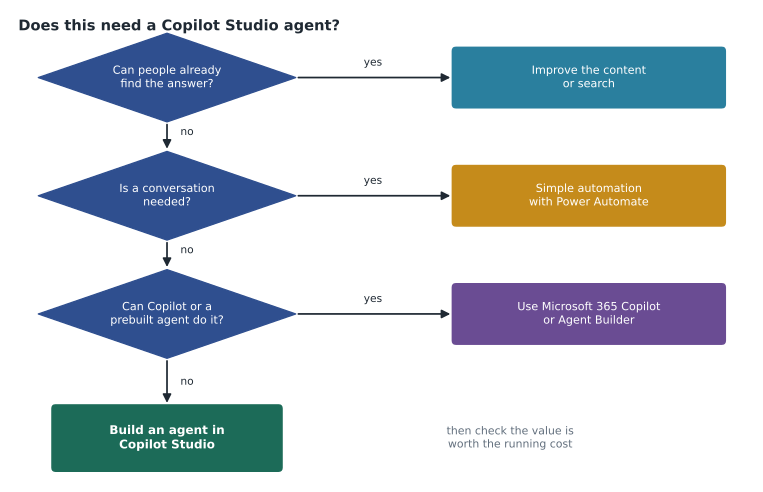
Four questions before you build
Bram's first question for each request was whether the information already existed and could simply be found. The claims team's "policy questions" turned out to be about where to find the latest version of the claims manual. The real problem was that the manual lived in four SharePoint libraries with conflicting copies. An agent grounded in four conflicting copies would give confident, conflicting answers. The fix was to consolidate the manual into one library with a clear owner, after which Microsoft 365 Copilot could already answer most of the questions, because it searches the content each user is allowed to see.
The second question is whether the person needs a conversation at all, or just needs something to happen. Sales' renewal reminders did not need a chat. A scheduled Power Automate flow could read renewal dates from the customer system every morning and send the account manager a reminder. Automation without conversation is cheaper, easier to test and more predictable. If nobody needs to ask a follow-up question, choose automation.
The third question is whether something that already exists can do the job. Microsoft 365 Copilot licenses include the ability for a licensed user to create agents in Agent Builder, to use prebuilt agents, and to use agents that run inside Microsoft 365 Copilot Chat. For a team that needs an assistant grounded in a few documents and used only by licensed colleagues, an Agent Builder agent may be enough. You move to Copilot Studio when you need things Agent Builder cannot give you, such as several knowledge sources with different owners, actions in business systems, authentication for users outside the organization, a public website channel, detailed control over conversation paths, or a managed path from development to production.
The fourth question is whether the value is worth the cost. An agent has a build cost, a running cost measured in Copilot Credits (covered in lesson 9), and a maintenance cost: someone has to keep its knowledge current, review what it gets wrong and update its instructions. Bram asked each requester to estimate how many times a month people would use it and how long each use saves. The HR parental-leave assistant passed easily. Roughly forty employees a month asked HR about leave, each conversation took an HR adviser about fifteen minutes, and the answers had to be consistent and correct. That request became Quillfield's first Copilot Studio agent for every employee, and you will follow it through the rest of this course.
| Need | Usually best served by | Why |
|---|---|---|
| Find a document or fact that already exists | Better content and Microsoft 365 search, or Copilot | The problem is findability, not conversation |
| Something should happen on a schedule or event, no questions asked | Power Automate flow | Deterministic, cheaper, easy to test |
| Licensed staff want help grounded in a few files | Microsoft 365 Copilot, Agent Builder | Included with the Copilot license, quick to set up |
| Answers from several governed sources, actions in systems, many channels or external users | Copilot Studio agent | Full control of knowledge, tools, authentication and lifecycle |
| Custom code, own models or complex multi-agent logic run by developers | Microsoft Foundry or the Agents SDK, often connected to Copilot Studio | Code-first control and hosting |
Agent patterns
When an agent is the right answer, it helps to name the pattern, because each pattern has typical knowledge, tools and risks. A question-and-answer agent grounds its replies in documents and data; the main risk is out-of-date or contradictory content. A task agent collects information through conversation and then acts: booking a meeting, opening a ticket, updating a record. Its risks are acting on the wrong record or acting without permission. A process agent guides someone through a multi-step procedure such as onboarding or filing a claim, often mixing questions, answers and actions. An autonomous agent responds to triggers rather than to a person typing, for example reading incoming emails and drafting replies for review. And an orchestrator agent delegates to other, specialized agents, which is the basis of multi-agent solutions covered in the next course.
Most real agents mix patterns. The HR assistant Yusra was asked to build starts as a question-and-answer agent about leave policies, but HR also wanted it to create a case in the HR system when an employee was ready to apply. That makes it partly a task agent, which raises new planning questions: who is allowed to create a case, under whose identity does the agent act, and what happens if the HR system is down? Naming the pattern early surfaces those questions before anyone opens Copilot Studio.
Worked problem
Sorting three requests
Quillfield receives three requests. (1) Finance wants every overdue commission statement emailed to the broker each Monday. (2) The front desk wants visitors to ask where meeting rooms are and how to book one. (3) Underwriting wants an assistant that answers questions from the 600-page underwriting guidelines and can check a client's current coverage in the policy system. Which tool fits each?
Show solution
- Request 1 needs no conversation; it is a scheduled job with a clear rule. A Power Automate flow fits.
- Request 2 needs a conversation with visitors who have no Quillfield account and no Copilot license. That requires a public channel and no sign-in for the questions, so it is a Copilot Studio agent, kept deliberately small.
- Request 3 needs grounding in a large governed document and a lookup in a business system with the user's permissions. That is a Copilot Studio agent with authentication and a tool.
Answer: Flow for the commission statements; a small public Copilot Studio agent for visitors; an authenticated Copilot Studio agent with knowledge and a tool for underwriting.
Writing an agent brief
Before building, Yusra and Bram wrote a one-page agent brief. It is not a formal requirements document, but it forces the decisions that matter. The brief names the audience (internal employees, partners, or the public), the problem in one sentence, the scope (what the agent will and will not do), the knowledge sources and their owners, the actions the agent may take, the channels where people will use it, the identity model (does the user sign in, and does the agent act as the user or as itself), the success measures, and the risks with an owner for each. Wendell Pike-Amari, Quillfield's compliance officer, insisted on one more line: what the agent must never do. For the HR assistant, that line read: never give advice about an individual's medical situation, and never disclose another employee's leave.
# Agent brief: Quillfield HR Leave Assistant

Audience: Quillfield employees (head office and branch offices)
Problem: Employees wait days for answers to routine leave questions.
In scope: Explain leave policies; estimate entitlement from service date;
          start an HR case when the employee is ready to apply.
Out of scope: Medical advice; other employees' records; payroll changes.
Knowledge: HR policy library (owner: HR policy lead); benefits FAQ.
Actions: Create HR case (as the signed-in employee).
Channels: Microsoft Teams and Microsoft 365 Copilot.
Identity: Microsoft Entra ID sign-in required.
Success: 70 percent of leave questions answered without HR follow-up;
         satisfaction 4 out of 5 or better; no privacy incidents.
Never: Disclose another employee's leave; advise on medical conditions.
The brief changes the build. Because the audience is internal and signs in with Microsoft Entra ID, the agent can use SharePoint knowledge trimmed to each person's permissions. Because it creates HR cases, it needs a tool and a decision about identity. Because it must never disclose another employee's leave, the HR case tool must only ever look up the signed-in user's own record. Every one of those choices is easier to make on paper than to undo after launch.
Internal and external audiences
The audience decides a surprising amount. An internal agent for employees can rely on Microsoft Entra ID sign-in, can be published to Microsoft Teams and Microsoft 365 Copilot, and can use knowledge that respects each person's existing permissions. Licensing is also friendlier: when an employee with a Microsoft 365 Copilot license uses an internal agent under their own identity, many of the agent's answers are not charged against the organization's Copilot Credits. An external agent for customers, partners or the public usually runs on a website or a messaging channel, often without sign-in. It must be grounded only in content that is safe for anyone to see, and every conversation consumes Copilot Credits. External agents also carry more reputational risk, so their scope should be narrower and their tone more careful.
For Quillfield, the audience question also brought in privacy law. An internal HR agent handles employee personal information, so Wendell checked the plan against the brokerage's state privacy obligations and Quillfield's own employee privacy policy before the build started.
Measuring success from the start
Agents are easy to launch and hard to judge without numbers. Decide before building what you will measure. Useful measures include resolution rate (the share of conversations where the person got what they needed without escalating), escalation rate, satisfaction from the end-of-conversation survey, deflection of work from a human team, accuracy on a fixed set of test questions, and cost per conversation. Copilot Studio provides analytics for sessions, outcomes and satisfaction, and its evaluation features let you score answers against a test set (covered in a later course). Hamish Quarrington, Quillfield's operations analyst, recorded HR's baseline before launch: forty leave questions a month, fifteen minutes each, about ten hours of adviser time. Without that baseline, nobody could later say whether the agent had helped.
Worked problem
Estimating the value of the HR agent
HR answers 40 leave questions a month, each taking 15 minutes. The brief targets 70 percent answered by the agent without follow-up. How many adviser hours a month would the agent save if it meets its target?
Show solution
- Questions handled fully by the agent: 70 percent of 40 = 28.
- Time saved: 28 x 15 minutes = 420 minutes.
- Convert to hours: 420 / 60 = 7 hours.
Answer: About 7 adviser hours a month, before counting the faster answers employees receive. Hamish set this beside the build effort and the running cost to decide whether the project was worth it.
Common mistakes
MistakeBuilding an agent because a tool makes it easy.
InsteadStart from the problem; many requests are better solved with content, search or a flow.
MistakeGrounding an agent in messy, conflicting documents.
InsteadFix the content first; an agent repeats what its sources say.
MistakeSkipping the "never do" list.
InsteadWrite down what the agent must never do and design tools and knowledge so it cannot.
MistakeLaunching without a baseline.
InsteadRecord the current effort and volume so you can show whether the agent helped.
Summary and key terms
- An agent understands a request, decides what to do and acts through knowledge, tools, workflows or other agents.
- Ask four questions first: can people already find it, is a conversation needed, can existing Copilot features do it, and is the value worth the cost?
- Copilot Studio fits when you need several governed knowledge sources, actions, authentication choices, many channels or managed lifecycle.
- Name the pattern (question and answer, task, process, autonomous, orchestrator) to surface risks early.
- Write a one-page agent brief with audience, scope, knowledge, actions, channels, identity, success measures and a "never" list.
- Agent
- Software that uses a language model to understand requests and act through knowledge, tools and other agents.
- Agent Builder
- The simple agent-creation experience inside Microsoft 365 Copilot for licensed users.
- Copilot Studio
- Microsoft's full authoring environment for building, publishing and managing agents.
- Autonomous agent
- An agent that starts work from a trigger such as an event, not only from a person's message.
- Agent brief
- A one-page plan stating an agent's audience, scope, knowledge, actions, channels, identity and measures.
- Resolution rate
- The share of conversations in which the person got what they needed without escalation.
Practice problems
Work each problem on paper first, then reveal the answer to check.
Name the four questions Bram asks before building an agent.
Show answer
Can people already find the answer; does it need a conversation; can existing Copilot features do it; is the value worth the cost?
Why does the audience matter so much for an agent?
Show answer
It decides sign-in, channels, which knowledge is safe, licensing and how much risk the agent carries.
What does a "never" line in an agent brief do?
Show answer
It records actions or disclosures the agent must not make, so knowledge and tools can be designed to prevent them.
Lesson quiz · 5 questions
Score 60% or more to complete this lesson.
Create a free account to save your progress, take quizzes and earn a certificate.