
MSBA-240 · Lesson 11 of 12 · 22 min
Designing conversations people trust
▶ Video coming soon A video version of this lesson is on the way.
In the pilot's first week, the HR Leave Assistant answered 92 questions. Its accuracy on the test set was excellent, yet the satisfaction ratings were middling and several pilot users stopped using it after one try. Yusra read every transcript. The problems were not wrong answers. They were small conversational failures: a long paragraph when someone wanted a yes or no, a cheerful "Great question!" to a person asking about bereavement leave, a confirmation card that did not say what would happen next, and an escalation message that left people unsure whether anyone would actually reply. "People don't judge an agent on its accuracy," Bram said. "They judge it on whether it feels like it's on their side."
Conversation design is the craft of making an agent's side of the conversation clear, efficient and trustworthy. It applies whether replies are scripted in topics or generated by the model, because instructions shape generated replies just as message nodes shape scripted ones. This lesson collects the design practices that make the difference between an agent people tolerate and one they choose.
Start well
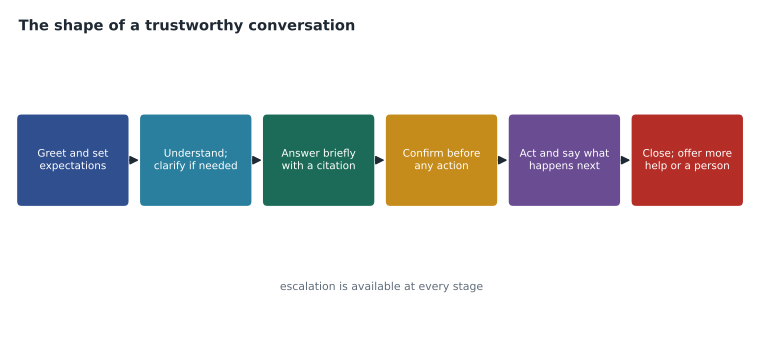
The first message sets expectations. A good greeting says what the agent is, what it can help with, what it cannot do and how to reach a person, in as few words as possible. It can offer two or three suggested prompts or quick replies for the most common needs, which helps people who are unsure what to ask. It should not be a wall of text or a list of every feature. In Microsoft 365 Copilot and Teams, agents can also show conversation starters, short example prompts in the agent's welcome view; Yusra chose "How much parental leave can I take?", "What happens to my benefits while I'm on leave?" and "Start a leave application", taken from the most common questions in the HR mailbox.
Understand before answering
When a request is ambiguous, a short clarifying question is better than a long answer to the wrong question. The agent should ask one thing at a time, offer choices where the options are known, and accept answers in natural language. With slot filling and generative orchestration, the agent often already knows part of the answer, so clarifying questions should only ask for what is genuinely missing. Avoid interrogation: if a process needs six pieces of information, consider whether some can be looked up rather than asked, such as the employee's start date from the HR system.
Answer in the shape people need
Most people want the answer first and the explanation second. "Yes, you qualify for parental leave. You have 12 months to start it after the birth, and here is how it works..." is easier to use than three paragraphs that reach the number at the end. Keep replies short in chat channels, use short lists for steps, include a citation for policy answers and a link to read more, and state the conditions an answer depends on. Instructions can ask for this format explicitly, and test transcripts quickly show whether the model follows it. For scripted messages, the same rules apply, and writing them out loud is a good test: if a sentence would sound strange said to a colleague, rewrite it.
| Instead of | Prefer |
|---|---|
| A long explanation before the answer | The answer first, then key conditions and a citation |
| "Great question!" before every reply | A plain, warm reply that fits the topic |
| "Error 500 from connector" | "I couldn't reach the HR system just now. You can try again in a few minutes or I can ask HR to contact you." |
| "Is there anything else?" after a sensitive answer | A gentle offer of further help or a person |
| A table in a phone chat | A short list |
Tone and empathy
An agent's tone should match the moment. Neutral and efficient suits most questions; warmth and care suit difficult ones. HR conversations include grief, illness and family change, so the HR agent's instructions tell it not to use exclamation marks or cheerful openers, to acknowledge difficult circumstances briefly and sincerely, and to move to practical help. For example: "I'm sorry for your loss. You can take up to five days of bereavement leave. Would you like me to start a leave case?" The wellness lead reviewed the bereavement, illness and urgent-help paths, and suggested removing "unfortunately" from refusals, because it read as insincere in writing.
Worked problem
Rewriting a refusal
An employee asks: "Is Jordan off on medical leave? I need to know if I should cover their clients." The agent replies: "Unfortunately I cannot provide information about other employees." Rewrite it so it protects privacy and still helps.
Show solution
- Keep the boundary clear: the agent never discusses another employee's leave.
- Recognize the real need: the employee wants to know whether to cover clients.
- Point to the right path: the manager or team lead manages coverage.
Answer: "I can't share anything about another employee's leave. For client coverage, your team lead can tell you who is covering and for how long." The boundary stays the same, but the person leaves with a next step.
Confirm before acting
Before an agent changes anything, it should summarize what it is about to do and ask for confirmation, in words that make the consequence clear. "I'll create a parental leave case starting March 3, 2027, returning November 15, 2027, with top-up payments. An HR adviser will review it within one business day. Shall I submit it?" is a good confirmation: it repeats the key details, says what happens next and asks a clear yes or no. After acting, the agent reports the result and the reference, such as a case number, so the person has something to quote. If the action fails, the agent says so plainly and offers an alternative; it never leaves a person unsure whether something happened.
Handle errors and dead ends gracefully
Every agent meets failures: a tool times out, a question is outside scope, the agent cannot understand the message. Design each of these as a path rather than a dead end. The On Error system topic should apologize briefly, say what failed in plain language and offer a next step. The Fallback behavior should say what the agent can help with and offer a person. Repeated misunderstandings should lead to escalation rather than a third identical "I didn't understand." Yusra added one more safeguard after the pilot: if the HR system failed while creating a case, the agent offered to send the details to HR by email, so the employee's effort was not lost.
Escalation people believe in
The escalation message from the first week said: "Please contact HR." Pilot users did not know how, or whether their question had been seen. The new version says who will reply, how and when: "I've sent your question to the HR advisers (case HR-2027-0142). They reply within one business day by Teams message. For anything urgent today, call extension 4100." An escalation that carries the question and gives a reference is one people trust enough to use, which in turn keeps them from giving up on the agent entirely.
Close and learn
A conversation should end clearly. The End of Conversation system topic can ask whether the person got what they needed and collect a satisfaction rating, which appears in analytics alongside the agent's outcomes. Ask briefly and not after every message. Then use what you learn: low-rated conversations, escalations and "I don't know" answers are the most valuable transcripts to read. Each month Yusra picked the ten lowest-rated conversations, sorted the causes into content, design or tool problems, and fixed the most common. Satisfaction rose from 3.4 to 4.3 out of 5 over the first two months, with no change to the underlying model.
Worked problem
Reading a weekly design review
In a week, the HR agent has 120 conversations: 84 resolved, 18 escalated, 10 abandoned and 8 unresolved with "I don't know". What is the resolution rate, and where should design effort go first?
Show solution
- Resolution rate: 84 / 120 = 70 percent.
- Read the 10 abandoned conversations first; abandonment often signals a design problem such as a confusing question or a long reply.
- Check the 8 "I don't know" answers for content gaps, and the 18 escalations for questions the agent could answer with better content.
Answer: 70 percent resolution. Abandoned conversations come first because they reveal frustration the ratings may not show; then content gaps and avoidable escalations.
Accessibility and language
Trust includes being usable by everyone. Write in plain language; avoid jargon and unexplained abbreviations; give images alt text; make sure adaptive cards work with screen readers and keyboard navigation; and do not rely on color alone to convey meaning in cards. For organizations with more than one working language, test each supported language with real speakers. Quillfield's French-speaking employees found the agent's French correct but stiff, so the instructions now ask for the same plain, warm tone in every language.
Generated and scripted messages together
Most agents mix scripted messages from topics with generated answers from knowledge, and the seams show if they are written in different voices. A cheerful scripted greeting followed by a formal generated answer feels like talking to two different systems. Align them: write scripted messages in the tone the instructions ask for, and give the instructions examples of that tone. Yusra rewrote the scripted messages in the leave topic after reading them next to generated answers in transcripts, and kept a short voice guide in the solution documentation: plain words, short sentences, no exclamation marks, the answer first, and a next step at the end.
Designing for interruptions
Real conversations do not follow the designed path. An employee halfway through a leave application asks "wait, does my benefits coverage continue?" and then wants to carry on. With generative orchestration, the agent can answer the side question from knowledge and return to the topic, but the experience should make that explicit: answer briefly, then say "Shall we continue with your application? Next I need your return date." People also leave and come back. Teams conversations persist, so a returning employee may see a half-finished application; the topic should handle "start over" and "cancel" gracefully, and the greeting should not repeat itself in an ongoing conversation.
Worked problem
Handling a side question mid-topic
During the leave application, after the start date, an employee asks whether their dental coverage continues on leave. The agent answers, then forgets the application and says "Is there anything else?" How should Yusra fix it?
Show solution
- Check in the test pane whether the topic ended when the planner switched to knowledge.
- Adjust the topic so it can resume, keeping its variables, after an interruption.
- Add an instruction: after answering a side question during an application, offer to continue from the next step.
- Test the interruption at several points in the topic.
Answer: The agent now answers the benefits question with a citation, then says "Shall we continue? Next I need your return date." Applications abandoned after side questions dropped in the following weeks.
Writing for scanning
People read chat replies on small screens, often while doing something else. They scan. Design for scanning by putting the key fact in the first sentence, using numbered steps for procedures, keeping each list to a handful of items, and bolding sparingly if the channel supports it. Avoid long introductions ("Thanks for your question about leave! At Quillfield we care about...") and long sign-offs. If an answer genuinely needs detail, give the short version and offer more: "Want the full eligibility rules?" lets the people who need detail ask for it without making everyone else read it. Yusra added a line to the instructions asking for replies of no more than about eighty words unless the employee asks for more, and transcripts showed the model followed it well.
Numbers deserve particular care. Dates should be unambiguous ("3 March 2027" or "March 3, 2027", never "3/3"), durations should say their unit ("five working days"), and money should state its currency where there is any doubt. The confirmation card and the case summary used the same date format as the HR system's emails, so employees saw one consistent format from first question to final approval.
Common mistakes
MistakeAnswering at length before reaching the point.
InsteadGive the answer first, then conditions and a citation.
MistakeUsing the same upbeat tone for every topic.
InsteadMatch tone to the moment, especially for sensitive subjects.
MistakeActing without a clear confirmation.
InsteadSummarize, state what happens next and ask yes or no before acting.
MistakeEscalation that says only "contact HR".
InsteadSay who replies, how and when, and give a reference.
Summary and key terms
- Greet with what the agent is, what it can and cannot do, and how to reach a person; offer a few suggested prompts.
- Clarify only what is missing, answer first, keep replies short and cite sources.
- Match tone to the moment and turn refusals into next steps.
- Confirm before acting, report results with a reference, and design error and fallback paths.
- Make escalation believable, collect satisfaction briefly and learn from low-rated, abandoned and unanswered conversations.
- Conversation design
- The craft of making an agent's side of a conversation clear, efficient and trustworthy.
- Suggested prompt
- An example request offered to help users start or continue a conversation.
- Conversation starter
- A short example prompt shown in an agent's welcome view in Teams or Microsoft 365 Copilot.
- Confirmation
- A summary of an intended action with a clear yes or no before the agent acts.
- Abandonment
- A conversation the user leaves without resolution or escalation.
Practice problems
Work each problem on paper first, then reveal the answer to check.
What should a good greeting include?
Show answer
What the agent is, what it can help with, what it cannot do and how to reach a person.
What makes a confirmation clear?
Show answer
It repeats the key details, says what happens next and asks a clear yes or no.
Why read abandoned conversations first?
Show answer
They often reveal design problems, such as confusing questions or long replies, that ratings may miss.
Lesson quiz · 5 questions
Score 60% or more to complete this lesson.
Create a free account to save your progress, take quizzes and earn a certificate.