
MSBA-240 · Lesson 7 of 12 · 21 min
Channels and publishing targets
▶ Video coming soon A video version of this lesson is on the way.
By late August the HR Leave Assistant was working well in the test pane, and Celestine Nwachukwu-Hale, Quillfield's chief operating officer, asked the obvious question at the steering meeting: "Where will people actually find it?" Yusra had assumed Teams. Hamish pointed out that half the brokers spent their day in Microsoft 365 Copilot Chat, not Teams, and that branch staff sometimes asked HR questions from their phones. Wendell added that a public version, for job candidates asking about benefits, had been floated by recruiting and should be a separate decision. Choosing channels turned out to be a design decision, not a final click.
A channel is a place where people talk to an agent: Microsoft Teams, Microsoft 365 Copilot, a website, a mobile app, a messaging service or a phone line. An agent is built once and can be published to several channels, but each channel has its own capabilities, sign-in behavior, formatting and audience. This lesson covers the main channels, what publishing does, and how to choose.
Publishing
Changes you make in Copilot Studio are saved as you work and can be tried in the test pane, but users do not see them until you publish. Publishing takes the current version of the agent and makes it live in every channel it is connected to. That is convenient and dangerous in equal measure: a half-finished change published from development reaches development users, and a change made directly in a production environment and published reaches everyone. In Quillfield's environment design, makers publish freely in development, test publishes happen after a solution import, and production publishes happen only as part of a deployment. After publishing, some channels pick up the new version immediately, while Teams and Microsoft 365 Copilot may take a little time or need users to start a new conversation.
Microsoft Teams and Microsoft 365 Copilot
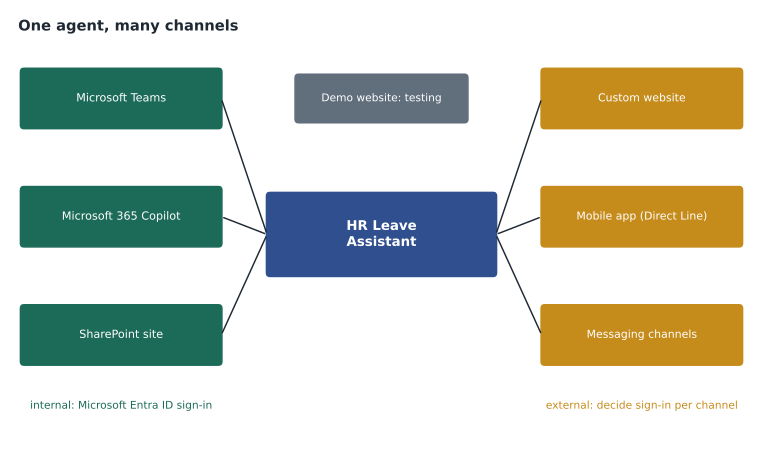
For employees, the main channels are Microsoft Teams and Microsoft 365 Copilot. Publishing to Teams makes the agent available as a Teams app that people can chat with one-to-one, and optionally add to group chats or channels. Publishing to Microsoft 365 Copilot makes the agent available inside Copilot Chat, where people can pick it from the agents list or mention it while working. Both channels use the person's Microsoft Entra ID identity, which suits agents with SharePoint knowledge and tools that act as the user. Makers can submit the agent to administrators for approval so that it appears in the organization's app catalog and the Copilot agent store; administrators decide in the Microsoft 365 admin center and the Teams admin center who can see and install it. Until approved, a maker can share it with specific people for testing.
Quillfield's Microsoft 365 administrator handled the approval request, and Wendell asked that the app catalog description say plainly that the agent is an automated assistant, that it uses Quillfield HR policies, and how to reach a person. That description appears to every employee before they open the agent.
The two channels differ in small but important ways. Teams supports adaptive cards, rich formatting and proactive messages in some cases; Microsoft 365 Copilot presents the agent inside the Copilot experience, where it works alongside the user's other Copilot features. Licensing also interacts with channels: when an employee with a Microsoft 365 Copilot license uses an internal agent under their own identity in these channels, many kinds of usage are not charged to the organization's Copilot Credits (lesson 9). Yusra tested the summary card from the leave topic in both channels and on the Teams mobile app, and simplified it after it turned out to be hard to read on a phone.
SharePoint and websites
An agent can be added to a SharePoint site, where it appears to people visiting the site and uses their Microsoft 365 sign-in. For the HR agent, that meant adding it to the HR intranet site, where employees already went to look for policies. For audiences outside the organization, the usual channel is a custom website. Copilot Studio provides embed code for a web chat component that can be added to a site, and a demo website that makers can use to share a test link quickly. Websites can be configured to require sign-in or not. An unauthenticated website agent can only use public knowledge and tools that do not depend on the user, and anyone on the internet can reach it, which is why recruiting's candidate benefits agent was planned as a separate, much smaller agent with only public content and no HR system access.
| Channel | Typical audience | Sign-in | Notes |
|---|---|---|---|
| Microsoft Teams | Employees | Microsoft Entra ID | Needs admin approval for the app catalog |
| Microsoft 365 Copilot | Employees with Copilot | Microsoft Entra ID | Appears in Copilot Chat's agent list |
| SharePoint site | Employees on that site | Microsoft Entra ID | Meets people where they look for content |
| Demo website | Testers | Configurable | For quick sharing, not production |
| Custom website | Customers, partners, public | Optional, configured by the maker | Embed code; public content only if no sign-in |
| Mobile or custom app | App users | Handled by the app | Through the Direct Line channel |
| Messaging and other channels | Customers | Channel-specific | Through Azure Bot Service channels |
Apps, messaging and voice
Developers can connect an agent to their own mobile or web app through the Direct Line channel, which gives the app a programmatic way to send and receive messages; the app is then responsible for its own user interface and sign-in. Copilot Studio agents can also reach channels supported by Azure Bot Service, which include messaging services used by customers. Some channels, such as Facebook Messenger, are available directly. For phone and voice scenarios, Copilot Studio supports telephony and voice-enabled agents, including integration with Dynamics 365 Contact Center, with voice usage billed per minute in Copilot Credits. These channels are mostly used for customer-facing agents and usually involve the organization's developers and contact-center team.
Hand-off to people
Some channels support handing the conversation to a live agent, a person in a contact center, with the conversation history passed along so the customer does not have to repeat themselves. Copilot Studio integrates with Dynamics 365 Contact Center and Omnichannel for Customer Service, and with other engagement hubs through hand-off configuration. For internal agents like the HR assistant, live hand-off is rarely set up; escalation usually means giving contact details or opening a case, as Yusra did. Whatever the channel, the plan should say what "talk to a person" means and test that path, because it is the moment when a frustrated user decides whether to trust the agent again.
Worked problem
Choosing channels for two agents
The HR Leave Assistant serves all employees; recruiting wants a candidate benefits agent for people applying to Quillfield. Recommend channels for each and say what changes between them.
Show solution
- HR Leave Assistant: Teams and Microsoft 365 Copilot for daily use, plus the HR SharePoint site where employees already look. All use Microsoft Entra ID sign-in, so SharePoint knowledge and the HR case tool work with each employee's identity.
- Candidate benefits agent: the careers page of Quillfield's public website, with no sign-in. Knowledge limited to the public benefits summary; no HR system tools.
- Separate the two agents rather than publishing the HR agent to the public site, so internal knowledge and tools can never reach the public channel.
Answer: Internal channels with sign-in for the HR agent; a separate public website agent with public content only for candidates. The audience difference is large enough to justify two agents.
Channel-specific design
Each channel changes how a message looks. Long answers that read well on a website feel heavy in a Teams chat; adaptive cards that look good on a desktop may wrap badly on a phone; some channels do not show quick-reply buttons at all. Copilot Studio lets you vary messages by channel where needed, and generative answers can be guided by instructions about length and format. Test every important path in every channel you publish to, on the devices people actually use. Yusra kept a small table in the solution documentation listing each topic and the channels it had been tested in, which turned out to be useful months later when a new channel was added.
Governing who can publish where
Administrators can restrict publishing. Data policies in the Power Platform admin center can block specific channels for an environment, for example preventing any agent in the HR environments from being published to public websites. Approval in the Microsoft 365 admin center controls which agents appear in the organization's catalog for Teams and Copilot. Managed Environments sharing limits control how widely a maker can share an agent directly. Together, these controls mean that a maker cannot accidentally turn an internal HR agent into a public chatbot, which was exactly the scenario Wendell had worried about when recruiting first mentioned candidates.
Planning a rollout across channels
Publishing to every channel on day one is rarely wise. Quillfield rolled out in stages. During the pilot, the agent was shared directly with thirty employees and four HR advisers in Teams only, so feedback came from one channel and problems were easy to trace. For launch, it was approved for all employees in Teams and Microsoft 365 Copilot. The HR SharePoint site was added two weeks later, after HR rewrote the site's home page to introduce the assistant. Each stage had a short checklist: test the important paths in the new channel, update the greeting if the channel needed it, tell users where to find the agent, and watch the analytics for the first week.
Communication is part of the rollout. People do not discover agents by accident; they need to be told where the agent lives, what it is for and how to reach a person. Quillfield's internal news post included a screenshot of the agent in Teams, three example questions and a sentence on privacy. Managers mentioned it in team meetings. Within a month, most leave questions arrived through the agent rather than the HR mailbox, and the HR advisers changed their mailbox auto-reply to point people to it.
Analytics by channel
Copilot Studio's analytics can be broken down by channel, which helps answer practical questions. Are mobile users abandoning conversations more often than desktop users? Do people in Microsoft 365 Copilot ask different kinds of questions from those in Teams? Is the SharePoint channel used at all? At Quillfield, the analytics showed that branch staff used the Teams mobile app heavily in the morning, which led Yusra to shorten replies further and move the confirmation details into the first lines of the card. The SharePoint channel had fewer conversations but higher resolution, because people arriving there had usually already read part of a policy.
Worked problem
Adding a channel later
Six months after launch, Quillfield's contact center wants the HR agent to answer leave questions from its agents over the phone system. What should the team consider before adding a voice channel?
Show solution
- Audience and identity: callers would be employees, but the phone system may not provide Microsoft Entra ID sign-in, so SharePoint knowledge and the user-identity tool may not work.
- Design: voice needs much shorter answers, no cards, and confirmations spoken in full.
- Cost: voice is billed per minute at its own Copilot Credit rate.
- Decision: a separate voice agent with limited scope and public-safe content may be better than adding voice to the HR agent.
Answer: Voice changes identity, design and cost at once. The team recommended keeping the HR agent on its current channels and piloting a small voice agent for general questions only.
Versions and what users see
Because publishing replaces the live version everywhere at once, it pays to know exactly what is being published. In a solution-based process, each deployment carries a solution version number, and the release notes say what changed: "1.4.0: rewrote escalation message; added family responsibility leave to the Leave type entity; updated the bereavement test questions." When a user reports a strange answer, the agent owner can match the time of the conversation to the version that was live. Transcripts and analytics then show whether the problem started with a release. Yusra kept release notes in the solution's documentation folder and posted a one-line summary in the HR team's channel after each production deployment, so advisers knew when the agent's behavior had changed.
Some changes need users to start a fresh conversation before they take effect, especially in Teams, where a long-running conversation may continue with the previous version for a while. For important changes, such as a corrected entitlement answer, the release note told advisers to suggest that employees type "start over" if they had an open conversation. It is a small detail, but it is the kind of detail that decides whether people believe a fix has really been made.
Common mistakes
MistakePublishing in production to fix a small issue quickly.
InsteadFix in development and deploy; publish in production only as part of a deployment.
MistakeReusing an internal agent for a public website.
InsteadBuild a separate agent for public audiences with public content only.
MistakeTesting only in the test pane.
InsteadTest each path in each channel and on the devices people use.
MistakeLeaving "talk to a person" undefined.
InsteadDecide what escalation means for each channel and test it.
Summary and key terms
- A channel is where people meet an agent; one agent can be published to many channels.
- Publishing makes the current version live everywhere the agent is connected, so control where and when you publish.
- Teams, Microsoft 365 Copilot and SharePoint serve employees with Microsoft Entra ID sign-in; websites, apps and messaging serve external audiences.
- Direct Line connects custom apps; Azure Bot Service and telephony reach messaging and voice channels.
- Design and test for each channel, define escalation, and use data policies and approvals to control publishing.
- Channel
- A place where people talk to an agent, such as Teams or a website.
- Publish
- Make the current version of an agent live in its channels.
- Demo website
- A quick test page for sharing an agent, not meant for production.
- Direct Line
- The channel that lets a custom app send and receive messages with an agent.
- Live agent hand-off
- Passing a conversation and its history to a person in a contact center.
Practice problems
Work each problem on paper first, then reveal the answer to check.
What does publishing do?
Show answer
It makes the current version of the agent live in every channel it is connected to.
Why build a separate agent for job candidates rather than publish the HR agent publicly?
Show answer
So internal knowledge and HR tools can never be reached from a public, unauthenticated channel.
Which admin controls stop an internal agent being published to a public website?
Show answer
Data policies that block channels, admin approval for catalogs, and Managed Environments sharing limits.
Lesson quiz · 5 questions
Score 60% or more to complete this lesson.
Create a free account to save your progress, take quizzes and earn a certificate.