
MSBA-240 · Lesson 8 of 12 · 23 min
Authentication options
▶ Video coming soon A video version of this lesson is on the way.
The question that took Bram and Yusra longest to settle was not about knowledge or topics. It was a single sentence in the agent brief: "Identity: Microsoft Entra ID sign-in required." Wendell wanted to know what it meant in practice. Who exactly signs in? To what? When the agent creates a leave case, does the HR system see the employee, or the agent? If an employee leaves Quillfield on a Friday, can they still use the agent on Monday? Those questions are what authentication planning is about, and the AB-620 exam lists "plan identity strategy" as one of the first skills in agent planning.
Authentication in Copilot Studio answers two related questions. First, user authentication: does the agent know who it is talking to, and how? Second, tool and knowledge authentication: when the agent searches a source or calls a system, under whose identity does it do so, the user's or its own? The answers decide which knowledge the agent can use, what it can do, which channels it can be published to, and how it is licensed.
The three user authentication options
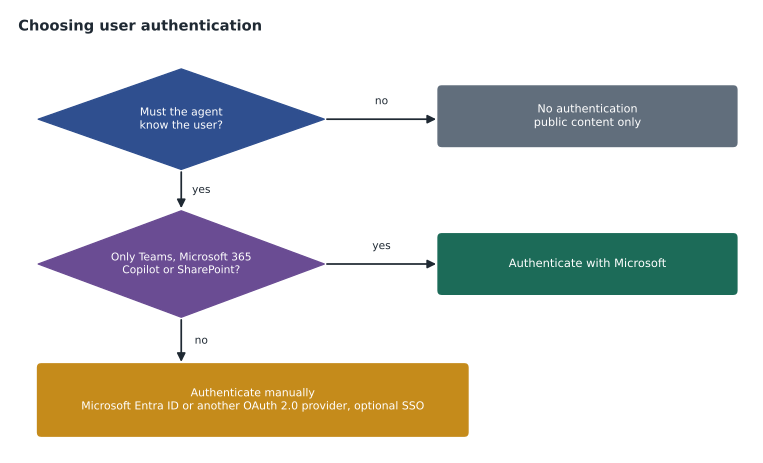
Each agent has one user authentication setting with three main options. No authentication means the agent does not know who the user is. Anyone who can reach the channel can chat, which suits public websites and general information, but the agent cannot search SharePoint or call tools as the user. Authenticate with Microsoft uses Microsoft Entra ID automatically in Microsoft channels such as Teams, Microsoft 365 Copilot and SharePoint. It needs no extra configuration by the maker, the person is signed in with their work account, and knowledge from SharePoint and other Microsoft 365 sources is searched with their permissions. Authenticate manually lets the maker configure an identity provider, such as Microsoft Entra ID through an app registration or another provider that supports OAuth 2.0, for channels like custom websites and apps, where automatic Microsoft sign-in is not available, or when the agent needs specific scopes and tokens to call other services.
| Option | Who the agent knows | Typical channels | Can use as the user |
|---|---|---|---|
| No authentication | Nobody | Public websites | Public knowledge and tools that do not act as the user |
| Authenticate with Microsoft | The signed-in work account | Teams, Microsoft 365 Copilot, SharePoint | SharePoint and Microsoft 365 knowledge, connectors with the user's connection |
| Authenticate manually | The user signed in through the configured provider | Custom websites, apps, other channels | Services that accept the tokens obtained |
A separate setting, often described as requiring users to sign in, decides whether sign-in happens at the start of every conversation or only when a topic or tool first needs it. For the HR agent, which can do nothing useful without knowing the employee, sign-in at the start is right. For an agent that answers general questions publicly but occasionally needs the user's account, sign-in on demand gives a smoother experience. In Microsoft channels with Authenticate with Microsoft, sign-in is usually seamless because the person is already signed in to Teams or Copilot.
Single sign-on
With manual authentication on a custom website, users would normally see a sign-in prompt in the chat. Single sign-on (SSO) avoids that by reusing the sign-in the user already has on the website or app. Setting it up requires configuring the app registration in Microsoft Entra ID with the correct scopes and token exchange, and the website must pass the user's token to the agent. SSO is mostly a developer task, but it affects the plan: a partner portal agent with SSO feels like part of the portal, while one without it asks people to sign in a second time, which many will not do.
Acting as the user or as the agent
The second identity question concerns tools and knowledge. A connector used as a tool runs with a connection, and the maker chooses whether that connection uses the end user's credentials or the maker's or a service account's credentials. With user credentials, the employee may be asked to consent the first time, and the system sees the employee: they can do only what they could do in the system directly, and audit logs show their name. With a shared maker or service account, every user acts with the same permissions, which is simpler but means the agent can do whatever that account can do, for everyone. For actions that change data, especially personal data, acting as the user is the safer default.
Worked problem
Deciding the identity for the HR case tool
The Create leave case tool calls the HR system's API through a connector. Option A uses a service account with permission to create cases for any employee. Option B uses each employee's own credentials, which only allow them to create their own cases. Which should Yusra choose, and why?
Show solution
- Ask what goes wrong in each design if the model is tricked or a user misbehaves.
- With option A, a successful prompt injection or a bug could create or view cases for other employees, because the service account can.
- With option B, the HR system itself prevents an employee from touching anyone else's case, whatever the agent is persuaded to try.
- Check the cost: option B needs the HR system to accept user tokens, and employees may see a consent prompt once.
Answer: Option B. Acting as the user lets the HR system enforce "own cases only", which turns the brief's never-disclose rule into a technical control instead of a hope.
Some autonomous agents have no user at all: an agent that reads an inbox and drafts replies runs because of an event, not a person typing. Those agents must use a maker or service connection, so their permissions should be as narrow as possible and their actions logged. Microsoft has also introduced agent identities in Microsoft Entra ID, so that agents can be treated as identities in their own right, with owners, sponsors and governance through Microsoft Entra Agent ID and the wider Agent 365 governance tools. For planning, the principle is the same either way: give every identity the least privilege that lets it do its job.
Authentication and knowledge
Knowledge authentication follows user authentication. SharePoint, Dataverse and Copilot connector knowledge is searched with the signed-in user's identity, so those sources need Authenticate with Microsoft or manual Microsoft Entra ID authentication configured for them. An agent with no authentication cannot use them. This is one reason Bram insisted on deciding authentication before choosing knowledge: an agent planned around SharePoint content cannot be published to a public website without sign-in, because the content would have no one to search for.
Authentication and licensing
Authentication also affects cost. When an employee with a Microsoft 365 Copilot license uses an internal agent in Microsoft 365 Copilot, Teams or SharePoint under their own identity, many kinds of usage are not charged to the organization's Copilot Credits, as long as the agent runs on the standard harness and stays within fair use. If the same agent runs with no authentication or under a shared identity, that inclusion does not apply. At Quillfield, about 200 of 380 employees had Microsoft 365 Copilot licenses, so authentication made a measurable difference to the HR agent's running cost, which lesson 9 calculates.
Wendell also noted that identity matters for privacy compliance. Because the agent signs employees in with their work accounts, conversation transcripts are associated with identifiable people, and Quillfield's retention schedule and employee privacy notice needed a line about the agent before launch.
Conditional Access and lifecycle
Because Authenticate with Microsoft uses Microsoft Entra ID, the organization's Conditional Access policies apply to the sign-in. If Quillfield requires multifactor authentication and a compliant device for HR applications, those rules apply to the agent as well. And because identity comes from Entra ID, the account lifecycle takes care of leavers: when an employee's account is disabled on their last day, they can no longer sign in to the agent. Contrast that with an agent using no authentication on an intranet page, where anyone who still has the link and network access could keep using it. Identity planning is therefore also offboarding planning.
| Question | HR Leave Assistant answer |
|---|---|
| Does the agent need to know the user? | Yes, always |
| User authentication option | Authenticate with Microsoft (Teams, Microsoft 365 Copilot, SharePoint) |
| When does sign-in happen? | At the start of the conversation |
| Knowledge identity | Signed-in user (SharePoint) |
| Tool identity | Signed-in user (HR system, own cases only) |
| Policies that apply | Conditional Access for HR apps: multifactor sign-in |
| Leavers | Disabled accounts cannot sign in |
Testing authentication
Test authentication with real accounts that differ in the ways that matter: an ordinary employee, an HR adviser, an employee without a Copilot license, a test account with no access to the HR site, and a disabled account. Check that each sees only what they should, that the consent prompt (if any) is understandable, and that error messages are clear when sign-in fails. In the test pane, makers can test as themselves, which can hide problems: Yusra had edit rights to the HR site and could see documents most employees could not, so her own tests made the agent look better informed than it would be for others.
Worked problem
Planning identity for a partner portal agent
Quillfield wants an agent on its broker partner portal, a custom website where partner brokers already sign in with Microsoft Entra ID business-to-business accounts. The agent should answer from a partner knowledge library and check commission statements in the finance system. Plan the identity.
Show solution
- The channel is a custom website, so Authenticate with Microsoft is not available; use manual authentication with Microsoft Entra ID.
- Configure single sign-on so partners are not asked to sign in twice.
- Search the partner library as the signed-in partner, so they see only partner content.
- Call the finance system with the partner's identity, so each sees only their own statements.
- Apply Conditional Access for external users as Quillfield's policy requires.
Answer: Manual Microsoft Entra ID authentication with SSO, and user identity for both knowledge and the finance tool. The portal's existing sign-in becomes the agent's sign-in, and the finance system enforces "own statements only".
Consent and the first-use experience
When a tool runs with the end user's credentials, the employee may see a consent prompt the first time the agent needs to use the connection, asking them to allow it. That moment is easy to get wrong. A prompt that appears without explanation looks like phishing to employees who have been trained, correctly, to be suspicious. Yusra added a line to the leave application topic just before the tool runs the first time: "To start your case, I'll connect to the HR system as you. You may be asked once to allow this." Administrators can also reduce prompts by granting organization-wide consent for the connector's app registration where policy allows, which removes the prompt for everyone but should be a deliberate security decision.
Authentication failures
Sign-in can fail for ordinary reasons: an expired session, a Conditional Access requirement the device does not meet, a user without permission to the HR system, or an outage. Each needs a clear message and a next step. "I couldn't sign you in to the HR system. If you're on a personal device, try again from your work laptop, or ask HR to start the case for you" is better than a technical error. The On Error system topic can detect failures and route them to a helpful message, and the analytics show how often sign-in or tool authentication fails, which is a useful early warning that a policy or permission has changed.
Worked problem
Handling a Conditional Access block
After launch, branch staff using personal phones report that the agent asks them to sign in and then fails. Quillfield's Conditional Access policy requires a compliant, company-managed device for HR applications. What should the team do?
Show solution
- Confirm in the sign-in logs that Conditional Access is blocking the sign-in, as designed.
- Decide whether the policy should change; for HR data, the security team keeps the managed-device requirement.
- Update the agent's failure message to explain the requirement and offer alternatives: use a work device, or ask HR by phone.
- Add the scenario to the test set with an unmanaged test device.
Answer: The block was correct. The fix was a clearer message, not a weaker policy, and branch managers were told which devices could use the agent.
Common mistakes
MistakeChoosing no authentication for an agent that needs internal knowledge.
InsteadSharePoint and Dataverse knowledge need the user's identity; plan authentication first.
MistakeUsing a powerful service account for tools that change personal data.
InsteadAct as the user where possible so the system enforces their permissions.
MistakeTesting only with the maker's account.
InsteadTest with accounts that have different permissions, licenses and statuses.
MistakeForgetting leavers.
InsteadUse Entra ID identity so disabled accounts lose access automatically.
Summary and key terms
- User authentication options are no authentication, Authenticate with Microsoft and Authenticate manually.
- Authenticate with Microsoft suits Teams, Microsoft 365 Copilot and SharePoint; manual authentication suits websites and apps, with optional SSO.
- Tools and knowledge run as the user or as a maker or service identity; acting as the user lets systems enforce permissions.
- Authentication decides which knowledge is usable and whether Microsoft 365 Copilot license inclusion applies.
- Conditional Access and the account lifecycle apply to Entra ID sign-in; test with varied real accounts.
- User authentication
- How an agent learns who it is talking to.
- Authenticate with Microsoft
- Automatic Microsoft Entra ID sign-in in Teams, Microsoft 365 Copilot and SharePoint.
- Authenticate manually
- A maker-configured identity provider for channels such as custom websites.
- Single sign-on (SSO)
- Reusing an existing sign-in so users are not asked to sign in again.
- Connection
- The stored sign-in a connector uses to reach a service.
- Least privilege
- Giving an identity only the permissions it needs.
Practice problems
Work each problem on paper first, then reveal the answer to check.
Why can't a public, unauthenticated website agent search SharePoint for its users?
Show answer
SharePoint knowledge is searched as the signed-in user, and an unauthenticated agent has no user identity.
What is the main safety benefit of running a tool as the user?
Show answer
The target system enforces the user's own permissions, whatever the agent is persuaded to try.
Name two things that apply automatically when an agent uses Entra ID sign-in.
Show answer
Conditional Access policies and the account lifecycle (disabled accounts cannot sign in).
Lesson quiz · 5 questions
Score 60% or more to complete this lesson.
Create a free account to save your progress, take quizzes and earn a certificate.