
MSBA-221 · Lesson 2 of 12 · 19 min
Standard, private and shared channels
▶ Video coming soon A video version of this lesson is on the way.
Two weeks into the clean-up, Ama Owusu-Pratt, the help desk lead, brought Teodor a list of complaints that all had the same root. A nurse at the North Branch could not find the Clinical Questions channel her manager had mentioned. A scheduler at head office could see a channel about a staff disciplinary matter that she should never have seen. A pharmacist at a partner pharmacy had been invited as a guest and kept losing track of which organization she was signed in to. "Three different problems," Ama said. "Three different channel types," Teodor replied.
Channels are where the work in a team happens. The MS-700 exam expects an administrator to recommend the right channel type, to add, edit and remove channels, to manage channel settings and membership, and to control channel creation and sharing with Teams policies. This lesson covers all of that, beginning with the choice between standard, private and shared channels.
The three channel types
A standard channel is open to every member of the team. Its conversations and files are visible to all team members, including guests who are team members, and its files are stored in a folder for that channel in the team's SharePoint site. Most channels should be standard: they are simple, discoverable and easy to govern.
A private channel is limited to a subset of the team's members. It has its own owners and members, chosen from the team, and its own separate SharePoint site so that files are visible only to channel members. Private channels suit sensitive work inside a team, such as a branch's staffing discussions or a disciplinary process, where the wider team should not see the content.
A shared channel can include people who are not members of the team, including whole other teams and, with the right configuration, people in other organizations. Like a private channel it has its own membership and its own SharePoint site. People from other organizations use it from their own Teams client, in their own tenant, without a guest account and without switching organizations. That is the experience the partner pharmacist needed.
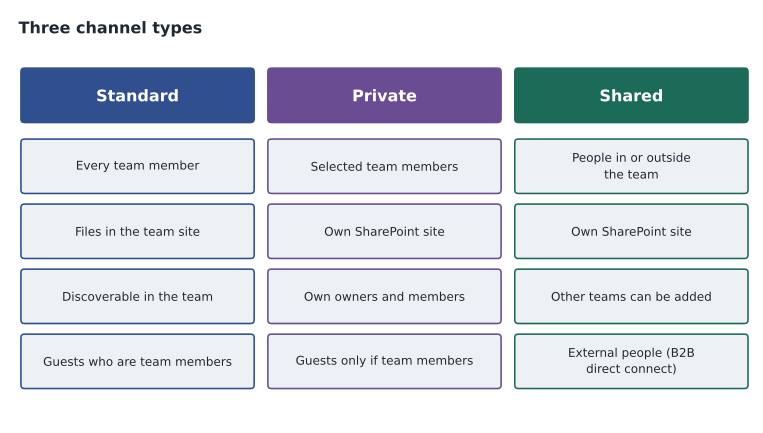
| Question | Standard | Private | Shared |
|---|---|---|---|
| Who can see it? | All team members | Selected team members | Its own members, who may be outside the team |
| Where are files stored? | Folder in the team's site | Separate SharePoint site | Separate SharePoint site |
| Can guests take part? | Yes, if they are team members | Yes, if they are team members | No guests; external people join through B2B direct connect |
| Can whole teams be added? | Not applicable | No | Yes, up to 50 teams |
| Typical use | Normal team work | Sensitive work inside a team | Work across teams or with partner organizations |
Microsoft's limits treat channels as a single pool: a team can have up to 1,000 channels in total, counting standard, private and shared channels and channels deleted within their recovery window. Private and shared channels can each have up to 5,000 members, and a shared channel can be shared with up to 50 teams beyond its parent. Microsoft raised the private channel limits during 2025, and some older documentation still mentions the earlier, much lower limit; always check the current limits page.
Choosing the right type
Teodor gave Corvallin's team owners a three-question test. First, should everyone in this team see it? If yes, use a standard channel. Second, if not, are the people who need it all members of this team? If yes, a private channel fits. Third, if the work involves people outside this team, especially another organization, consider a shared channel, but only if the external organization also allows it.
The test fixed the scheduler's problem at once. The disciplinary channel had been created as a standard channel in the head office team, so all 60 members could read it. The HR manager moved the work to a private channel with three members, and Teodor removed the old channel after its content was copied across. For the North Branch nurse, the issue was the opposite: Clinical Questions was a private channel she had not been added to, when it should have been a standard channel that every clinician in the branch could use. The branch manager recreated it as standard.
Over-use of private channels is a common governance problem. Each private channel creates another SharePoint site to secure, another membership list to maintain and another place where files can be forgotten. Corvallin's guidance said to prefer standard channels, to use private channels only for genuinely restricted work, and to create a separate team when a group of people needs many private conversations.
Shared channels across organizations
Shared channels with people in other organizations rely on Microsoft Entra B2B direct connect. Both organizations must allow it in their cross-tenant access settings in Microsoft Entra ID: the host organization allows outbound access for the users and the partner's users inbound, and the partner organization does the reverse. If either side has not configured it, external people cannot be added. Teams policies on each side must also allow users to create shared channels and to invite or join external shared channels.
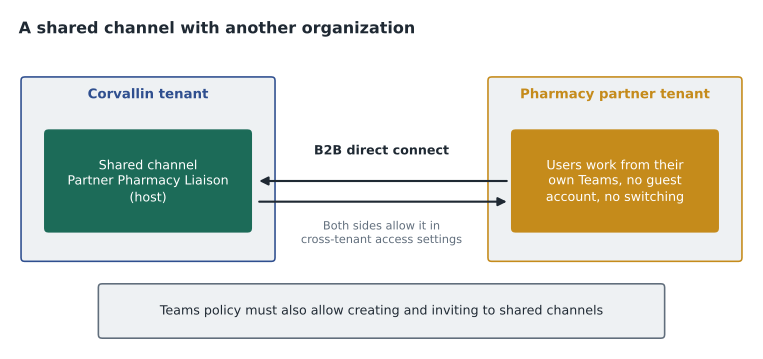
Corvallin worked with one partner pharmacy, and Felix Okonkwo-Reyes coordinated the set-up with the pharmacy's IT contractor. Corvallin added the pharmacy's tenant to its cross-tenant access settings with B2B direct connect allowed for a security group of liaison staff; the pharmacy did the same for its pharmacists. Corvallin's channel policy for liaison staff allowed inviting external users to shared channels. Within a day the pharmacist was working in the Partner Pharmacy Liaison channel from her own Teams, with no guest account to manage and no tenant switching.
Two cautions apply. Shared channel content is still stored in the host's tenant, so the host's retention, eDiscovery and data loss prevention policies apply to it, and the host decides who stays. And external participants in a shared channel do not appear in the host directory, which changes how access reviews work: the host reviews channel membership rather than guest accounts.
Channel policies
Whether users can create private and shared channels is controlled by Teams policies in the Teams admin center (under Teams and then Teams policies). A Teams policy includes settings such as whether users can create private channels, whether they can create shared channels, whether they can invite external users to shared channels and whether they can join external shared channels. Like other Teams policies, it can be assigned directly to users, to groups with a rank, or left at the Global (Org-wide default).
# A policy for liaison staff who work with the partner pharmacy
New-CsTeamsChannelsPolicy -Identity 'Partner-Liaison' `
    -AllowPrivateChannelCreation $true `
    -AllowSharedChannelCreation $true `
    -AllowChannelSharingToExternalUser $true `
    -AllowUserToParticipateInExternalSharedChannel $true
Grant-CsTeamsChannelsPolicy -PolicyName 'Partner-Liaison' -Identity 'liaison1@corvallincare.example'
# Everyone else: shared channels inside Corvallin only
Set-CsTeamsChannelsPolicy -Identity Global -AllowChannelSharingToExternalUser $false
Team owners also control channel creation inside their team through team settings: whether members can create and update channels, and whether they can create private channels. A user needs both the policy and the team setting to allow it. Corvallin left private channel creation on for team owners only, because branch managers occasionally needed one and the help desk did not want to create them on request.
Adding, editing and removing channels
Owners and, where allowed, members add channels from the team's menu in the Teams client. Administrators can add, rename and delete channels from the Manage teams page in the Teams admin center or with PowerShell. Channel names can be changed later, but the underlying SharePoint folder for a standard channel keeps its original name in some cases, which can confuse users who browse the site directly. Corvallin's guidance was to name channels carefully the first time.
Deleted channels can be restored for 30 days by a team owner. During that time they still count toward the channel limit, and their names cannot be reused. Deleting a channel does not delete its files at once: standard channel files stay in the team's site until someone removes them, and private and shared channel sites are deleted with the channel and can be restored within the same window.
# Add a standard channel and a private channel to a branch team
New-TeamChannel -GroupId $gid -DisplayName 'Visits Today'
New-TeamChannel -GroupId $gid -DisplayName 'Staffing (managers)' -MembershipType Private -Owner 'branchmgr.east@corvallincare.example'
Get-TeamChannel -GroupId $gid | Select-Object DisplayName, MembershipType
Channel settings and moderation
Each channel has settings that owners manage. Channel moderation turns a standard channel into a broadcast space: only moderators can start new posts, and owners can choose whether members can reply and whether bots and connectors can post. Corvallin's head office team used moderation on its Announcements channel so that only communications staff and managers could post, while staff could still reply with questions.
Other channel settings include whether the channel appears in members' channel lists by default, notification defaults, and the channel's email address. Each standard channel can have an email address so that messages can be sent into it; this is convenient for system notifications but can let spam in, so the org-wide setting can restrict which domains may send to channel email addresses. Teodor allowed only Corvallin's own domain and the scheduling vendor's notification domain.
Managing private and shared channel membership
Private and shared channels have their own owners. A team owner can see all private channels in the team and delete them, but cannot read their content or manage their membership without being added. Administrators can see and manage the membership of every private and shared channel from the Teams admin center or with PowerShell, which is how Teodor fixed private channels whose only owner had left.
When a person leaves the team, they are removed from its private channels automatically, because private channel members must be team members. Shared channels behave differently, because their members do not have to be team members; removing someone from the team does not remove them from a shared channel they were added to directly. Corvallin's offboarding checklist therefore included a step to review shared channel memberships for liaison staff.
Worked problem
Choosing a channel type for a case conference group
Dr. Marguerite Ostrander-Bey, the clinical director, wants a space for the weekly complex-case conference. Members are the four branch clinical leads, all in the Clinical Leadership team, plus two physiotherapists at Kittiwake, the clinic Corvallin acquired in November 2026, which still has its own tenant until the 2027 merger. Which channel type fits, and what must be configured?
Show solution
- Not everyone in Clinical Leadership needs it, so a standard channel would overshare.
- Two participants are in another tenant, so a private channel (team members only) would need guest accounts.
- A shared channel can include the Kittiwake staff from their own tenant, provided both tenants allow B2B direct connect.
- Configure cross-tenant access in both tenants for the specific users, and give the channel owner a Teams policy that allows inviting external users to shared channels.
Answer: A shared channel hosted in the Clinical Leadership team, with B2B direct connect configured in both tenants and a channels policy that permits external sharing for the owner.
Channel governance in practice
Channel sprawl is a smaller version of team sprawl, and the same habits prevent it. Corvallin's branch template fixes the core channels, so members cannot add channels in branch teams; owners add them on request, and Teodor's quarterly report lists channels with no posts in 180 days so owners can remove or rename them. For project teams, where flexibility matters more, members can create standard channels but not private ones.
Channel names follow a simple convention: short, plain words that describe the work, not the people, such as Scheduling rather than Kathy and Raj. Private channels add the audience in brackets, such as Staffing (managers), so members understand at a glance why they cannot see everything. Shared channels with partners include the partner's role, such as Partner Pharmacy Liaison. These conventions cost nothing and save help desk calls, because people can tell from the name where a conversation belongs.
Common mistakes
MistakeUsing private channels for anything slightly sensitive.
InsteadPrefer standard channels; use private channels for genuinely restricted work, and a separate team when many private conversations are needed.
MistakeExpecting external partners to join a shared channel as soon as they are invited.
InsteadBoth tenants must allow B2B direct connect in cross-tenant access settings, and Teams policies must allow external sharing.
MistakeAssuming removing someone from a team removes them from every channel.
InsteadPrivate channel members leave with the team, but direct members of shared channels must be removed separately.
MistakeLeaving channel email open to any sender.
InsteadRestrict channel email to trusted domains in the org-wide settings.
Summary and key terms
- Standard channels are open to every team member; private channels are limited to selected team members; shared channels can include people outside the team and outside the organization.
- Private and shared channels each have their own SharePoint site and their own owners and members.
- Shared channels with other organizations need B2B direct connect allowed in both tenants' cross-tenant access settings.
- Teams policies (channels policies in PowerShell) control creating private and shared channels and sharing with external people; team settings add a second layer.
- Deleted channels can be restored for 30 days and count toward the 1,000-channel limit during that time.
- Moderation turns a standard channel into an announcement channel.
- Private channel
- A channel limited to selected team members, with its own SharePoint site.
- Shared channel
- A channel that can include people outside the team, including other organizations, with its own SharePoint site.
- B2B direct connect
- A Microsoft Entra cross-tenant setting that lets users take part in another organization's shared channels without a guest account.
- Channel moderation
- A setting that limits who can start posts in a standard channel.
- Channels policy
- The PowerShell name for the Teams policy that controls private and shared channel creation and sharing.
Practice problems
Work each problem on paper first, then reveal the answer to check.
A team member cannot see a channel others mention. Name one likely reason.
Show answer
It is a private or shared channel and they have not been added to it.
Where are the files of a private channel stored?
Show answer
In a separate SharePoint site created for that channel.
What two things must be true before people from a partner organization can join your shared channel?
Show answer
Both tenants allow B2B direct connect for those users, and the channel owner's Teams policy allows sharing channels with external users.
Lesson quiz · 5 questions
Score 60% or more to complete this lesson.
Create a free account to save your progress, take quizzes and earn a certificate.