
MSBA-213 · Lesson 8 of 12 · 18 min
Enterprise App Catalog
▶ Video coming soon A video version of this lesson is on the way.
The inventory in lesson 1 found about 380 laptops with common third-party tools on them: two different PDF readers, a compression tool, a screenshot utility and three browsers besides Edge. Each one needed packaging, testing and, above all, updating, because third-party apps are a favorite route for attackers when they fall behind. Ama could package each one as a Win32 app, as in lesson 3, and repeat the work every time a vendor shipped an update. Or she could use the Enterprise App Catalog, where Microsoft does the packaging. The MD-102 skills list it under the Intune Suite add-on capabilities: manage applications by using the Enterprise App Catalog. This lesson explains what the catalog does, what it costs, and how Corvallin decided whether to use it.
What the catalog is
Enterprise App Management (EAM) is an Intune add-on capability. Its center is the Enterprise App Catalog, a list of common Windows applications that Microsoft has already packaged as Win32 apps: installer, install and uninstall commands, detection rules and requirement rules, kept current as vendors release new versions. An administrator browses or searches the catalog in the admin center, picks an app and a version, reviews the prefilled settings, and adds it. The result is an ordinary Win32 app in Intune, assigned and reported like any other.
Because catalog apps are Win32 apps, everything from lesson 3 still applies. The administrator can change the install command, add a requirement rule, set the restart behavior, add dependencies or keep the defaults. What the catalog removes is the work of finding the installer, working out its silent switches, writing detection and repeating all of that with every release. Microsoft also describes security checks on the catalog's content, from ingestion through to the device, which matters because a catalog of installers is an attractive target.
Keeping catalog apps current
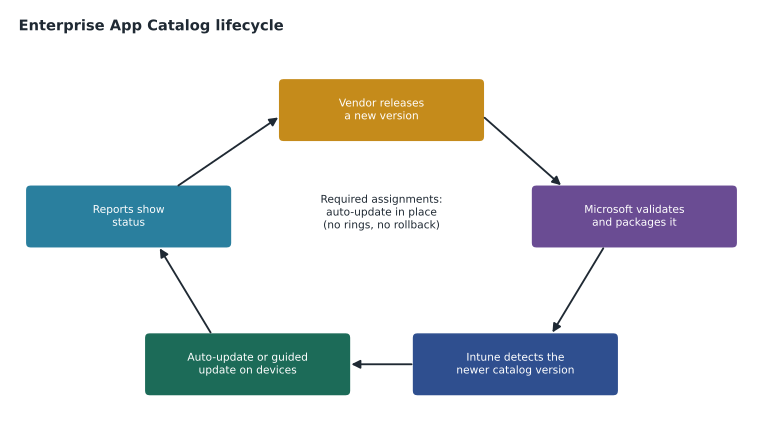
Updating was the part that interested Ama most. There are two ways to update a catalog app. The older way is a guided update: when a newer version appears in the catalog, the admin center flags the app, and the administrator creates the new version with a supersedence relationship to the old one, as lesson 9 describes for any Win32 app. The newer way is auto-update. With the June 2026 service release, Microsoft made auto-update for catalog apps generally available: when Intune detects a newer catalog version, it updates the app in place on targeted devices, without a new app or a supersedence relationship.
| Aspect | Auto-update as documented in mid-2026 |
|---|---|
| Which apps | Enterprise App Catalog apps only, not your own Win32 apps |
| Which assignments | Required assignments; Available assignments keep the guided update workflow |
| Platforms | Windows 10 and Windows 11 |
| Control | No rollout rings, no approval step and no automatic rollback |
| Speed | Microsoft's stated objectives are most updates in the catalog within about a day of the vendor's release, longer when manual validation is needed |
The absence of rings was the important point for Ama. With auto-update, a new version of a PDF reader would reach every laptop with a Required assignment at once. For a browser or PDF reader, where a fast security fix matters more than a careful test, that was acceptable. For anything that integrated with VisitWise or the finance system, she would want the guided update, with the new version going to the IT ring first and supersedence moving everyone else later.
Licensing: the real question
EAM is not part of Intune Plan 1 or Plan 2. It is sold as an add-on and as part of the Intune Suite, and Microsoft announced it would be included in Microsoft 365 E5 as part of the 2026 packaging change described in the device course. Corvallin's staff hold Microsoft 365 E3 and F3, so the catalog was not available to them without buying it. Licensing is per user: a catalog app can only be deployed to users, or the devices of users, who are licensed for EAM. That turned the technical question into a business one.
Worked problem
Is the catalog worth buying for Corvallin?
Ama estimates that packaging and updating six common third-party apps by hand takes about 4 hours of packaging per app per year plus about 2 hours per update, with about 10 updates per app per year. The add-on is priced per user per month. How should she frame the decision for Ines?
Show solution
- Manual effort: 6 apps times (4 hours of packaging plus 10 updates times 2 hours) is 6 times 24, or 144 hours a year.
- Risk: during a manual update cycle, laptops run an outdated version for days or weeks, and the Monday report showed some apps months behind.
- Cost: the add-on for every licensed user, or a subset if only some devices need catalog apps.
- Alternative: reduce the number of third-party apps first, so fewer need maintaining.
Answer: Ama recommended standardizing first: one PDF reader, no extra browsers, the compression tool replaced by Windows' built-in support. That left three third-party apps. She would package those as Win32 and revisit EAM in 2027 when the license review looked at E5. Ines agreed, and the decision went into the log with the 144-hour estimate.
Standardizing turned out to be the bigger win. Windows 11 opens many archive formats natively, and Edge reads PDFs well enough for most staff. Two of the three extra browsers had been installed by one vendor's support technician years earlier. After a short survey of who used what, Ama retired five of the eight common tools, kept one PDF editor for the 20 staff who filled in forms, kept the scanner utility, and packaged both as Win32 apps with tidy detection rules.
Working with the catalog when you have it
For organizations that do license EAM, a few practices make it work well. Review the prefilled settings rather than accepting them blindly: the default install command may not match how you want the app configured, for example whether it creates desktop shortcuts or sets itself as the default handler. Add a requirement rule when the app should reach only some devices. Use Available assignments for optional tools and Required with auto-update for apps that must always be current. And read the catalog app's details, which list the version, the publisher and the language of the package.
| Practice | Why |
|---|---|
| Review install commands and detection before adding | Defaults suit most organizations, not every one |
| Decide per app between auto-update and guided update | Auto-update has no rings or rollback |
| Pair catalog apps with an inventory review | Catalog apps do not remove the old copies users installed themselves |
| Check licensing before assigning | Only EAM-licensed users or their devices can receive catalog apps |
| Keep a test device in a separate group | To see each new version before it reaches everyone |
The catalog and existing installations
A catalog app installs the vendor's normal installer, so it usually upgrades a copy that a user installed earlier, but not always. Some vendors offer per-user and per-machine editions, and installing the per-machine edition does not remove a per-user copy in someone's profile. That leaves two copies, one of which never updates. Whether using the catalog or packaging by hand, Ama's approach was the same: deploy the standard version, then use the discovered apps report and a detection-only Remediation to find leftover copies, and remove them with an Uninstall assignment or a clean-up script.
What the exam expects
MD-102 treats the Enterprise App Catalog as one of several Intune Suite capabilities, alongside Remote Help, Microsoft Tunnel for MAM and Endpoint Privilege Management. Expect questions that test whether you know what each capability does and that it needs a license beyond Intune Plan 1. Expect also to be asked how a catalog app is added and updated, and how auto-update differs from a supersedence-based update. The details have changed several times since the catalog appeared, so check Microsoft Learn for the version current when you study.
Packaging the remaining tools by hand
With the catalog decision made, Ama packaged the three remaining third-party tools herself, following lesson 3. The PDF editor and the scanner utility became Win32 apps; the third, a free screenshot tool, turned out to be in the Microsoft Store as a Store-packaged app, so it went in through lesson 4's route and updated itself. For the two Win32 apps, she subscribed to the vendors' release notes and added each new version to the monthly release routine in lesson 9. Over October and November that meant three new versions to package, about six hours of work in total, which matched her estimate.
Third-party apps and security
Ines's interest in third-party updates was about risk, not tidiness. Outdated PDF readers, browsers and archive tools are common targets because they open files from outside the organization. The security course covers Microsoft Defender Vulnerability Management, which can list outdated software and its known vulnerabilities on each device. At Corvallin, that list was the evidence that persuaded the board to back standardization: on the day Ama checked, more than half the laptops with the second PDF reader were running a version with published vulnerabilities, because nobody owned its updates.
| Option for third-party apps | Effort | Update speed | Cost |
|---|---|---|---|
| Leave them unmanaged | None | Whenever users update, often never | Risk |
| Package by hand as Win32 | Hours per release | As fast as the release routine | Staff time |
| Enterprise App Catalog with guided updates | Minutes per release | After testing | Add-on license |
| Enterprise App Catalog with auto-update | Almost none | Within days of release | Add-on license |
| Remove them | One-time | Not applicable | None |
Reading a catalog entry
For organizations that license EAM, each catalog entry shows the information needed to decide whether to use it: the app's name and publisher, the available versions, the language of the package, the architecture and the prefilled install and uninstall commands, detection and requirements. Some apps are offered in more than one variant, such as per-machine and per-user editions or different languages, and choosing the wrong one is the commonest catalog mistake. The administrator should match the variant to what is already installed, or plan the clean-up of the other variant as part of the deployment.
The catalog also changes what the help desk sees. Catalog apps appear in Intune with the publisher's details filled in and in Company Portal with a proper icon and description, so Available catalog apps look as polished as Store apps. Microsoft describes security controls on the catalog pipeline, from how vendor installers are obtained to how packages are signed and checked on the device, in its Intune customer success posts. Ama read them while preparing the business case, because the first question from Ines about any catalog of installers was how it was protected against tampering.
| Question for a catalog business case | Corvallin's answer in 2026 |
|---|---|
| How many third-party apps after standardization? | Three |
| Packaging and update effort by hand | About 72 hours a year for the three |
| Users who would need the license | Only those whose devices receive catalog apps |
| Would E5 change the answer? | Yes; review in the 2027 license renewal |
| Security of the catalog itself | Microsoft documents pipeline controls; acceptable |
The 72-hour figure came from the same estimate as before, applied to three apps instead of six. Halving the number of apps had halved the work, which was the clearest argument for standardizing first.
Teodor raised one more point at the review: the catalog would not have helped with VoxNote, the visit verification app or the VPN client, because none of them was the kind of mass-market app Microsoft packages. The catalog is about common third-party software, while an organization's own line-of-business apps still need Win32 packaging. That split, catalog for common tools and Win32 for everything specific to the business, is how most organizations that buy EAM end up using it.
Common mistakes
MistakeAssuming the Enterprise App Catalog is part of Intune Plan 1.
InsteadIt belongs to Enterprise App Management, an add-on or suite capability, and is licensed per user.
MistakeTurning on auto-update for every catalog app.
InsteadAuto-update has no rings, approval or rollback; use guided updates with supersedence where testing matters.
MistakeExpecting a catalog app to remove every older copy.
InsteadPer-user copies may remain; find them with discovered apps and remove them deliberately.
MistakeBuying a catalog to manage apps nobody needs.
InsteadStandardize first, then decide whether the remaining apps justify the license.
Summary and key terms
- The Enterprise App Catalog provides common Windows apps already packaged as Win32 apps by Microsoft.
- Catalog apps behave as ordinary Win32 apps and can be customized.
- Since mid-2026, auto-update keeps Required catalog apps current in place, without rings, approval or rollback.
- Enterprise App Management is an add-on or suite capability, licensed per user, and was announced for Microsoft 365 E5.
- Standardizing third-party apps often saves more effort than any tool.
- Enterprise App Management (EAM)
- An Intune add-on capability that provides the Enterprise App Catalog.
- Enterprise App Catalog
- Microsoft's list of prepackaged Win32 apps available to EAM-licensed tenants.
- Auto-update
- Updating a catalog app in place on targeted devices when a newer version appears.
- Guided update
- Creating a new catalog app version with supersedence of the old one.
- Intune Suite
- The bundle of advanced Intune capabilities such as Remote Help, EAM and Endpoint Privilege Management.
Practice problems
Work each problem on paper first, then reveal the answer to check.
What kind of Intune app does adding an Enterprise App Catalog app create?
Show answer
A Win32 app with prefilled settings.
Which assignments does catalog auto-update apply to?
Show answer
Required assignments.
Why did Corvallin not buy EAM in 2026?
Show answer
Standardizing cut the third-party apps to three, which were cheaper to package by hand; EAM would be reconsidered with E5 in 2027.
Lesson quiz · 5 questions
Score 60% or more to complete this lesson.
Create a free account to save your progress, take quizzes and earn a certificate.