
MSBA-213 · Lesson 12 of 12 · 16 min
Case study: replacing an old line-of-business app
▶ Video coming soon A video version of this lesson is on the way.
This lesson brings the course together in one project. About 30 intake and care coordinators at Corvallin used VoxNote Pro 4, a Windows dictation program, to record and transcribe notes after calls with clients and families. It was installed in 2017, had been copied from laptop to laptop since, and needed local administrator rights to run because it wrote its dictionary and templates into its own folder under Program Files. When the device project removed the last local administrator rights, the help desk started a workaround list. The vendor, Quillmark Software, had replaced it with VoxNote Cloud, a desktop app that stores recordings in the vendor's cloud and does not need administrator rights. VoxNote and Quillmark are fictional, but the shape of the project is typical of replacing any old line-of-business app.
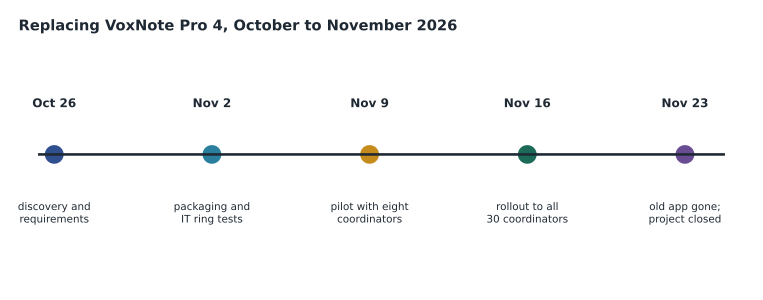
Ines set three conditions. Nobody's notes or custom vocabulary could be lost. The coordinators could not be without dictation for more than a morning. And Dr. Ostrander-Bey had to approve where the recordings would be stored before anything went live. The project ran from October 26 to November 20, 2026.
Week 1: discovery
Ama started from data rather than assumptions. The discovered apps report showed VoxNote Pro 4 on 41 laptops, not 30; eleven were laptops of people who had changed roles and no longer dictated. A detection-only Remediation that looked for each user's custom vocabulary file found real vocabulary on 28 laptops, some with years of clinical terms and family names added. Two coordinators used a USB foot pedal for playback control, which needed a small driver. And the old app had a Word add-in that inserted transcriptions into templates.
| Finding | Consequence for the plan |
|---|---|
| Installed on 41 laptops; used on 30 | Install the new app only for the Dictation-Users group; remove the old one everywhere |
| Custom vocabulary on 28 laptops | Migrate vocabulary before removing the old app |
| Foot pedal on 2 laptops | Package the pedal driver as a dependency, targeted only where needed |
| Word add-in | Confirm VoxNote Cloud's add-in works with the current Microsoft 365 Apps |
| Needs local admin today | The new app installs per machine in system context and runs as a standard user |
Dr. Ostrander-Bey's question about storage took a meeting with Quillmark. The vendor offered regional storage, and Corvallin's privacy officer approved storing recordings in the vendor's data center in the same country as each site under the agency's existing service agreement, with recordings deleted after transcription confirmation. That decision went into the privacy notice and the decision log before packaging began.
Week 2: packaging and testing
VoxNote Cloud came as an EXE installer with a silent switch and an option to set the organization's tenant address. Ama built it as a Win32 app following lesson 3.
| Win32 setting | Value |
|---|---|
| Install command | VoxNoteCloudSetup.exe /quiet TENANT=corvallin /norestart |
| Uninstall command | The vendor's uninstaller with its silent switch |
| Install behavior | System |
| Requirement rules | x64 or ARM64; Windows 11 24H2 or later; 2 GB free disk space |
| Detection rule | VoxNoteCloud.exe in Program Files, file version greater than or equal to 3.1.0 |
| Dependency | Vocabulary migration package (below), automatic install |
| Supersedence | Supersedes a retirement package for VoxNote Pro 4, Uninstall previous version: Yes |
Two design choices matter. First, VoxNote Pro 4 had never been in Intune, so there was nothing to supersede. Ama used the technique from lesson 9: a small Win32 app for VoxNote Pro 4 whose detection finds the old program and whose uninstall command removes it. With that app in Intune, VoxNote Cloud could supersede it with Uninstall previous version set to Yes, a product replacement rather than an upgrade, so Intune removes the old app before installing the new one.
Second, the vocabulary had to move before the old app went. Ama wrote a dependency package: a script that copies each user's vocabulary and templates from the old Program Files location into a folder VoxNote Cloud imports from on first start, and writes a marker file when it finishes. Its detection rule checks for the marker. Because dependencies install first, the order on each laptop was guaranteed: copy the vocabulary, uninstall the old app, install the new one. She tested the chain on two IT laptops seeded with copies of real vocabulary files, and on a third with no vocabulary at all, to make sure the script did not fail when there was nothing to copy.
$src = Join-Path ${env:ProgramFiles(x86)} 'VoxNote\Users'
$dst = Join-Path $env:ProgramData 'VoxNoteCloud\Import'
New-Item -ItemType Directory -Path $dst -Force | Out-Null
if (Test-Path $src) {
    Copy-Item -Path (Join-Path $src '*') -Destination $dst -Recurse -Force
}
Set-Content -Path (Join-Path $dst 'migrated.txt') -Value (Get-Date -Format o)
exit 0
The foot pedal driver became its own Win32 app with a requirement rule that checks for the pedal's hardware ID, assigned as Required to the two coordinators' laptops; on every other laptop it reports Not applicable. The Word add-in was tested against the current Monthly Enterprise build from lesson 2 and worked once a trust setting in Cloud Policy allowed the vendor's signed add-in. Teodor added that setting for the Dictation-Users group only.
Week 3: the pilot
Eight coordinators from three branches joined the pilot on November 9. Ama assigned VoxNote Cloud as Required to a pilot group with an installation deadline of 7:00 the next morning, before the first calls, and sent a short message with what would change: the old app's icon would disappear, the new one would appear, and the vocabulary would be there on first start. Remote Help was ready for the pilot, because all eight held E3 licenses.
| Pilot result | Count |
|---|---|
| Installed overnight with vocabulary migrated | 6 |
| Installed, but the user's vocabulary was in an unexpected folder | 1 |
| Install waited because Word was open all night with an unsaved document | 1 |
The one coordinator whose vocabulary went missing had, years earlier, moved the old app's user folder to a second drive. The AppWorkload log showed the migration script finishing with nothing to copy, exactly as designed for an empty laptop, and the marker file let the install continue. Ama recovered the vocabulary from the second drive during a Remote Help session and changed the script to read the old app's configured user folder from its registry key rather than assuming the default. The coordinator with Word open had a smoother story: the install waited, retried at the next opportunity and finished at 9:15 the next morning.
Week 4: rollout and clean-up
On November 16 the assignment moved to the full Dictation-Users group of 30. The 22 remaining coordinators had the new app by the next morning; the help desk took three calls, all about the new app's sign-in screen, which the vendor's quick guide answered. The retirement package for VoxNote Pro 4 was then assigned as Uninstall to all corporate laptops, which removed the 11 copies on laptops of people who no longer dictated. By November 20 the discovered apps report showed no copies of VoxNote Pro 4. The workaround list for administrator rights had one entry fewer, and the project closed on November 23 with a short review.
| Measure | Before | After |
|---|---|---|
| Laptops with VoxNote Pro 4 | 41 | 0 |
| Coordinators with working dictation | 30 | 30 |
| Vocabulary files lost | Not applicable | 0 after one recovery |
| Local admin exceptions for dictation | 2 workarounds | 0 |
| Help desk calls during rollout | Not applicable | 3, plus 2 in the pilot |
What the project used from this course
Almost every lesson appeared somewhere. The app type decision from lesson 1 made it a Win32 app. Lesson 2's Office configuration and Cloud Policy carried the Word add-in. Lesson 3's packaging, detection, requirements and dependencies did the heavy lifting. Lesson 9's supersedence and retirement packages handled the old app that Intune never installed. Remote Help from lesson 10 fixed the one real problem in minutes, and lesson 11's logs explained it. The parts not used, such as mobile app configuration and app protection, would have mattered if VoxNote Cloud's phone app had been in scope; Ama noted it as a 2027 option for managers who dictate on the road.
Ama's checklist for replacing any app
| Phase | Questions to answer |
|---|---|
| Discover | Where is the old app, who really uses it, what data and integrations does it have? |
| Decide | Who approves where data goes? Which app type? Which groups? |
| Package | Silent commands, system or user context, detection, requirements, dependencies |
| Relate | Does the old app exist in Intune? If not, create a retirement package to supersede |
| Pilot | A real group with a deadline outside working hours and Remote Help ready |
| Roll out | Expand in stages and watch reports and calls |
| Retire | Uninstall leftovers everywhere and confirm with discovered apps |
| Record | Decision log, package notes and lessons learned |
The review
At the closing review on November 23, Ines asked what the team would do differently. Ama had three answers. Discovery should have included asking coordinators directly about unusual setups, which would have found the moved vocabulary folder before the pilot rather than during it. The migration script should have logged what it copied, not only that it finished, so a missing file would have been obvious in the logs. And the pilot should have included at least one coordinator from every branch, because the edge case came from a laptop configured years earlier at a branch with its own habits. Teodor added that the Cloud Policy trust setting for the Word add-in should be reviewed each year, since add-in signing certificates expire.
Dr. Ostrander-Bey's question was simpler: did anyone lose a client note? Nobody had. The recordings stored with Quillmark were deleted after transcription as agreed, and the privacy officer's checklist for the vendor was filed with the contract. The coordinators' main comment was that the new app started faster than the old one, which, after months of workarounds for administrator rights, was the outcome Ines had wanted.
How the course's skills map to the exam
The VoxNote project touched most of the MD-102 bullets for managing and securing applications. Preparing applications for deployment was the packaging work. Deploying Win32, line-of-business and Store apps appeared in the choice of types across the course. Monitoring deployment status and troubleshooting installation failures was the pilot. Configuring policies for Microsoft 365 Apps was the Word add-in trust setting. The bullets the project did not touch, such as app protection and Quiet Time, belonged to the phone work earlier in the course. Mapping a real project to the exam outline this way is a useful study method: for each bullet, ask where in your own work you have done it, and practice the ones you have not.
| MD-102 skill (October 27, 2026) | Where it appears in this course |
|---|---|
| Prepare applications for deployment | Lessons 1, 3 and 12 |
| Deploy Win32, line-of-business and Store apps | Lessons 1, 3, 4 and 12 |
| Configure Quiet Time policies | Lesson 5 |
| Deploy and manage Microsoft 365 Apps, including during Autopilot | Lesson 2 |
| Deploy apps from Apple Business Manager and managed Google Play | Lesson 5 |
| Monitor deployments and troubleshoot failures | Lessons 11 and 12 |
| App protection and Conditional Access | Lesson 7 |
| App configuration policies | Lesson 6 |
| Enterprise App Catalog and Remote Help | Lessons 8 and 10 |
What came next
The project left two follow-ups in the decision log. VoxNote Cloud's mobile app for managers who dictate on the road was deferred to 2027, when it would need app protection and a managed apps configuration like Outlook's. And the retirement-package technique was written up as a standard procedure, because the inventory from lesson 1 still had a handful of old programs that Intune had never installed. Ama scheduled one retirement a month through the first half of 2027, each following the checklist from lesson 9.
Common mistakes
MistakePlanning the replacement from the number of users someone remembers.
InsteadUse discovered apps and a detection-only script to find where the app and its data really are.
MistakeUninstalling the old app before its data is migrated.
InsteadMake the migration a dependency so it always runs first.
MistakeAssuming default paths in a migration script.
InsteadRead the old app's configured locations, and test on laptops with unusual setups.
MistakeSkipping the privacy question until after deployment.
InsteadGet approval for where data will be stored before packaging begins.
Summary and key terms
- Discovery with reports and scripts showed the old app on more laptops than expected and found the data to migrate.
- The new app was a Win32 app with requirement and detection rules, a migration dependency and a driver dependency.
- A retirement package let the new app supersede an old app that Intune had never installed.
- A pilot with a deadline outside working hours and Remote Help ready found the one edge case.
- Retirement finished with an Uninstall assignment and a check of discovered apps.
- Retirement package
- A Win32 app created only to detect and uninstall an unwanted program.
- Product replacement
- Supersedence where a different product replaces the old one, with Uninstall previous version set to Yes.
- Migration dependency
- A dependency package that moves user data before the new app installs.
- Installation deadline
- The time by which a Required app must install, used to schedule installs outside working hours.
Practice problems
Work each problem on paper first, then reveal the answer to check.
How could VoxNote Cloud supersede an app Intune never installed?
Show answer
Ama created a retirement Win32 app for the old program, which the new app could then supersede.
Why was the vocabulary migration a dependency?
Show answer
Dependencies install first, so data was copied before the old app was removed.
What change did the pilot cause in the migration script?
Show answer
It read the old app's configured user folder from the registry instead of assuming the default path.
Lesson quiz · 5 questions
Score 60% or more to complete this lesson.
Create a free account to save your progress, take quizzes and earn a certificate.