
MSBA-213 · Lesson 5 of 12 · 18 min
macOS and mobile app deployment
▶ Video coming soon A video version of this lesson is on the way.
Windows laptops were only part of the picture. Corvallin's 260 Samsung phones were the tool home-care staff used most: VisitWise for the day's visits, Outlook and Teams for messages, the camera for wound photos stored in VisitWise, and the phone itself for calling clients. The 74 corporate iPhones belonged to managers, schedulers and on-call coordinators, and the nine Macs to communications and finance. The device project had enrolled all of them. This lesson is about getting the right apps onto them, and keeping those apps current, without anyone typing an Apple Account password or a Google password on a work phone.
Apple: volume purchasing through Apple Business Manager
Corvallin already used Apple Business Manager for Automated Device Enrollment of its iPhones and Macs. The same portal has an Apps and Books section, formerly called the Volume Purchase Program. An organization acquires apps there, free or paid, in the quantity it needs, and links a location token to Intune. Intune then synchronizes the licenses and lets the administrator assign the apps like any other app. The token must be renewed every year, so Ama put its expiry date in the same vault entry and calendar reminders as the Apple push certificate and the enrollment token.
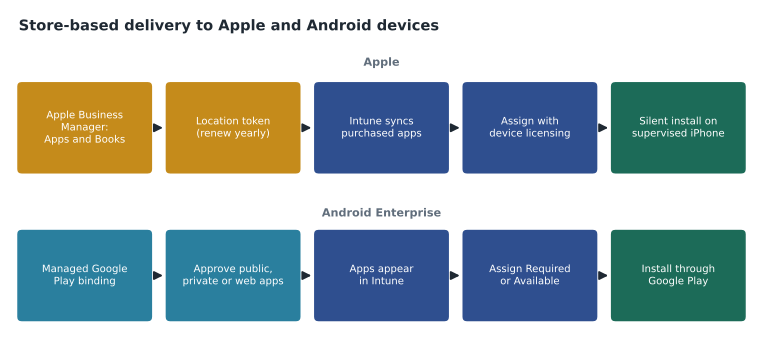
Volume-purchased apps can be licensed in two ways. Device licensing ties the license to the device, and the app installs without anyone signing in to the App Store. User licensing ties it to a person, who must accept an invitation with an Apple Account, and the person can use the app on several devices. For corporate phones, device licensing is almost always right, and for supervised devices enrolled through Automated Device Enrollment it lets Intune install apps silently. Ama assigned every iPhone app with device licensing, so the managers never saw an App Store sign-in prompt.
| iOS and iPadOS option | What it does | Corvallin's setting |
|---|---|---|
| License type | Device or user licensing for volume-purchased apps | Device |
| Uninstall on device removal | Removes the app when the device is retired from Intune | Yes for work apps |
| Prevent iCloud app backup | Stops the app's data being backed up to the user's iCloud | Yes |
| Automatic app updates | Installs new versions from the App Store automatically | Yes for volume-purchased apps |
| Removable | Lets the user delete the app on supervised devices | No for Outlook, Teams, Authenticator |
Apps already installed on a device before enrollment are unmanaged; Intune cannot configure or remove them. On supervised devices, Intune can take over an existing App Store app and make it managed, and Microsoft's documentation describes when that happens automatically. Because Corvallin's iPhones were erased and re-enrolled through Automated Device Enrollment, every work app on them arrived through Intune and was managed from the start, which made the app protection and configuration work in later lessons straightforward.
Line-of-business apps on Apple devices
Some apps never go to the App Store. An iOS line-of-business app is an IPA file signed with an enterprise distribution certificate or distributed through Apple Business Manager as a custom app. Custom apps are now the preferred route because they are distributed like App Store apps, keep themselves updated and avoid the yearly expiry of enterprise signing certificates. Corvallin had none on iPhones, but the scheduling vendor offered a custom-app version of VisitWise for organizations that wanted one; Ama noted it as an option for 2027.
Apps on macOS
Macs take apps in four main ways. Microsoft 365 Apps and Microsoft Edge have built-in app types, as on Windows. PKG files, the standard macOS installer format, can be deployed directly, including packages that are not signed for MDM distribution, which Intune installs through its macOS agent. DMG files, the disk images many vendors ship, contain an application bundle that Intune copies into the Applications folder. Volume-purchased Mac App Store apps come through Apple Business Manager. Shell scripts, delivered by the macOS agent, handle anything else, such as removing an old version first.
| macOS type | Delivered by | Detection | Typical use |
|---|---|---|---|
| Microsoft 365 Apps, Edge | Built-in app types | Built in | Office and the browser |
| PKG | MDM or the Intune agent for macOS | Bundle ID and version from the package | Most third-party installers |
| DMG | The Intune agent for macOS | Bundle ID and version of the app bundle | Drag-to-install apps |
| Volume-purchased apps | Apple Business Manager and MDM | Built in | Mac App Store apps |
| Shell scripts | The Intune agent for macOS | Script output | Clean-up and configuration steps |
For the nine Macs, Ama assigned Microsoft 365 Apps and Edge as Required, the design tools the communications team used as PKGs, and the finance team's banking client as a DMG. She learned one lesson the hard way: a PKG that contains several components needs its detection set to the component that matters, or Intune may report success for the wrong one. The communications app's PKG included a helper tool with its own bundle identifier, and the first version of the assignment reported the helper as the installed app.
Android: managed Google Play
On Android Enterprise devices, apps come from managed Google Play, a version of the Play Store that the organization controls. Intune connects to it through a one-time binding with a Google account that represents the organization. After binding, administrators search Play from the Intune admin center and approve apps. Approved apps appear in Intune and are assigned like any other app. On a fully managed Samsung phone, a Required app installs silently through Google Play, with no personal Google account on the device.
| Managed Google Play app | What it is | Corvallin example |
|---|---|---|
| Public app | An app from the Play Store, approved for the organization | VisitWise, Outlook, Teams, Microsoft Authenticator, Microsoft Launcher |
| Private app | An app published only to the organization | None yet; an option for an internal forms app |
| Web app | A website packaged to look like an app on the home screen | The staff intranet and the policy library |
| System app | An app built into the device, enabled for a work profile or fully managed device | The Samsung camera on fully managed phones |
Approval matters because apps change their permissions over time. When a public app's new version asks for new permissions, managed Google Play can hold it until an administrator accepts them, depending on how approval settings are configured. For VisitWise, which needed location and camera permission, Ama also used an app configuration policy, covered in lesson 6, to pre-grant those permissions on the fully managed phones, so staff were not asked to decide on their first morning.
Updates for managed Google Play apps follow Google Play's update behavior, which Intune can influence with an update priority per assignment. The default lets Play update apps when the device is charging, idle and on Wi-Fi. High priority updates an app as soon as a new version is available, which Ama used for Microsoft Authenticator after a sign-in issue in October was fixed by an update that some phones took a week to install. Postponed priority holds updates for a period, which suits an app being tested.
Dedicated devices and Managed Home Screen
The six reception tablets ran in dedicated mode, locked to a sign-in app with Managed Home Screen, Microsoft's launcher for dedicated Android devices. On dedicated devices, the apps shown on the home screen must also be assigned as Required, and the launcher itself must be assigned, or the tablet shows a blank screen. Ama had seen that in the device project and kept a checklist for any change to the reception tablets: assign the app, add it to the Managed Home Screen configuration, then test on the spare tablet in the IT office.
Quiet Time for Microsoft apps
MD-102 includes configuring Quiet Time policies for Android and iOS apps. Quiet Time lets an organization silence notifications from supported Microsoft apps, such as Outlook and Teams, during set hours, so staff are not pinged when they are off shift. Dr. Ostrander-Bey had asked for exactly this: personal support workers were getting team messages at night on their work phones and some were answering them unpaid. Ama created a Quiet Time policy for the home-care staff group that muted notifications from Outlook and Teams in the evening and overnight, with the on-call coordinators excluded, and the clinical director explained it at the November branch meetings. The exact options and which apps honor them are listed in Microsoft's documentation; Ama tested the policy on her own corporate phone before assigning it.
Worked problem
Getting VisitWise onto a newly enrolled Samsung phone
A new personal support worker at the East Branch receives a factory-fresh Samsung phone. Knox Mobile Enrollment enrolls it as fully managed. What must be in place so VisitWise is ready when she signs in?
Show solution
- VisitWise is approved in managed Google Play and assigned as Required to the fully managed device group.
- An app configuration policy pre-grants location and camera permissions and supplies Corvallin's tenant address.
- Microsoft Authenticator is Required, so single sign-on works when she opens VisitWise.
- The enrollment time grouping from the device project puts the phone into the right group at enrollment.
Answer: Within about 15 minutes of setup, the phone had VisitWise, Outlook, Teams and Authenticator, with VisitWise already pointed at Corvallin's tenant and allowed to use the camera.
Line-of-business apps on Android
Android line-of-business apps, uploaded as APK files, are possible on some Android device types, but on Android Enterprise the better route for an internal app is a private app in managed Google Play. The administrator publishes the app to the organization from within the managed Google Play pages that Intune embeds, and only that organization can see it. Private apps get Google Play's update handling and malware scanning, which an uploaded APK does not. For Corvallin, the private app route was the plan if the agency ever built its own forms app for branch staff.
Corporate phones and personal Apple Accounts
Corporate iPhones raise a policy question as well as a technical one: can staff sign in to the App Store with a personal Apple Account to install their own apps? With device licensing, work apps never need one, and Corvallin's iPhone restrictions profile from the device course allowed users to install App Store apps but blocked removing managed apps. Ama checked how managed and unmanaged apps would mix. Work apps installed by Intune stayed managed, their data stayed inside the app protection boundary from lesson 7, and personal apps installed with a personal account were outside Intune's view, which was the intended privacy line.
| Corvallin device group | Required apps | Available apps |
|---|---|---|
| Corporate iPhones (74) | Outlook, Teams, Authenticator, OneDrive, Edge, Company Portal | Adobe Acrobat Reader, the policy library web clip |
| Fully managed Samsung phones (260) | VisitWise, Outlook, Teams, Authenticator, Microsoft Launcher | None |
| Reception tablets (6) | Managed Home Screen, the sign-in app | None |
| Macs (9) | Microsoft 365 Apps, Edge, Company Portal | Design tools for communications staff |
The Samsung phones had no Available apps on purpose. Home-care staff used the phones for a narrow set of tasks, and a Company Portal full of optional apps would only invite questions. If a branch manager asked for something, Ama reviewed it with Dr. Ostrander-Bey before approving it in managed Google Play.
One more Apple detail mattered on the Macs. Intune's macOS agent must be present for PKG and DMG deployments that are not distributed through the MDM channel, and for shell scripts. It installs automatically when the first such assignment targets a Mac, much as the IME does on Windows. When one finance Mac reported every DMG as pending, the cause was that the agent had failed to install because the Mac was offline during the first assignment; a sync with the Company Portal fixed it.
Common mistakes
MistakeAssigning volume-purchased apps with user licensing on corporate phones.
InsteadUse device licensing so apps install without an Apple Account sign-in.
MistakeLetting the Apps and Books location token expire.
InsteadRenew it yearly; track it with the Apple push certificate and enrollment token.
MistakeAdding an app to a dedicated device's home screen without assigning it.
InsteadApps shown by Managed Home Screen must also be assigned as Required.
MistakeDetecting a multi-component PKG by its first component.
InsteadSet detection to the bundle identifier of the app that matters.
Summary and key terms
- Apple Business Manager Apps and Books delivers volume-purchased apps to Intune through a yearly location token.
- Device licensing installs apps on supervised corporate devices without an Apple Account.
- macOS supports PKG, DMG, volume-purchased apps and built-in Microsoft types, plus shell scripts.
- Managed Google Play provides public, private, web and system apps for Android Enterprise, with update priority per assignment.
- Quiet Time policies silence notifications from supported Microsoft apps outside working hours.
- Apps and Books
- The Apple Business Manager section for acquiring app licenses in volume.
- Location token
- The file that links an Apple Business Manager location's app licenses to Intune.
- Device licensing
- A volume-purchase license tied to a device rather than a person.
- Managed Google Play
- The organization-controlled version of Google Play used with Android Enterprise.
- Managed Home Screen
- Microsoft's launcher for Android dedicated devices.
- Quiet Time
- An Intune policy that silences notifications from supported apps during set hours.
Practice problems
Work each problem on paper first, then reveal the answer to check.
Why does device licensing suit Corvallin's iPhones?
Show answer
Apps install silently on supervised devices without anyone signing in to the App Store.
What else must be done for an app to appear on a dedicated tablet's Managed Home Screen?
Show answer
Assign the app as Required to the device.
Which update priority did Ama use for Microsoft Authenticator, and why?
Show answer
High priority, so the fix for a sign-in issue installed as soon as it was available.
Lesson quiz · 5 questions
Score 60% or more to complete this lesson.
Create a free account to save your progress, take quizzes and earn a certificate.