
MSBA-169 · Lesson 9 of 12 · 22 min
Domain review: community
▶ Video coming soon A video version of this lesson is on the way.
The last domain review, on Thursday, April 22, covered the GitHub community, worth 5 to 10 in 100 of the exam. Malik Osei, who maintains open-trail-report, joined by video from his kitchen, because, as Priya put it, "he is the community". The outline lists six skills: the benefits of open source and GitHub Sponsors, how GitHub supports open source projects, following people and organizations, the GitHub Marketplace, inner source and open source principles inside organizations, and when to use forks, templates and discoverable repositories. Owen had ticks on almost all of them after MSBA-161's last two lessons, so the session became a fast round of scenario questions, with Malik answering from experience whenever Owen hesitated.
Why open source
Open source software is published under a license that lets anyone use, study, change and share it. The benefits come up in questions from both sides. For users and organizations: lower cost, the freedom to inspect and adapt code, no dependence on a single vendor, and security that benefits from many eyes. For contributors: learning, a public record of their work, and influence over tools they depend on. For maintainers and the projects: more contributors, faster bug reports and fixes, and a community that outlasts any one person. Tidewater's open-trail-report format exists because two other trail organizations wanted to publish reports the same way and were willing to help.
Open source still needs a license. Without one, as lesson 4 noted, the code is visible but all rights are reserved. Permissive licenses such as MIT and Apache 2.0 allow reuse with few conditions; copyleft licenses such as the GNU GPL require that changed versions are shared under the same license. GitHub detects the license file and shows a summary of what it permits, requires and forbids. Open-trail-report uses MIT for its code and a Creative Commons Attribution license for its data.
| License family | Example | What users must do | Good for |
|---|---|---|---|
| Permissive | MIT, Apache 2.0, BSD | Keep the copyright notice; Apache 2.0 also covers patents | Libraries and formats meant for wide reuse |
| Copyleft | GNU GPL | Share changed versions under the same license | Keeping improvements open |
| Weak copyleft | Mozilla Public License, LGPL | Share changes to the licensed files only | Libraries used inside other products |
| Content licenses | Creative Commons Attribution | Credit the creator | Text, images and data rather than code |
Worked problem
Choosing a license for a data format
The two partner trail organizations want to build commercial apps that read open-trail-report files, and Tidewater wants that. Which license family fits the validator code, and why did the project use Creative Commons for the data?
Show solution
- Commercial reuse without having to publish their own app code points to a permissive license for the validator: MIT.
- A copyleft license would require the partners to release changed versions of the validator under the same license, which they would accept for the validator but might find limiting.
- Trail reports are data, not software, and Creative Commons licenses are written for content and data.
- Creative Commons Attribution asks only that users credit the source.
Answer: MIT for the code, because it allows commercial reuse with few conditions, and Creative Commons Attribution for the data, because it is designed for content.
How GitHub supports open source
GitHub supports open source projects in several practical ways. Public repositories get unlimited collaborators and free GitHub Actions minutes on GitHub-hosted runners, free security features such as Dependabot alerts, secret scanning and code scanning, and free GitHub Pages. Community features help maintainers: community health files and the community profile checklist, issue and pull request templates, Discussions, labels such as good first issue that GitHub highlights for newcomers, interaction limits and moderation tools. GitHub Sponsors lets people and organizations fund the developers and projects they rely on, and GitHub also runs programs such as the GitHub Secure Open Source Fund and the GitHub Archive Program, which preserves open source code for the long term.
| Support | Who benefits | Example |
|---|---|---|
| Free Actions minutes on public repositories | Maintainers | open-trail-report validates every pull request at no cost |
| Free security features on public repositories | Users and maintainers | Dependabot alerts on the validator's dependencies |
| Good first issue and help wanted labels | New contributors | Highlighted to people looking for a first contribution |
| Community profile checklist | Maintainers | Shows which health files are missing |
| GitHub Sponsors | Maintainers | Monthly or one-time funding from users |
GitHub Sponsors
GitHub Sponsors lets a person or organization sponsor an open source developer or project with monthly or one-time payments. A maintainer with an approved Sponsors profile sets tiers, each with an amount and an optional description of what sponsors receive, such as a name in the README. A Sponsor button appears on repositories that list the maintainer in a FUNDING.yml file in the .github folder, which can also link to other funding platforms. GitHub does not take a fee on sponsorships from personal accounts; payment-processing costs may apply to sponsorships from organizations. The exam usually asks what Sponsors is for and which file adds the Sponsor button.
Worked problem
Budgeting a sponsorship
Tidewater relies on two open source tools: the Markdown linter it uses in every workflow and a map-rendering library on TrailCheck. Grace proposes sponsoring each maintainer at the 10-dollar monthly tier for a year. What is the annual cost, and how does it compare with the 40-dollar monthly tools budget from MSBA-161?
Show solution
- Monthly: 2 sponsorships times 10 dollars is 20 dollars.
- Annual: 20 times 12 is 240 dollars.
- 20 dollars a month is half of a 40-dollar monthly tools budget, so it would need its own line rather than coming from that budget.
Answer: 240 dollars a year, which Grace put in the budget as a separate line for open source support.
Following people and organizations
Following a user or organization on GitHub puts their public activity in your personal dashboard feed: new repositories, releases, stars and similar events. It does not give access, and it does not subscribe you to notifications, which come from watching and participating, as lesson 5 explained. People follow maintainers whose work they use, colleagues, and organizations whose projects they want to hear about. Your followers and the people you follow are shown on your profile. The distinction the exam tests is between following, watching and starring.
| Action | Applies to | Effect |
|---|---|---|
| Follow | A user or organization | Their public activity appears in your feed |
| Watch | A repository | Controls notifications from that repository |
| Star | A repository | Bookmarks it and shows appreciation |
The GitHub Marketplace
The GitHub Marketplace, covered in MSBA-161 lesson 6, is GitHub's catalog of apps, which connect to GitHub and act on repositories, and actions, reusable workflow steps. Listings show the publisher, whether the publisher is verified, pricing, the permissions requested and the publisher's policies. The exam asks what the Marketplace is for, how an app differs from an action, and what to check before installing something: whether the permissions requested match the job, and who publishes it.
Inner source
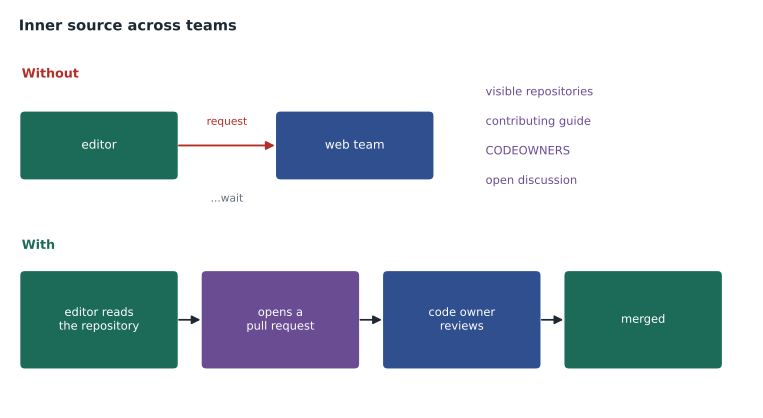
Inner source applies open source practices inside an organization. Repositories are made visible to colleagues across teams, through internal visibility on Enterprise or a base permission of Read on other plans; projects have clear READMEs and contributing guides; anyone can propose a change by pull request; designated maintainers, often listed in CODEOWNERS, review and decide; and decisions happen in the open in issues and discussions. The benefits are less duplicated work, faster fixes from the people who need them, shared knowledge, and better documentation, because outsiders to a team need it. Tidewater's inner source moment, in MSBA-161 lesson 11, was an editor fixing a typo in the TrailCheck site's footer herself instead of filing a request with the web team.
Forks, templates and discoverable repositories
The last skill brings together choices from earlier lessons. Forks are for contributing to someone else's project or building a variant that stays connected to it. Templates are for starting new projects from a standard structure with a fresh history. Discoverability is about helping people find a repository: a clear description, topics such as hiking-trails or open-data, a good README, a license, a website link, and starring and sharing; GitHub's Explore pages and search use these signals. For inner source, discoverability inside the organization matters as much: a pinned repository on the organization profile and a profile README that lists the main projects help colleagues find what already exists.
Worked problem
Fork, template or neither?
Three requests arrive. A trail club in another province wants to suggest a new field for the open-trail-report format. A volunteer wants to start a new guide to waterfalls using Tidewater's guidebook structure. A colleague wants to know whether Tidewater already has a tool for converting trail maps. What should each do?
Show solution
- Suggesting a change to an existing project: fork open-trail-report, make the change, and open a pull request; or start with a discussion.
- Starting a new project from a standard structure: use the style-guide template repository.
- Finding existing tools: search the organization's repositories by topic, which works because each has a description and topics.
Answer: A fork for the trail club, the template for the volunteer, and discoverable repositories for the colleague.
Making a first contribution
Questions often follow a newcomer through a first contribution, so it helps to know the usual path. Find a project and an issue labeled good first issue or help wanted; read the README, CONTRIBUTING.md and CODE_OF_CONDUCT.md; comment on the issue to say you would like to work on it, so no one duplicates the effort; fork the repository, create a branch, make the change and push it to the fork; open a pull request to the original repository that follows its template and links the issue; and respond to review. Maintainers of busy projects often ask newcomers to discuss larger changes in an issue or discussion first, so that nobody spends a weekend on a change the project will not accept.
| Step | Where it happens |
|---|---|
| Find a good first issue | The project's issues, filtered by label |
| Read the rules | README, CONTRIBUTING.md, CODE_OF_CONDUCT.md |
| Claim the work | A comment on the issue |
| Make the change | A branch in your fork |
| Propose it | A pull request to the original repository |
| Respond to review | Further commits to the same branch |
Profiles and public presence
A personal profile on GitHub shows pinned repositories, a contribution graph of activity over the past year, achievements, followers and an optional profile README, which appears when a repository has the same name as the account and contains a README. Organizations have a profile too, with pinned repositories and a README stored in the public .github repository, as Tidewater set up in MSBA-161 lesson 5. A clear profile makes a maintainer or project easier to trust and find, which is part of what the outline means by discoverable repositories. Contributions to private repositories can be shown on the graph as anonymous counts if the person chooses.
Moderation and healthy communities
Healthy communities need care as well as code. A code of conduct sets expectations, and maintainers enforce it with GitHub's moderation tools: hiding disruptive comments, locking heated conversations, setting temporary interaction limits that restrict who can comment on a public repository, reporting abuse to GitHub, and blocking users from an organization. Organization owners can give trusted people the moderator role to do this without full ownership. Malik uses interaction limits once a year, when a local news story sends a wave of new visitors to the project.
Malik's advice
At the end, Owen asked Malik what one thing he would want a GitHub Foundations candidate to understand about community. Malik said that most open source work is not code: it is answering questions, improving documentation, reviewing, triaging and welcoming people. "If an exam question asks how a non-developer can contribute to open source," he said, "every one of those is a right answer." Owen added that to his notes as the last line of the domain reviews.
Common mistakes
MistakeThinking public code without a license is open source.
InsteadOpen source needs a license that grants the rights to use, change and share.
MistakeConfusing following with watching.
InsteadFollowing shows a person's activity in your feed; watching controls repository notifications.
MistakeUsing a template to propose changes to an existing project.
InsteadFork it and open a pull request.
MistakeTreating inner source as making everything public.
InsteadInner source opens repositories to colleagues inside the organization.
Summary and key terms
- Open source gives users freedom and lower cost, contributors learning and visibility, and projects more help; it needs a license.
- GitHub supports open source with free Actions minutes, security features and Pages for public repositories, community tools and Sponsors.
- GitHub Sponsors funds developers through tiers; FUNDING.yml adds the Sponsor button.
- Following puts a person's activity in your feed; watching controls notifications; starring bookmarks.
- The Marketplace lists apps and actions; check permissions and publisher before installing.
- Inner source brings open source practices inside an organization; forks, templates and discoverability each fit different needs.
- Open source
- Software published under a license that allows anyone to use, study, change and share it.
- Permissive license
- An open source license with few conditions, such as MIT.
- Copyleft license
- A license requiring changed versions to be shared under the same terms, such as the GPL.
- GitHub Sponsors
- A way to fund open source developers and projects with monthly or one-time payments.
- FUNDING.yml
- A file in .github that adds a Sponsor button and funding links to a repository.
- Inner source
- Using open source practices for collaboration inside an organization.
- Topics
- Labels on a repository that help people find it by subject.
Practice problems
Work each problem on paper first, then reveal the answer to check.
Which file adds a Sponsor button to a repository?
Show answer
FUNDING.yml in the .github folder.
What does following a user do?
Show answer
Shows their public activity in your feed; it gives no access and no notifications.
Name two ways a non-developer can contribute to open source.
Show answer
Any two of documentation, answering questions, triaging, reviewing, translating or welcoming newcomers.
Lesson quiz · 5 questions
Score 60% or more to complete this lesson.
Create a free account to save your progress, take quizzes and earn a certificate.