
MSBA-169 · Lesson 6 of 12 · 22 min
Domain review: modern development
▶ Video coming soon A video version of this lesson is on the way.
Monday, April 19, began the second week. Modern development, the fourth area of the outline at 10 to 15 in 100, was where Owen's self-assessment had three crosses and where five of his thirteen baseline misses came from. It covers GitHub Actions, GitHub Copilot and its plans, GitHub Codespaces and dev containers, and the choice between github.dev and Codespaces. Tidewater uses Actions every day but not Codespaces, and Owen had only watched Priya use Copilot, so Priya planned a longer session, with Dmitri joining to show Copilot live. "You do not need to be a developer for these questions," she said. "You need to know what each tool is for, how it is offered, and how it differs from the one next to it."
GitHub Actions
GitHub Actions is GitHub's automation platform. A workflow, written in YAML and stored in the .github/workflows folder, runs automatically when an event happens, such as a push, a pull request, a new issue, a schedule or a manual trigger. A workflow contains one or more jobs; each job runs on a runner, a virtual machine that GitHub hosts or one an organization runs itself, and is made of steps, which run commands or use reusable actions from the Marketplace or another repository. Typical uses are continuous integration (building and testing every change), continuous deployment (publishing when main changes), and repository automation (labeling new issues, greeting first-time contributors, closing stale items).
name: Validate trail data
on:
  pull_request:
    paths: ["data/**"]
permissions:
  contents: read
jobs:
  validate:
    runs-on: ubuntu-latest
    steps:
      - uses: actions/checkout@v4
      - name: Check every report against the format
run: ./scripts/validate-data.sh data/| Term | Meaning |
|---|---|
| Workflow | An automated process defined in a YAML file in .github/workflows |
| Event | What starts a workflow, such as push, pull_request, schedule or workflow_dispatch |
| Job | A set of steps that runs on one runner; jobs can run in parallel or in sequence |
| Step | A single command or action within a job |
| Action | A reusable unit, often from the Marketplace, used with uses: |
| Runner | The machine that runs a job: GitHub-hosted or self-hosted |
GitHub-hosted runners are free for public repositories; private repositories get an allowance of minutes each month depending on the plan, as MSBA-161 lesson 10 showed: 2,000 on Free, 3,000 on Pro and Team, and 50,000 on Enterprise. Workflow results appear as checks on pull requests, which branch protection can require before merging.
Workflows often need credentials, such as a token for a publishing service. These are stored as encrypted secrets at the repository, environment or organization level and referred to by name in the workflow, never written into the YAML file; GitHub hides their values in logs. Variables hold non-secret settings the same way. Environments, such as production, can require a reviewer's approval before a job that deploys to them runs, which is how Tidewater makes sure the TrailCheck site is published only after Priya or Dmitri approves. The workflow's own token, GITHUB_TOKEN, is created for each run and expires when it ends; the permissions key limits what it can do.
Worked problem
Reading an event list
A workflow file begins with on: followed by push to main, pull_request, and schedule with a weekly time. A question asks how many different kinds of event can start it, and what happens when a pull request is opened.
Show solution
- Three event types are listed: push (limited to main), pull_request and schedule.
- Opening a pull request matches pull_request, so the workflow runs and reports its result as a check on the pull request.
- The schedule runs it weekly even if nothing changes, which suits link checks against outside websites.
Answer: Three kinds of event. Opening a pull request runs the workflow and shows its result as a check.
GitHub Copilot
GitHub Copilot is GitHub's AI assistant for development. Its core features, as the outline describes them, are code completions, suggestions that appear as you type in an editor; Copilot Chat, a conversation in the editor, on GitHub.com, in GitHub Mobile and elsewhere, for explaining code, answering questions, writing tests or fixing errors; agent mode in the editor, where Copilot plans and makes changes across several files, runs commands and iterates until a task is done, with you approving; and the Copilot coding agent, to which you can assign an issue on GitHub so that it works in the background in its own environment and opens a draft pull request for review. Copilot offers a choice of several AI models from different providers, and users or administrators can choose among those their plan allows.
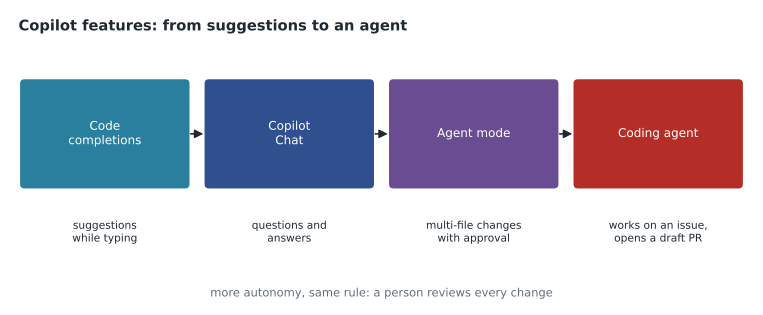
Whatever the feature, a person stays responsible for the result. Suggestions can be wrong, insecure or out of date, so they are reviewed like any colleague's work, and the coding agent's pull requests go through the same review and checks as everyone else's. Dmitri's demonstration made the point: Copilot drafted a validation rule for trail reports in seconds, and the rule missed reports with no date, which the existing tests caught.
Two Copilot settings come up in questions about responsible use. A public code filter, where enabled, blocks suggestions that match public code closely, which reduces the chance of copying licensed code without knowing it; where suggestions are allowed to match, Copilot can show code referencing with the matching repositories and their licenses. Content exclusion, on Business and Enterprise, lets administrators keep chosen files or repositories, such as those holding secrets or confidential contracts, out of Copilot's context entirely. Both are organization or enterprise policies, which is why the outline places Copilot policy under administration as well as modern development.
Copilot plans
The outline asks for the differences between Copilot for individuals and for organizations. Plans and prices change often, so learn the shape rather than every figure, and check GitHub's Copilot plans page before the exam.
| Plan | For | Key differences |
|---|---|---|
| Copilot Free | Individuals trying it out | A limited monthly number of completions and chat requests |
| Copilot Pro and Pro+ | Individual developers | Unlimited completions, more premium requests and models; Pro+ has the most |
| Copilot Business | Organizations | Seats assigned by the organization, central policies, audit logs, IP indemnity, and no use of business code to train models |
| Copilot Enterprise | Enterprises on GitHub Enterprise Cloud | Everything in Business, plus more premium requests and features that draw on the organization's knowledge |
The individual plans are bought by a person for their own account. Business and Enterprise are bought by an organization or enterprise, which assigns seats to members and controls policies: which features are allowed, which models, whether suggestions matching public code are blocked, and whether content exclusions keep certain files out of Copilot's context. Lesson 8 returns to Copilot policy as an administration topic. MSBA-161 lesson 10 gave the Business and Enterprise prices as 19 and 39 US dollars per seat per month.
Worked problem
Which plan?
Tidewater wants Copilot for its three web developers. Rosa needs to control which features are allowed, keep a record of usage, and be sure company code is not used to train models. Tidewater uses GitHub Team, not Enterprise Cloud. Which plan fits, and what would three seats cost a month at 19 US dollars each?
Show solution
- Central policies and usage records rule out the individual plans.
- Copilot Enterprise requires GitHub Enterprise Cloud, which Tidewater does not have.
- Copilot Business meets the needs on a Team plan.
- Cost: 3 times 19 is 57 US dollars a month.
Answer: Copilot Business, at 57 US dollars a month for three seats.
GitHub Codespaces
GitHub Codespaces is a complete development environment in the cloud. A codespace is a container running on a virtual machine that GitHub hosts, with the repository cloned, the tools installed and an editor attached: Visual Studio Code in the browser, VS Code on the desktop, or a JetBrains IDE. It has a terminal, can run and debug the project, and can forward ports so you can preview a website. Codespaces are useful for onboarding, because a newcomer can start working in minutes without installing anything; for working from any computer; and for keeping environments identical across a team.
The environment is defined by a dev container configuration, a devcontainer.json file in a .devcontainer folder. It names a base image or Dockerfile, the tools and features to add, editor extensions and settings, ports to forward, and commands to run when the container is created. Because the file lives in the repository, everyone who opens a codespace gets the same setup, and changes to it are reviewed like code. Without one, GitHub uses a default image with common languages and tools.
{
  "name": "TrailCheck",
  "image": "mcr.microsoft.com/devcontainers/javascript-node:20",
  "features": {
    "ghcr.io/devcontainers/features/github-cli:1": {}
  },
  "forwardPorts": [4000],
  "postCreateCommand": "npm install",
  "customizations": {
    "vscode": { "extensions": ["DavidAnson.vscode-markdownlint"] }
  }
}
Codespaces are billed for compute time, by the hour and the number of cores, and for storage, by the gigabyte per month. Personal accounts get a free monthly allowance, which MSBA-160 lesson 10 gave as 120 core hours and 15 GB-month on Free and 180 core hours and 20 GB-month on Pro. Organizations pay for their members' codespaces if they enable it. A codespace stops after a period of inactivity, 30 minutes by default, and stopped codespaces are deleted after a retention period, so uncommitted work should be pushed.
Worked problem
Core hours in an allowance
Lena uses a 4-core codespace for 2 hours a day on 15 working days. How many core hours does she use, and does it fit in a 120 core-hour allowance?
Show solution
- Hours of use: 2 times 15 is 30 hours.
- Core hours: 30 hours times 4 cores is 120 core hours.
- That uses the whole 120 core-hour allowance, before storage.
- A 2-core machine would use 60 core hours for the same work.
Answer: 120 core hours, exactly the allowance. Choosing a 2-core machine would halve it.
A codespace has a simple lifecycle. You create one from the Code button on a repository or branch, choosing a machine size; it starts, runs while you work, stops after the idle timeout or when you stop it, and can be restarted with your files intact; and it is deleted when you delete it or when the retention period after stopping runs out. Organizations can set prebuilds, which prepare codespaces in advance for a branch so that start-up takes seconds rather than minutes, and can set policies on machine sizes, idle timeouts and who may create codespaces at the organization's expense. A codespace can be shared temporarily by forwarding a port publicly or within the organization, which is how a reviewer can preview a website change without creating a codespace of their own.
github.dev versus Codespaces
Pressing the full stop key, ., while viewing a repository on GitHub, or changing github.com to github.dev in the address, opens github.dev, a lightweight editor in the browser. It is free, opens instantly, and is good for editing several files, searching and making a commit or pull request. But it has no terminal and no compute: you cannot run, build, test or debug code, and extensions that need a running environment do not work. When you need any of those, github.dev offers to continue in a codespace.
| Need | github.dev | Codespaces |
|---|---|---|
| Fix a typo in three Markdown files and open a pull request | Ideal | Works, but more than needed |
| Run the test suite | Not possible | Yes |
| Preview the website on a forwarded port | Not possible | Yes |
| Cost | Free | Compute and storage, with a free allowance |
| Start-up | Instant | Under a minute, or faster with prebuilds |
| Terminal | No | Yes |
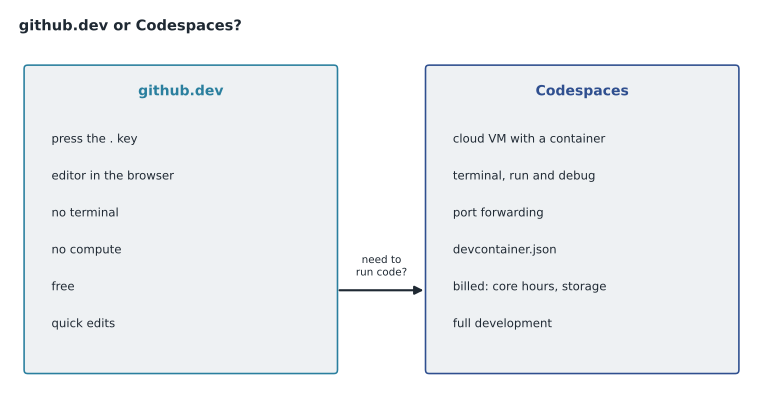
Owen's most frequent baseline mistake in this area was choosing Codespaces for a quick documentation edit. The exam rewards the simplest tool that does the job. If a scenario mentions only editing and committing, github.dev or the web editor is the answer; if it mentions running, building, testing, debugging, a terminal or a consistent environment, it is Codespaces.
Common mistakes
MistakeChoosing Codespaces for a quick text edit.
InsteadUse github.dev or the web editor; Codespaces is for running code.
MistakeThinking github.dev has a terminal.
Insteadgithub.dev has no terminal and no compute.
MistakeTreating Copilot output as finished work.
InsteadReview Copilot suggestions and agent pull requests like any change.
MistakeAssuming Copilot Enterprise works on any plan.
InsteadCopilot Enterprise needs GitHub Enterprise Cloud; Business works with Team.
Summary and key terms
- Actions runs YAML workflows in .github/workflows, triggered by events, made of jobs and steps on runners.
- Copilot offers completions, Chat, agent mode in the editor and a coding agent that opens draft pull requests, with a choice of models.
- Free, Pro and Pro+ are for individuals; Business and Enterprise are for organizations, with seats and central policies.
- Codespaces are cloud development environments defined by devcontainer.json and billed by core hours and storage.
- github.dev is a free browser editor with no terminal or compute, for quick edits.
- Choose the simplest tool that fits: github.dev to edit, Codespaces to run.
- Workflow
- An automated process in GitHub Actions defined in a YAML file.
- Runner
- The machine that runs a workflow job, hosted by GitHub or self-hosted.
- Agent mode
- A Copilot mode in the editor that plans and makes multi-file changes with your approval.
- Copilot coding agent
- A Copilot agent that works on an assigned issue in the background and opens a draft pull request.
- Codespace
- A cloud-hosted development environment running in a container.
- Dev container
- A configuration, devcontainer.json, that defines a codespace's tools and settings.
- github.dev
- A lightweight browser editor for repositories, with no terminal or compute.
Practice problems
Work each problem on paper first, then reveal the answer to check.
Where are GitHub Actions workflows stored?
Show answer
In YAML files in the .github/workflows folder.
What file defines a codespace's environment?
Show answer
devcontainer.json, usually in a .devcontainer folder.
Which Copilot plan suits an organization on GitHub Team that needs central policies?
Show answer
Copilot Business.
Lesson quiz · 5 questions
Score 60% or more to complete this lesson.
Create a free account to save your progress, take quizzes and earn a certificate.