
MSBA-169 · Lesson 12 of 12 · 32 min
Final review
▶ Video coming soon A video version of this lesson is on the way.
The last session, on Tuesday, April 27, was the day before the exam. Priya, Rosa, Grace and Malik all came, Malik by video again, and the meeting room in Portland had a plate of oatcakes on the table. Priya had planned it in three parts: a one-page review of every area, a final set of mixed questions, and the exam-day checklist. "No new material today," she said. "Today is about seeing that you already know it." This lesson follows that plan. It ends with what happens after the exam, whatever the result, and with where the GitHub Foundations certification can lead.
The one-page review
Owen's one-page review had a box for each area, with the facts he most needed to recall and the confusable pairs from lesson 10. He wrote it himself from memory first, then checked it against his notes, which is retrieval practice in its simplest form. The table below is a cleaned-up version.
| Area and weight | Must recall | Watch for |
|---|---|---|
| Git and GitHub basics (25 to 30) | Git versus GitHub; repository, commit, branch, merge; working directory to remote; personal, organization and enterprise accounts; GitHub Flow; Markdown; Desktop and Mobile | Clone versus fork; committed but not pushed |
| Repositories (10 to 15) | README, LICENSE, CONTRIBUTING, CODEOWNERS, SECURITY; templates; insights and Pulse; stars; archiving | Template versus fork; no license means all rights reserved |
| Collaboration (10 to 15) | Issues, pull requests, discussions; closing keywords; templates and filters; reviews and merge methods; notifications; gists, wikis, Pages | Keywords close only on merge into the default branch; secret gists are not private |
| Modern development (10 to 15) | Actions workflows, events, jobs, runners; Copilot completions, Chat, agent mode, coding agent; plans; Codespaces and devcontainer.json; github.dev | github.dev has no terminal; Copilot Enterprise needs Enterprise Cloud |
| Project management (5 to 10) | Projects across repositories; table, board, roadmap; fields and views; labels and milestones; built-in workflows; saved replies; insights | Labels belong to repositories, fields to projects |
| Privacy, security and administration (10 to 15) | 2FA and passkeys; roles Read to Admin; least privilege; EMUs; Copilot policy; public, private, internal; branch protection and rulesets; organization settings and teams | Internal versus private; the strictest rule wins |
| Community (5 to 10) | Open source and licenses; how GitHub supports open source; Sponsors and FUNDING.yml; following; Marketplace; inner source; forks, templates, discoverability | Following versus watching versus starring |
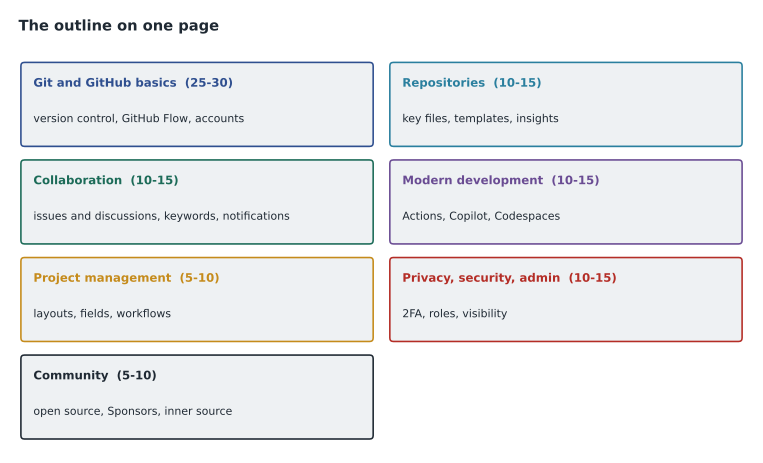
Writing the page from memory took Owen eighteen minutes, and checking it took five. He had missed only two items, the merge methods in collaboration and project templates in project management, and he added both in a different color so they would stand out on a last read the next morning. The value of the page is less the finished summary than the act of producing it: every item he could recall without looking was one he would recall in the exam.
A final mixed set
Priya read ten mixed questions aloud, one from each area and three on confusable pairs, and Owen answered each with a reason, as he would think it through in the exam. Seven of them are worked here, because the reasoning matters more than the answers.
Worked problem
Question 1: the stuck commit
Grace says Owen's correction is not on GitHub, though he committed it an hour ago. What is the most likely cause?
Show solution
- A commit is recorded in the local repository.
- It reaches GitHub only when pushed.
- The fix is git push, or Push origin in GitHub Desktop.
Answer: The commit was not pushed.
Worked problem
Question 2: closing an issue
Which pull request description closes issue 60 when the pull request is merged into main?
Show solution
- "Related to #60" only creates a reference.
- "Resolves #60" uses a closing keyword.
- Merging into main, the default branch, triggers the close.
Answer: "Resolves #60".
Worked problem
Question 3: the right environment
A new contractor must run TrailCheck's tests on the first morning, from a borrowed laptop, with no time to install tools. What should the team provide?
Show solution
- Running tests needs compute and a terminal, which rules out github.dev.
- A codespace with a dev container configuration gives a ready environment in the browser.
- Installing tools locally is ruled out by the scenario.
Answer: A GitHub codespace defined by the repository's devcontainer.json.
Worked problem
Question 4: least privilege
A volunteer should be able to label, assign and close issues on open-trail-report, and must not push code. Which role?
Show solution
- Read cannot manage issues.
- Triage manages issues and pull requests without push access.
- Write would allow pushing.
Answer: Triage.
Worked problem
Question 5: community
A user wants to see a maintainer's new public repositories and releases in their feed, without notifications. What should they do?
Show solution
- Watching gives notifications from a repository.
- Starring only bookmarks.
- Following a user puts their public activity in your feed.
Answer: Follow the maintainer.
Worked problem
Question 6: the missing tab
A contributor says there is no Discussions tab on open-trail-report, though the maintainers want community questions there. What is the cause and who can fix it?
Show solution
- Discussions is a feature that is switched on per repository, or for an organization.
- It is enabled in the repository's General settings.
- Only someone with the Admin role can change those settings.
Answer: Discussions is not enabled; a repository admin turns it on in Settings.
Worked problem
Question 7: protecting tags
The team wants to stop anyone except the release managers from creating or deleting tags that start with v. Which feature fits?
Show solution
- Branch protection rules apply to branches only.
- Rulesets can target tags as well as branches, with a bypass list.
- A tag ruleset for v* with the release managers allowed to bypass does exactly this.
Answer: A tag ruleset, as Tidewater set up on trailcheck in MSBA-161.
Owen answered all ten correctly, and, more importantly, gave the right reason each time. Rosa pointed out that he had stopped hesitating on the pairs that had cost him marks a week before, which was the real measure of readiness.
The exam-day checklist
Grace, who runs the print schedule and does not trust memory for anything important, turned the logistics into a checklist. Owen printed it and put it by his door.
| When | Check |
|---|---|
| A week before (done April 21) | Run the OnVUE system test on the laptop and network he will use |
| The day before | Confirm the appointment time and time zone in the confirmation email; check the name on his ID matches the booking exactly |
| The day before | Clear the desk and the room; plan for no interruptions; charge the laptop |
| The day before | Click through the exam sandbox once; stop studying by 9 p.m. |
| Exam morning | Normal breakfast; close every other application; silence and remove the phone after check-in |
| 8:30 | Start online check-in: ID photos, room photos, wait for the proctor |
| 9:00 to about 10:40 | 100 minutes of answering time; checkpoints at minutes 30, 60 and 85 |
| After the exam | Read the result; save the score report |
At a test center the checklist is similar, with travel instead of a system test: plan to arrive early, bring the right ID, and expect to store belongings in a locker. Either way, the aim is the same: nothing about the day should require a decision.
In the exam
The last part of the session was a short list of rules for the 100 minutes, each one drawn from lessons 2 and 10. Owen read them aloud and Priya stopped him after each to explain why.
| Rule | Why |
|---|---|
| Read the stem twice; restate negatives | Misreading caused a quarter of the practice mistakes |
| Count selections against "Choose two" | Multiple-select questions need the exact number |
| Answer every question | There is no penalty for wrong answers |
| Mark and move on after about two minutes | One stuck question can cost three later ones |
| Pick the simplest option that fully meets the need | Overthinking leads to elaborate wrong answers |
| Change an answer only with a specific reason | Vague doubts are a second guess, not a correction |
| Use the review screen in the last 15 minutes | Marked questions get a calm second look |
Worked problem
Using the review time
With 15 minutes left, Owen has answered all questions and marked 9. If he spends about a minute and a half on each, how much time remains for a final check that nothing is unanswered?
Show solution
- Time for marked questions: 9 times 1.5 is 13.5 minutes.
- Time left: 15 minus 13.5 is 1.5 minutes.
- That is enough to scan the review screen for any unanswered item before submitting.
Answer: About a minute and a half, enough for a final scan.
Managing nerves
Even a well-prepared candidate feels nervous, and a little tension sharpens attention. Too much narrows it, which is when people misread questions. Priya's advice was practical. Arrive at the desk early, so check-in is not rushed. In the first minute, before reading question one, take three slow breaths and look at the timer once, so the clock feels like a tool rather than a threat. If a run of hard questions comes early, remember that forms mix difficulties and that one hard question says nothing about the next. And if the mind goes blank on a topic, mark the question and move on; the answer often returns while reading a later question on a related feature.
Malik added that the proctor is not an adversary. If something goes wrong, such as the connection dropping or the screen freezing, the right response is to stay in view and use the chat or wait for the proctor to reconnect, not to walk away. Pearson VUE can often resume the exam, and a technical failure recorded with a case number is one of the few situations in which Microsoft waives the retake waiting period.
After the exam
If Owen passes, the certification appears on his Microsoft Learn profile, from which he can share it on professional profiles and print a certificate. It does not expire. If he does not pass, lesson 11's plan applies: keep the score report, wait at least a day, recalculate priorities from it, study for two or three weeks, and rebook within the retake policy. Either way, Priya asked him to write a short note for Hélène while the experience was fresh: what surprised him, what he would study differently, and which question styles appeared.
Rosa added one administrative step: the receipt goes to the training budget so the exam fee is reimbursed in the next pay run.
Where the certification leads
GitHub Foundations is the base for GitHub's other certifications, each of which has its own preparation program that builds on this course and its two predecessors. GitHub Actions covers workflows and automation in depth. GitHub Administration covers enterprise and organization management, identity and policy. GitHub Advanced Security covers code scanning, secret scanning and supply chain security. GitHub Copilot covers using and managing Copilot. Owen's own next step was more modest and more practical: he would take over the triage rota for open-trail-report from Malik for the summer, putting the community skills into practice.
| Certification | Focus | Who it suits |
|---|---|---|
| GitHub Actions | Workflows, runners, reusable actions, deployment | Developers and DevOps engineers |
| GitHub Administration | Enterprise and organization management, identity, policy | Administrators like Rosa |
| GitHub Advanced Security | Code scanning, secret scanning, dependency security | Security managers and developers |
| GitHub Copilot | Using and governing Copilot | Developers and administrators |
Owen's note for Hélène, written that evening before he put his books away, was four lines long. Study from the current outline and nothing older. Learn the reason each feature exists, because the questions test reasons. Build the confusable pairs table early and read it every day. And treat the logistics as part of the exam, because the only marks you can lose before the first question are the ones a checklist saves. Priya added the note to the shared study folder, with the one-page review and the error log template, so the next candidate starts where Owen finished rather than where he began.
Owen's last word
At the end of the session, Grace asked Owen what had changed most since November, when he had first asked what a commit was. He said it was not the facts. It was that he now knew why each feature existed, so a question about a feature he had never used could still be reasoned out. That, Priya said, is exactly what a foundations exam measures. The meeting ended at 1:00, and Owen went home early, as the plan said.
Common mistakes
MistakeStudying new material the day before the exam.
InsteadReview what you know, check logistics, and stop early.
MistakeLeaving logistics to the morning.
InsteadWork through a checklist days before and the day before.
MistakeDiscarding the score report after a pass.
InsteadKeep it; it is useful for the next certification and for colleagues.
MistakeTreating the certification as the end.
InsteadUse it as a base for practice and for the next GitHub certifications.
Summary and key terms
- A one-page review lists what to recall and the trap to watch in each of the seven areas.
- Final practice should check reasoning, not only answers.
- An exam-day checklist removes decisions: system test, ID, room, sandbox, early night, check-in at 8:30.
- In the exam: restate the stem, count selections, answer everything, mark and move on, and use the review screen.
- After a pass, the certification appears on the Microsoft Learn profile and does not expire; after a fail, plan the retake from the score report.
- GitHub Foundations leads to the Actions, Administration, Advanced Security and Copilot certifications.
- One-page review
- A summary of every exam area written from memory, then checked.
- Exam-day checklist
- A list of logistics checks for the week, day and morning of the exam.
- Score report
- The report after an exam showing performance by area.
- Certification profile
- The Microsoft Learn record of a candidate's exams and certifications.
Practice problems
Work each problem on paper first, then reveal the answer to check.
Name three checks for the day before an online exam.
Show answer
Any three of: confirm the time and time zone, check the ID name, clear the room and desk, click through the sandbox, charge the laptop, stop studying early.
What should you do if a question takes more than about two minutes?
Show answer
Choose the best answer, mark it for review and move on.
Which GitHub certification suits an organization administrator?
Show answer
GitHub Administration.
Lesson quiz · 5 questions
Score 60% or more to complete this lesson.
Create a free account to save your progress, take quizzes and earn a certificate.