
MSBA-169 · Lesson 8 of 12 · 24 min
Domain review: privacy, security and administration
▶ Video coming soon A video version of this lesson is on the way.
Rosa Delgado led the session on Wednesday, April 21, as she had promised. Privacy, security and administration carries 10 to 15 in 100 of the exam, and Owen had studied most of it in depth in March. His dots were on Enterprise Managed Users and on Copilot policy, both added to the outline in January 2026, and on the difference between internal and private repositories. "The exam asks what these controls are for and who uses them," Rosa said. "You already set half of them up with me." The session covered securing accounts with two-factor authentication and passkeys, permissions and roles, Enterprise Managed Users, Copilot policy, repository visibility and branch protection, and organization settings and teams.
Securing accounts: 2FA and passkeys
Two-factor authentication, 2FA, requires a second proof of identity in addition to a password. GitHub supports an authenticator app that generates time-based codes, security keys and passkeys, GitHub Mobile as a second factor, and text messages in some regions, which are the least secure option. GitHub requires 2FA for everyone who contributes code on GitHub.com, and organization owners can require 2FA for all members, outside collaborators and billing managers; anyone without it is removed from the organization until they enable it. Every account should save its recovery codes somewhere safe, because they are the way back in if the second factor is lost.
A passkey is a modern credential based on public-key cryptography, stored on a device or in a password manager and unlocked with a fingerprint, face or device PIN. It resists phishing, because it works only on the real GitHub site, and it can replace both the password and the second factor for signing in. On GitHub, a passkey can be used to sign in without a password and also counts as a second factor. Security keys are physical devices that work the same way. The exam outline names passkeys explicitly, so expect a question on why they are stronger than codes: they cannot be typed into a fake site.
| Method | Strength | Notes |
|---|---|---|
| Password only | Weak | Not acceptable for contributors |
| Text message code | Better than nothing | Vulnerable to SIM swapping and phishing |
| Authenticator app code | Good | Codes can still be phished |
| GitHub Mobile | Good | Approve sign-ins on a registered phone |
| Passkey or security key | Strongest | Phishing-resistant; can replace the password |
Other credentials
Signing in through the browser is only one way to reach GitHub. Git on the command line and other tools authenticate with personal access tokens or SSH keys. A fine-grained personal access token is limited to chosen repositories and permissions and has an expiry date, which makes it far safer than a classic token, whose scopes are broad. Organizations can require approval for fine-grained tokens and can block classic tokens altogether. An SSH key pair lets a computer push and pull without typing a password; the private key stays on the computer and the public key is added to the account. Tokens and keys should be named for what they are used for, given the shortest sensible lifetime, and revoked when no longer needed, and GitHub lists every one in the account settings so this is easy to review.
Worked problem
Which credential for the script?
Rosa's nightly backup script needs to read three private repositories and nothing else, for one year. Which credential should she create?
Show solution
- The script needs read access to contents on three named repositories only.
- A classic token with the repo scope would reach every repository Rosa can access.
- A fine-grained token can be limited to those three repositories, to read-only contents, and set to expire in a year.
- Better still for automation that outlives one person: a GitHub App, as MSBA-161 lesson 6 explained.
Answer: A fine-grained personal access token limited to the three repositories with read-only access and a one-year expiry, or a GitHub App.
Permissions and roles
Permissions and roles
MSBA-161 covered roles in depth; the exam expects you to recognize them and choose correctly. Organization roles are owner, member, and specialist roles such as billing manager, moderator, security manager and GitHub App manager; outside collaborators have access only to the repositories they are given. Repository roles are, from least to most, Read, Triage, Write, Maintain and Admin. A person's effective role is the highest they receive from any source: the organization's base permission, their teams or a direct grant. The principle of least privilege says to give the lowest role that lets someone do their job.
| Role | Can | Cannot |
|---|---|---|
| Read | View, clone, open issues and comment | Push |
| Triage | Manage issues and pull requests: labels, assignees, closing | Push |
| Write | Push to branches, merge pull requests | Change settings |
| Maintain | Manage the repository without sensitive settings | Delete, transfer or change visibility |
| Admin | Everything, including settings, protection and deletion | (full control) |
Worked problem
Choosing the least role
A volunteer moderator for open-trail-report needs to label and close issues and mark duplicates, but should never change code. A new editor needs to push corrections to branches and merge approved pull requests. What roles fit?
Show solution
- Labeling and closing issues without pushing is exactly Triage.
- Pushing and merging is Write.
- Maintain or Admin would give more than either needs.
Answer: Triage for the volunteer, Write for the editor.
Enterprise Managed Users
Normally, people use their own personal accounts to join organizations, and they keep those accounts when they leave. Enterprise Managed Users, EMUs, is an option for GitHub Enterprise Cloud in which the company creates and controls the accounts itself. User accounts are created and removed from the company's identity provider, such as Microsoft Entra ID or Okta, through SCIM provisioning; people sign in with single sign-on; their usernames and profile details come from the company; and managed users cannot create public content or collaborate outside the enterprise, for example by opening issues on other public repositories. The trade-off is control against openness: EMUs suit companies that must own every identity and keep all work inside, and do not suit open source contribution with the same account.
| Personal accounts in an enterprise | Enterprise Managed Users | |
|---|---|---|
| Who owns the account | The person | The company |
| Created by | The person signing up | The identity provider through SCIM |
| Sign-in | GitHub credentials, optionally with SAML single sign-on for the organization | Single sign-on through the identity provider |
| Public contributions | Allowed | Not allowed outside the enterprise |
| When someone leaves | They keep their account; access is removed | The account is suspended by the identity provider |
Copilot policy for organizations
When an organization or enterprise buys Copilot Business or Enterprise, owners decide who gets a seat and set policies that apply to every seat. Policies cover which features are enabled, such as Copilot in the IDE, on GitHub.com, in the CLI, the coding agent or preview features; which AI models are available; whether suggestions matching public code are allowed or blocked; and content exclusions, which keep chosen files or repositories out of Copilot's context. In an enterprise, enterprise owners can set a policy for all organizations or let each organization decide. Usage is visible in Copilot metrics and audit logs. The exam asks what can be controlled centrally and at which level, rather than where each switch is.
Worked problem
Policy levels
Tidewater's partner publisher has an enterprise with three organizations. The enterprise owners want the coding agent off everywhere, but want each organization to choose its own AI models. How should they set the policies?
Show solution
- A policy set at the enterprise level applies to every organization and cannot be overridden.
- Set the coding agent policy to disabled at the enterprise level.
- Leave the model policy as "let organizations decide", so each organization's owners choose.
Answer: Disable the coding agent at the enterprise level; delegate model choice to the organizations.
Repository visibility
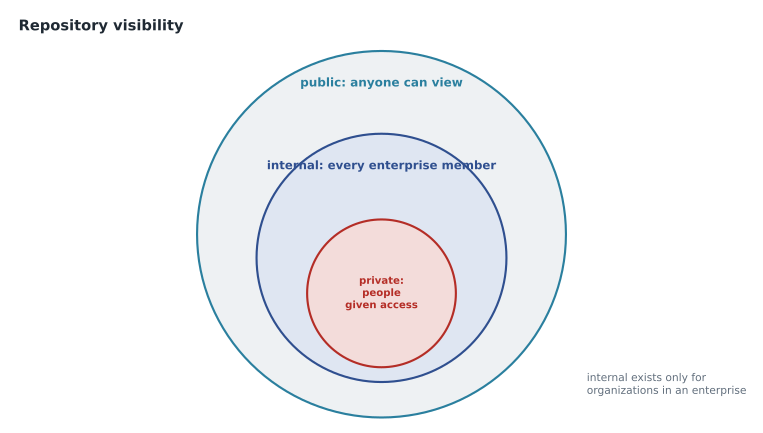
Repositories have three possible visibilities. Public repositories can be seen by anyone on the internet, although only people with access can push. Private repositories can be seen only by people who have been given access, directly or through teams. Internal repositories exist only for organizations in an enterprise: every member of the enterprise can see them, but no one outside it can, which supports inner source. Changing visibility is an Admin action in the danger zone, and making a private repository public exposes its whole history, so secrets committed long ago become visible.
Branch protection and rulesets
Branch protection rules and rulesets stop accidental or unreviewed changes to important branches. They can require pull requests before merging, a number of approving reviews, review from code owners, passing status checks, resolved conversations, signed commits or linear history, and they can block force pushes and deletion. Rulesets, the newer system, can layer several sets on the same branch, protect tags as well as branches, be switched off without deleting them, and be seen by anyone with read access. Where several rules apply, the most restrictive wins.
Worked problem
Which rule applies?
Main on trailcheck has a branch protection rule requiring one approval and a ruleset requiring two approvals and a passing validate-data check. A pull request has one approval and a passing check. Can it merge?
Show solution
- Both apply, because rules layer.
- The strictest approval requirement is two.
- The pull request has only one, so it cannot merge yet.
Answer: No. It needs a second approval.
Security features in one paragraph
The outline's security skills overlap with the features MSBA-161 lessons 7 to 9 covered, and a foundations question may name any of them. The dependency graph lists a repository's dependencies; Dependabot alerts warn when one has a known vulnerability, Dependabot security updates open pull requests to fix it, and Dependabot version updates keep dependencies current on a schedule. Secret scanning finds committed credentials, and push protection blocks a push that contains one before it reaches GitHub. Code scanning analyzes code for weaknesses. Private vulnerability reporting lets outsiders report a weakness privately through the Security tab. On public repositories most of these are free; on private repositories several are part of the paid GitHub Secret Protection and GitHub Code Security products.
Organization settings and teams
Organization owners manage the settings that apply across repositories. The ones most likely in questions are the base permission for members, member privileges such as who may create repositories and of which visibility, whether members may fork private repositories, required 2FA, verified domains for email notifications, third-party access restrictions for OAuth apps, and the audit log, which records who did what and when. Teams group members, can be nested so that child teams inherit the parent's access, are given repository roles in one place, can be mentioned with @organization/team, and can be requested as reviewers.
| Owner wants to | Setting |
|---|---|
| Make sure no one can sign in with only a password | Require two-factor authentication |
| Stop members creating public repositories | Member privileges: repository creation |
| See who changed a repository's visibility | Audit log |
| Give the editors access to trail-notes in one step | Grant the editors team the Write role |
| Give members read access to everything by default | Base permission: Read |
Two further organization controls appear in questions about privacy. Verified domains let an organization confirm that it owns a domain, show a verified badge, and route notification emails for organization activity only to members' addresses on that domain. And an organization on GitHub Enterprise Cloud can require SAML single sign-on without moving to EMUs, so members keep their personal accounts but must also authenticate through the company's identity provider to reach organization resources. Rosa summed up the area for Owen as three questions that any scenario reduces to: who is this person, what may they reach, and what is the evidence afterwards.
What Owen fixed
Owen's three dots became ticks with one sentence each. Enterprise Managed Users: company-owned accounts from the identity provider, with no public contributions. Copilot policy: seats and policies set by owners, at enterprise or organization level. Internal versus private: internal is visible to the whole enterprise, private only to people given access. Rosa added a fourth, unprompted: recovery codes are the answer when a question asks how to regain access after losing a phone.
Common mistakes
MistakeCalling text-message codes the strongest second factor.
InsteadPasskeys and security keys are strongest because they resist phishing.
MistakeGiving Admin when Write or Triage would do.
InsteadApply least privilege: the lowest role that fits the job.
MistakeUsing EMUs for staff who contribute to public open source with the same account.
InsteadManaged users cannot contribute publicly outside the enterprise.
MistakeTreating internal as another name for private.
InsteadInternal is visible to every enterprise member; private only to people given access.
Summary and key terms
- 2FA adds a second proof of identity; passkeys and security keys are phishing-resistant, and recovery codes restore access.
- Repository roles run Read, Triage, Write, Maintain, Admin; effective access is the highest from any source.
- Enterprise Managed Users are company-owned accounts provisioned from an identity provider, with no public contributions.
- Owners assign Copilot seats and set policies on features, models, public code matching and content exclusions.
- Visibility is public, private, or internal for enterprise organizations.
- Branch protection and rulesets layer, with the strictest rule winning; organization settings and teams manage access at scale.
- Two-factor authentication
- Signing in with a second proof of identity in addition to a password.
- Passkey
- A phishing-resistant credential unlocked on a device, which can replace a password.
- Recovery codes
- One-time codes that restore access if the second factor is lost.
- Least privilege
- Giving the lowest level of access that lets someone do their job.
- Enterprise Managed Users
- Company-owned GitHub accounts created and controlled through an identity provider.
- Internal repository
- A repository visible to every member of an enterprise and no one outside it.
- Audit log
- A record of actions taken in an organization or enterprise.
Practice problems
Work each problem on paper first, then reveal the answer to check.
Why is a passkey stronger than an authenticator code?
Show answer
It works only on the real site, so it cannot be phished.
Which repository role lets someone manage issues but not push?
Show answer
Triage.
Who can see an internal repository?
Show answer
Every member of the enterprise, and no one outside it.
Lesson quiz · 5 questions
Score 60% or more to complete this lesson.
Create a free account to save your progress, take quizzes and earn a certificate.