
MSBA-131 · Lesson 9 of 12 · 19 min
Sharing and permissions
▶ Video coming soon A video version of this lesson is on the way.
The first real test of the equipment system came on the morning Maribeth shared the canvas app with forty instructors in the Business Studies department. By nine o'clock she had six messages. Four said the app opened but the equipment list was empty. One said the Send button showed an error. One asked why he could see a button labeled "Delete all test data" that Maribeth had added for herself and forgotten. Every one of those problems was about permissions, and none of them had appeared while Maribeth tested the app as its owner.
Sharing is where many Power Platform projects stumble, because access works in layers and each tool has its own rules. This lesson explains those layers, how to share canvas apps, model-driven apps, flows and agents, how Dataverse security decides what each person can see and change, and how administrators use data policies to keep sharing safe.
Three layers of access
Every Power Platform solution has three separate layers of access, and a person needs the right permission at each layer for things to work.
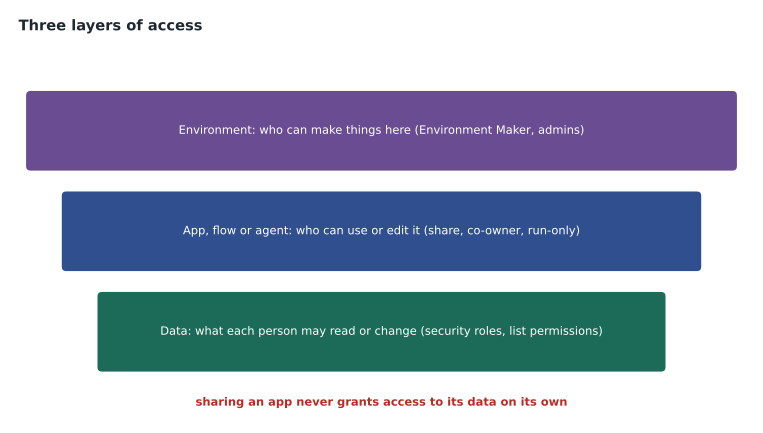
Environment access decides who can create and manage things in an environment. In an environment without Dataverse, there are two roles: Environment Admin and Environment Maker. In an environment with Dataverse, these become security roles such as System Administrator, System Customizer and Environment Maker, alongside Basic User, which lets people use apps and work with their own data. In the tenant's default environment, every licensed user is a maker by default, which is why organizations usually create separate environments for important solutions.
Resource access decides who can use or edit a specific app, flow or agent. Each tool has its own sharing options, described below. Data access decides what a person can read or change in the data the resource uses: permissions on a SharePoint list, roles in Dataverse, or rights in another system. The single most important rule of this lesson is that sharing a resource never grants access to its data on its own. That explains Maribeth's empty lists: the instructors could open the app but had no permission on the Equipment table.
Sharing canvas apps
A canvas app is shared from its Share command in Power Apps. The maker enters people or Microsoft Entra security groups and chooses whether each is a user, who can run the app, or a co-owner, who can also edit and share it. An app can be shared with the whole organization for broad tools. The share panel can send an email invitation with a link. If the app uses Dataverse, the share panel also lets the maker assign the security roles the users need, which covers the data layer for Dataverse in the same step. For other data sources, such as a SharePoint list, the maker must grant permissions in that service separately.
Sharing with security groups rather than individuals is the better habit. When a new instructor joins Business Studies, IT adds them to the department's group and they get the app automatically, and when someone leaves, removing them from the group removes access. Users also need a license that covers the app's connectors: premium connectors such as Dataverse require each user to have a premium license, as lesson 1 explained.
Worked problem
Fixing the first morning's six messages
Maribeth shared the canvas app with the Business Studies security group as users. Four people saw empty lists, one got an error on Send, and one saw a Delete all test data button. What caused each problem and what fixed it?
Show solution
- Empty lists: the group had no Dataverse security role, so the app could not read Equipment. Fix: assign a custom role, Equipment Requester, with read access to Equipment and Campus at organization level.
- Error on Send: the same role had no create privilege on Requests. Fix: add create on Requests and read on the user's own Requests (user level) to the role.
- Visible test button: the button had no condition on its Visible property. Fix: remove it from the published app. Hiding controls is not security; the role is what protects the data.
- Retest as a user, not as the owner, using a test account that belongs only to the requester group.
Answer: Two missing privileges in Dataverse and one leftover control. All three would have been found by testing with a user account before sharing, which became a fixed step in Lumenvale's release checklist (lesson 10).
Dataverse security in more depth
Dataverse security, introduced in lesson 2, is the data layer for both canvas and model-driven apps that use Dataverse. A security role lists privileges (create, read, write, delete, append, append to, assign and share) for each table, each at a level: none, user (rows the person owns), business unit, parent and child business units, or organization. People receive roles directly or through teams. An owner team owns rows like a user; an access team grants access to specific rows; and a Microsoft Entra group team links a Dataverse team to a security group so membership is managed in one place.
Two further tools handle finer needs. Column security protects individual columns, such as a purchase price or a personal phone number, so only people with a column security profile can read or update them, even if they can see the row. Record sharing grants one person or team access to a particular row they would not otherwise see, which suits exceptions rather than everyday access. The usual design is to start with as few custom roles as possible, built by copying a standard role and adjusting it, and to assign them to teams rather than individuals.
| Need | Dataverse feature |
|---|---|
| Instructors create requests and see only their own | Security role with create and user-level read on Requests |
| Campus desk staff see their campus's equipment | Business unit per campus and a role with business-unit-level read and write |
| Only the asset team sees purchase price | Column security profile on the Purchase Price column |
| One visiting technician needs access to one loan | Share that row with the technician |
| Membership managed by IT in Microsoft Entra ID | Microsoft Entra group teams with roles assigned |
Sharing model-driven apps
A model-driven app is shared by giving people a security role that is associated with the app. In the app's sharing settings, the maker chooses which roles can open the app; anyone holding one of those roles sees it in their list of apps. Because model-driven apps always use Dataverse, the same roles also control the data, so a single, well-designed role usually covers both layers. Lumenvale's media desk app was associated with the Media Desk Staff and Asset Team roles, and nobody else could open it.
Sharing flows
Cloud flows have owners and, for instant flows, run-only users. Adding a co-owner lets another person or a security group edit the flow, see its run history and manage it; this is the simplest way to make sure a flow survives when its creator moves on. Run-only users can start an instant flow, for example from a button, without seeing or editing its design. When adding run-only users, the maker decides for each connection whether the flow uses the maker's connection or asks each user to provide their own. Using the user's own connection means actions run with that user's permissions, which is safer when the flow reads or changes data the user owns.
Connections deserve attention. A connection stores credentials for one person to one service, and flows run with the permissions of their connections. If Maribeth built the approval flow with her own Dataverse connection and then left Lumenvale, the flow would break when her account was removed. Flows in solutions use connection references, which point to a connection that can be changed without editing the flow, and important flows are often owned by a service account or an application user so they do not depend on any one employee.
Sharing agents
In Copilot Studio, an agent has editors, who can change it, and users, who can talk to it. Makers share editing rights with individual colleagues or security groups. Who can use the agent depends on its authentication setting and channel: an agent published to Teams with Microsoft Entra ID sign-in can be limited to specific security groups, and an administrator can control whether it appears in the organization's Teams app catalog. The agent's own permissions matter as much as who can use it. Knowledge from SharePoint is searched with each user's permissions, but tools that use a fixed connection act with that connection's permissions for everyone, so a tool should only ever do what every user of the agent is allowed to do.
Data policies and governance
Administrators set guard rails above individual resources. Data policies, often called data loss prevention (DLP) policies, group connectors into business, non-business and blocked categories for an environment or the whole tenant. An app or flow cannot combine connectors from the business and non-business groups, and blocked connectors cannot be used at all. Lumenvale's policy placed Dataverse, SharePoint, Outlook and Teams in the business group, left consumer social media connectors in non-business, and blocked file-sharing services the college did not approve. That stops a maker, by accident or otherwise, from building a flow that copies student data to a personal storage account.
Managed Environments, a premium set of governance features, add controls such as limits on how widely apps can be shared, weekly usage digests for administrators, pipelines for deployment and solution checker enforcement. Tenant-wide settings in the Power Platform admin center control who can create environments and whether features such as Copilot are on.
Guests and external users
People from outside the organization can be invited into the tenant as Microsoft Entra guests and use canvas apps shared with them, provided they have suitable licenses and the data sources allow guest access. Model-driven apps and Copilot Studio agents can also serve guests in some configurations. For large external audiences who will never be guests, Power Pages (lesson 4) is usually the better route.
A permission design worksheet
Lumenvale's IT team now asks every maker to complete a one-page permission worksheet before sharing anything. It lists each group of people who will use the solution, such as requesters, approvers, desk staff and the asset team. For each group, it records the Microsoft Entra security group, the environment role (usually Basic User), the resources they get (which apps as user or co-owner, which flows as run-only or co-owner, which agents), and the data access they need, table by table, with the privilege level. It also records the licenses each group needs. Filling in the worksheet before building forces the important questions early, and it becomes the reference for testing: each row is a test account and a set of things that account should and should not be able to do.
Reviewing access over time
Access that was right at launch drifts. People change roles, temporary access is never removed and test permissions linger. Rupert scheduled a short access review each term: list who holds each custom security role, check the membership of each security group used for sharing, review co-owners of apps and flows, and remove anything no longer needed. The Power Platform admin center and its inventory features make that part easier, but the judgment of whether each person still needs access belongs to the solution's business owner, not IT alone.
Common mistakes
MistakeSharing an app and assuming users can now see its data.
InsteadGrant data permissions separately, or assign Dataverse security roles in the share panel.
MistakeTesting only as the app's owner.
InsteadTest with an account that has exactly the permissions of a real user.
MistakeHiding a control or field to protect data.
InsteadUse security roles, column security and data source permissions; hiding is not security.
MistakeLeaving important flows owned by one person's account.
InsteadAdd co-owners, use solutions with connection references, or a service account.
MistakeSharing with long lists of individuals.
InsteadShare with Microsoft Entra security groups so membership is managed in one place.
Summary and key terms
- Access has three layers: environment (who can make things), resource (who can use or edit) and data (what each person can read or change).
- Sharing a resource never grants data access on its own.
- Canvas apps are shared with users or co-owners, preferably security groups; Dataverse roles can be assigned in the same step.
- Model-driven apps are shared through security roles associated with the app.
- Flows have owners, co-owners and run-only users; connections and connection references decide whose permissions a flow uses.
- Agents have editors and users; tools with fixed connections act with those connections' permissions.
- Data policies group connectors into business, non-business and blocked; Managed Environments add further governance.
- Environment Maker
- The role that lets a person create apps, flows and other resources in an environment.
- Co-owner
- A person or group who can edit and share a canvas app or flow.
- Run-only user
- A person who can start an instant flow without editing it.
- Connection
- Stored credentials for one person to one service, used by apps and flows.
- Connection reference
- A solution component that points to a connection and can be changed per environment.
- Column security
- Protection of individual Dataverse columns through column security profiles.
- Data policy (DLP)
- An admin policy grouping connectors into business, non-business and blocked.
Practice problems
Work each problem on paper first, then reveal the answer to check.
A user can open a shared canvas app but sees an empty gallery. What is the likely cause?
Show answer
They lack permission on the data source, such as a Dataverse security role or SharePoint list permission.
How is a model-driven app shared?
Show answer
By associating it with security roles and giving people those roles.
What can a run-only user of a flow do?
Show answer
Start the instant flow, without seeing or editing its design.
A flow combines a business connector and a non-business connector. What happens?
Show answer
The data policy blocks it from being saved or run.
Lesson quiz · 5 questions
Score 60% or more to complete this lesson.
Create a free account to save your progress, take quizzes and earn a certificate.