
MSBA-131 · Lesson 10 of 12 · 19 min
Testing and publishing
▶ Video coming soon A video version of this lesson is on the way.
After the first morning's permission problems, Rupert asked for something Lumenvale's IT team used for every other system: a release process. Until then, Maribeth had built everything in one development environment and shared it straight from there. A change to a formula reached instructors the moment she published it, tested or not. With the canvas app, the model-driven app, five flows and an agent now in daily use, a mistake would interrupt work at three campuses. This lesson covers how each Power Platform tool is tested and published, and how solutions and environments let a team move changes safely from development to production.
Testing canvas apps
Testing a canvas app starts while it is being built. Preview mode in Power Apps Studio, opened with the play button or the F5 key, runs the app inside the editor so the maker can try each screen. The App checker lists formula errors, runtime problems, delegation warnings, accessibility issues and performance suggestions; a clean App checker is a good minimum before publishing. Monitor records every event while the app runs, including each data call with its timing, request and response, each formula evaluation and each error, so a maker can see exactly why a Patch failed or which screen loads slowly. Monitor can also be attached to a session run by someone else, with their consent, to troubleshoot a problem only they see.
For repeatable testing, Power Apps Test Engine lets teams write automated tests that open an app, select controls, enter values and check results, using test plans written in YAML with Power Fx steps. Automated tests are most valuable for apps that change often, because they catch a change that breaks an existing feature before users do. Lumenvale did not automate every test at first; Signe wrote automated tests for the request screen and the confirmation screen, which carried most of the app's value.
The most important test, though, is a person using the app with a real user's permissions on a real device. Lesson 9 showed why: everything works for the owner. Lumenvale created two test accounts, one in the requester group and one in the media desk group, and every release was tried with both before it went live.
Testing model-driven apps
Model-driven apps have less custom logic than canvas apps, so testing focuses on the parts the maker defined: forms show the right columns to the right roles, views return the right rows, business rules fire when they should, business process flows move between stages correctly, and security roles allow and deny what they are meant to. Solution checker, described below, analyses components such as JavaScript and plug-ins for problems. Testing as each role, with test accounts holding only that role, matters even more here, because model-driven apps rely entirely on Dataverse security.
Testing flows
A cloud flow can be tested from the designer by choosing to test it manually, which waits for the trigger to happen, or by reusing the trigger data from a recent run, which saves creating a new record each time. Each test run appears in run history with every step's inputs and outputs, so the maker can check that a condition took the expected branch and that each action received the right values. The flow checker in the designer shows errors and warnings before saving, such as a missing required parameter or an expression that will not work. Flows that send emails or approvals should be tested with the maker or a test account as the recipient, not with real approvers, by using environment variables or a test mode condition that redirects messages.
Testing agents
Copilot Studio has a test pane next to the authoring canvas, where the maker can chat with the agent and see which topic, knowledge source or tool it used for each answer, along with an activity map of its reasoning steps. Changes appear in the test pane immediately, before publishing. For broader testing, agent evaluations (lesson 8) run a whole test set of questions and score the results, and can compare two versions of the agent. Maribeth's rule was that any change to knowledge or instructions had to keep the evaluation score at or above the previous version's before she published.
Publishing each tool
Each tool separates editing from what users see, but the words differ, and confusing them causes surprises.
| Tool | Saving | Making it live |
|---|---|---|
| Canvas app | Creates a version that only makers see | Publish a version; earlier versions can be restored |
| Model-driven app | Saves changes to the app and components | Publish the app and customizations; users with the app's roles get the update |
| Cloud flow | Saves the definition; an active flow uses it immediately | Turn the flow on; changes to an active flow take effect on the next run |
| Copilot Studio agent | Saves the draft and updates the test pane | Publish the agent; each channel gets the published version |
The cloud flow row deserves emphasis: saving an active flow changes its behavior for the next run, with no separate publish step. This is one of the strongest reasons to edit flows in a development environment rather than directly in production.
Environments and solutions
The safe way to release changes is to build in one environment and run in another. A typical arrangement has three environments: development, where makers build and change things; test, where testers and a few real users try a release; and production, where everyone works. This is called application lifecycle management, or ALM.
What moves between environments is a solution: a container for the components of a project, such as tables, apps, flows, agents, security roles, connection references and environment variables. Solutions come in two forms. An unmanaged solution is the editable form used in development. A managed solution is a locked, packaged form imported into test and production, where components cannot be edited directly and can be cleanly removed by uninstalling the solution. Every solution belongs to a publisher, whose prefix, such as cr123 or lcc, appears in the names of tables and columns the solution creates.
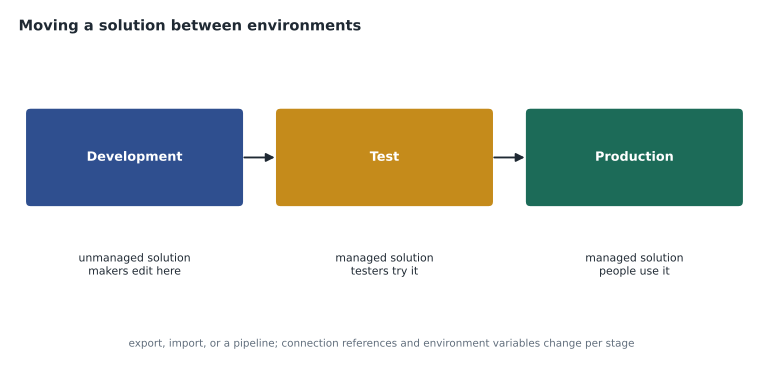
Two kinds of solution component make the same solution work in every environment. Connection references (lesson 9) point flows and apps to connections that are set up separately in each environment. Environment variables hold values that differ per environment, such as the address of a SharePoint site, an email address for notifications or a threshold amount. When the solution is imported, the importer supplies the values for that environment, so test sends messages to the test mailbox and production to the real one, without anyone editing a flow.
Moving solutions: export, import and pipelines
A maker can export a solution from development as a file, choosing managed or unmanaged, and import it into another environment. Each export carries a version number in four parts, such as 1.4.0.2, and increasing it with each release keeps a clear history. Before export, solution checker analyses the solution against Microsoft's rules and reports problems in code, performance and supportability.
Pipelines in Power Platform automate this. An administrator defines a pipeline with stages, such as development to test to production, and makers deploy a solution by running the pipeline from inside Power Apps, without handling files. Pipelines can require approval before deploying to production, run solution checker automatically, and keep a history of every deployment. Organizations with professional developers may also keep solutions in source control and use tools such as the Power Platform CLI with Azure DevOps or GitHub Actions. Managed Environments make some of these features easier to adopt and enforce.
Worked problem
Lumenvale's first release through a pipeline
The team needed to change the approval threshold from 1,500 to 2,000 dollars and add a column to the Requests table. How should the change reach production under the new process?
Show solution
- In development, add the column to Requests and update the canvas app and model-driven form to show it.
- Change the threshold, which Signe had already moved into an environment variable called Approval Threshold, rather than editing the flow.
- Run the app checker and flow checker, then increase the solution version from 1.3.0.0 to 1.4.0.0.
- Run the pipeline to test. Testers use the two test accounts to submit requests above and below 2,000 dollars and confirm the right approvals appear.
- Request deployment to production; Rupert approves in the pipeline. The import sets the production value of Approval Threshold to 2,000.
Answer: Change in development, store the threshold in an environment variable, check, version, deploy to test, test with user accounts, then deploy to production with approval. No one edited anything directly in production.
Publishing to users
Finally, people need to find what has been released. Canvas apps can be added to Teams as an app or a tab, featured in the Power Apps mobile app, embedded in a SharePoint page, or linked from an intranet. Model-driven apps appear in the app list for anyone with the right role. Agents are published to channels and can be approved for the organization's Teams app catalog by an administrator. A short announcement that tells people what changed and where to get help does as much for adoption as any technical step.
By mid-November, Lumenvale had shipped six releases through the pipeline. Two were stopped in test: one because a formula worked only for the Lakeshore campus, and one because an agent change lowered the evaluation score. Neither reached the instructors. Rupert wrote the release checklist on one page: build in development, check, version, test with user accounts, deploy with approval, announce.
Release notes and rollback
Every release at Lumenvale now has a short release note: the solution version, what changed, who tested it and when it was deployed. The note goes in the pipeline's deployment record and a summary goes to the people affected. When something does go wrong after a release, the team has two options. For a small problem, they fix it in development and deploy a new version through the pipeline, which usually takes less than an hour. For a serious problem, they can import the previous managed solution version, which they keep for exactly this reason, to return production to its earlier state. Knowing which option applies before a release, rather than during an incident, keeps a bad afternoon from becoming a bad week.
Testing with real people
Automated checks and test accounts catch many problems, but they do not tell you whether people find the change useful. Before each larger release, Lumenvale invited two or three users from the test group to try it in the test environment for a day. They used it for their actual work, entering real requests that were then deleted, and reported anything confusing. This user acceptance testing found problems no checker would: a button label that instructors misread, a date format that differed from what the desks expected, and an agent answer that was technically correct but too long to read on a phone. Each fix was small, and each made the release land better.
Monitoring after release
Publishing is not the end of testing. After each release, someone watches the signals for a few days: flow run failures in run history and the admin center, errors reported through Monitor or by users, agent analytics for a drop in resolved conversations, and messages to the media desks. The Power Platform admin center shows capacity, usage and failures across environments, and Managed Environments add weekly digests for administrators. Small dips caught in the first days are easy to fix; the same problems found a month later have usually spread into data and habits.
Common mistakes
MistakeEditing an active flow in production to fix a small problem.
InsteadFix it in development and deploy; saving an active flow changes the next run immediately.
MistakeImporting unmanaged solutions into production.
InsteadUse managed solutions outside development so components are locked and removable.
MistakeHard-coding addresses, mailboxes and thresholds in flows.
InsteadUse environment variables so each environment gets its own values.
MistakeTreating a clean App checker as proof the app works.
InsteadAlso test with real user permissions, on real devices, with real scenarios.
Summary and key terms
- Canvas apps are tested in preview, with the App checker, with Monitor and with Power Apps Test Engine; always test as a real user.
- Flows are tested manually or with recent trigger data; run history and the flow checker show problems.
- Agents are tested in the test pane and with evaluations before publishing.
- Saving and publishing differ by tool; saving an active flow affects its next run.
- ALM uses development, test and production environments; solutions carry components between them.
- Unmanaged solutions are edited in development; managed solutions are imported elsewhere.
- Connection references and environment variables adapt a solution to each environment; pipelines automate deployment.
- Monitor
- A tool that records events, data calls and errors while an app runs.
- Power Apps Test Engine
- A tool for automated canvas app tests written in YAML with Power Fx steps.
- Solution
- A container for the components of a project that can be moved between environments.
- Managed solution
- A locked, packaged solution imported into test or production.
- Environment variable
- A solution component holding a value that differs per environment.
- Solution checker
- A tool that analyses a solution for problems before deployment.
- Pipelines in Power Platform
- An automated way to deploy solutions through stages such as test and production.
Practice problems
Work each problem on paper first, then reveal the answer to check.
Which canvas app tool shows each data call and its timing while the app runs?
Show answer
Monitor.
What happens when a maker saves a change to an active cloud flow?
Show answer
The change takes effect on the flow's next run.
Which kind of solution should be imported into production?
Show answer
A managed solution.
How can a flow send notices to a test mailbox in test and a real mailbox in production without editing?
Show answer
Store the address in an environment variable set differently in each environment.
Lesson quiz · 5 questions
Score 60% or more to complete this lesson.
Create a free account to save your progress, take quizzes and earn a certificate.