
MSBA-131 · Lesson 12 of 12 · 25 min
Case study: an equipment request system
▶ Video coming soon A video version of this lesson is on the way.
On November 20, 2026, Rupert asked Maribeth and Signe to present the equipment request system to the college's leadership team, along with a recommendation for whether other departments should build on it. This final lesson walks through the complete system as they presented it: the requirements, the design, how each part was built, the decisions they would make differently, and a set of problems for you to work through. It draws on every earlier lesson, and it is a good rehearsal for the scenario questions on the PL-900 exam.
The requirements
The project began with a paper process and a list of complaints. By the time of the presentation, the requirements had been written down and agreed with the media desks, instructors, department chairs, budget officers, finance and IT.
| Who | Requirement |
|---|---|
| Instructors and staff | Request equipment from a phone or laptop in under two minutes; see the status of their requests |
| Department chairs | Approve or reject from Teams or Outlook; get the request details without opening another system |
| Budget officers | Approve high-value or long loans; receive a weekly digest of approved high-value loans |
| Media desk staff | Manage equipment, loans and repairs for their campus; see overdue loans each morning |
| Asset team and finance | See all campuses; keep the legacy asset system up to date; protect purchase prices |
| Everyone | Get answers to loan policy questions at any time |
| IT | A supportable solution with owners, a release process and no dependence on one person |
The design
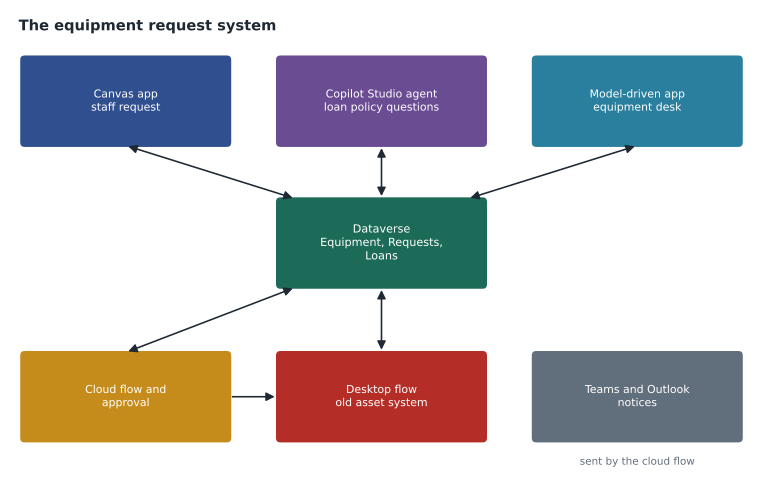
Every component shares one data model in Dataverse, which is what made the system coherent. A request made in the canvas app is instantly visible to the media desk app, the approval flow, the agent's status tool and the reports Kwabena built in Power BI.
| Component | Tool | Lesson |
|---|---|---|
| Data model: Campus, Equipment, Request, Loan, Loan Item, Repair | Dataverse tables in a solution | 2, 3 |
| Staff request app | Canvas app | 1, 3 |
| Media desk app | Model-driven app with business rules and a returns process flow | 2 |
| Notifications and overdue reminders | Automated and scheduled cloud flows | 5 |
| Availability check and approvals | Automated cloud flow with sequential approvals, timeouts and escalation | 7 |
| Legacy asset system update | Scheduled cloud flow calling an unattended desktop flow | 6 |
| Equipment Help | Copilot Studio agent with policy knowledge and a status tool, published to Teams | 8 |
| Access | Security roles, business units per campus, column security, security groups | 9 |
| Releases | Development, test and production environments; managed solution; pipeline | 10 |
| Community request site (planned) | Power Pages | 4 |
The data model
Signe's data model went through three versions. The first, generated by Copilot in lesson 3, had a single Requests table with the equipment typed in as text. The second linked each request to one Equipment row. The third, after the media desk supervisor's comment about kits, introduced a Loan Item table so one loan could cover several items, each with its own return condition. The final relationships were: one Campus has many Equipment rows; one Request leads to at most one Loan; one Loan has many Loan Items; each Loan Item refers to one Equipment row; one Equipment row has many Repairs. Purchase price was protected with column security so only the asset team and finance could see it.
How the parts work together
A typical request now runs like this. An instructor opens the canvas app in Teams, picks a campus and an item, and sends a request for October 21. The automated approval flow starts when the Request row is added. It checks Loans for an overlapping booking of the same item, finds none, and sends an Approve/Reject approval to the department chair, who approves from the Teams Approvals app on her phone. Because the projector is worth less than 2,000 dollars and the loan is one day, no budget officer approval is needed. The flow creates the Loan and Loan Item rows, sets the request to Approved, posts a card in the campus media desk channel and emails the instructor. On October 21, the technician checks the projector out in the model-driven app. When it comes back, the returns process flow guides the technician through Returned, Inspected and Restocked. If the item is sent for repair, a Repair row is created, and on Monday the desktop flow updates the legacy asset system. If the instructor wonders at any point what happens if the projector is late, Equipment Help answers from the policy.
Worked problem
Problem 1: a new campus
Suppose Lumenvale opens a fourth, smaller campus next year. It has its own media desk with two technicians. What must change in the system, and what should not need to change?
Show solution
- Data: add a Campus row for the new campus. No table changes are needed.
- Security: create a business unit for the campus under the college root unit, and add the two technicians to a Microsoft Entra group team in that unit with the Media Desk Staff role.
- Flows: the reminder flow's switch on campus needs a branch for the new desk mailbox, or better, the desk mailbox should be a column on the Campus table so no flow edit is needed.
- Agent: add the new campus's desk contact to the Media Desk FAQ knowledge document.
- Release: make the changes in development and deploy through the pipeline; the canvas app and model-driven app need no changes because they read campuses from data.
Answer: A data row, a business unit and team, a knowledge update and ideally a Campus column for the mailbox. The fact that the apps need no changes is evidence the design is data-driven, as it should be.
Worked problem
Problem 2: the chair is on sabbatical
The Business Studies chair goes on a six-month sabbatical. Requests from her department start escalating to the assistant chair after two days, which delays everything. What is the better fix?
Show solution
- The flow looks up the chair from the Departments table, so the right fix is data, not flow design.
- Update the Department row so the approver column points to the acting chair for the sabbatical period.
- Optionally add Acting Approver and Acting Until columns, and have the flow use the acting approver when the date is in range, so future absences need only data entry.
- Keep the timeout and escalation for unexpected absences.
Answer: Change the approver in data, not in the flow. A flow that reads approvers from a table can follow organizational changes without a release.
Worked problem
Problem 3: the agent gives an out-of-date answer
Suppose the college changes the loan policy so laptops can be borrowed for up to 14 days instead of 7. A week after the change, an instructor reports that Equipment Help still says 7 days. What happened and how should the team prevent it?
Show solution
- Check the knowledge source: the agent answers from the Equipment Loan Policy document. The new policy was saved as a new file, and the old file remained the agent's knowledge source.
- Replace the knowledge source with the current document, or keep one canonical file whose contents are updated in place.
- Add a question about laptop loan length to the agent's evaluation test set with the new expected answer, rerun the evaluation, and publish.
- Add the agent's knowledge sources to the policy owner's checklist so future policy changes include the agent.
Answer: The agent was grounded in the old document. Update the knowledge source, add the changed fact to the evaluation test set, republish, and make the agent part of the policy change process.
Worked problem
Problem 4: a maker leaves
Suppose Maribeth later moves to a new role at another college. Which parts of the system would have broken if the team had not prepared, and what preparation prevented it?
Show solution
- Flows built with Maribeth's personal connections would stop when her account was disabled. Prevention: flows live in a solution with connection references, owned by a service account, with Signe and Rupert as co-owners.
- The canvas app would have no one who could edit it. Prevention: a security group of IT makers was added as co-owner.
- The agent would have no editor. Prevention: Signe and Rupert were added as editors in Copilot Studio.
- Knowledge of why decisions were made would leave with her. Prevention: the Plan designer plan, the release checklist, the permission design and app descriptions recording AI-generated parts were kept with the solution.
Answer: Personal connections, sole ownership and undocumented decisions are the usual failure points. Solutions, connection references, co-owners, editors and written decisions kept the system running.
Results
The numbers in the presentation were modest and real. In the seven weeks since launch, 1,140 requests had gone through the system. The average time from request to decision fell from about two and a half days to under five hours. Loans more than a week overdue fell from 23 to 4. Technicians estimated they saved about six hours a week across the three campuses, mostly from retyping, chasing signatures and the Monday asset updates. Equipment Help handled about 300 conversations, resolving most without a person; the rest were escalated to desk staff, and the unresolved questions became new entries in the FAQ.
What they would do differently
Maribeth and Signe ended with lessons rather than a victory lap. Start in Dataverse if the data will grow or needs security, rather than moving from SharePoint later. Put thresholds, mailboxes and approvers in data or environment variables from the first day. Create test accounts before sharing anything. Use focused, current documents as agent knowledge. Set up the development, test and production environments and the pipeline before the first release, not after the first mistake. And involve the people who will use the system in every round, because the technician who found two bugs in ten minutes in lesson 1 was worth more than any checklist.
The recommendation
The leadership team asked whether the library and athletics could reuse the system. The recommendation was yes, as separate solutions built from a copy of the equipment solution, sharing the Campus table and the approval pattern, each with its own owner and its own security roles. Rupert added one condition, the same one he had given at the start of the project: whatever they built had to be something IT could support after the builders moved on.
Problem 5: sizing the licenses
Leadership asked what the system cost to run. Kwabena worked through the licensing in categories rather than with prices, because prices change. Instructors used a canvas app that read and wrote Dataverse, so each needed a premium Power Apps license; the college already licensed Power Apps Premium for most staff under an agreement, so the extra cost was small. Media desk staff used the model-driven app, covered by the same premium license. The approval and reminder flows used Dataverse, a premium connector, so they ran under the owners' Power Automate Premium licenses or a Process license assigned to the flow; Rupert chose a Process license for the approval flow because it served everyone. The unattended desktop flow needed a Process license for the machine. The agent consumed Copilot Studio capacity measured in Copilot Credits, estimated from 300 conversations a month. The planned Power Pages site would need authenticated and anonymous capacity. Listing licenses by component made the total clear and showed where design choices, such as using SharePoint instead of Dataverse, would have changed the cost.
Problem 6: an exam-style review
To close the course, try matching each requirement from the start of this lesson to the tool that met it, without looking back. Requesting from a phone in under two minutes: a canvas app. Approving from Teams or Outlook: a cloud flow with the Approvals connector. A weekly digest for budget officers: a scheduled cloud flow. Managing equipment, loans and repairs per campus: a model-driven app with Dataverse security roles and business units. Keeping the legacy asset system current: an unattended desktop flow called from a scheduled cloud flow. Protecting purchase prices: column security. Answering policy questions at any time: a Copilot Studio agent with knowledge sources, published to Teams. A supportable solution: solutions, environments, a pipeline, co-owners and connection references. If you matched all of these, you have the core of the PL-900 Power Apps, Power Automate and Copilot Studio domains in hand, and you are ready for MSBA-132 and the exam readiness course, MSBA-139.
Common mistakes
MistakeHard-coding people, mailboxes and thresholds into flows.
InsteadStore them in Dataverse tables or environment variables so changes need data, not releases.
MistakeTreating agent knowledge as set-and-forget.
InsteadTie knowledge sources to the owners of the underlying documents and test changes with evaluations.
MistakeBuilding each department's version from scratch.
InsteadCopy and adapt a proven solution, sharing common tables and patterns.
Summary and key terms
- The equipment system combines a canvas app, a model-driven app, cloud flows with approvals, a desktop flow and a Copilot Studio agent around one Dataverse data model.
- A data-driven design let the team add a campus or change an approver without editing apps or flows.
- Security used roles, business units, teams, column security and security groups.
- Solutions, connection references, co-owners and documented decisions kept the system independent of any one person.
- Measured results included faster decisions, fewer overdue loans and hours saved each week.
- The same questions and patterns apply to any new Power Platform project.
- Data-driven design
- A design where behavior changes by editing data rather than apps or flows.
- Loan Item
- The table that lets one loan cover several pieces of equipment.
- Canonical document
- The single authoritative copy of a document that systems refer to.
- Acting approver
- A temporary approver stored in data and used during a set period.
Practice problems
Work each problem on paper first, then reveal the answer to check.
Why did the apps need no changes when a campus was added?
Show answer
They read campuses from the Campus table, so a new row was enough.
What is the best way to handle a chair on sabbatical?
Show answer
Change the approver in the Departments data, optionally with acting approver columns, rather than editing the flow.
Why did Equipment Help give an out-of-date answer?
Show answer
Its knowledge source was still the old policy document.
Name two preparations that protected the system when Maribeth left.
Show answer
Any two of: solutions with connection references, a service account owner, co-owners, agent editors, documented decisions.
Lesson quiz · 5 questions
Score 60% or more to complete this lesson.
Create a free account to save your progress, take quizzes and earn a certificate.