
MSAZ-341 · Lesson 8 of 12 · 20 min
Threat intelligence
▶ Video coming soon A video version of this lesson is on the way.
In October the SOC had collected a short list of things it knew were bad: two domains used by the adversary-in-the-middle phishing pages that caught the buyer and the store manager, three IP addresses that had signed in with stolen tokens, and the file hash of the malicious label utility found on the distribution center laptop. They were in a spreadsheet on Nadia's desktop. On the afternoon of November 11, the sprint turned that spreadsheet, and a lot of other people's knowledge, into something Sentinel could use.
What threat intelligence is in Sentinel
Threat intelligence is information about threats: who is attacking, how, and with what. The part Sentinel uses most directly is indicators of compromise, observable values such as IP addresses, domain names, URLs and file hashes that are known to be linked to malicious activity. Indicators let a rule ask a simple question of your logs: did anything here touch something known to be bad? Broader intelligence about threat actors and their techniques helps analysts understand an incident and decide what else to look for.
Sentinel stores threat intelligence in the STIX format, a standard way of describing threat information as objects such as indicators, threat actors, attack patterns and the relationships between them. Current workspaces hold it in two tables: ThreatIntelIndicators for indicators, and ThreatIntelObjects for the other STIX objects such as threat actors and attack patterns. These replaced the older ThreatIntelligenceIndicator table; Microsoft stopped writing to the old table on July 31, 2025, so queries, rules and workbooks written for it need to be updated. Ama found two content hub templates the team had installed that still referred to the old table and noted them for Sunil.
| Way in | What it is | Harrow & Finch |
|---|---|---|
| Microsoft Defender Threat Intelligence connector | Indicators from Microsoft's own threat intelligence | Enabled on November 11 |
| TAXII feed | Any STIX-compatible source published over the TAXII protocol | A retail industry sharing community's feed |
| Threat intelligence platform | A dedicated platform that aggregates feeds and pushes them in | Not used; too large for the team |
| Upload indicators API | Your own tools or scripts send indicators | Planned, to push indicators from closed incidents |
| Manual entry or import | Indicators added by hand in the portal or from a file | The October spreadsheet |
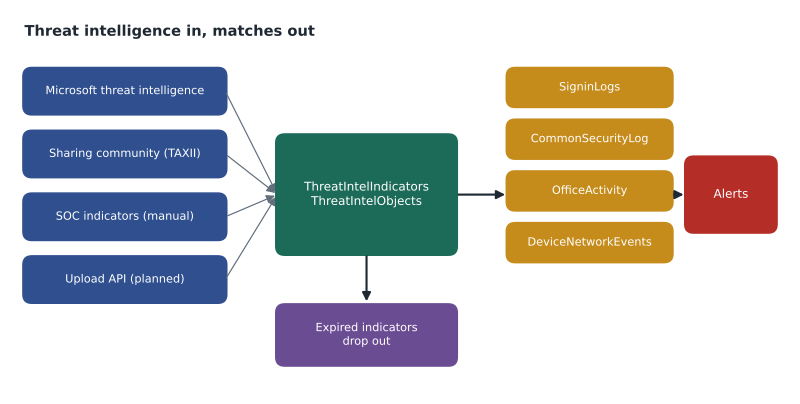
Connecting the feeds
The Microsoft connector took minutes: Sunil enabled it from the Threat Intelligence solution in the content hub. The sharing community's TAXII feed needed four values the community sent by email: the API root URL, a collection ID, a username and a password. The TAXII connector polls the collection on a schedule you choose and writes new indicators to the workspace. The community's feed was small, a few hundred new indicators a week, but focused on campaigns against retailers, including gift card fraud and point-of-sale malware, which Microsoft's broad feed would not necessarily prioritize.
Microsoft's guidance for organizations with several workspaces is to bring indicators into one central workspace and use cross-workspace queries, rather than importing the same indicators into each workspace. With one security workspace, that was simple for Harrow & Finch.
Indicators of your own
The October spreadsheet became six indicators, entered in the threat intelligence page of the Defender portal. For each one Ama recorded the type and value, a description linking it to the incident it came from, a confidence score, the threat type, and a valid-until date. The valid-until date matters more than it looks. IP addresses and domains used by attackers are often rented, abandoned and later reused by someone harmless, so an indicator that never expires eventually produces false positives. Nadia's rule was 90 days for IP addresses, 180 days for domains, and no expiry for file hashes, because a hash identifies exactly one file.
| Indicator | Type | Source incident | Valid until |
|---|---|---|---|
| Two phishing page domains | Domain | Buyer phishing (Oct 20) and store manager (Nov 3) | 180 days |
| Three sign-in addresses | IPv4 | Token reuse after the phishing cases | 90 days |
| Label utility hash | SHA-256 file hash | Distribution center laptop (Nov 5) | No expiry |
Matching indicators against logs
Indicators do nothing until something compares them with your data. Sentinel offers two ways. Microsoft provides a built-in analytics rule that matches Microsoft's threat intelligence against your logs and creates alerts when it finds a match; the SC-200 study guide lists threat intelligence rules as one of the rule types to configure. The Threat Intelligence solution also includes templates for scheduled rules that join your own indicators with specific tables, such as IP indicators against firewall logs or domain indicators against DNS and proxy logs. Sunil enabled the Microsoft rule and created four rules from the templates, one each for sign-in logs, firewall logs, Office activity and Defender XDR network events.
let ioc = ThreatIntelIndicators
    | where IsActive == true and ValidUntil > now()
    | where ObservableKey == "ipv4-addr:value"
    | project DestinationIP = ObservableValue, Confidence, Description = tostring(Data.description);
CommonSecurityLog
| where TimeGenerated > ago(1h)
| join kind=inner ioc on DestinationIP
| project TimeGenerated, SourceIP, SourceHostName, DestinationIP, Confidence, Description, DeviceName
The first match came within an hour, and it taught a lesson. One of the three sign-in addresses from October matched outbound firewall traffic from a head office workstation. Ama started an investigation, then found that the address now belonged to a cloud hosting provider whose service a marketing tool used. The indicator had been valid in October, but the attacker had moved on and the address had been reassigned. Nadia shortened the IP expiry to 60 days for addresses in hosting providers' ranges and closed the alert as a false positive with a comment.
from datetime import date
indicators = [
    # value, type, confidence (0-100), valid until
    ("198.51.100.23", "ip", 80, date(2027, 1, 18)),
    ("203.0.113.40", "ip", 70, date(2026, 11, 2)),
    ("login-harrowfinch-sso.example", "domain", 90, date(2027, 4, 19)),
    ("9f2c...e81a", "sha256", 100, None),
]
seen = ["198.51.100.23", "203.0.113.40", "192.0.2.15", "9f2c...e81a"]
today = date(2026, 11, 11)
minimum_confidence = 60
for value in seen:
    match = next((i for i in indicators if i[0] == value), None)
    if match is None:
        result = "no indicator"
    elif match[3] is not None and match[3] < today:
        result = "indicator expired, ignored"
    elif match[2] < minimum_confidence:
        result = "below confidence threshold"
    else:
        result = f"MATCH ({match[1]}, confidence {match[2]})"
print(f"{value:<32} {result}")198.51.100.23 MATCH (ip, confidence 80) 203.0.113.40 indicator expired, ignored 192.0.2.15 no indicator 9f2c...e81a MATCH (sha256, confidence 100)
What this code does
The program holds four indicators, each with a type, a confidence score and a valid-until date, and four values seen in the logs. For each value it looks for an indicator, ignores it if it has expired, skips it if its confidence is below the threshold, and otherwise reports a match. The output shows two matches, one value with no indicator, and one address ignored because its indicator expired at the start of November, which is the reason expiry dates prevent stale false positives. The addresses and domain are reserved documentation examples, not real indicators.
Using intelligence in investigations
Indicators are only part of threat intelligence. When an incident involves an IP address or domain, the analyst can look up what Microsoft and other sources know about it, such as who owns it, when it was first seen and which campaigns it is linked to. Threat analytics reports in the Defender portal, covered in MSAZ-340, describe active campaigns and point to the indicators and techniques involved. ThreatIntelObjects can hold threat actor and attack pattern objects, with relationships linking indicators to the actors that use them, so an analyst who matches one indicator can see what else that actor typically does. Playbooks can also enrich incidents automatically, for example by looking up each IP entity in a reputation service and adding the result as a comment, as lesson 11 describes.
Nadia insisted on one habit: every indicator the SOC creates should point back to the evidence. An indicator with no description is something someone once thought was bad; an indicator with a link to the incident is something the team can defend, share with the sharing community, or retire when the evidence no longer holds.
Sharing back
Threat intelligence works best when it flows both ways. The sharing community asks members to contribute indicators from their own incidents, stripped of anything that identifies the member or its customers. Harrow & Finch planned to start contributing in January 2027, after the legal team reviewed the community's sharing agreement. The plan is that when an incident is closed as a true positive, a playbook proposes indicators from its entities, an analyst approves them, and they are sent to the community through its submission process. Lesson 11 builds the first half of that playbook.
Judging indicator quality
Not all indicators deserve the same trust. Each indicator carries a confidence value, usually from 0 to 100, set by whoever created it, and the source's reputation matters as much as the number. A broad commercial or Microsoft feed is large and generally reliable but not specific to retail; a sharing community's feed is small and specific but depends on members' care; the SOC's own indicators are the most specific of all, because they come from its own incidents. Nadia set the matching rules to ignore indicators below a confidence of 60 and asked Ama to review, once a month, which feed produced each true positive and each false positive, so that weak sources can be retired.
Indicator types also differ in how long they stay useful and how easily attackers change them. A file hash changes as soon as the attacker recompiles the tool; a domain costs a little money and a few minutes to replace; an IP address is often shared or recycled. Patterns of behavior, such as an adversary-in-the-middle sign-in followed by a new inbox rule, are much harder for an attacker to change, which is why the rules from lessons 6 and 7 and the behavior analytics in lesson 9 matter more over time than any list of indicators. Indicators catch the known; behavior catches the unknown.
Large feeds raise a practical question too: volume. A feed with hundreds of thousands of active indicators makes every matching query heavier, and indicator tables are billed like other analytics data. Sunil checked the size of ThreatIntelIndicators after a week, found it under 0.1 GB a day, and noted that a future commercial feed would need the same check.
Worked problem
Setting up indicator matching for mail
Nadia wants to know when anyone at Harrow & Finch receives mail containing a URL whose domain is a known phishing indicator. Mail data is in EmailUrlInfo and EmailEvents, ingested from Defender XDR. Domain indicators come from Microsoft, the sharing community and the SOC's own list. What should the rule look like?
Show solution
- Start from the Threat Intelligence solution's template for domain indicators against mail URLs if it exists, rather than writing from nothing.
- Select only active domain indicators that have not passed their valid-until date, from ThreatIntelIndicators.
- Extract the domain from each URL in EmailUrlInfo and join it with the indicators on the domain value.
- Join with EmailEvents to get the recipient, sender and delivery action, so the alert shows whether the message reached an inbox.
- Map the recipient as an Account entity, the URL as a URL entity and the sender as a Mailbox entity, and put the indicator's description and confidence in custom details.
- Schedule it every 30 minutes with a 30-minute lookback, and remember that Defender for Office 365 may already have blocked or removed the message; the delivery action tells the analyst which.
Answer: A scheduled rule joining active, unexpired domain indicators with mail URLs and mail events, with recipient, URL and sender entities and the indicator details in custom details.
Common mistakes
MistakeKeep indicators forever so nothing is missed.
InsteadSet valid-until dates; addresses and domains are often reused by harmless parties later.
MistakeWrite new rules against the ThreatIntelligenceIndicator table.
InsteadUse ThreatIntelIndicators and ThreatIntelObjects; the old table stopped receiving data on July 31, 2025.
MistakeImport the same indicators into every workspace.
InsteadBring them into a central workspace and use cross-workspace queries.
MistakeCreate indicators without descriptions.
InsteadLink each indicator to the incident or source that justifies it.
Summary and key terms
- Threat intelligence in Sentinel is stored as STIX objects in ThreatIntelIndicators and ThreatIntelObjects.
- Feeds come from Microsoft's connector, TAXII servers, threat intelligence platforms, the upload API and manual entry.
- Indicators need a type, value, description, confidence and a valid-until date.
- Built-in and template rules match indicators against logs and create alerts.
- Expired or low-confidence indicators should not create alerts.
- Intelligence about actors and campaigns helps investigations beyond simple matching.
- Sharing indicators back to a community multiplies their value.
- Threat intelligence
- Information about threats, their actors, methods and indicators.
- Indicator of compromise
- An observable value, such as an IP address, domain or file hash, linked to malicious activity.
- STIX
- A standard format for describing threat intelligence as objects and relationships.
- TAXII
- A protocol for publishing and collecting STIX threat intelligence.
- Valid-until date
- The date after which an indicator should no longer be used for matching.
- ThreatIntelIndicators
- The Sentinel table that holds threat indicators.
Practice problems
Work each problem on paper first, then reveal the answer to check.
Which table replaced ThreatIntelligenceIndicator for indicators?
Show answer
ThreatIntelIndicators, with other STIX objects in ThreatIntelObjects.
What four values did the TAXII connector need?
Show answer
The API root URL, a collection ID, a username and a password.
Why did an October IP indicator produce a false positive?
Show answer
The address had been reassigned to a hosting provider used by a legitimate tool.
Why do file hashes not need an expiry date?
Show answer
A hash identifies exactly one file, which does not stop being malicious.
What did Nadia require of every SOC-created indicator?
Show answer
A description that links it to the evidence.
Lesson quiz · 5 questions
Score 60% or more to complete this lesson.
Create a free account to save your progress, take quizzes and earn a certificate.