
MSAZ-341 · Lesson 3 of 12 · 21 min
Data connectors and the content hub
▶ Video coming soon A video version of this lesson is on the way.
An empty workspace detects nothing. On Wednesday, November 4, the sprint turned to data, and Nadia began with a question that surprised Ama: "Which incidents from October would we have missed without the Defender portal?" Ama listed them from memory. The phished buyer's mailbox had been caught by Defender for Office 365; the storage token leak by Defender for Cloud; the laptop with the malicious label utility by Defender for Endpoint. Every one had been caught by a product that already sent its alerts to the Defender portal. "So Sentinel isn't here to repeat those," Nadia said. "It's here for what those products can't see, and for keeping evidence longer than they do." That framed the choice of connectors.
How data reaches Sentinel
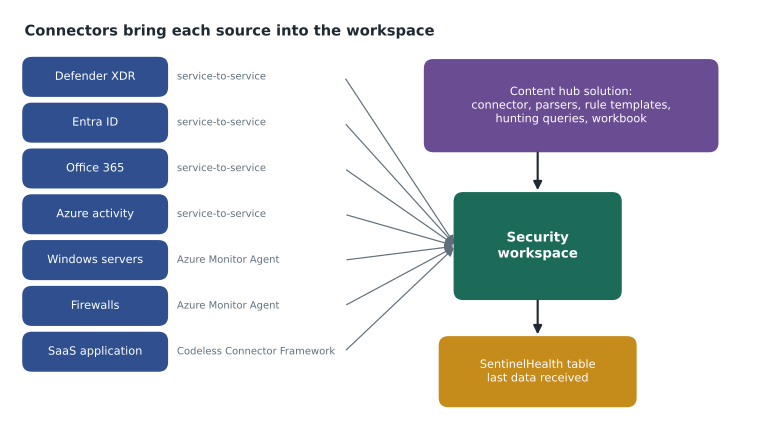
A data connector is the configuration that brings data from a source into the workspace. Connectors are not all built the same way, and knowing the type tells you what it needs and what can go wrong. Microsoft's own services mostly use service-to-service connections, where you switch the connector on and the service writes into the workspace. Servers and network devices use the Azure Monitor Agent, covered in lesson 4. Other cloud services and software-as-a-service products are reached through their APIs, either with connectors built on Microsoft's Codeless Connector Framework, which Sentinel runs for you, or with older connectors built on Azure Functions, which run in your subscription and are billed separately.
| Connector type | Examples | What it needs | Typical failure |
|---|---|---|---|
| Service-to-service | Defender XDR, Microsoft Entra ID, Office 365, Azure activity | Permissions in the source service and workspace write access | Diagnostic setting removed or permission lost |
| Azure Monitor Agent | Windows security events, Syslog, CEF | The agent on each machine, Azure Arc for non-Azure machines, a data collection rule | Agent stopped or rule not associated with the machine |
| Codeless Connector Framework | Many SaaS APIs | API credentials stored in the connector | Expired secret or API change |
| Azure Functions | Older API connectors | A function app in your subscription, its own billing and patching | Function failing silently |
| Threat intelligence | TAXII feeds, upload API | Feed or API credentials | Feed credential expired |
The content hub
In Sentinel, connectors usually come packaged with other content in solutions from the content hub. A solution for a product typically contains its data connector, parsers that turn its raw logs into usable fields, analytics rule templates, hunting queries, workbooks and sometimes playbooks. Microsoft publishes solutions for its own products and many partners publish solutions for theirs. Installing a solution needs the Microsoft Sentinel Contributor role on the workspace's resource group, which is why Sunil activated his eligible role at the start of the session.
Installing a solution does not switch anything on by itself. The connector still has to be configured, and analytics rule templates have to be turned into active rules, ideally after reading them, because a template written for a generic environment may be noisy in yours. Solutions also have versions. When a publisher updates a solution, the content hub shows that an update is available, and installed templates can show that a newer version exists; rules created from them are not changed automatically. Sunil added a monthly task to review content hub updates, because detection content that never changes slowly falls behind the threats it was written for.
The Microsoft sources
The team connected four Microsoft sources on the first afternoon. Each needed a decision about which data types to bring in, because a connector often covers several tables with different costs and value.
| Connector | Data types chosen | Why |
|---|---|---|
| Microsoft Defender XDR | Incidents and alerts; raw tables DeviceProcessEvents, DeviceNetworkEvents, DeviceLogonEvents, EmailEvents, IdentityLogonEvents | Keep key device, mail and identity evidence longer than advanced hunting's retention; alerts are free |
| Microsoft Entra ID | SigninLogs, AuditLogs, non-interactive user sign-ins, service principal sign-ins, risky users | Identity is where most October incidents started |
| Microsoft 365 (Office 365) | Exchange, SharePoint and Teams audit | Free to ingest; shows mailbox rules, sharing and admin changes |
| Azure activity | Subscription activity logs, through Azure Policy | Free; shows who changed what in Azure |
The Defender XDR connector deserved the most thought. Because the workspace is connected to the Defender portal, advanced hunting can already query Defender XDR tables for about the last 30 days without ingesting them into Sentinel at all. Ingesting them costs money, so the reasons have to be real. Nadia had two. Investigations sometimes need device and mail evidence older than 30 days, as the October penetration test review had shown when the testers asked about a laptop's activity from early September. And Sentinel analytics rules and workbooks can only use what is in the workspace. Nadia did not ask for every raw table: DeviceFileEvents and DeviceRegistryEvents, the largest ones, stayed in the Defender portal only, available for 30-day hunting and for custom detection rules written in Defender itself.
The Microsoft Entra ID connector works through diagnostic settings on the tenant, which needs the Security Administrator or Global Administrator role in Entra ID to configure. Sign-in logs come in several tables: interactive user sign-ins in SigninLogs, non-interactive sign-ins (tokens refreshed by apps in the background) in AADNonInteractiveUserSignInLogs, and service principal and managed identity sign-ins in their own tables. Non-interactive sign-ins are the big one, often many times the volume of interactive sign-ins, so Sunil checked their size during the free trial before deciding to keep them in the analytics tier. They stayed, because the token theft in the October phishing cases had shown up only in non-interactive sign-ins from an unfamiliar address.
Usage
| where TimeGenerated > ago(7d)
| where IsBillable == true
| summarize GB = round(sum(Quantity) / 1024, 2) by DataType
| sort by GB desc
Ama ran that query at the end of the first week of the trial. Non-interactive sign-ins were 1.6 GB a day against 0.5 GB for interactive sign-ins, and DeviceNetworkEvents was the largest Defender table at 2.9 GB. The Usage table itself is a good habit: it shows what each table really costs rather than what the estimate in lesson 1 assumed.
Partner and SaaS sources
Two non-Microsoft sources were in scope for the sprint. The store and head office firewalls send logs in Common Event Format (CEF), which lesson 4 connects through a Linux log forwarder. The firewall vendor publishes a content hub solution with a parser and rule templates, so Sunil installed it to get the content even though the data would arrive through the generic CEF via AMA connector. The second source, the hosted HR and payroll system, has an API that reports sign-ins and changes to bank details. Its connector would use the Codeless Connector Framework, but the vendor's API credentials needed a contract change, so the team planned it for January 2027.
Nadia ruled out a third request. The cloud team had suggested sending every Azure resource's diagnostic logs to the security workspace. She asked which threats each log would help detect, and for most of them nobody could name one. Key Vault access logs, Azure Firewall logs, the storage accounts with supplier and customer data, and the SQL servers' auditing logs went to the security workspace. Everything else stayed in the operations workspace, reachable by a cross-workspace query if an investigation ever needed it.
Checking connector health
A connector that stops working fails quietly: the detections that depend on it simply stop firing. Sentinel has a health feature that, once enabled in the workspace settings, writes events about connectors, analytics rules and automation to the SentinelHealth table, which is free to ingest. The data connectors page also shows when each connector last received data. Sunil enabled health monitoring on the first day and wrote an analytics rule that raises a medium-severity incident if any billable table that normally receives data every hour has received nothing for three hours.
from datetime import datetime, timedelta
now = datetime(2026, 11, 12, 9, 0)
last_seen = {
    "SigninLogs": now - timedelta(minutes=12),
    "AADNonInteractiveUserSignInLogs": now - timedelta(minutes=9),
    "CommonSecurityLog": now - timedelta(hours=4, minutes=20),
    "SecurityEvent": now - timedelta(minutes=31),
    "OfficeActivity": now - timedelta(hours=1, minutes=5),
}
threshold = timedelta(hours=3)
for table, seen in sorted(last_seen.items(), key=lambda kv: kv[1]):
    gap = now - seen
    hours = gap.total_seconds() / 3600
    flag = "SILENT - raise incident" if gap > threshold else "ok"
print(f"{table:<32} last data {hours:4.1f} h ago {flag}")CommonSecurityLog last data 4.3 h ago SILENT - raise incident OfficeActivity last data 1.1 h ago ok SecurityEvent last data 0.5 h ago ok SigninLogs last data 0.2 h ago ok AADNonInteractiveUserSignInLogs last data 0.1 h ago ok
What this code does
The program records, for five tables, the last time each one received data, and compares each gap with a three-hour threshold. It prints the tables from the longest silence to the shortest, with the gap in hours and a flag. Only the firewall table, silent for more than four hours, is flagged, which is the situation the team met when a store firewall lost its route to the log forwarder.
The check paid for itself in the second week. On the morning of November 12, CommonSecurityLog had been silent for over four hours. The cause was not an attack: a configuration change on the head office router overnight had removed the route from the store network to the log forwarder. Without the check, nobody would have noticed until an investigation needed firewall data and found a hole in it.
Owning each connector
Every connector depends on something outside the SOC: a diagnostic setting someone could delete, a forwarder someone could patch, a credential that will expire. Nadia insisted that each connector have a named owner on the source side as well as in the SOC. For the Microsoft Entra ID connector the source owner is the identity team; for the firewalls it is the network team; for the future HR connector it will be the HR systems administrator. When the silent-table rule fires, the incident's first task is to contact that owner, which is why the owner's name is in the connector record rather than in someone's memory.
Changes on the source side are the commonest cause of silent connectors, so Sunil asked the change advisory board to add one question to every change request touching a logged system: will this change affect what the system sends to the security workspace? The router change that silenced the firewalls on November 12 would have been caught by that question.
Worked problem
Choosing what to connect
Nadia's guidance was: connect what helps detect or investigate threats the Defender products cannot see alone, or what must be kept longer than the Defender portal keeps it. For each candidate, decide yes, no or later: Entra ID non-interactive sign-ins; Defender XDR DeviceFileEvents; store firewall logs; HR and payroll sign-ins; diagnostic logs from every Azure resource; Key Vault access logs.
Show solution
- Entra ID non-interactive sign-ins: yes. Token theft shows up there, and Entra ID keeps its own logs only for a limited time.
- DeviceFileEvents: no for now. It is the largest Defender table, 30 days of hunting in the Defender portal covers most needs, and custom detections can use it in Defender.
- Store firewall logs: yes, through CEF via AMA, with the vendor's solution for parsers and templates.
- HR and payroll sign-ins: later, January 2027, once the API credentials are agreed.
- Diagnostic logs from every Azure resource: no. Only logs tied to a threat someone can name are sent.
- Key Vault access logs: yes. They show who read secrets and are central to detecting credential theft in Azure.
Answer: Connect non-interactive sign-ins, firewall logs and Key Vault logs now, plan HR and payroll for January, and leave DeviceFileEvents and unrelated diagnostic logs out.
By the end of November 4 the workspace was receiving data from eight sources. Ama recorded each connector in the design record with its type, the tables it fills, the person who owns the source system, and how a failure would be noticed, so that when something goes quiet the SOC knows whom to call.
Common mistakes
MistakeInstall every content hub solution that might be useful.
InsteadInstall solutions for sources you actually connect, and review the templates before turning them into rules.
MistakeIngest every Defender XDR raw table into Sentinel.
InsteadAdvanced hunting already covers about 30 days in the Defender portal; ingest the tables you need for longer retention or Sentinel rules.
MistakeA connector that shows Connected is working.
InsteadCheck when data last arrived and monitor SentinelHealth; a connected source can still go silent.
MistakeRules created from templates update themselves when the solution is updated.
InsteadReview updated templates and apply changes to your rules yourself.
Summary and key terms
- Connectors bring data into the workspace; their type tells you what they need and how they fail.
- Content hub solutions package a connector with parsers, rule templates, hunting queries and workbooks.
- Installing a solution needs Sentinel Contributor and does not activate rules by itself.
- With the Defender portal, Defender XDR tables can be hunted for about 30 days without ingestion; ingest only those needed longer.
- Entra ID sign-in data comes in several tables, and non-interactive sign-ins are often the largest.
- The Usage table shows real billable volume by table.
- SentinelHealth and silent-table rules catch connectors that stop sending.
- Data connector
- Configuration that brings data from a source into a Sentinel workspace.
- Content hub
- The Sentinel catalog of solutions and standalone content from Microsoft and partners.
- Solution
- A package of a connector and related content such as parsers, rules, workbooks and playbooks.
- Codeless Connector Framework
- Microsoft's framework for API connectors that Sentinel runs without customer-hosted code.
- SentinelHealth
- A free table of health events for connectors, analytics rules and automation.
- Non-interactive sign-in
- A sign-in made by an app in the background, such as refreshing a token.
Practice problems
Work each problem on paper first, then reveal the answer to check.
What does a content hub solution usually contain?
Show answer
A data connector, parsers, analytics rule templates, hunting queries, workbooks and sometimes playbooks.
Why did the team not ingest DeviceFileEvents?
Show answer
It was the largest table and 30-day hunting in the Defender portal covered most needs.
Which Entra ID table showed the token theft in October?
Show answer
The non-interactive user sign-in table.
What table shows billable volume per table?
Show answer
The Usage table.
What caused the silent firewall table on November 12?
Show answer
A router change removed the route from the store network to the log forwarder.
Lesson quiz · 5 questions
Score 60% or more to complete this lesson.
Create a free account to save your progress, take quizzes and earn a certificate.