
MSAZ-341 · Lesson 11 of 12 · 20 min
Playbooks with Logic Apps
▶ Video coming soon A video version of this lesson is on the way.
Automation rules can tag, assign and close, but they cannot reach outside Sentinel. To look up an address in a reputation service, post a message to the SOC's Teams channel or revoke a user's sessions in Microsoft Entra ID, Sentinel needs a playbook. The last build session of the sprint, on the afternoon of November 12, produced two: one that enriches incidents with information, and one that takes a response action after a person approves it. Sunil built them; Ama tested them; Nadia decided what each was allowed to do.
What a playbook is
A playbook is an Azure Logic Apps workflow with a Microsoft Sentinel trigger. Logic Apps is Azure's low-code workflow service: a workflow starts with a trigger and then runs a sequence of actions, with conditions, loops and branches, using connectors to hundreds of services, including Microsoft Graph, Teams, Outlook, Defender XDR and generic HTTP calls. Because playbooks are Azure resources, they are created, secured, billed and monitored like other Logic Apps, and their charges appear separately from Sentinel's.
| Sentinel trigger | Starts the playbook | How it is usually run |
|---|---|---|
| Incident trigger | With the incident and all its alerts and entities | From an automation rule, or manually on an incident |
| Alert trigger | With one alert | From an automation rule with an alert trigger |
| Entity trigger | With one entity, such as an account or IP address | Manually during an investigation, in the Azure portal experience |
Microsoft's recommendation is to build most playbooks on the incident trigger and run them from automation rules, so they appear in the ordered automation list from lesson 10. The Defender portal reinforces that: running a playbook manually on an alert or on an entity is not supported there, although running one manually on an incident is. Logic Apps comes in two hosting plans. Consumption workflows are billed per action and are simplest to start with. Standard workflows run on dedicated resources, can hold several workflows in one app, and support private networking, which some organizations need for playbooks that call internal systems.
Identity and permissions
A playbook acts in other systems, so it needs an identity there. Sunil gave each playbook a system-assigned managed identity, so no passwords or secrets are stored in the workflow, and granted each identity only what its actions needed. Three separate permissions are involved, and lesson 2 introduced them: Logic App Contributor to build the playbook, Microsoft Sentinel Playbook Operator for people who run it manually, and permission for the Sentinel service account on the playbook's resource group so automation rules can run it. On top of those, the playbook's own managed identity needs rights in each system it touches.
| Playbook | Managed identity needs | Granted on |
|---|---|---|
| Enrich-IP-Reputation | Microsoft Sentinel Responder, to add comments and tags to incidents | The security workspace's resource group |
| An API key for the reputation service, stored in Key Vault | Key Vault secret read, one secret only | |
| Revoke-User-Sessions | Microsoft Sentinel Responder, to comment and update the incident | The security workspace's resource group |
| A Microsoft Graph application permission that allows revoking a user's sign-in sessions | The tenant, approved by a Global Administrator | |
| Permission to post to the SOC Teams channel and wait for a response | A Teams connection owned by a service account |
The Graph permission for revoking sessions was the one Nadia scrutinized. A playbook that can revoke any user's sessions can lock any user out of their mail for a while, including executives in the middle of a deal. She accepted it only because the playbook would never act without a person approving the specific user, and because every run is logged in the incident and in the Logic Apps run history.
The enrichment playbook
The first playbook, Enrich-IP-Reputation, runs on every new incident with IP entities, from the order-60 automation rule in lesson 10. For each IP entity it calls the reputation service the company subscribes to, gets a score, the owning network and the country, and adds them to the incident as a single comment. If the score is above a threshold, it also adds the tag ip-reputation-bad. Enrichment playbooks are the safest kind: they only read from outside services and write comments, so the worst a bug can do is clutter an incident.
Sunil built it from a template. The content hub's threat intelligence and enrichment solutions include playbook templates for several reputation services; installing one creates a Logic Apps workflow that you then connect to your accounts. He kept the template's structure, replaced its API key parameter with a Key Vault lookup, and added a loop limit so an incident with hundreds of IP entities would not make hundreds of paid lookups.
# Illustrative Logic Apps Consumption costs; real prices vary by region.
price_per_action = 0.000125     # dollars per standard action
price_per_connector = 0.000125  # dollars per standard connector call
incidents_per_day = 10
ips_per_incident = 3
max_ips = 20
actions_fixed = 6               # trigger, parse, loop control, comment, tag check, finish
calls = min(ips_per_incident, max_ips)
per_run = actions_fixed * price_per_action + calls * 2 * price_per_connector
per_month = per_run * incidents_per_day * 30
print(f"Connector calls per run: {calls * 2} (lookup and parse for each IP)")
print(f"Cost per run: {per_run:.5f} dollars")
print(f"Cost per month: {per_month:.2f} dollars")
print(f"Worst case run with {max_ips} IPs: {actions_fixed * price_per_action + max_ips * 2 * price_per_connector:.5f} dollars")Connector calls per run: 6 (lookup and parse for each IP) Cost per run: 0.00150 dollars Cost per month: 0.45 dollars Worst case run with 20 IPs: 0.00575 dollars
What this code does
The program uses illustrative per-action prices for a Consumption workflow. It counts a fixed set of actions for every run plus two connector calls for each IP address, capped at 20 addresses, and multiplies by ten incidents a day for 30 days. The output shows that a normal run costs a fraction of a cent and the playbook costs well under a dollar a month, and that even the capped worst case stays small; the cap mainly protects the reputation service's own paid quota, which is far more expensive per lookup.
The response playbook
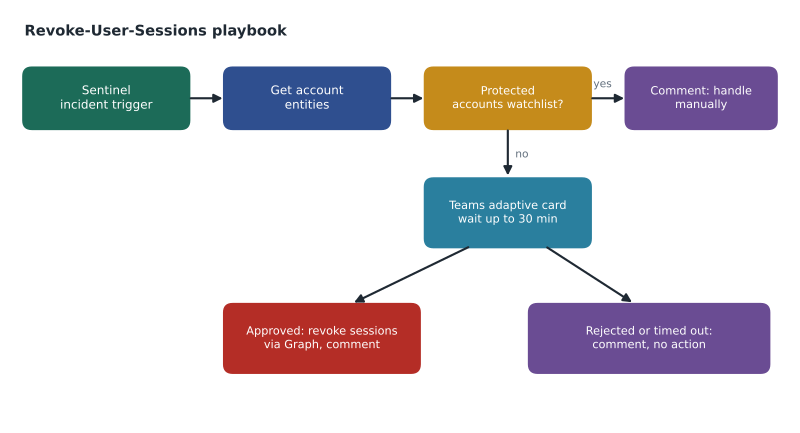
The second playbook, Revoke-User-Sessions, is not run automatically. Nadia's rule was that response actions on people need a person. So the playbook is run either manually by an analyst on an incident, or by an automation rule only for incidents from the phishing rules, and in both cases its first real step is to ask. For each account entity, it checks a watchlist of protected accounts, such as the break-glass accounts and the chief executive, and sends those straight to a comment asking for manual handling. For every other account it posts an adaptive card to the SOC's Teams channel, showing the user, the incident and the reason, with Approve and Reject buttons, and waits up to 30 minutes.
If an analyst approves, the playbook calls Microsoft Graph to revoke the user's sign-in sessions, which invalidates refresh tokens so stolen session cookies stop working, and adds a comment naming who approved it and when. If someone rejects, or nobody answers in 30 minutes, it adds a comment saying no action was taken. It never resets passwords; that remains a manual step, because a password reset needs a conversation with the user.
In MSAZ-340 Ama had seen automatic attack disruption revoke sessions on its own, within minutes, for a high-confidence attack. The playbook is not a replacement for that. It covers the many incidents that do not meet attack disruption's confidence bar but where the analyst has decided to act, and it turns a five-minute manual task across two portals into one click in Teams.
Testing and running playbooks safely
Ama tested both playbooks against a test incident built on a test account, never a real user. Logic Apps keeps a run history showing every action's inputs and outputs, which made it easy to see why the first test failed: the Graph call had been given the user's display name instead of the object ID. She also tested the timeout, by approving nothing, and the protected-account branch, by adding the test account to the watchlist for an hour.
Two Defender portal behaviors affected testing. Incidents from Defender can take up to about five minutes to appear in Sentinel, so a playbook triggered by an automation rule may start a little later than expected. And Microsoft notes that a playbook run on an incident may fail with an error about not being able to access the incident's data until the incident has synchronized to Sentinel; refreshing the page after the sync fixes it. Neither is a fault in the playbook, but both can look like one during a test.
| Check | Result on November 12 |
|---|---|
| Enrichment on an incident with 2 IP entities | One comment with two scores; tag not added (scores below threshold) |
| Enrichment with a known bad test address | Comment and ip-reputation-bad tag added |
| Revoke with approval | Sessions revoked for the test account; comment with approver and time |
| Revoke with no response | Timed out after 30 minutes; comment that no action was taken |
| Protected account | No card posted; comment asking for manual handling |
Keeping playbooks maintainable
Playbooks outlive the people who build them, so Sunil set three conventions. Every playbook has a description listing its trigger, what it reads, what it changes and the permissions its identity holds. Every playbook writes a comment on the incident for every outcome, including failures and timeouts, so analysts never have to open the Logic Apps run history to know what happened. And every playbook is exported as a template into the SOC's Git repository with the analytics and automation rules, so a change can be reviewed and an accidental deletion recovered.
Monitoring completes the picture. A playbook that fails silently is worse than none, because the SOC believes it ran. Logic Apps can send its run results to a workspace through diagnostic settings, and Sunil sent them to the security workspace, where a rule raises an incident if either playbook fails more than twice in an hour. The SentinelHealth table also records automation rule runs, including playbooks they started, which gives a second view.
Worked problem
Designing a playbook for the store firewalls
Nadia wants a way to block an outside IP address at all 26 firewalls quickly during an incident. The firewall vendor has a central management API that can add an address to a block list group pushed to every firewall. How should the playbook be designed?
Show solution
- Use the incident trigger and run it from automation rules or manually on incidents, so it fits the ordered automation list and works in the Defender portal.
- Read the incident's IP entities and check each against a watchlist of addresses that must never be blocked, such as the payment processor, the reporting vendor and Microsoft services.
- Ask for approval in the SOC Teams channel, showing the address, its reputation comment from the enrichment playbook, and the incident.
- On approval, call the vendor's API with credentials stored in Key Vault, add the address to the block list group with an expiry, and record the change.
- Comment on the incident with the result and the expiry, and tag it so a later rule can review blocks that are about to expire.
- Give the managed identity only Key Vault read on one secret and Responder on the workspace, and run the workflow on a Standard plan with private networking if the firewall API is reachable only internally.
Answer: An approval-gated, incident-triggered playbook that checks a never-block watchlist, calls the firewall management API with a Key Vault secret, sets an expiry on each block and records everything in the incident.
Common mistakes
MistakeBuild playbooks on the entity trigger and run them from the Defender portal.
InsteadManual runs on entities and alerts are not supported in the Defender portal; use the incident trigger.
MistakeStore API keys and passwords in the workflow.
InsteadUse a managed identity and Key Vault for secrets.
MistakeLet response playbooks act on any account automatically.
InsteadRequire approval, and send protected accounts to manual handling.
MistakeAssume a failed first run means the playbook is broken.
InsteadCheck the run history, and allow for the delay before Defender incidents sync to Sentinel.
Summary and key terms
- Playbooks are Logic Apps workflows with a Sentinel incident, alert or entity trigger.
- Run most playbooks on incidents from automation rules; the Defender portal does not support manual runs on alerts or entities.
- Consumption workflows are billed per action; Standard workflows add dedicated hosting and private networking.
- Building needs Logic App Contributor, running needs Playbook Operator, and automation needs the Sentinel service account's permission.
- Give each playbook a managed identity with only the rights its actions need, and keep secrets in Key Vault.
- Enrichment playbooks are low risk; response playbooks should ask a person before acting.
- Test with test accounts and use the Logic Apps run history to debug.
- Playbook
- A Logic Apps workflow triggered from Sentinel to automate investigation or response.
- Logic Apps
- Azure's workflow service, made of triggers, actions and connectors.
- Managed identity
- An identity Azure manages for a resource, so it can authenticate without stored secrets.
- Adaptive card
- An interactive message, for example in Teams, that can collect a response such as Approve or Reject.
- Run history
- The Logic Apps record of each run's actions, inputs and outputs.
- Enrichment
- Adding information from other sources to an incident without changing anything else.
Practice problems
Work each problem on paper first, then reveal the answer to check.
What trigger should most playbooks use?
Show answer
The Microsoft Sentinel incident trigger.
Why does the response playbook check a watchlist first?
Show answer
To send protected accounts, such as break-glass accounts, to manual handling.
What happens if nobody answers the approval card?
Show answer
After 30 minutes the playbook comments that no action was taken.
Why did the first revoke test fail?
Show answer
The Graph call was given the display name instead of the object ID.
Which hosting plan supports private networking for playbooks?
Show answer
The Logic Apps Standard plan.
Lesson quiz · 5 questions
Score 60% or more to complete this lesson.
Create a free account to save your progress, take quizzes and earn a certificate.