
MSAZ-341 · Lesson 6 of 12 · 20 min
Analytics rules: scheduled and near real time
▶ Video coming soon A video version of this lesson is on the way.
Data in a workspace becomes detection only when something looks at it. On Tuesday, November 10, the sprint wrote its first analytics rules. Nadia brought a list of five things she wanted to know about within minutes or hours, each tied to something that had happened at Harrow & Finch or to a gap the October penetration test had found. Sunil brought the content hub templates installed in lesson 3. By the end of the day the team had built five rules, two from templates and three of their own, and Ama had learned that the hard part of a rule is not the query but the schedule, the threshold and what happens when it fires.
What an analytics rule is
An analytics rule runs a KQL query against the workspace and turns the results into alerts. Alerts can create incidents, which appear in the unified queue in the Defender portal beside Defender XDR incidents. A rule has more parts than its query: a name and description, a severity, MITRE ATT&CK tactics and techniques, a schedule, a threshold, entity mappings and custom details (lesson 7), alert grouping and incident settings (lesson 7), and automated responses (lessons 10 and 11).
Sentinel has several kinds of rule. The SC-200 study guide names scheduled, near-real-time (NRT), threat intelligence and machine learning rules, and expects candidates to configure and manage them.
| Rule type | How it works | Typical use |
|---|---|---|
| Scheduled | Runs your KQL query on a schedule over a lookback period | Most custom detections |
| Near real time (NRT) | Runs every minute on data ingested in the previous minute | A few high-value, simple detections |
| Threat intelligence | Matches your data against threat indicators | Known bad addresses, domains and hashes (lesson 8) |
| Anomaly (machine learning) | Microsoft's models find behavior that departs from a baseline | Signals for hunting and correlation (lesson 9) |
| Microsoft security | Creates incidents from other Microsoft products' alerts | Not supported once the workspace is in the Defender portal, where those incidents come through Defender XDR |
Fusion, the machine learning engine that used to correlate alerts into multistage incidents in Sentinel, is turned off in workspaces connected to the Defender portal, because the Defender correlation engine does that job across both Sentinel and Defender XDR alerts. For detections that need Defender XDR data and Sentinel data together, Microsoft points to custom detection rules in the Defender portal, which can query both without the Defender XDR data being ingested into Sentinel.
Scheduling a scheduled rule
A scheduled rule has two time settings. The run frequency says how often it runs; the lookback period says how much data each run examines. Both can range from five minutes up to fourteen days. Sentinel also applies a built-in delay of five minutes to scheduled rules, so each run looks at a window ending a few minutes before the run time, to allow for data that arrives a little late. The basic rule is that the lookback should be at least as long as the frequency; otherwise there are gaps between runs that no run examines.
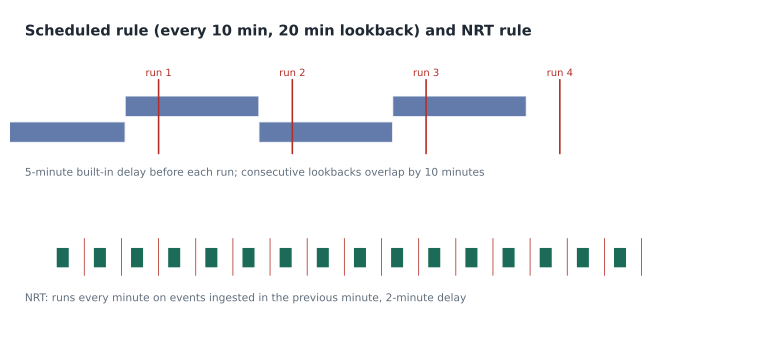
A lookback longer than the frequency means each event is examined by more than one run. That is usually good, because it catches events that arrive late, but it can produce duplicate alerts for the same activity. Suppression handles that: once a rule fires, it can stop itself from running again for a set period. The till PC brute force rule below uses both.
rules = [
    # name, frequency (minutes), lookback (minutes)
    ("Failed sign-ins on till PCs", 10, 20),
    ("New country then MFA change", 60, 60),
    ("Key Vault secret reads", 30, 15),
    ("Mailbox forwarding to outside domain", 60, 120),
]
for name, freq, look in rules:
    if look < freq:
        verdict = f"GAP: {freq - look} minutes of every run unexamined"
    elif look == freq:
        verdict = "no gap, no overlap"
    else:
        verdict = f"overlap of {look - freq} minutes (consider suppression)"
print(f"{name:<38} every {freq:>3} min, lookback {look:>3} min: {verdict}")Failed sign-ins on till PCs every 10 min, lookback 20 min: overlap of 10 minutes (consider suppression) New country then MFA change every 60 min, lookback 60 min: no gap, no overlap Key Vault secret reads every 30 min, lookback 15 min: GAP: 15 minutes of every run unexamined Mailbox forwarding to outside domain every 60 min, lookback 120 min: overlap of 60 minutes (consider suppression)
What this code does
The program lists four rules with how often each runs and how far back each run looks. For each it compares the lookback with the frequency: a shorter lookback leaves a gap that no run examines, an equal one leaves neither gap nor overlap, and a longer one makes consecutive runs overlap. The output shows the Key Vault rule has a 15-minute gap in every 30, which Ama caught and fixed by making its lookback 30 minutes, and that two rules overlap and may need suppression.
Thresholds and event grouping
The alert threshold decides when a run produces an alert: by default when the query returns more than zero results, but you can set it to more than some number. Event grouping then decides how results become alerts. Grouping all events into a single alert gives one alert per run with all the results attached. Triggering an alert for each event gives a separate alert per result row, up to a limit, which is useful when each row is a different user or device that should be handled separately.
For most custom rules it is better to put the counting logic in the query, with summarize and a where clause, than to rely on the threshold, because the query can count per user or per device while the threshold only counts rows. The till PC rule is an example.
SecurityEvent
| where EventID == 4625
| where Computer startswith "TILL-"
| summarize FailedAttempts = count(), Accounts = dcount(TargetUserName),
            FirstSeen = min(TimeGenerated), LastSeen = max(TimeGenerated)
            by Computer, IpAddress
| where FailedAttempts >= 20
The rule runs every 10 minutes with a 20-minute lookback, triggers an alert for each result row so each till PC becomes its own alert, and suppresses itself for one hour after firing. Its severity is medium and its MITRE ATT&CK mapping is Credential Access, Brute Force. When Ama tested it against two weeks of trial data it returned three rows, all from one till PC in the Ankeny store whose cached password for a service account had expired. That was a real fault, not an attack, but it was exactly the kind of noise that would recur, so Sunil added an exclusion for that service account on that machine with a comment and an expiry date.
Near-real-time rules
Near-real-time (NRT) rules are for the few detections where minutes matter. They run every minute, look at events ingested in the previous minute, and have a built-in delay of only two minutes rather than five. They use ingestion time rather than the time an event was generated, which makes them robust to sources that deliver data late. Their limits are strict: 50 NRT rules per customer, and each run produces at most 30 alerts; if the query returns more, the first 29 become alerts and the thirtieth summarizes the rest. The source's ingestion delay must be under 12 hours. NRT rules support entity mapping, custom details, alert grouping, suppression and automation like scheduled rules.
Nadia chose one NRT rule for the sprint: a security event log being cleared on any server or domain controller. Clearing the log is rare for legitimate reasons and is a classic attempt to hide activity, mapped in MITRE ATT&CK as Defense Evasion, Indicator Removal. Because the query is a simple filter with no aggregation, it suits NRT well.
SecurityEvent
| where EventID == 1102
| project TimeGenerated, Computer, Account = SubjectUserName, Activity| Setting | Scheduled rule | NRT rule |
|---|---|---|
| Frequency | From 5 minutes to 14 days | Every minute, fixed |
| Data examined | The lookback period, by event time | Events ingested in the previous minute |
| Built-in delay | Five minutes | Two minutes |
| Limit on rules | Workspace limits for rules overall | 50 per customer |
| Alerts per run | Per grouping setting, up to a limit | 30 (29 plus one summary) |
| Best for | Counting, joining and baselines | Simple, high-value filters |
Rules from templates
Two of the five rules came from templates. The Microsoft Entra ID solution included a template for sign-ins from a new country followed by a change to multifactor authentication methods, which matched the October phishing pattern closely; Ama read the query, kept its logic, changed its schedule to hourly with a one-hour lookback and its severity to high. The Azure Key Vault solution included a template for unusually many secret reads; Sunil adjusted the threshold, which had been written for much larger estates. The two other custom rules watched for new mailbox forwarding rules to outside domains, and for any sign-in to the break-glass emergency administrator accounts.
Every rule got a description that says what it detects, why it matters, what a first responder should check, and who wrote it. Ama's version of Nadia's rule was that a rule nobody can explain at three in the morning is a rule nobody will trust.
Testing and watching rules
Before turning a rule on, run its query against past data and look at what it would have returned. The rule wizard shows a results simulation for the query against recent data, and Ama also ran each query by hand over 14 days of trial data. After rules are on, the SentinelHealth table records each run, including failures and runs that hit limits, and a rule that keeps failing is effectively no rule. Sunil added a weekly check of rule health to the SOC's Monday tasks.
A rule that is set to generate alerts but not incidents is not visible in the Defender portal's queue, Microsoft notes. Nadia wanted every rule to create incidents, so analysts would see them, and to rely on alert grouping (lesson 7) and tuning to keep the queue manageable.
Rules are also code, and the SOC treats them that way. Sunil exported the five rules as Azure Resource Manager templates into the SOC's Git repository, where each change is proposed, reviewed by a second person and deployed through a pipeline. Rules changed by hand in the portal drift from the repository, so the monthly review compares the two and either commits the portal change or reverts it.
Worked problem
Designing the Key Vault rule
The Key Vault template fired when one identity read more than 50 secrets in an hour. Harrow & Finch has 4 key vaults; the busiest legitimate reader, the StockLine application's managed identity, reads about 12 secrets an hour, and an administrator rotating secrets reads at most about 20. The rule is scheduled every 30 minutes. What threshold, lookback and grouping make sense?
Show solution
- Normal readers stay at or below about 20 reads an hour, so a threshold of more than 25 reads by one identity in a 30-minute window catches bulk reading without firing on rotations.
- Set the lookback to 30 minutes to match the frequency, so no period goes unexamined.
- Count per identity in the query with summarize, so the alert names the identity rather than counting all rows together.
- Trigger an alert per result row, because each identity should be investigated separately.
- Map the tactic as Credential Access and the technique as Credentials from Password Stores, and set severity to high, since secrets give access to other systems.
Answer: Count reads per identity over a 30-minute lookback every 30 minutes, alert on more than 25, one alert per identity, high severity, mapped to Credential Access.
Common mistakes
MistakeMake the lookback shorter than the frequency to reduce cost.
InsteadThat leaves gaps that no run examines; use a lookback at least as long as the frequency.
MistakeTurn every important rule into an NRT rule.
InsteadNRT rules are limited to 50 per customer and suit simple filters; most rules should be scheduled.
MistakeUse the alert threshold to count failed sign-ins per user.
InsteadCount per user or device in the query with summarize; the threshold counts result rows.
MistakeTurn on a template unchanged.
InsteadRead it, adjust schedule, thresholds and severity to your estate, and test against past data first.
Summary and key terms
- Analytics rules run KQL queries and turn results into alerts and incidents.
- Rule types include scheduled, NRT, threat intelligence and anomaly rules; Fusion is off in the Defender portal.
- Scheduled rules run from every 5 minutes to every 14 days, with a lookback of the same range and a 5-minute built-in delay.
- Keep the lookback at least as long as the frequency, and use suppression for overlaps.
- NRT rules run every minute on newly ingested data, with a 2-minute delay, 50 rules per customer and 30 alerts per run.
- Count per entity in the query; use event grouping to decide one alert per run or per result.
- Test against past data and watch rule health in SentinelHealth.
- Analytics rule
- A Sentinel rule that runs a query and creates alerts from its results.
- Lookback period
- The window of data each run of a scheduled rule examines.
- Run frequency
- How often a scheduled rule runs.
- Suppression
- A setting that stops a rule from running for a period after it fires.
- Near-real-time (NRT) rule
- A rule that runs every minute on data ingested in the previous minute.
- Event grouping
- The setting that decides whether a run produces one alert or one alert per result.
Practice problems
Work each problem on paper first, then reveal the answer to check.
What happens if a rule's lookback is shorter than its frequency?
Show answer
Part of each interval is never examined.
How often does an NRT rule run?
Show answer
Every minute.
Why was clearing the security log a good NRT rule?
Show answer
It is rare, high-value and a simple filter with no aggregation.
Why count failed sign-ins in the query rather than with the threshold?
Show answer
The query can count per device or user; the threshold counts result rows.
What did the gap check find in the Key Vault rule?
Show answer
A 15-minute lookback with a 30-minute frequency left a 15-minute gap.
Lesson quiz · 5 questions
Score 60% or more to complete this lesson.
Create a free account to save your progress, take quizzes and earn a certificate.