
MSAZ-341 · Lesson 1 of 12 · 21 min
Designing a Sentinel workspace
▶ Video coming soon A video version of this lesson is on the way.
In the first week of November 2026, Harrow & Finch turned on Microsoft Sentinel. Sunil Rao, the IT security manager, did the engineering; Nadia Okonjo, the security operations lead, set the requirements; and Ama Boateng, the analyst who had spent October shadowing Nadia's shifts in the Defender portal, joined every build session to learn how the platform underneath her incident queue is put together. The sprint ran from Monday, November 2 to Thursday, November 12, in the small meeting room next to the security operations desk at head office in Des Moines. This course follows those sessions. Everything the team planned for after November 13 is written as a plan.
Ama already knew Sentinel from the outside. In SC-900 study she had learned that it is a cloud-native security information and event management (SIEM) and security orchestration, automation and response (SOAR) service, and in her October shifts she had seen its incidents appear in the same queue as Defender XDR. What she had not done was design one. Nadia's opening question for the sprint was the one she asks about every system: "What will we need to see, and how long will we need to see it for?" Every design decision in the next twelve lessons comes back to that question.
What a Sentinel workspace is
Sentinel does not have its own database. It is enabled on a Log Analytics workspace, the same kind of workspace Azure Monitor uses, and everything Sentinel collects lands in tables in that workspace: sign-in logs in SigninLogs, Windows security events in SecurityEvent, firewall logs in CommonSecurityLog, alerts in SecurityAlert, incidents in SecurityIncident, and many more. Analytics rules, hunting queries and workbooks are all written in the Kusto Query Language (KQL) against those tables. When the workspace is onboarded to the Defender portal, the same tables appear in advanced hunting next to the Defender XDR tables Ama used in October.
Two consequences follow from that design. First, the workspace is the unit of configuration: data connectors, analytics rules, automation rules, watchlists and retention are all set per workspace. Second, the workspace is the unit of billing. Once Sentinel is enabled on a workspace, Sentinel charges apply to the data in it that goes to the analytics tier, not just the security data. Lesson 5 covers the tiers in detail; for workspace design the important point is that you should not switch Sentinel on for a workspace that is mostly full of data nobody will ever use for security.
One workspace or several
Microsoft's general advice is to use as few workspaces as you can. One workspace makes correlation simple, because every analytics rule and hunting query sees all the data. It also keeps administration simple: one set of rules, one set of connectors, one place to look. More workspaces become necessary only for specific reasons, and the team listed the usual ones on the whiteboard before deciding.
| Reason for another workspace | Example | Does it apply to Harrow & Finch? |
|---|---|---|
| Data residency or sovereignty | Data about people in one country must stay in a region there | No residency rule applies; one workspace in Central US is enough |
| Separate tenants | A company with two Microsoft Entra tenants after an acquisition | No, there is one tenant |
| Separate ownership or billing | A subsidiary that pays for and runs its own SOC | No, one SOC serves the whole company |
| Very different retention needs | Regulated logs kept for years beside short-lived debug data | Handled with table-level retention and the data lake instead |
| Keeping non-security data out of Sentinel | Performance counters and application logs used only by operations | Yes: operations data stays in its own workspace |
The last row decided the design. Since September, Renata Kowal's cloud team had been sending virtual machine performance counters, application logs from the StockLine back end and diagnostic logs from the VPN gateway to the operations workspace law-hf-cus, which they used for Azure Monitor dashboards and alerts. About 11 GB a day of that data had nothing to do with security. If Sentinel were enabled on that workspace, all of it would be billed at Sentinel's analytics rate as well as the Log Analytics rate. So Sunil created a dedicated security workspace, law-hf-sentinel-cus, enabled Sentinel on it, and pointed only security-relevant data at it.
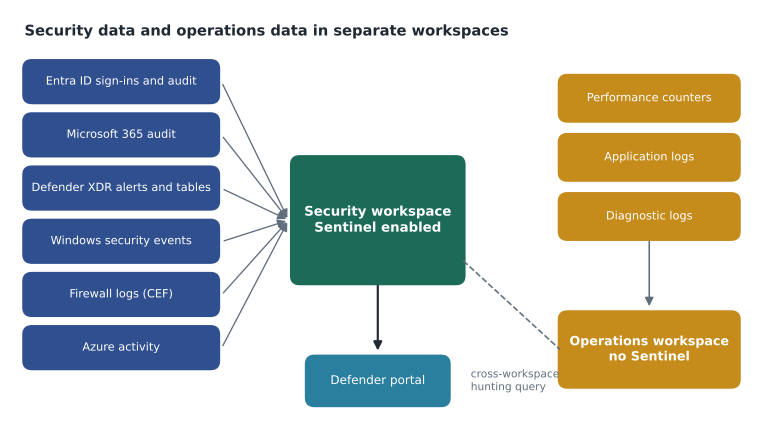
Splitting the data has a cost too: a rule in the security workspace cannot see the operations workspace without a cross-workspace query. Nadia accepted that. The operations data was useful to security only occasionally, for example to see whether a server's CPU spiked during an incident, and for that a hunting query can use the workspace() function to read the other workspace. What she did not want was an analytics rule depending on data the SOC did not control.
Region and data residency
A workspace is created in one Azure region, and its data is stored there. Harrow & Finch has no legal requirement to keep security data in one place, so Sunil put the security workspace in Central US, the same region as the rest of Project Skylight. Keeping it beside the other resources reduces latency for diagnostic settings and keeps data transfer simple. Sign-in logs and device events still contain personal information about employees, so the workspace falls under the company's privacy notice and the Iowa Consumer Data Protection Act is mentioned in its records of processing, even though that law mainly covers consumers. Some Sentinel features, including the data lake described in lesson 5, are available only in certain regions, so Sunil checked Microsoft's supported-regions list for the workspace region before committing to the design.
Other residency details are easy to miss. Some Sentinel features process data outside the workspace's region: machine learning features, the Defender portal itself, and Microsoft's threat intelligence services each have their own data-location statements. Sunil saved Microsoft's current geographical availability and data residency page to the design record and wrote down which features the company had decided to use, so that a later privacy review could see exactly what had been accepted.
Connecting the workspace to the Defender portal
Harrow & Finch connected the new workspace to the Defender portal on the first day of the sprint, as course MSAZ-340 described. Microsoft has announced that the Sentinel experience in the Azure portal will be retired on March 31, 2027, after which Sentinel is used only in the Defender portal, so a new deployment has no reason to learn the old screens first. Connecting the workspace changes some behavior, and Sunil walked Ama through the changes that matter for design.
| Area | What changes once the workspace is in the Defender portal |
|---|---|
| Incidents | One queue for Sentinel and Defender XDR incidents; the Defender correlation engine groups alerts into incidents, and Microsoft incident creation rules are turned off to avoid duplicates |
| Fusion | Turned off; the Defender correlation engine takes over multistage correlation |
| Defender XDR connector | Connects only to the primary workspace in the tenant |
| Hunting | Advanced hunting queries Defender XDR tables and Sentinel tables together |
| Automation | Automation rules run on incidents from both Sentinel and Defender XDR unless their conditions limit them |
| Customer-managed keys | Log data stays encrypted with the customer key; alerts and incidents in the Defender portal do not |
The primary workspace rule matters for anyone with more than one workspace. The Defender XDR connector, which brings Defender incidents and raw tables into Sentinel, connects only to the tenant's primary workspace, and only alerts in the primary workspace are correlated with Defender XDR data. With a single security workspace, law-hf-sentinel-cus was simply the primary workspace. A company that later adds a second workspace for an acquired business would need to plan which one is primary.
Naming, tags and the resource group
Sunil put the workspace in its own resource group, rg-secops-prod-cus, with the playbooks, workbooks and data collection rules that lessons 4 and 11 add later. Sentinel's built-in roles are usually assigned at resource group level, so keeping security resources together means one role assignment gives an analyst access to the workspace and the playbooks without exposing anything else. The resource group follows the Project Skylight naming pattern, and its tags record the owner (security operations), the cost center and the data classification (Confidential).
He also set a daily cap alert rather than a daily cap. A daily cap stops ingestion when a limit is reached, which protects the budget but can blind the SOC in the middle of an attack, exactly when logs surge. Instead, an Azure Monitor alert emails Sunil and Nadia when ingestion passes 30 GB in a day, well above the planned level, so a person can decide whether the spike is an attack, a misconfigured connector or a new data source someone forgot to mention.
Estimating ingestion before you build
Before creating anything, Sunil estimated how much data each source would send per day, because ingestion volume drives cost and the choice between pay-as-you-go and a commitment tier. Some sources are free to ingest into Sentinel's analytics tier, including Azure activity logs, Office 365 audit logs for SharePoint, Exchange administration and Teams, and alerts from the Defender products. Others, such as Microsoft Entra ID sign-in logs, raw Defender for Endpoint tables and firewall logs, are billed. The free trial gives the first 10 GB a day free for 31 days, which the team used to measure real volumes rather than guesses.
sources = [
    # source, estimated GB per day, free to ingest?
    ("Azure activity", 0.3, True),
    ("Office 365 audit (SharePoint, Exchange admin, Teams)", 0.8, True),
    ("Defender XDR alerts", 0.1, True),
    ("Entra ID sign-in and audit logs", 2.4, False),
    ("Defender for Endpoint raw tables", 6.5, False),
    ("Windows security events (servers)", 3.2, False),
    ("Store and head office firewalls (CEF)", 4.0, False),
]
billable = sum(gb for _, gb, free in sources if not free)
free = sum(gb for _, gb, free in sources if free)
price = 5.20   # illustrative pay-as-you-go price per GB, analytics tier
print(f"Free per day:     {free:5.1f} GB")
print(f"Billable per day: {billable:5.1f} GB")
print(f"Billable per 30-day month: {billable * 30:,.0f} GB")
print(f"Illustrative monthly cost: {billable * 30 * price:,.0f} dollars")Free per day: 1.2 GB Billable per day: 16.1 GB Billable per 30-day month: 483 GB Illustrative monthly cost: 2,512 dollars
What this code does
The program lists each planned data source with an estimated daily volume and whether Microsoft lets it be ingested free. It adds up the free and billable volumes separately, scales the billable volume to a 30-day month and multiplies by an illustrative price per gigabyte. The result shows that about 16 GB a day would be billed, roughly 480 GB a month, which gives the team a cost figure to compare with the commitment tiers in lesson 5.
The illustrative price in the program is only a placeholder; Microsoft's prices vary by region and currency and change over time, so Sunil took the real figure from the Azure pricing calculator for the workspace's region on the day he wrote the design. What the estimate showed clearly was where the volume came from. Defender for Endpoint's raw tables and the firewalls together made up two thirds of the billable data, so those were the sources where lesson 5's tier choices would matter most.
Worked problem
Choosing a workspace design for the sprint
Nadia's requirements were: one SOC for the whole company; security data searchable for at least 90 days and kept for 2 years for investigations; operations data kept out of Sentinel billing; no residency requirement; and everything in the Defender portal. Which workspace design meets them?
Show solution
- One tenant and one SOC means there is no ownership or tenant reason for more than one security workspace.
- Operations data used only by the cloud team should stay in law-hf-cus, so Sentinel is not enabled there.
- Create one security workspace, law-hf-sentinel-cus, in Central US, beside the rest of Project Skylight, and enable Sentinel on it.
- Connect it to the Defender portal as the primary workspace, so the Defender XDR connector and correlation use it.
- Meet the 90-day and 2-year needs with table retention settings and the data lake (lesson 5), not with extra workspaces.
- Use cross-workspace hunting queries for the rare cases that need operations data.
Answer: A single Sentinel-enabled security workspace in the primary region, connected to the Defender portal as the primary workspace, with operations data kept in a separate workspace and long retention handled by table settings.
Ama wrote the design in one page and Nadia signed it on November 2. The page listed the workspace name and region, the resource group, the decision not to enable Sentinel on the operations workspace, the ingestion estimate, the alert at 30 GB a day, and a note that the design would be reviewed when the Sentinel data lake was onboarded, planned for December 2026.
Common mistakes
MistakeEnable Sentinel on the existing operations workspace to save effort.
InsteadSentinel charges apply to the analytics data in a Sentinel-enabled workspace, so keep large non-security data in a separate workspace.
MistakeCreate a workspace per data source or per department.
InsteadUse as few workspaces as possible; more workspaces only for residency, tenant, ownership or similar reasons.
MistakeUse a daily cap to control cost.
InsteadA cap can stop ingestion during an attack; prefer an alert on ingestion volume and fix the source.
MistakeThe Defender XDR connector can feed every workspace.
InsteadIt connects only to the tenant's primary workspace once workspaces are in the Defender portal.
Summary and key terms
- Sentinel is enabled on a Log Analytics workspace, and its data lives in workspace tables queried with KQL.
- The workspace is the unit of configuration and of billing.
- Use as few workspaces as possible; extra ones are justified by residency, tenants, ownership or keeping non-security data out.
- The workspace region determines where data is stored; check feature availability by region.
- Connecting to the Defender portal gives one incident queue, turns off Fusion, and makes one workspace primary.
- Estimate ingestion by source before building; some Microsoft sources are free to ingest.
- Log Analytics workspace
- The Azure Monitor data store in which Sentinel keeps its tables.
- Primary workspace
- The workspace in a tenant that the Defender XDR connector feeds and correlates with.
- Cross-workspace query
- A KQL query that reads tables in more than one workspace.
- Daily cap
- A workspace setting that stops ingestion after a daily volume is reached.
- Free data source
- A source, such as Azure activity logs, that can be ingested into the analytics tier without ingestion charges.
- SIEM
- Security information and event management: collecting, correlating and alerting on security data.
Practice problems
Work each problem on paper first, then reveal the answer to check.
Why did Harrow & Finch not enable Sentinel on its operations workspace?
Show answer
About 11 GB a day of operations data would then have been billed at Sentinel rates without being used for security.
Give two reasons that justify a second Sentinel workspace.
Show answer
Any two of: data residency, separate tenants, separate ownership or billing, keeping large non-security data out.
What does the Defender XDR connector connect to in the Defender portal?
Show answer
Only the tenant's primary workspace.
Why prefer an ingestion alert to a daily cap?
Show answer
A cap can stop collection during an attack, when the data is most needed.
Which two sources made up most of the billable estimate?
Show answer
Defender for Endpoint raw tables and firewall logs.
Lesson quiz · 5 questions
Score 60% or more to complete this lesson.
Create a free account to save your progress, take quizzes and earn a certificate.