
MSAZ-341 · Lesson 2 of 12 · 20 min
Roles and permissions
▶ Video coming soon A video version of this lesson is on the way.
On Tuesday, November 3, the second session of the sprint was about who could do what. Sunil had created the workspace the day before with his own administrator account, and Nadia's first instruction was that nobody, including Sunil, should keep using that account for daily work. "A SIEM holds the evidence," she said. "If the wrong person can change a rule or delete a table, we can't trust what it tells us." The session produced a role table that Ama later used as a model for every new tool the SOC adopted.
Access to Sentinel comes from two directions. Azure role-based access control (Azure RBAC) governs the workspace and the Azure resources around it: analytics rules, automation rules, playbooks, workbooks and the workspace's tables. Microsoft Entra roles and the Defender portal's own permissions govern what people see and do in the Defender portal, including the Defender XDR side of an incident and the Sentinel data lake. An analyst who works incidents from both Sentinel and Defender XDR needs the right permissions on both sides, which is why Nadia wanted the whole picture in one table.
The built-in Sentinel roles
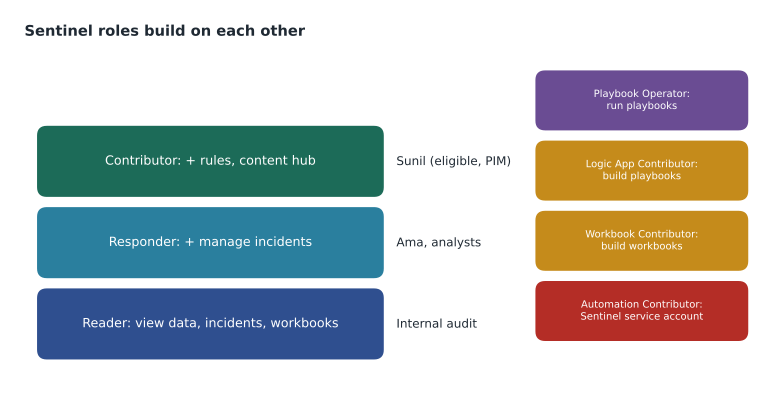
Microsoft provides a small set of built-in Azure roles for Sentinel. They are cumulative: each role in the main line includes everything in the one before it. Microsoft recommends assigning them at the resource group that holds the workspace, so that the same assignment also covers the playbooks, workbooks and other resources kept there.
| Role | What it allows | Who at Harrow & Finch |
|---|---|---|
| Microsoft Sentinel Reader | View data, incidents, workbooks, rules and recommendations | Internal audit, during reviews |
| Microsoft Sentinel Responder | Everything a Reader can do, plus manage incidents: assign, change status, comment, close | Ama and the other analysts |
| Microsoft Sentinel Contributor | Everything a Responder can do, plus create and edit analytics rules, workbooks and other content, and install solutions from the content hub | Sunil, through Privileged Identity Management |
| Microsoft Sentinel Playbook Operator | List, view and run playbooks manually | Nadia and the senior analysts |
| Microsoft Sentinel Automation Contributor | Lets Sentinel itself add playbooks to automation rules; not for people | The Sentinel service account only |
Three supporting Azure roles complete the picture. Logic App Contributor lets someone create and edit playbooks, because playbooks are Azure Logic Apps; Sunil got it, the analysts did not. Workbook Contributor lets someone create and edit workbooks, so a Reader who also needs to build a report can be given it without becoming a Sentinel Contributor. And Log Analytics roles matter when someone needs to query the workspace from Azure Monitor rather than through Sentinel.
Least privilege and just-in-time access
Nadia's rule was that everyday accounts get the least role that lets people do their work, and anything stronger is activated only when needed. Harrow & Finch already used Microsoft Entra Privileged Identity Management (PIM) for Azure administrator roles, so Sunil made his Sentinel Contributor and Logic App Contributor assignments eligible rather than active. When he needs to change a rule he activates the role for up to four hours, gives a reason that is recorded, and the assignment expires on its own. Ama's Responder role is active, because she uses it all day.
Role assignments add up. A person who is a Responder on the resource group and a Contributor on the subscription is effectively a Contributor on the workspace, because the subscription assignment is inherited. When Ama reviewed the existing assignments she found exactly that: two members of the cloud team had Contributor on the whole production subscription from Project Skylight's early weeks, which would have let them edit or delete Sentinel rules. Renata agreed to replace those assignments with narrower ones on the resource groups the cloud team actually managed, and Sunil added a check to the monthly access review.
# Which is the least role that covers what each person must do?
roles = [
    ("Microsoft Sentinel Reader", {"view"}),
    ("Microsoft Sentinel Responder", {"view", "manage incidents"}),
    ("Microsoft Sentinel Contributor", {"view", "manage incidents", "edit rules", "install content"}),
]
needs = {
    "Internal auditor": {"view"},
    "Ama (analyst)": {"view", "manage incidents"},
    "Sunil (engineer)": {"view", "manage incidents", "edit rules"},
}
for person, tasks in needs.items():
    for name, allowed in roles:          # roles are listed from least to most
        if tasks <= allowed:
            print(f"{person:<18} -> {name}")
breakInternal auditor -> Microsoft Sentinel Reader Ama (analyst) -> Microsoft Sentinel Responder Sunil (engineer) -> Microsoft Sentinel Contributor
What this code does
The program lists the three main Sentinel roles from least to most powerful, each with the set of tasks it allows. For each person it checks the roles in order and stops at the first one whose allowed tasks include everything the person needs. The output shows the auditor needs only Reader, Ama needs Responder and Sunil needs Contributor, which is the least-privilege assignment the team chose.
Playbooks and the Sentinel service account
Automation adds one more identity. When an automation rule runs a playbook, Sentinel does not run it as the analyst who created the rule; it uses a special Microsoft Sentinel service account. That account needs explicit permission on the resource group that contains the playbook, and granting it requires someone with Owner rights on that resource group. In the portal this appears as a Manage playbook permissions link in the automation rule wizard. Once granted, any automation rule in the workspace can run any playbook in that resource group, which is another reason to keep production playbooks in a resource group of their own.
The playbooks themselves also need identities to act on other systems, for example to disable a user in Microsoft Entra ID or post a message in Teams. Lesson 11 covers this, but the role session set the principle: each playbook gets a managed identity with only the permissions it needs, and those permissions are listed in the playbook's description so a reviewer can see them without opening the code.
Limiting what data people can see
Not everyone who needs some Sentinel data needs all of it. Two Azure features narrow access below the workspace level. Resource-context RBAC lets people see log data from the Azure resources they already have access to, without any access to the workspace itself: a database administrator with rights on a SQL server can see that server's logs and nothing else. Table-level RBAC lets you grant or deny access to specific tables, so a team can read SecurityEvent but not SigninLogs, for example.
Harrow & Finch used both, once each. The store support team had asked for firewall logs to troubleshoot store network problems. Rather than make them Sentinel Readers, which would have shown them sign-in logs and incidents about colleagues, Sunil gave them table-level read access to CommonSecurityLog and nothing else. The database administrators, Elena Brandt's team, already had rights on the SQL resources, so resource-context access let them see auditing data for their own servers without any new role.
| Need | Least access that meets it |
|---|---|
| See firewall logs for store troubleshooting | Table-level read on CommonSecurityLog only |
| See auditing logs for the team's own SQL servers | Resource-context access through existing rights on those servers |
| Review incidents during an audit | Microsoft Sentinel Reader, time-limited |
| Work incidents every day | Microsoft Sentinel Responder |
| Build playbooks | Logic App Contributor, plus Playbook Operator to test them |
| Build a report without editing rules | Sentinel Reader plus Workbook Contributor |
Permissions in the Defender portal
Because the workspace is connected to the Defender portal, Ama also needs permissions there to see the Defender XDR parts of incidents, run advanced hunting on Defender tables and take response actions. Those come from Microsoft Entra roles such as Security Operator and Security Reader, or from the Defender portal's own role system. Microsoft has been moving the Defender portal to a single permissions model, Microsoft Defender XDR Unified role-based access control, which can also cover Sentinel data in the portal; check the current status for your tenant before relying on it, because features have been arriving in stages. Harrow & Finch kept the Azure Sentinel roles for the workspace and used custom Defender roles for the XDR side, as MSAZ-340 described.
The Sentinel data lake, covered in lesson 5, uses its own combination. Reading lake data across all workspaces comes from Microsoft Entra roles such as Security Reader or Security Operator, while reading a single workspace's lake data can come from that workspace's Azure roles. Running jobs that write data, such as a KQL job that promotes lake data to the analytics tier, needs Security Operator or Security Administrator. Sunil noted these in the role table as "to be assigned when the lake is onboarded in December".
Guests and outside responders
Harrow & Finch has an incident response retainer with an outside firm, which would join if a major incident went beyond the SOC. The plan, written during the sprint, is to invite the firm's responders as guest users in Microsoft Entra ID when the retainer is invoked, and give them Microsoft Sentinel Responder plus the Microsoft Entra Directory Reader role. Directory Reader is needed because a guest cannot otherwise look up users in the directory to assign incidents to them. The assignments are made eligible through PIM with a 30-day maximum, so they cannot quietly outlive the engagement.
Reviewing access over time
A role table is only true on the day it is written. People change jobs, projects end and temporary access is forgotten. Nadia's quarterly review asks three questions of every assignment on the security resource group: is the person still in the job the table names, is the role still the least one for that job, and is the assignment active when it could be eligible. Microsoft Entra access reviews can send those questions to each person's manager automatically for group-based and eligible assignments, and record the answers as evidence for the auditors.
The review also covers the identities that are not people. Playbooks' managed identities, the Sentinel service account's permission on the playbook resource group and any service principals used by connectors all hold rights that an attacker would value, because they are rarely watched. Ama added a hunting query to the quarterly checklist that lists role assignment changes on rg-secops-prod-cus from the AzureActivity table, so any change made outside the review stands out. In the first review, planned for February 2027, the team expects to remove at least the two cloud team assignments found during the sprint.
Worked problem
Building the role table
Nadia listed the people and jobs: Ama and two other analysts work incidents; Nadia works incidents and runs playbooks; Sunil builds rules, playbooks and workbooks; internal audit reviews quarterly; store support needs firewall logs; the retainer firm may need access in an emergency. Assign the least access for each, and say which assignments should be eligible through PIM.
Show solution
- Analysts: Microsoft Sentinel Responder on rg-secops-prod-cus, active.
- Nadia: Responder, plus Playbook Operator to run playbooks manually, active.
- Sunil: Sentinel Contributor, Logic App Contributor and Workbook Contributor, all eligible through PIM with a reason required.
- Internal audit: Sentinel Reader, eligible, activated for the review period.
- Store support: table-level read on CommonSecurityLog only.
- Retainer firm: guest accounts with Responder and Directory Reader, eligible for at most 30 days, created only if the retainer is invoked.
- Sentinel service account: permissions on the playbook resource group, granted once by an Owner.
Answer: Responder for analysts, Responder plus Playbook Operator for Nadia, eligible Contributor roles for Sunil, eligible Reader for audit, table-level access for store support, time-limited guest access for the retainer firm, and playbook permissions for the Sentinel service account.
Ama turned the table into a short access policy for the security workspace and added it to the design record. Every quarter Nadia reviews the list against the actual assignments, using the Microsoft Entra access review feature for the eligible roles, and removes anything that no longer matches a job on the table.
Common mistakes
MistakeGive analysts Sentinel Contributor so they never get blocked.
InsteadAnalysts need Responder; Contributor lets them change rules, which weakens trust in the detections.
MistakeAssign roles one resource at a time.
InsteadAssign Sentinel roles at the resource group so playbooks and workbooks are covered too.
MistakeMake someone a Sentinel Reader just to see one table.
InsteadUse table-level RBAC or resource-context RBAC for narrow needs.
MistakePlaybooks run with the permissions of whoever created the automation rule.
InsteadAutomation rules run playbooks through the Sentinel service account, which needs permission on the playbook's resource group.
Summary and key terms
- Sentinel's main roles, Reader, Responder and Contributor, are cumulative and are best assigned at the resource group.
- Playbook Operator runs playbooks; Logic App Contributor builds them; Workbook Contributor builds workbooks.
- Automation Contributor is for the Sentinel service account, which needs permission on the playbook resource group, granted by an Owner.
- Role assignments are cumulative across scopes, so review inherited roles.
- Use PIM to make powerful roles eligible rather than active.
- Resource-context and table-level RBAC give narrow access to specific data.
- Defender portal permissions and data lake permissions come from Microsoft Entra and Defender roles as well as Azure roles.
- Microsoft Sentinel Responder
- A built-in role that can view data and manage incidents.
- Microsoft Sentinel Contributor
- A built-in role that can also create and edit rules and content.
- Playbook Operator
- A built-in role that can list, view and run playbooks manually.
- Sentinel service account
- The identity Sentinel uses to run playbooks from automation rules.
- Table-level RBAC
- Access control that grants or denies access to specific tables in a workspace.
- Resource-context RBAC
- Access to log data based on rights to the Azure resource that produced it.
Practice problems
Work each problem on paper first, then reveal the answer to check.
Which role lets an analyst close incidents but not edit analytics rules?
Show answer
Microsoft Sentinel Responder.
Why are Sentinel roles assigned at the resource group?
Show answer
So the same assignment covers the workspace and the playbooks and workbooks kept with it.
What must happen before an automation rule can run a playbook?
Show answer
An Owner grants the Sentinel service account permission on the playbook's resource group.
How did store support get firewall logs without seeing sign-in logs?
Show answer
Table-level read access to CommonSecurityLog only.
What extra role does a guest responder need to assign incidents?
Show answer
The Microsoft Entra Directory Reader role.
Lesson quiz · 5 questions
Score 60% or more to complete this lesson.
Create a free account to save your progress, take quizzes and earn a certificate.