
MSAZ-300 · Lesson 6 of 12 · 21 min
Temporal and ledger tables
▶ Video coming soon A video version of this lesson is on the way.
Two requests reached the design sessions in the same week. The customer service team wanted to answer calls like this one: "Last month the app said I was a Kestrel member, and now it says Finch. What happened?" Answering it means knowing what a member row looked like on a past date. And Harrow & Finch's finance director, Malcolm Reyes, wanted proof that nobody, including a database administrator, could quietly change the points ledger. Points are a liability on the balance sheet: 412,000 members holding an average of 1,840 points each, with each point worth half a cent when redeemed, add up to about 3.8 million dollars of promises. The auditors asked how the company knows the numbers have not been edited. DP-800 lists both answers as specialized tables: temporal tables for history, and ledger tables for tamper evidence.
System-versioned temporal tables
A system-versioned temporal table keeps a full history of every row. It has two period columns, usually called ValidFrom and ValidTo, of type datetime2, which the engine sets itself. The current table holds the current version of each row, with ValidTo set to the maximum date. When a row is updated or deleted, the engine copies the old version to a linked history table and sets its ValidTo to the time of the change. Applications keep writing to the table exactly as before; they do not need to know history exists.
ALTER TABLE rewards.Member ADD
    ValidFrom datetime2(3) GENERATED ALWAYS AS ROW START HIDDEN NOT NULL
        CONSTRAINT DF_Member_ValidFrom DEFAULT SYSUTCDATETIME(),
    ValidTo   datetime2(3) GENERATED ALWAYS AS ROW END HIDDEN NOT NULL
        CONSTRAINT DF_Member_ValidTo DEFAULT CONVERT(datetime2(3), '9999-12-31 23:59:59.999'),
    PERIOD FOR SYSTEM_TIME (ValidFrom, ValidTo);

ALTER TABLE rewards.Member SET (SYSTEM_VERSIONING = ON (
    HISTORY_TABLE = rewards.MemberHistory,
    HISTORY_RETENTION_PERIOD = 24 MONTHS));
The period values are the transaction's begin time in UTC, not the time each statement ran, so every row changed in one transaction gets the same ValidFrom. That matters when a test compares times: two updates in one transaction produce one history row per changed row, and the intermediate state between the two statements is never recorded. HIDDEN period columns do not appear in SELECT * and do not need values in INSERT statements, which is how Hana added history to Member without changing a line of the API.
Querying history uses the FOR SYSTEM_TIME clause after the table name, and the engine reads the current and history tables together. AS OF returns each row as it was at one moment. FROM ... TO and BETWEEN ... AND return every version active at any time in a range, differing only in whether a version that starts exactly at the end point is included. CONTAINED IN returns versions that started and ended within the range. ALL returns every version.
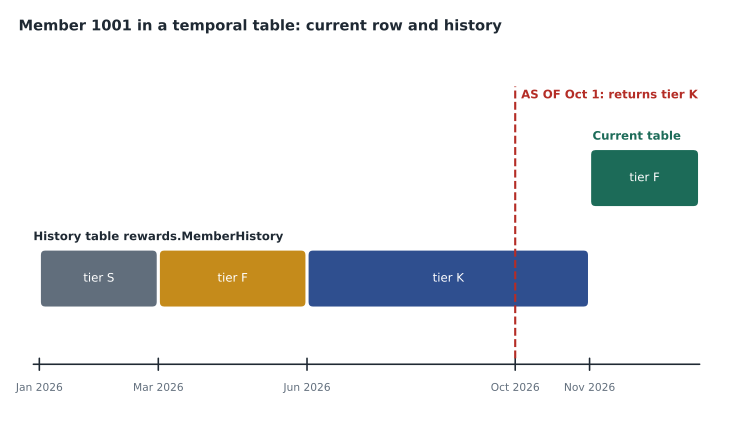
-- What did member 1001 look like on October 1, 2026?
SELECT MemberId, TierCode, PointsBalance, ValidFrom, ValidTo
FROM rewards.Member FOR SYSTEM_TIME AS OF '2026-10-01T00:00:00'
WHERE MemberId = 1001;

-- Every version of member 1001 since the start of the year
SELECT TierCode, PointsBalance, ValidFrom, ValidTo
FROM rewards.Member FOR SYSTEM_TIME BETWEEN '2026-01-01' AND '9999-12-31'
WHERE MemberId = 1001
ORDER BY ValidFrom;| Clause | Returns versions that | Use it for |
|---|---|---|
| AS OF t | were current at time t | What did this look like on a date? |
| FROM a TO b | were current at any time after a and before b (end excluded) | Everything active during a period |
| BETWEEN a AND b | as FROM ... TO, but a version starting exactly at b is included | The same, with an inclusive end |
| CONTAINED IN (a, b) | started and ended within the period | Changes that came and went inside a window |
| ALL | existed at any time | The full history of a row |
With history in place, the customer service question takes one query. Member 1001's history shows the tier changing from K to F at 08:12 UTC on November 2, 2026, in the nightly tier recalculation, because points earned in the previous twelve months had dropped to 9,640, below the Kestrel threshold of 10,000. Customer service can now explain the change and, if marketing approves a goodwill adjustment, post it through the normal procedure.
History size and retention
History grows with every update, and Member is updated often, because every purchase changes PointsBalance. Elena estimated the growth before switching versioning on, as the worked example in this lesson shows, and the estimate changed the design: the balance moved out of Member into a separate MemberBalance table that is not temporal, because the points transactions already record every change to it. Member now changes only when a member edits a profile or changes tier. Azure SQL Database and Managed Instance support a history retention policy, and HISTORY_RETENTION_PERIOD = 24 MONTHS lets a background task delete history older than two years, which matches Carmen's retention rule for profile data. Clustered columnstore on the history table is another common choice, because history is written once, read rarely and compresses well.
Changing the schema of a temporal table is mostly straightforward: adding a column to the current table adds it to the history table too. Some changes, such as altering the period columns or dropping the table, require SYSTEM_VERSIONING = OFF first, which breaks the link and leaves two ordinary tables; turning it back on re-links them and, with DATA_CONSISTENCY_CHECK = ON, checks that the history is valid. Elena's deployment scripts never turn versioning off without turning it on again in the same transaction, so no change can slip in unrecorded.
Ledger tables
Temporal history shows what changed, but it does not prove that nobody tampered with it. A user with enough permissions could turn versioning off, edit the history table and turn versioning back on. The ledger feature answers Malcolm's question in a different way: it makes tampering detectable. Each transaction that changes a ledger table is hashed, the hashes are linked in a chain, and the chain is summarized in a database digest. If anyone changes a row, the history or the chain afterwards, the hashes no longer match the digests stored outside the database, and verification fails.
There are two kinds of ledger table. An updatable ledger table allows inserts, updates and deletes, and keeps every earlier version in a ledger history table, much as a temporal table does, with hidden columns recording the transaction and sequence numbers that created and ended each version. An append-only ledger table allows only inserts, which suits records that should never change, such as an event log. The points journal is a natural append-only table: a mistake is corrected with a new ADJUST transaction, never by editing the old one.
CREATE TABLE rewards.PointsJournal
(
    JournalId    bigint IDENTITY(1,1) NOT NULL PRIMARY KEY,
    MemberId     bigint NOT NULL,
    ReasonCode   varchar(12) NOT NULL,
    Points       int NOT NULL,
    PostedAtUtc  datetime2(3) NOT NULL DEFAULT SYSUTCDATETIME()
)
WITH (LEDGER = ON (APPEND_ONLY = ON));

-- Each transaction's hash and the database digest it rolls up into
SELECT * FROM sys.database_ledger_transactions;
EXECUTE sp_generate_database_ledger_digest;
A table must be created as a ledger table; an existing table cannot be converted, so data is moved into a new ledger table with an INSERT ... SELECT. Ledger cannot be turned off for a table once on. Dropping a ledger table is allowed but recorded: the table is renamed and kept as a dropped ledger table, so its history is still verifiable. A database can also be created as a ledger database, in which every table is a ledger table; that suits a system of record, but not Finch Rewards, where most tables are ordinary operational data.
The digests must be stored where an attacker who controls the database cannot change them. Azure SQL Database can upload a digest automatically, every few seconds, to Azure immutable Blob storage or to Azure confidential ledger. Verification runs sp_verify_database_ledger_from_digest_storage, which recomputes the hashes and compares them with the stored digests. Elena scheduled the verification weekly in the test environment and will run it monthly in production, with the result sent to Malcolm's team. Ledger is not encryption and does not hide data; it is evidence. It also does not stop an authorized application from writing a wrong value, which is why the procedures and constraints from earlier lessons still matter.
import hashlib
def h(text): return hashlib.sha256(text.encode()).hexdigest()
journal = ["1001,PURCHASE,49", "1001,BONUS,500", "1002,PURCHASE,120", "1001,REDEEM,-500"]
def chain(rows):
    prev = "0" * 64
    links = []
    for r in rows:
        prev = h(prev + "|" + r)          # each link covers the row and every link before it
        links.append(prev)
    return links
original = chain(journal)
digest = original[-1]                      # stored outside the database, where it cannot be edited
print("stored digest:", digest[:16], "...")
tampered = journal.copy()
tampered[1] = "1001,BONUS,5000"            # someone edits an old row
check = chain(tampered)
print("recomputed:   ", check[-1][:16], "...")
print("verification passes?", check[-1] == digest)
first_bad = next(i for i, (a, b) in enumerate(zip(original, check)) if a != b)
print("first link that no longer matches: row", first_bad + 1)stored digest: 5b4ec23753b7e202 ... recomputed: 3e171544c419d0e1 ... verification passes? False first link that no longer matches: row 2
What this code does
The program builds a chain of fingerprints over four journal entries: each fingerprint is computed from one entry together with the fingerprint before it, so the last one depends on every entry. That last fingerprint is the digest, kept somewhere safe. When an old entry is edited, from a bonus of 500 points to 5,000, the program rebuilds the chain and the new digest no longer matches the stored one, so verification fails. It also shows that the mismatch starts at the edited entry.
| Need | Temporal table | Updatable ledger table | Append-only ledger table |
|---|---|---|---|
| See a row as it was on a date | Yes, with FOR SYSTEM_TIME | Yes, through the ledger view and history | Not needed; rows never change |
| Detect tampering, including by administrators | No | Yes, with digests stored outside | Yes |
| Allow updates and deletes | Yes | Yes, every version kept | No, inserts only |
| Retention policy to age out history | Yes | No; history is kept | No |
| Convert an existing table | Yes | No; create new and copy | No |
Other specialized tables
The DP-800 outline lists two more specialized tables. A memory-optimized table lives in memory with lock-free data structures, and natively compiled procedures run against it without the usual interpreter; it suits very high-rate inserts such as session state, and in Azure SQL Database it needs the Premium or Business Critical tier. An external table points at data outside the database, such as Parquet files in storage, so queries can read it without loading it; Finch Rewards does not use one yet, but the Finch Data Hub may. Hana noted both in the design document with a sentence each on why they are not needed now.
Worked problem
How fast would history grow if balances stayed in Member?
Each Member row is about 420 bytes. Purchases change the balance about 1.1 million times a month, and each change would create one history row. Profile edits and tier changes add about 60,000 updates a month. Compare the history growth per year with the balance in Member and with the balance moved to its own table.
Show solution
- Balance in Member: (1,100,000 + 60,000) × 12 = 13,920,000 history rows a year.
- \[13\,920\,000 \times 420 \text{ bytes} \approx 5.85 \times 10^{9} \text{ bytes} \approx 5.8 \text{ GB}\]
- Balance moved out: 60,000 × 12 = 720,000 rows a year.
- \[720\,000 \times 420 \text{ bytes} \approx 3.0 \times 10^{8} \text{ bytes} \approx 0.3 \text{ GB}\]
- Moving the balance cuts history growth by a factor of about 19, and the history that remains records changes people care about.
Answer: About 5.8 GB of history a year with the balance in Member, against about 0.3 GB after moving it out, roughly 19 times less.
Common mistakes
MistakeTemporal period columns record when each statement ran.
InsteadThey record the transaction's start time in UTC; rows changed in one transaction share it.
MistakeA temporal table proves its history has not been edited.
InsteadTemporal history can be changed by turning versioning off; ledger provides tamper evidence.
MistakeAn existing table can be switched to a ledger table.
InsteadLedger tables must be created as ledger; copy the data into a new one.
MistakeLedger encrypts the data.
InsteadLedger detects tampering; it does not hide or encrypt anything.
MistakeMake every frequently updated table temporal, just in case.
InsteadEstimate history growth first; move fast-changing columns out or record changes another way.
Summary and key terms
- Temporal tables keep every version of a row in a history table with UTC period columns.
- FOR SYSTEM_TIME AS OF, FROM, BETWEEN, CONTAINED IN and ALL query history.
- HIDDEN period columns keep existing code working; a retention policy ages out old history.
- Ledger tables hash every transaction into a chain whose digests are stored outside the database.
- Updatable ledger tables keep versions; append-only ledger tables allow inserts only.
- Ledger cannot be added to an existing table or turned off.
- Memory-optimized and external tables are the other specialized tables in the outline.
- System-versioned temporal table
- A table whose earlier row versions the engine keeps in a linked history table.
- Period columns
- The ValidFrom and ValidTo datetime2 columns the engine sets for each row version.
- FOR SYSTEM_TIME
- The clause that queries a temporal table at a point in time or over a range.
- Ledger table
- A table whose changes are hashed into a verifiable chain to detect tampering.
- Append-only ledger table
- A ledger table that accepts inserts but not updates or deletes.
- Database digest
- A hash summarizing the ledger state, stored outside the database for verification.
Practice problems
Work each problem on paper first, then reveal the answer to check.
Why did customer service's question need a temporal table?
Show answer
They needed the member row as it was on a past date, which only the history holds.
Which FOR SYSTEM_TIME clause returns the version current at one moment?
Show answer
AS OF.
Why did Elena move PointsBalance out of the temporal Member table?
Show answer
Every purchase changed it, which would have created about 14 million history rows a year.
Where should ledger digests be stored?
Show answer
Somewhere the database's administrators cannot change, such as immutable Blob storage or Azure confidential ledger.
How is a mistake in an append-only points journal corrected?
Show answer
By inserting a new adjusting entry; the original row cannot be changed.
Lesson quiz · 5 questions
Score 60% or more to complete this lesson.
Create a free account to save your progress, take quizzes and earn a certificate.