
MSAZ-300 · Lesson 2 of 12 · 23 min
Data types, including JSON
▶ Video coming soon A video version of this lesson is on the way.
The second design session began with a column Hana had copied from the old database: Points float. Elena circled it. "Points are whole numbers," she said. "Money is decimal. Nothing in a loyalty program is a floating-point number." Choosing data types sounds like the dullest part of database design, and it is one of the most expensive to get wrong, because a type chosen today is written into every row, index, backup and network packet for as long as the table lives. A column that is four bytes too wide in a 30-million-row table costs about 120 MB in the table alone, more again in each index that carries it, and memory in every query that touches it.
This lesson covers the type choices DP-800 expects a developer to make, with most of the time on the new json data type, which Azure SQL Database, Azure SQL Managed Instance with the SQL Server 2025 or Always-up-to-date update policy, SQL Server 2025 and SQL database in Microsoft Fabric now support.
Numbers
Integers come in four sizes: tinyint (1 byte, 0 to 255), smallint (2 bytes), int (4 bytes, up to about 2.1 billion) and bigint (8 bytes). Choose the smallest type that will hold every value the column could ever need, with room to grow, and remember that keys propagate: a bigint primary key makes every foreign key that refers to it a bigint too. Hana chose int for StoreId, because Harrow & Finch will never have two billion stores, and bigint for MemberId and TxnId. At about 1.1 million points transactions a month, an int TxnId would run out in about 160 years, so int would technically do. Elena still chose bigint: migrations, retries and test loads consume identity values faster than real business does, and running out of key values is an outage.
For exact fractional values, such as dollar amounts, use decimal(p, s), where p is the total number of digits and s the digits after the decimal point. decimal(10,2) holds amounts up to 99,999,999.99 in 9 bytes. The money type also exists, but it rounds intermediate results in division to four decimal places, which can surprise people, and Elena's team standard is decimal. Never store money or points in float or real. Those are approximate binary types: they hold most decimal fractions only approximately, and the errors add up when values are summed.
from decimal import Decimal
# Thirty purchases of 19.99 dollars, summed as binary floating point and as decimal
f_total = 0.0
d_total = Decimal("0.00")
for _ in range(30):
    f_total += 19.99
    d_total += Decimal("19.99")
print("float total:  ", repr(f_total))
print("decimal total:", d_total)
print("equal to 599.70?", f_total == 599.70, d_total == Decimal("599.70"))
# One tenth of a point per dollar, ten times
print("0.1 added ten times as float:", sum([0.1] * 10))float total: 599.7000000000002 decimal total: 599.70 equal to 599.70? False True 0.1 added ten times as float: 1.0
What this code does
The program adds 19.99 dollars thirty times, once with ordinary floating-point numbers, which are what float and real use, and once with exact decimal numbers, which are what decimal uses. The decimal total is exactly 599.70, but the floating-point total is off by a tiny fraction, so a test for equality with 599.70 fails. The last line shows the same problem with ten additions of 0.1. A database column of type decimal avoids this; a float column does not.
Text
char(n) and nchar(n) are fixed length; varchar(n) and nvarchar(n) are variable length and store only what is used, plus two bytes of length. nvarchar stores UTF-16, using 2 bytes for most characters, and handles every language. varchar stores characters in the code page of the column's collation, or in UTF-8 when the collation name ends in _UTF8. A UTF-8 collation such as Latin1_General_100_CI_AS_SC_UTF8 lets a varchar column hold any Unicode text, using 1 byte for each basic Latin character and 2 to 4 bytes for others. For text that is mostly English with occasional accented names, UTF-8 varchar can be close to half the size of nvarchar.
Names at Harrow & Finch include French, Ukrainian, Filipino and Vietnamese names, and the old database mangled some of them because it used varchar with a Western code page. Hana made name columns nvarchar(100). Elena pointed out that UTF-8 varchar would have been smaller, and they agreed to keep nvarchar for this release because the existing API code and reports expect it, and to measure the saving before changing it. They did agree on lengths. The old database used nvarchar(max) for everything, which stores large values off the row and stops the column being an index key. An email address can be at most 254 characters under the standards that govern email, so the column is nvarchar(254). Postal codes are varchar(10), because they use only basic characters on both sides of the border.
| Type | Storage | Use it for | Avoid it for |
|---|---|---|---|
| int / bigint | 4 / 8 bytes | Keys, counts, points | Values with fractions |
| decimal(p, s) | 5 to 17 bytes, by precision | Money, rates, exact quantities | Scientific measurements with huge ranges |
| float / real | 8 / 4 bytes | Measurements where tiny errors do not matter | Money, points, anything compared for equality |
| nvarchar(n) | 2 bytes per character (UTF-16) plus 2 | Names and text in any language | Long documents without a sensible limit |
| varchar(n) with _UTF8 collation | 1 to 4 bytes per character plus 2 | Mostly Latin text, codes, identifiers | Code that expects UTF-16 semantics |
| datetime2(p) | 6 to 8 bytes | Points in time, stored in UTC | Dates with no time |
| datetimeoffset(p) | 8 to 10 bytes | Times where the original offset matters | Columns compared across time zones without care |
| date | 3 bytes | Birthdays, offer start and end dates | Times of day |
Dates and times
datetime is the old type: 8 bytes, accurate to about a third of a millisecond, with a range starting in 1753. datetime2 replaces it with better precision, a range starting in year 1 and, at lower precision, less storage. Hana stores every point in time as datetime2(3) in UTC, set with SYSUTCDATETIME(), and lets the app show local time. Points earned at 23:30 on the last day of a promotion in Des Moines would otherwise be recorded on the wrong day when the database runs in a different time zone, and daylight saving time would create an hour each autumn when the same local time happens twice. Where the original local offset matters, for example in an audit of when a store clerk pressed a button, datetimeoffset keeps it. Pure dates, such as a birthday or an offer's end date, use date, which is 3 bytes and has no time zone problem at all.
The json data type
Some of the data in Finch Rewards does not fit neatly into columns. Each member can set preferences in the app: which stores they want offers from, whether they want texts or emails, which departments they care about, and settings for features that do not exist yet. Before the json type, a developer had two choices: a separate table with one row per preference, or an nvarchar(max) column holding JSON text that every query had to parse again. The json type stores the document in a binary format that is already parsed, so reading a value does not mean reparsing the whole document, and invalid JSON is rejected when it is written.
ALTER TABLE rewards.Member
    ADD Preferences json NULL;

UPDATE rewards.Member
SET Preferences = '{"channels":["email","app"],
                    "stores":[4,11],
                    "departments":["garden","paint"],
                    "language":"fr"}'
WHERE MemberId = 1001;

-- Change one value in place with the modify method
UPDATE rewards.Member
SET Preferences.modify('$.language', 'en')
WHERE MemberId = 1001;
The top-level value of a json column must be an object or an array; a bare number or string is rejected, though a SQL NULL is allowed. A document can be up to 2 GB. Duplicate keys do not raise an error: the first value is kept and the rest are discarded, which is worth knowing before importing data from a system that produced duplicates. The type converts implicitly from char, nchar, varchar and nvarchar, so existing code that inserts JSON text keeps working, but conversion back to text must be explicit with CAST or CONVERT. A json column cannot be a key column in an ordinary index, cannot be compared with the equals sign and cannot be used with sql_variant.
The modify method changes part of a document, and the engine can often do it in place: a string replaced by one of the same length or shorter, or a number replaced by one that fits, does not rewrite the whole value. Hana's API will update preferences one setting at a time, so modify suits it. Replacing a whole document with a new one also works, and is simpler when the app sends the full set of preferences.
Querying JSON
The JSON functions that SQL Server has had since 2016 work on the new type without changes. JSON_VALUE extracts a scalar, JSON_QUERY extracts an object or array, ISJSON tests text, and OPENJSON turns an array or object into rows. The constructors JSON_OBJECT and JSON_ARRAY build documents from values, and the aggregates JSON_ARRAYAGG and JSON_OBJECTAGG build them from many rows. DP-800 also names JSON_CONTAINS, which tests whether a document holds a value at a path; check which platforms support it before relying on it, as the JSON function reference marks availability per product.
-- Members who want offers from store 11, with their language
SELECT m.MemberId, JSON_VALUE(m.Preferences, '$.language') AS Lang
FROM rewards.Member AS m
WHERE EXISTS (SELECT 1
              FROM OPENJSON(m.Preferences, '$.stores') AS s
              WHERE s.value = 11);

-- One JSON document per store listing its top members, for the API
SELECT s.StoreId,
       JSON_OBJECT('store': s.StoreId,
                   'members': JSON_ARRAYAGG(m.PublicId)) AS Doc
FROM rewards.Store AS s
JOIN rewards.Member AS m ON m.HomeStoreId = s.StoreId
WHERE m.TierCode = 'K'
GROUP BY s.StoreId;
Two ways exist to make JSON queries fast. The older one, which works on any version, is a computed column that extracts a value with JSON_VALUE, indexed like any column. The newer one is a JSON index, created with CREATE JSON INDEX, which indexes values inside the documents of a json column and can serve queries on paths that were not known in advance. JSON indexes are supported in Azure SQL Database, Managed Instance with the SQL Server 2025 or Always-up-to-date policy, SQL Server 2025 and SQL database in Fabric. Hana's most frequent query asks for members who prefer a given language, so she started with a computed column; the JSON index is in the plan for the store and department searches the marketing team wants in 2027.
ALTER TABLE rewards.Member
    ADD PrefLanguage AS CAST(JSON_VALUE(Preferences, '$.language') AS char(2));
CREATE INDEX IX_Member_PrefLanguage ON rewards.Member (PrefLanguage);

-- Index paths inside the documents for ad hoc searches
CREATE JSON INDEX JX_Member_Preferences
    ON rewards.Member (Preferences)
    FOR ('$.stores', '$.departments');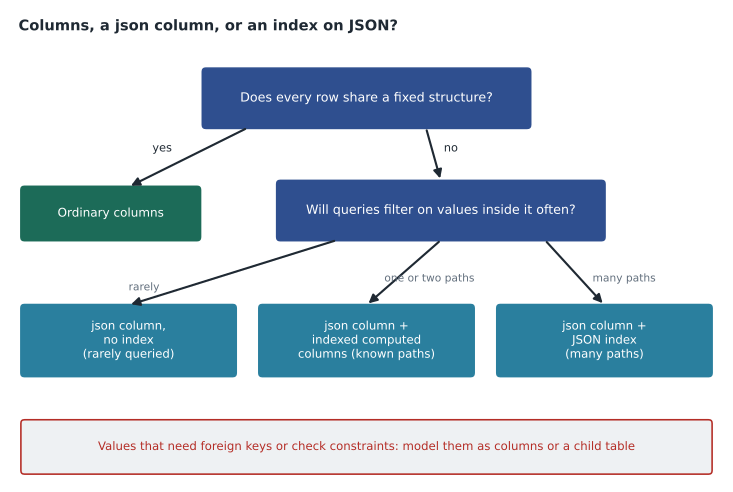
When not to use JSON
Elena's caution was that JSON is not a way to avoid designing tables. Values inside a JSON document cannot have foreign keys, and only limited check constraints apply to them. If every member has a home store, it is a column with a foreign key. If the app needs to list every member who chose store 11, a child table MemberStorePreference with a key on (StoreId, MemberId) is easy to index, easy to constrain and easy to understand. JSON earns its place for data whose shape varies, data that is read and written whole by the application, and data from outside systems whose structure the database does not control. Hana kept channels and language in JSON, because they are read and written as a set, and moved the list of preferred stores to a child table after the session, because marketing will query it every week.
Other types
varbinary(n) holds binary data such as hashes and small files; large files belong in Blob storage with a URL in the database. uniqueidentifier is 16 bytes. bit holds Boolean values in one bit, with up to eight bit columns sharing a byte. geography and geometry hold spatial data, covered in lesson 7, as is the graph feature. The vector type, used for embeddings, is covered in MSAZ-301. sql_variant can hold values of many types and is almost never the right answer in a new design.
Worked problem
How much space does UTF-8 save on the name columns?
Members' given and family names average 7.4 and 8.6 characters. In a sample of 10,000 names, 96 in 100 characters are basic Latin letters and the rest are accented or other characters, which take 2 bytes each in UTF-8. Ignoring the 2-byte length overhead, which both types have, compare the average bytes per member for the two name columns in nvarchar and in varchar with a UTF-8 collation, and the total for 412,000 members.
Show solution
- Characters per member: 7.4 + 8.6 = 16.0.
- nvarchar: 2 bytes per character, so 16.0 × 2 = 32.0 bytes.
- UTF-8: 0.96 of the characters take 1 byte and 0.04 take 2, so 16.0 × (0.96 × 1 + 0.04 × 2) = 16.0 × 1.04 = 16.64 bytes.
- \[412\,000 \times (32.0 - 16.64) \approx 6.33 \times 10^{6} \text{ bytes}\]
- That is about 6.3 MB in the table, saved again in any index that includes the names.
Answer: About 32 bytes per member in nvarchar against about 16.6 in UTF-8, a saving of about 6.3 MB across 412,000 members. Real, but small enough that Hana kept nvarchar for this release.
Common mistakes
MistakePoints and money can go in float; the rounding is too small to matter.
InsteadUse int for points and decimal for money; float errors accumulate and break equality tests.
MistakeMake every text column nvarchar(max) so nothing is ever cut off.
InsteadChoose a realistic maximum length; max values can be stored off the row and cannot be index keys.
MistakeA json column accepts a single string or number as its whole value.
InsteadThe top-level value must be an object or array (or a SQL NULL).
MistakeJSON is a good place for values that need foreign keys.
InsteadValues inside JSON cannot have foreign keys; model them as columns or a child table.
MistakeStore local times so reports match the store clocks.
InsteadStore UTC in datetime2 and convert for display; use datetimeoffset when the original offset must be kept.
Summary and key terms
- Pick the smallest type that safely holds every value; key types propagate to every foreign key.
- Use decimal for money and int for points; float and real are approximate.
- nvarchar handles every language; varchar with a UTF-8 collation can be smaller for mostly Latin text.
- Store points in time as datetime2 in UTC; use date for dates.
- The json type stores parsed binary JSON up to 2 GB; modify changes values in place.
- Index JSON with computed columns for known paths or a JSON index for several paths.
- Use JSON for variable shapes read and written whole, not to avoid designing tables.
- json data type
- A native type that stores a JSON object or array in a parsed binary format.
- modify method
- A method of the json type that changes the value at a path, in place when possible.
- JSON index
- An index on values inside the documents of a json column, created with CREATE JSON INDEX.
- UTF-8 collation
- A collation whose name ends in _UTF8, letting varchar columns store any Unicode text.
- decimal
- An exact numeric type with a fixed precision and scale.
- datetime2
- A date and time type with precision up to 100 nanoseconds and a range from year 1.
Practice problems
Work each problem on paper first, then reveal the answer to check.
Why did Elena reject float for points?
Show answer
Points are whole numbers and float is approximate; int is exact and smaller.
What happens when a document with duplicate keys is stored in a json column?
Show answer
No error is raised; the first value is kept and the others are discarded.
Name two ways to speed up queries that filter on a value inside a json column.
Show answer
An indexed computed column using JSON_VALUE, or a JSON index on the column.
Why is UTC preferred for stored times?
Show answer
It avoids ambiguous or missing local times at daylight saving changes and differences between server and store time zones.
Hana moved preferred stores from JSON to a child table. Why?
Show answer
Marketing queries it often, and a child table can have keys, foreign keys and simple indexes.
Lesson quiz · 5 questions
Score 60% or more to complete this lesson.
Create a free account to save your progress, take quizzes and earn a certificate.