
MSAZ-300 · Lesson 3 of 12 · 22 min
Writing advanced T-SQL
▶ Video coming soon A video version of this lesson is on the way.
By the third session the tables existed in the hf-sql-rewards-test-cus server, loaded with an anonymized copy of last year's data, and Hana started writing the queries the API needs. The first was easy to say and hard to write well: show a member's points history with a running balance, the way a bank statement does. The old system did it in application code, reading every transaction a member ever had and adding them up in a loop. Elena showed her how to do it in one statement. Then the questions came quickly: rank members within each store, find each member's previous visit, clean up the phone numbers, find duplicate accounts with slightly different names. This lesson covers the T-SQL that DP-800 calls advanced: common table expressions, window functions, correlated queries, regular expressions and fuzzy string matching.
Common table expressions
A common table expression, or CTE, names a query so a later part of the statement can use it like a table. It exists only for the one statement that follows the WITH clause. CTEs do not make a query faster by themselves; the optimizer expands them into the main query, much like a derived table. Their value is readability: a long query becomes a sequence of named steps, each of which can be checked on its own. Because a CTE is not stored, referring to it twice usually means the work is done twice; when an intermediate result is expensive and used several times, a temporary table is often better.
WITH LastYear AS (
    SELECT MemberId, SUM(Points) AS Earned
    FROM rewards.PointsTransaction
    WHERE Points > 0
      AND PostedAtUtc >= DATEADD(month, -12, SYSUTCDATETIME())
    GROUP BY MemberId
),
Tiered AS (
    SELECT MemberId, Earned,
           CASE WHEN Earned >= 10000 THEN 'K'
                WHEN Earned >= 2500  THEN 'F'
                ELSE 'S' END AS NewTier
    FROM LastYear
)
SELECT t.NewTier, COUNT(*) AS Members
FROM Tiered AS t
GROUP BY t.NewTier;
A recursive CTE refers to itself, which lets one statement walk a hierarchy. It has an anchor member, which returns the starting rows, a UNION ALL, and a recursive member that joins back to the CTE. Recursion stops when the recursive member returns no rows, and the MAXRECURSION option, 100 by default, stops runaway loops. Finch Rewards lets a member refer a friend, and the friend can refer others. A recursive CTE can list everyone a member brought in, directly or indirectly, with their depth. Lesson 7 shows the same question answered with graph tables, which are designed for it.
WITH Chain AS (
    SELECT MemberId, ReferredBy, 0 AS Depth
    FROM rewards.Member
    WHERE MemberId = 1001                        -- anchor: the starting member
    UNION ALL
    SELECT m.MemberId, m.ReferredBy, c.Depth + 1
    FROM rewards.Member AS m
    JOIN Chain AS c ON m.ReferredBy = c.MemberId  -- recursive member
)
SELECT MemberId, Depth FROM Chain
WHERE Depth > 0
OPTION (MAXRECURSION 20);
Window functions
A window function computes a value for each row from a set of related rows, its window, without collapsing the rows the way GROUP BY does. The OVER clause defines the window. PARTITION BY divides the rows into groups, ORDER BY orders the rows within each group, and a frame clause such as ROWS BETWEEN UNBOUNDED PRECEDING AND CURRENT ROW says which rows around the current one take part. Window functions fall into three families: ranking functions (ROW_NUMBER, RANK, DENSE_RANK, NTILE), aggregates used with OVER (SUM, AVG, COUNT, MIN, MAX) and offset functions (LAG, LEAD, FIRST_VALUE, LAST_VALUE).
The running balance is a SUM with OVER. Partitioning by member restarts the total for each member, ordering by posting time and transaction ID makes the order deterministic, and the frame from the first row to the current row makes the sum cumulative. Elena insisted on writing ROWS explicitly. When ORDER BY is given and no frame is written, the default frame is RANGE BETWEEN UNBOUNDED PRECEDING AND CURRENT ROW, which treats rows with the same ordering value as peers and includes all of them. If two transactions had the same posting time, both rows would show the balance after both of them, and RANGE can also be slower because it may use a worktable on disk where ROWS uses memory.
SELECT TxnId, PostedAtUtc, ReasonCode, Points,
       SUM(Points) OVER (PARTITION BY MemberId
                         ORDER BY PostedAtUtc, TxnId
                         ROWS BETWEEN UNBOUNDED PRECEDING AND CURRENT ROW) AS Balance,
       LAG(PostedAtUtc) OVER (PARTITION BY MemberId
                              ORDER BY PostedAtUtc, TxnId) AS PreviousTxnAt
FROM rewards.PointsTransaction
WHERE MemberId = 1001
ORDER BY PostedAtUtc, TxnId;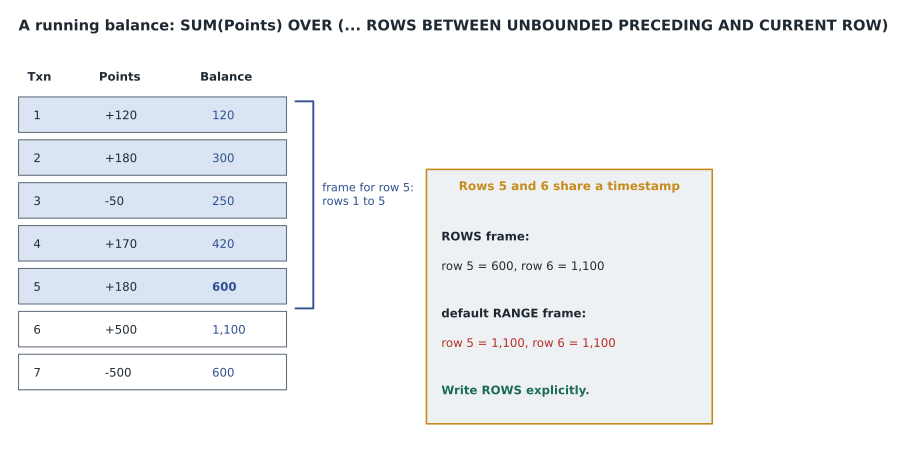
import sqlite3
db = sqlite3.connect(":memory:")
db.execute("CREATE TABLE Txn (TxnId INTEGER, MemberId INTEGER, PostedAt TEXT, Reason TEXT, Points INTEGER)")
rows = [(1, 1001, "2026-01-04 10:15", "PURCHASE", 120),
        (2, 1001, "2026-02-11 17:40", "PURCHASE", 180),
        (3, 1001, "2026-02-12 09:05", "RETURN",   -50),
        (4, 1001, "2026-03-20 12:30", "PURCHASE", 170),
        (5, 1001, "2026-05-02 14:00", "BONUS",    180),
        (6, 1001, "2026-05-02 14:00", "PURCHASE", 500),
        (7, 1001, "2026-06-15 11:20", "REDEEM",  -500)]
db.executemany("INSERT INTO Txn VALUES (?,?,?,?,?)", rows)
sql = """
SELECT TxnId, Reason, Points,
  SUM(Points) OVER (PARTITION BY MemberId ORDER BY PostedAt, TxnId
                    ROWS BETWEEN UNBOUNDED PRECEDING AND CURRENT ROW) AS by_rows,
  SUM(Points) OVER (PARTITION BY MemberId ORDER BY PostedAt) AS by_range
FROM Txn ORDER BY PostedAt, TxnId"""
print("txn reason    points  rows-frame  default-range")
for t, r, p, a, b in db.execute(sql):
print(f"{t:3d} {r:9s} {p:6d} {a:11d} {b:14d}")txn reason points rows-frame default-range 1 PURCHASE 120 120 120 2 PURCHASE 180 300 300 3 RETURN -50 250 250 4 PURCHASE 170 420 420 5 BONUS 180 600 1100 6 PURCHASE 500 1100 1100 7 REDEEM -500 600 600
What this code does
The program loads seven points transactions for one member, two of which were posted at exactly the same time, and computes the running balance twice. The first column uses an explicit ROWS frame, so each row adds up exactly the transactions up to and including itself. The second uses the default frame you get by ordering without naming one, which treats rows with the same time as a single step. Rows 5 and 6 show the difference: with ROWS they show 600 and 1,100, but with the default frame both show 1,100.
Ranking functions answer the questions marketing asks most. ROW_NUMBER gives each row a distinct number, so it suits picking exactly one row per group, such as each member's most recent purchase. RANK leaves gaps after ties, so two members tied for first are both 1 and the next is 3; DENSE_RANK leaves no gap, so the next is 2. NTILE(10) splits rows into ten groups of nearly equal size, which is how the marketing team defines the top decile of spenders at each store.
-- Top three members by points earned this year at each store
SELECT StoreId, MemberId, Earned, Rnk
FROM (
    SELECT t.StoreId, t.MemberId, SUM(t.Points) AS Earned,
           DENSE_RANK() OVER (PARTITION BY t.StoreId ORDER BY SUM(t.Points) DESC) AS Rnk
    FROM rewards.PointsTransaction AS t
    WHERE t.Points > 0 AND t.PostedAtUtc >= '2026-01-01'
    GROUP BY t.StoreId, t.MemberId
) AS ranked
WHERE Rnk <= 3;
Correlated queries and APPLY
A correlated subquery refers to a column of the outer query, so conceptually it runs once for each outer row. The optimizer often rewrites it as a join, but not always, and a correlated subquery in the SELECT list that runs per row can be slow on large tables. EXISTS with a correlated subquery is the clearest way to ask whether related rows exist, and it stops at the first match. CROSS APPLY and OUTER APPLY run a table expression for each row of the left side; they are the natural tool for a top-N per group or for calling a table-valued function per row. OUTER APPLY keeps left rows that return nothing, like a left join.
-- Each Kestrel member with their two most recent redemptions
SELECT m.MemberId, r.OfferId, r.RedeemedAtUtc
FROM rewards.Member AS m
CROSS APPLY (SELECT TOP (2) OfferId, RedeemedAtUtc
             FROM rewards.Redemption AS x
             WHERE x.MemberId = m.MemberId
             ORDER BY x.RedeemedAtUtc DESC) AS r
WHERE m.TierCode = 'K';
Regular expressions
Before 2025, T-SQL had only LIKE and PATINDEX for pattern matching, and anything harder needed CLR code or the application. Azure SQL Database, SQL Server 2025, SQL database in Fabric and Managed Instance with the SQL Server 2025 or Always-up-to-date update policy now provide regular expression functions based on the RE2 library. REGEXP_LIKE tests a match and is used in WHERE clauses and check constraints. REGEXP_REPLACE, REGEXP_SUBSTR, REGEXP_INSTR and REGEXP_COUNT replace, extract, locate and count matches. REGEXP_MATCHES and REGEXP_SPLIT_TO_TABLE are table-valued: the first returns each match with its captured groups and the second splits a string into rows.
Hana used them to clean the old phone numbers, which arrive as 204-555-0142, (204) 555 0142, 2045550142 and worse. REGEXP_REPLACE with a pattern for any character that is not a digit strips the punctuation, and REGEXP_LIKE in a check constraint makes sure only ten-digit numbers are stored from now on. Elena added two cautions. Regular expression matching does not follow SQL collations, so case and accent rules can differ from LIKE on the same column. And a regular expression on a column in a WHERE clause cannot use an index seek, so it should clean data or validate it, not drive searches on large tables. Inputs are limited to 2 MB, and counted repetitions such as {n,m} cannot exceed 1,000.
-- Clean phone numbers to ten digits
UPDATE rewards.Member
SET Phone = REGEXP_REPLACE(Phone, '[^0-9]', '')
WHERE Phone IS NOT NULL;

-- From now on, only ten digits are allowed
ALTER TABLE rewards.Member ADD CONSTRAINT CK_Member_Phone
    CHECK (Phone IS NULL OR REGEXP_LIKE(Phone, '^[0-9]{10}$'));

-- Postal or ZIP code checks differ by country
SELECT COUNT(*) AS BadCodes
FROM rewards.Member
WHERE NOT REGEXP_LIKE(PostalCode, '^[0-9]{5}(-[0-9]{4})?$');
Fuzzy string matching
The old program let anyone sign up twice with a slightly different name or email, and Harrow & Finch suspects that several thousand people hold duplicate accounts to collect sign-up bonuses. Exact comparisons cannot find Jean-Francois Tremblay and Jean Francois Tremblay, or Kowalczyk and Kowalcyzk. The fuzzy string functions can. EDIT_DISTANCE counts the single-character insertions, deletions and substitutions needed to turn one string into another, EDIT_DISTANCE_SIMILARITY expresses that as a score from 0 to 100, and JARO_WINKLER_DISTANCE and JARO_WINKLER_SIMILARITY use a measure that rewards matching prefixes, which suits names. In SQL Server 2025 these functions are a preview feature, enabled with ALTER DATABASE SCOPED CONFIGURATION SET PREVIEW_FEATURES = ON, so Hana checked the status on each platform before building on them.
Fuzzy comparisons are expensive, because they compare pairs of strings, and comparing every member with every other member means about 85 billion pairs for 412,000 members. The practical method is blocking: compare only pairs that already share something cheap to match exactly, such as the same postal code and the same first letter of the family name. Hana's duplicate check compares candidates within each block and flags pairs with a Jaro-Winkler similarity of 90 or more on the full name for a person to review. The function finds candidates; a person decides.
SELECT a.MemberId AS KeepId, b.MemberId AS ReviewId,
       a.GivenName + ' ' + a.FamilyName AS NameA,
       b.GivenName + ' ' + b.FamilyName AS NameB,
       JARO_WINKLER_SIMILARITY(a.GivenName + ' ' + a.FamilyName,
                               b.GivenName + ' ' + b.FamilyName) AS Similarity
FROM rewards.Member AS a
JOIN rewards.Member AS b
  ON  b.PostalCode = a.PostalCode                       -- blocking key
  AND LEFT(b.FamilyName, 1) = LEFT(a.FamilyName, 1)
  AND b.MemberId > a.MemberId                           -- each pair once
WHERE JARO_WINKLER_SIMILARITY(a.GivenName + ' ' + a.FamilyName,
                              b.GivenName + ' ' + b.FamilyName) >= 90;
Worked problem
How many comparisons does blocking save?
Comparing every pair of n members takes n(n − 1)/2 comparisons. Finch Rewards has 412,000 members. After blocking by postal code and the first letter of the family name, the test data has about 61,000 blocks with an average of about 6.75 members each. Estimate the comparisons with and without blocking, treating every block as average size.
Show solution
- Without blocking: 412,000 × 411,999 / 2 ≈ 8.49 × 10^10, about 85 billion pairs.
- Within one average block: 6.75 × 5.75 / 2 ≈ 19.4 pairs.
- Across all blocks: 61,000 × 19.4 ≈ 1.18 million pairs.
- \[\frac{8.49 \times 10^{10}}{1.18 \times 10^{6}} \approx 72\,000\]
- Blocking cuts the work by a factor of about 72,000. Real blocks vary in size, and large blocks dominate the cost, so the real saving is somewhat smaller.
Answer: About 85 billion comparisons without blocking against about 1.2 million with it, roughly 72,000 times fewer.
Common mistakes
MistakeA CTE stores its result, so using it twice is free.
InsteadA CTE is expanded into the query; reuse can repeat the work. Use a temporary table for expensive results used often.
MistakeSUM() OVER (ORDER BY ...) with no frame always gives a row-by-row running total.
InsteadThe default frame is RANGE, which groups ties; write ROWS BETWEEN UNBOUNDED PRECEDING AND CURRENT ROW.
MistakeRANK and DENSE_RANK are interchangeable.
InsteadRANK leaves gaps after ties; DENSE_RANK does not.
MistakeREGEXP_LIKE in a WHERE clause can use an index seek.
InsteadRegular expressions cannot seek; use them to clean and validate, and search on indexed columns.
MistakeFuzzy matching should compare every row with every other row.
InsteadBlock first on cheap exact keys, then compare within blocks, and have a person review candidates.
Summary and key terms
- CTEs name steps of a query for readability; recursive CTEs walk hierarchies with an anchor, UNION ALL and a recursive member.
- Window functions compute per-row values over a window defined by PARTITION BY, ORDER BY and a frame.
- Write ROWS frames for running totals; the default RANGE frame groups rows with equal ordering values.
- ROW_NUMBER, RANK, DENSE_RANK and NTILE rank; LAG and LEAD reach neighboring rows.
- EXISTS and APPLY handle correlated questions such as top N per group.
- REGEXP_ functions clean and validate text; they ignore collations and cannot seek.
- Fuzzy functions such as EDIT_DISTANCE and JARO_WINKLER_SIMILARITY find near matches; block first.
- Common table expression
- A named query defined with WITH that the following statement can reference.
- Recursive CTE
- A CTE that references itself to process hierarchies or chains.
- Window function
- A function evaluated over a set of rows related to the current row, defined by OVER.
- Frame
- The rows within a partition that a window aggregate includes, such as ROWS BETWEEN UNBOUNDED PRECEDING AND CURRENT ROW.
- Correlated subquery
- A subquery that references a column of the outer query.
- REGEXP_LIKE
- A function that returns whether a string matches a regular expression.
- Edit distance
- The number of single-character edits needed to turn one string into another.
- Blocking
- Limiting fuzzy comparisons to pairs that share a cheap exact key.
Practice problems
Work each problem on paper first, then reveal the answer to check.
Why did Elena write ROWS explicitly in the running balance?
Show answer
The default RANGE frame gives tied rows the same total and can be slower.
What stops a recursive CTE from looping forever?
Show answer
The recursive member returning no rows, with MAXRECURSION as a safety limit (100 by default).
Which ranking function gives the next member after a two-way tie for first the rank 2?
Show answer
DENSE_RANK.
Why should REGEXP_LIKE not drive searches on a large table?
Show answer
It cannot use an index seek, so every row must be tested.
Why compare only within blocks when looking for duplicate accounts?
Show answer
Comparing all pairs grows with the square of the row count; blocking keeps the work manageable.
Lesson quiz · 5 questions
Score 60% or more to complete this lesson.
Create a free account to save your progress, take quizzes and earn a certificate.