
MSAZ-300 · Lesson 4 of 12 · 21 min
Views, functions and stored procedures
▶ Video coming soon A video version of this lesson is on the way.
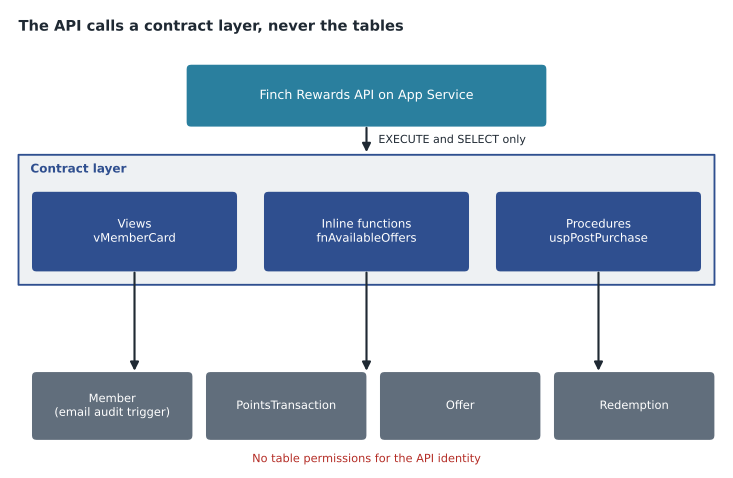
In the fourth session Hana brought a list of everything the Finch Rewards API will ask the database to do. It had 41 lines. Some were reads, such as a member's summary card and the offers a member can still use. Some were writes that had to follow rules, such as posting a purchase, redeeming an offer and recalculating tiers each night. One was an audit requirement from Carmen Ortiz, the privacy officer: every change to a member's email address must be recorded. Elena sorted the list into four kinds of object, which are the programmability objects DP-800 names: views, functions, stored procedures and triggers. "Each one is a contract," she said. "The API calls the contract, not the tables, and we can change the tables behind it without breaking the app."
Views
A view is a stored SELECT statement that can be queried like a table. It stores no data unless it is indexed. Views give the API a stable shape while the tables underneath change, hide columns a caller should not see and save every caller from repeating the same joins. Hana's first view, rewards.vMemberCard, joins Member, Store and the tier names and returns exactly the fields the app's card screen shows. When she later split the address into its own table, only the view changed; the API code did not.
CREATE OR ALTER VIEW rewards.vMemberCard
WITH SCHEMABINDING
AS
SELECT m.PublicId, m.GivenName, m.FamilyName, m.CardNumber,
       m.PointsBalance, t.TierName, s.StoreName AS HomeStore
FROM rewards.Member AS m
JOIN rewards.Tier AS t ON t.TierCode = m.TierCode
LEFT JOIN rewards.Store AS s ON s.StoreId = m.HomeStoreId
WHERE m.ClosedOn IS NULL;
WITH SCHEMABINDING ties the view to the definitions of the objects it references: nobody can drop Member or alter a column the view uses without first changing the view. Schema-bound objects must use two-part names such as rewards.Member and cannot use SELECT *. Elena makes every view and function in the project schema-bound by default, because the error at deployment time is much better than a view that silently breaks in production.
A view can be updated when each change affects only one base table and the columns map directly to base columns, so an UPDATE of GivenName through vMemberCard works. WITH CHECK OPTION stops an update through a view from producing a row the view would no longer return. An indexed view materializes the result: creating a unique clustered index on a schema-bound view stores its rows and keeps them up to date as the base tables change. Indexed views suit summaries that are read far more than the base tables are written, such as points earned per store per day. They have many restrictions, for example no outer joins and COUNT_BIG(*) in any grouped view, and every write to the base tables pays to maintain them.
Functions
User-defined functions return a value or a table and cannot change data. A scalar function returns one value. Before SQL Server 2019 a scalar function called in a query ran once per row in its own context, which made it notoriously slow and stopped the query from running in parallel. Scalar UDF inlining, available in Azure SQL Database and SQL Server 2019 and later at compatibility level 150 or higher, rewrites many scalar functions into the calling query, so they cost about the same as writing the expression inline. Not every function qualifies; functions that call time-dependent built-ins, use table variables in certain ways or have multiple RETURN statements in loops may not be inlined. The is_inlineable column in sys.sql_modules shows whether a function can be.
Table-valued functions come in two kinds, and the difference matters. An inline table-valued function is a single SELECT with parameters, in effect a parameterized view, and the optimizer expands it into the calling query with full knowledge of its statistics. A multi-statement table-valued function fills a table variable in several statements and returns it. The optimizer cannot see inside it, and although interleaved execution improves the estimate in newer versions, multi-statement functions are still a common cause of poor plans. Elena's rule: write inline functions; write a multi-statement function only when the logic truly needs several steps, and then consider a stored procedure instead.
CREATE OR ALTER FUNCTION rewards.fnAvailableOffers (@MemberId bigint, @AsOf date)
RETURNS TABLE
WITH SCHEMABINDING
AS
RETURN
    SELECT o.OfferId, o.Title, o.PointsCost, o.EndsOn
    FROM rewards.Offer AS o
    JOIN rewards.Member AS m ON m.MemberId = @MemberId
    WHERE @AsOf BETWEEN o.StartsOn AND o.EndsOn
      AND o.MinTier <= m.TierRank
      AND o.PointsCost <= m.PointsBalance
      AND NOT EXISTS (SELECT 1 FROM rewards.Redemption AS r
WHERE r.MemberId = @MemberId AND r.OfferId = o.OfferId);| Object | Returns | Can change data? | Typical Finch Rewards use | Watch out for |
|---|---|---|---|---|
| View | A result set | Only through simple updatable views | vMemberCard for the app | Hidden expensive joins; SELECT * without schema binding |
| Scalar function | One value | No | Formatting a card number | Per-row cost when not inlined |
| Inline table-valued function | A table, from one SELECT | No | fnAvailableOffers | Very little; it behaves like a parameterized view |
| Multi-statement TVF | A table variable | No (only its own table variable) | Rarely used | Poor row estimates and no parallelism in the function |
| Stored procedure | Result sets, output parameters, a return code | Yes | uspPostPurchase, uspRecalculateTiers | Parameter sensitivity (MSAZ-281) |
| Trigger | Nothing to the caller | Yes, as part of the statement | Email change audit | Hidden work; single-row assumptions |
Stored procedures
A stored procedure is a named batch with parameters. It can read and change data, return result sets, set output parameters and return an integer status. For an API, procedures are the main contract for writes: the API calls rewards.uspPostPurchase with a member, a store, an amount and a receipt number, and the procedure applies every rule in one place, in one transaction. Permission to execute the procedure can be granted without any permission on the tables, through ownership chaining, so the API's identity cannot write to PointsTransaction except through the rules.
CREATE OR ALTER PROCEDURE rewards.uspPostPurchase
    @MemberPublicId uniqueidentifier,
    @StoreId        int,
    @AmountCents    int,
    @ReceiptNo      varchar(30),
    @PointsEarned   int OUTPUT
AS
BEGIN
    SET NOCOUNT ON;
    SET XACT_ABORT ON;

    DECLARE @MemberId bigint =
        (SELECT MemberId FROM rewards.Member
         WHERE PublicId = @MemberPublicId AND ClosedOn IS NULL);
    IF @MemberId IS NULL
        THROW 50001, 'Unknown or closed member.', 1;

    -- One point per whole dollar; Kestrel members earn 1.5 points
    SELECT @PointsEarned = (@AmountCents / 100) * CASE TierCode WHEN 'K' THEN 3 ELSE 2 END / 2
    FROM rewards.Member WHERE MemberId = @MemberId;

    BEGIN TRANSACTION;
        INSERT rewards.PointsTransaction (MemberId, StoreId, ReasonCode, Points, ReceiptNo)
        VALUES (@MemberId, @StoreId, 'PURCHASE', @PointsEarned, @ReceiptNo);
        UPDATE rewards.Member
        SET PointsBalance += @PointsEarned
        WHERE MemberId = @MemberId;
    COMMIT;
END;
SET NOCOUNT ON stops the 'rows affected' messages that some client libraries mistake for result sets and that add network traffic. Output parameters return single values, such as the points earned, without the cost of a result set. A table-valued parameter passes many rows in one call: the store systems send end-of-day batches of purchases, and a user-defined table type rewards.PurchaseList lets one call to uspPostPurchaseBatch carry 4,000 rows instead of 4,000 round trips. Table-valued parameters are read-only inside the procedure.
Elena checked Hana's arithmetic in the earning rule, because integer division in T-SQL truncates. With AmountCents of 4,999, @AmountCents / 100 is 49, not 49.99, which is what the business wants: points are earned on whole dollars. For a Kestrel member, 49 × 3 / 2 is 147 / 2, which T-SQL evaluates as 73, dropping the half point. Harrow & Finch's rule says Kestrel members earn 1.5 points per dollar rounded down, so 73 is right. Writing the rule in one procedure means it is applied the same way at every till and on the website.
Triggers
A DML trigger runs automatically after, or instead of, an INSERT, UPDATE or DELETE on a table or view. Inside it, the inserted and deleted pseudo-tables hold the new and old versions of every affected row. The most common mistake with triggers is to assume one row: a statement that updates 500 members fires the trigger once, with 500 rows in inserted, and code that reads a single value into a variable silently processes only one of them. Triggers also add hidden work to every statement on the table and can surprise developers who do not know they exist. Elena allows them for exactly two purposes in this project: auditing that must happen whatever the writer, and enforcing a rule that no constraint can express.
CREATE OR ALTER TRIGGER rewards.trMemberEmailAudit
ON rewards.Member
AFTER UPDATE
AS
BEGIN
    SET NOCOUNT ON;
    IF NOT UPDATE(Email) RETURN;        -- skip if the column was not in the SET list

    INSERT rewards.MemberEmailHistory (MemberId, OldEmail, NewEmail, ChangedAtUtc, ChangedBy)
    SELECT d.MemberId, d.Email, i.Email, SYSUTCDATETIME(), ORIGINAL_LOGIN()
    FROM inserted AS i
    JOIN deleted  AS d ON d.MemberId = i.MemberId
    WHERE d.Email <> i.Email;           -- every changed row, not just one
END;
An INSTEAD OF trigger replaces the statement, which makes it possible to update a view that would otherwise not be updatable. DDL triggers fire on schema changes such as CREATE TABLE, and logon triggers on sign-in; both are tools for administrators more than developers. Lesson 6 shows that temporal tables can record every version of a row without a trigger at all, which is usually the better choice when the whole row's history is wanted. Hana kept the email trigger because Carmen wants the identity of whoever made the change, which a temporal table does not record.
Nightly tier recalculation
The rule Hana could not write as a check constraint in lesson 1, that a member's tier matches points earned in the last twelve months, became a stored procedure that runs each night. It uses the CTE from lesson 3 to compute the new tier for every member and updates only the members whose tier changed. Updating only changed rows matters for more than speed: the update fires the audit trigger only for real changes, writes less to the transaction log and holds fewer locks while the API is busy with late-night online orders.
CREATE OR ALTER PROCEDURE rewards.uspRecalculateTiers
AS
BEGIN
    SET NOCOUNT ON; SET XACT_ABORT ON;
    WITH Earned AS (
        SELECT MemberId, SUM(Points) AS Pts
        FROM rewards.PointsTransaction
        WHERE Points > 0 AND PostedAtUtc >= DATEADD(month, -12, SYSUTCDATETIME())
        GROUP BY MemberId)
    UPDATE m
    SET TierCode = v.NewTier
    FROM rewards.Member AS m
    LEFT JOIN Earned AS e ON e.MemberId = m.MemberId
    CROSS APPLY (SELECT CASE WHEN ISNULL(e.Pts, 0) >= 10000 THEN 'K'
                             WHEN ISNULL(e.Pts, 0) >= 2500  THEN 'F'
                             ELSE 'S' END AS NewTier) AS v
    WHERE m.TierCode <> v.NewTier;
END;
Worked problem
What does a non-inlined scalar function cost?
A report lists all 412,000 members with their card number formatted by a scalar function rewards.fnFormatCard, which takes about 0.02 ms per call when it cannot be inlined. Written as an expression in the query, the formatting adds about 0.0004 ms per row. Estimate the time each version adds to the report.
Show solution
- Function not inlined: 412,000 × 0.02 ms = 8,240 ms, about 8.2 seconds, on one thread.
- Expression inline: 412,000 × 0.0004 ms ≈ 165 ms.
- \[\frac{8\,240}{165} \approx 50\]
- If the function can be inlined at compatibility level 150 or higher, it costs about the same as the expression, and the query can also use parallelism.
Answer: About 8.2 seconds for the non-inlined function against about 0.17 seconds for the expression, roughly 50 times slower. Check is_inlineable, or write the expression inline.
Common mistakes
MistakeA trigger fires once per row, so reading one value from inserted is fine.
InsteadTriggers fire once per statement; process every row in inserted and deleted with set-based code.
MistakeMulti-statement table-valued functions are as efficient as inline ones.
InsteadThe optimizer cannot see inside them; prefer inline functions.
MistakeA view always stores its data.
InsteadOnly an indexed view stores data; an ordinary view is a saved query.
MistakeSET NOCOUNT ON hides errors from the caller.
InsteadIt only suppresses the rows-affected messages; errors are still raised.
MistakeThe API needs table permissions to call procedures that change those tables.
InsteadOwnership chaining lets EXECUTE on the procedure suffice when the procedure and tables have the same owner.
Summary and key terms
- Views, functions and procedures are contracts that let the tables change without breaking callers.
- WITH SCHEMABINDING protects views and functions from changes to the objects they depend on.
- Indexed views store results and suit read-heavy summaries, at a cost on every write.
- Scalar UDF inlining removes much of the per-row cost of scalar functions; check is_inlineable.
- Prefer inline table-valued functions; multi-statement ones hide their cost from the optimizer.
- Stored procedures carry the write rules, use output and table-valued parameters, and can be the only way in.
- Triggers run per statement with inserted and deleted; use them sparingly, for audit and rules constraints cannot express.
- View
- A stored SELECT statement that can be queried like a table.
- Indexed view
- A schema-bound view with a unique clustered index, whose results are stored and maintained.
- Inline table-valued function
- A function whose body is a single SELECT, expanded into the calling query.
- Scalar UDF inlining
- An optimizer feature that rewrites eligible scalar functions into the calling query.
- Table-valued parameter
- A parameter of a user-defined table type that passes many rows in one call.
- inserted and deleted
- Pseudo-tables in a trigger holding the new and old versions of the affected rows.
- Ownership chaining
- Permission behavior where access through a procedure or view is not rechecked on objects with the same owner.
Practice problems
Work each problem on paper first, then reveal the answer to check.
Why did Hana's view survive splitting the address into its own table?
Show answer
Only the view's definition changed; callers query the view, not the tables.
What two restrictions does SCHEMABINDING impose on a view's definition?
Show answer
Two-part object names and no SELECT *.
Why is a multi-statement TVF a common cause of poor plans?
Show answer
The optimizer cannot see its contents and may estimate the wrong number of rows.
A statement updates 500 members' emails. How many times does an AFTER UPDATE trigger fire?
Show answer
Once, with 500 rows in inserted and deleted.
What does 147 / 2 return in T-SQL when both values are integers?
Show answer
73, because integer division truncates.
Lesson quiz · 5 questions
Score 60% or more to complete this lesson.
Create a free account to save your progress, take quizzes and earn a certificate.