
MSAZ-300 · Lesson 5 of 12 · 21 min
Transactions and error handling
▶ Video coming soon A video version of this lesson is on the way.
Liam asked the question that opened the fifth session. In StockLine, a stored procedure that moves stock between stores inserts a row for the sending store and another for the receiving store. Two years ago the second insert failed on a constraint, the first one stayed, and 140 cordless drills existed in nobody's inventory for a week. "How do I make sure that can't happen in Finch Rewards?" Hana had the same worry about uspPostPurchase from lesson 4: it inserts a points transaction and updates the member's balance, and if the update fails the history and the balance disagree. The answer is transactions, used correctly, and error handling that does not leave a transaction half open.
What a transaction promises
A transaction is a unit of work that the database treats as all or nothing. The four properties usually listed are atomicity (every change commits or none does), consistency (constraints hold at the end), isolation (concurrent transactions do not see each other's half-finished work, to the degree the isolation level says) and durability (once committed, the change survives a crash). SQL Server writes every change to the transaction log before it is considered committed, which is what makes rollback and recovery possible.
By default each statement is its own transaction, called autocommit mode. A single UPDATE of 500 rows either changes all 500 or none, but two statements in a row are two transactions. BEGIN TRANSACTION starts an explicit transaction that lasts until COMMIT or ROLLBACK, and everything between them is one unit. The connection's @@TRANCOUNT shows how many BEGIN TRANSACTION statements are open.
Why BEGIN and COMMIT are not enough
Hana's first version of uspPostPurchase in lesson 4 already had BEGIN TRANSACTION and COMMIT around the insert and update. Elena asked her to predict what happens if the UPDATE fails. Hana expected the INSERT to be rolled back. It is not, by default. Many run-time errors in SQL Server end only the statement that failed, not the transaction or the batch. The procedure carries on to COMMIT, which commits the insert without the update. That is exactly Liam's missing drills.
Two tools fix it, and Elena uses both. SET XACT_ABORT ON makes almost any run-time error roll back the whole transaction and end the batch. It also covers the case where a client times out and stops waiting: without XACT_ABORT, a transaction left open by a canceled request keeps its locks until the connection is reused or closed, and connection pooling can keep that connection alive for a long time. TRY...CATCH catches the error, so the procedure can roll back deliberately, record what happened and pass a clean error to the caller.
CREATE OR ALTER PROCEDURE rewards.uspRedeemOffer
    @MemberId bigint,
    @OfferId  int
AS
BEGIN
    SET NOCOUNT ON;
    SET XACT_ABORT ON;
    BEGIN TRY
        BEGIN TRANSACTION;

        DECLARE @Cost int = (SELECT PointsCost FROM rewards.Offer WITH (UPDLOCK)
                             WHERE OfferId = @OfferId);

        UPDATE rewards.Member
        SET PointsBalance -= @Cost         -- CK_Member_Points stops a negative balance
        WHERE MemberId = @MemberId;

        INSERT rewards.PointsTransaction (MemberId, ReasonCode, Points)
        VALUES (@MemberId, 'REDEEM', -@Cost);

        INSERT rewards.Redemption (MemberId, OfferId, RedeemedAtUtc)
        VALUES (@MemberId, @OfferId, SYSUTCDATETIME());

        COMMIT TRANSACTION;
    END TRY
    BEGIN CATCH
        IF XACT_STATE() <> 0 ROLLBACK TRANSACTION;

        INSERT rewards.ErrorLog (ProcName, ErrorNumber, ErrorMessage, LoggedAtUtc)
        VALUES (ERROR_PROCEDURE(), ERROR_NUMBER(), ERROR_MESSAGE(), SYSUTCDATETIME());

        THROW;                             -- re-raise the original error to the caller
    END CATCH;
END;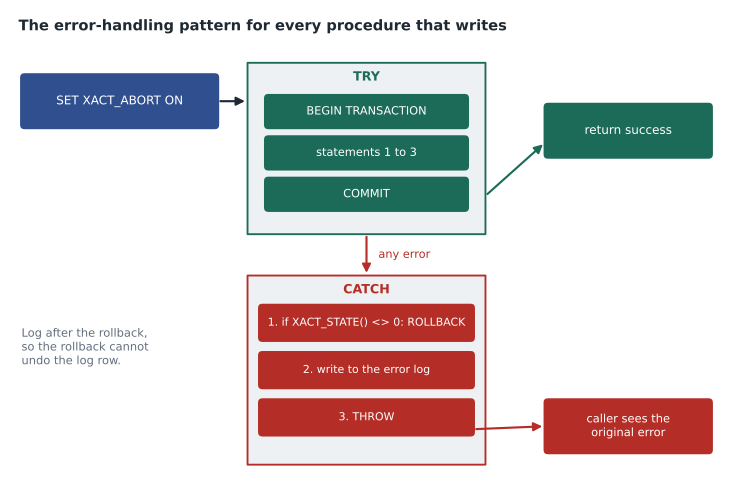
Reading the state in CATCH
Inside a CATCH block, the functions ERROR_NUMBER, ERROR_MESSAGE, ERROR_SEVERITY, ERROR_STATE, ERROR_LINE and ERROR_PROCEDURE describe the error that was caught. XACT_STATE() describes the transaction. It returns 1 when a transaction is open and can still be committed, 0 when there is no transaction, and −1 when a transaction is open but doomed: it can only be rolled back. With XACT_ABORT ON, any error dooms the transaction, so the CATCH block's job is simply to roll back if XACT_STATE() is not zero. Testing @@TRANCOUNT instead does not tell committable from doomed transactions, which is why Elena prefers XACT_STATE.
The order inside CATCH matters. Hana's first draft wrote to the error log and then rolled back. The rollback undid the log row too, so every failure left no trace. Logging after the rollback keeps the record. The final THROW with no arguments re-raises the original error with its original number and message, so the API sees the real reason, such as error 547 for a violated constraint, rather than a vague failure.
| Feature | THROW | RAISERROR |
|---|---|---|
| Re-raise the caught error unchanged | Yes, THROW with no arguments | No; it raises a new error |
| Custom error numbers | 50000 and above, no need to add to sys.messages | Needs sys.messages for numbers other than 50000 |
| Severity | Always 16 | Chosen by the caller |
| Respects SET XACT_ABORT | Yes | No |
| Message formatting | Build the string first | printf-style substitution |
| Statement before it | Must end with a semicolon | No rule |
Nested transactions and savepoints
SQL Server does not really nest transactions. Each BEGIN TRANSACTION adds one to @@TRANCOUNT, each COMMIT subtracts one, and only the outermost COMMIT actually commits. A ROLLBACK, however deep, rolls back everything and sets @@TRANCOUNT to zero. When one procedure calls another and both begin transactions, an inner ROLLBACK destroys the outer transaction, and the outer procedure then fails when it tries to commit or roll back something that no longer exists. Elena's rule is that only the outermost caller starts the transaction; inner procedures check @@TRANCOUNT and join an existing transaction instead of starting their own.
A savepoint, created with SAVE TRANSACTION name, marks a point inside a transaction. ROLLBACK TRANSACTION name undoes the work since that savepoint without ending the transaction. Savepoints are useful when one optional step may fail and the rest should continue, such as sending a welcome bonus that is allowed to fail when a member signs up. They do not help when the transaction is doomed, because a doomed transaction can only be rolled back completely.
Isolation, blocking and deadlocks
Isolation decides what a transaction sees of others' changes. Under READ COMMITTED, the default level, a query sees only committed data. Azure SQL Database turns on the READ_COMMITTED_SNAPSHOT database option by default, so readers see the last committed version of a row from the version store instead of waiting for writers to release locks. That is why reports in Finch Rewards do not block purchases. SNAPSHOT isolation gives a whole transaction one consistent view as of its start; it must be allowed with ALLOW_SNAPSHOT_ISOLATION and fails with an update conflict if two transactions change the same row. REPEATABLE READ and SERIALIZABLE hold locks longer to prevent rows changing or appearing, at the cost of more blocking. MSAZ-281 covers diagnosing blocking; this lesson covers what a developer writes.
Redemptions need care because two requests could spend the same points at once, for example when a member double-taps the redeem button on a slow connection. The procedure avoids the race in two ways. The balance update and the check constraint together guarantee that the balance cannot go below zero, because the UPDATE takes an exclusive lock on the member row and the second request waits for the first to finish before it subtracts. And the Redemption table has a unique constraint on (MemberId, OfferId), so the same offer cannot be redeemed twice even if two requests arrive together.
A deadlock happens when two transactions each hold a lock the other needs. SQL Server detects it within a few seconds, chooses one transaction as the victim, rolls it back and raises error 1205. Deadlocks are best reduced by touching tables in the same order everywhere and keeping transactions short, but they cannot be ruled out, so callers should retry. Elena's convention is that the API retries error 1205 up to three times with a short, growing delay, and that the procedures it calls are written so that a retry is safe.
Making retries safe
A retry is safe only if running the operation twice has the same effect as running it once. Networks make this matter even without deadlocks: if the connection drops after the database committed a purchase but before the API heard back, the API cannot know whether it succeeded. Hana made purchases idempotent by giving PointsTransaction a unique constraint on (StoreId, ReceiptNo). If the API retries a purchase that already committed, the insert fails with a duplicate key error, number 2627, and the procedure catches it and returns the original transaction instead of an error. A retried request changes nothing the second time.
BEGIN CATCH
    IF XACT_STATE() <> 0 ROLLBACK TRANSACTION;
    IF ERROR_NUMBER() IN (2627, 2601)        -- this receipt was already posted
    BEGIN
        SELECT @PointsEarned = Points
        FROM rewards.PointsTransaction
        WHERE StoreId = @StoreId AND ReceiptNo = @ReceiptNo;
        RETURN 0;                            -- treat as success
    END;
    THROW;
END CATCH;import sqlite3
db = sqlite3.connect(":memory:", isolation_level=None) # we manage transactions ourselves
db.executescript("""
CREATE TABLE Member (MemberId INTEGER PRIMARY KEY,
PointsBalance INTEGER NOT NULL CHECK (PointsBalance >= 0));
CREATE TABLE Txn (TxnId INTEGER PRIMARY KEY, MemberId INTEGER, Points INTEGER);
INSERT INTO Member VALUES (1001, 300);
""")
def redeem(cost, use_transaction):
try:
if use_transaction: db.execute("BEGIN")
db.execute("INSERT INTO Txn (MemberId, Points) VALUES (1001, ?)", (-cost,))
db.execute("UPDATE Member SET PointsBalance = PointsBalance - ? WHERE MemberId = 1001", (cost,))
if use_transaction: db.execute("COMMIT")
return "ok"
except sqlite3.IntegrityError as e:
if use_transaction: db.execute("ROLLBACK")
return f"failed ({e})"
def state():
bal = db.execute("SELECT PointsBalance FROM Member").fetchone()[0]
hist = db.execute("SELECT COALESCE(SUM(Points), 0) FROM Txn").fetchone()[0]
return f"balance {bal}, history total {hist}"
print("without transaction:", redeem(500, False), "->", state())
db.execute("DELETE FROM Txn")
print("with transaction: ", redeem(500, True), "->", state())without transaction: failed (CHECK constraint failed: PointsBalance >= 0) -> balance 300, history total -500 with transaction: failed (CHECK constraint failed: PointsBalance >= 0) -> balance 300, history total 0
What this code does
The program gives one member 300 points and tries to redeem an offer costing 500, which the balance rule must refuse. The redemption writes a history row first and then lowers the balance. Without a transaction, the history row stays even though the balance update was refused, so the history no longer matches the balance. With a transaction, the failure rolls back both statements, and the history and the balance still agree.
Elena added one more habit: keep transactions short and do nothing slow inside them. A transaction that waits for user input, calls a web service, or reads far more rows than it needs holds its locks for all that time, and other sessions queue behind it. In uspRedeemOffer the transaction covers three small statements on rows found by key, so it lasts a few milliseconds. Anything that can be computed before BEGIN TRANSACTION, such as validating parameters or looking up the offer's details, is done before it, and anything that can wait until after COMMIT, such as sending a notification, is done after it, as lesson 11 shows with an outbox table.
Worked problem
How long can a retry policy keep a caller waiting?
The API retries a deadlocked call up to three times. Before retry n it waits 200 × 2^(n − 1) milliseconds, so the waits are 200, 400 and 800 ms. Each attempt that deadlocks takes about 1.2 seconds before SQL Server picks it as the victim, because the deadlock monitor runs about every second or two. In the worst case all four attempts deadlock. How long does the caller wait before seeing the final error?
Show solution
- Attempts: the first try plus three retries, 4 × 1.2 s = 4.8 s.
- Waits between attempts: 0.2 + 0.4 + 0.8 = 1.4 s.
- \[4.8 + 1.4 = 6.2 \text{ s}\]
- The app's request timeout is 10 seconds, so the policy fits, with room for the successful case.
Answer: About 6.2 seconds in the worst case, inside the 10-second request timeout.
Common mistakes
MistakeBEGIN TRANSACTION and COMMIT are enough to make two statements all or nothing.
InsteadWithout XACT_ABORT or TRY...CATCH, a failed statement can leave the rest to commit.
MistakeLog the error and then roll back.
InsteadRoll back first; otherwise the rollback undoes the log row.
MistakeAn inner procedure should start and roll back its own transaction.
InsteadA ROLLBACK anywhere rolls back everything; only the outermost caller should control the transaction.
MistakeRAISERROR is the modern way to re-raise an error.
InsteadTHROW with no arguments re-raises the original error and respects XACT_ABORT.
MistakeA retry after a dropped connection is always safe.
InsteadOnly idempotent operations are safe to retry; use unique keys such as a receipt number.
Summary and key terms
- A transaction is all or nothing; autocommit makes each statement its own transaction.
- Many errors end only the statement; use SET XACT_ABORT ON and TRY...CATCH.
- In CATCH, roll back if XACT_STATE() is not 0, log after rolling back, then THROW.
- Transactions do not truly nest; one ROLLBACK undoes all. Savepoints undo part of a committable transaction.
- Azure SQL Database uses read committed snapshot by default, so readers do not block writers.
- Deadlock victims get error 1205; keep transactions short and retry.
- Make operations idempotent so retries are safe.
- Transaction
- A unit of work that commits completely or not at all.
- XACT_ABORT
- A session setting that rolls back the whole transaction on most run-time errors.
- XACT_STATE
- A function returning 1 for a committable transaction, 0 for none and −1 for a doomed one.
- THROW
- A statement that raises an error, or re-raises the caught one when used without arguments.
- Savepoint
- A named point in a transaction that a partial rollback can return to.
- Deadlock
- Two or more transactions each waiting for a lock the other holds; one is chosen as the victim.
- Idempotent
- Producing the same result whether an operation runs once or several times.
Practice problems
Work each problem on paper first, then reveal the answer to check.
What happens to Liam's first insert if the second fails, with neither XACT_ABORT nor TRY...CATCH?
Show answer
It can still be committed, because the error may end only the failed statement.
What does XACT_STATE() = −1 mean?
Show answer
A transaction is open but doomed; it can only be rolled back.
Why must an inner procedure not roll back a transaction it did not start?
Show answer
ROLLBACK undoes the whole transaction and sets @@TRANCOUNT to zero, breaking the caller.
How does Finch Rewards stop the same offer being redeemed twice by a double tap?
Show answer
A unique constraint on (MemberId, OfferId), with the balance update serializing concurrent requests.
Which error number does a deadlock victim receive?
Show answer
1205.
Lesson quiz · 5 questions
Score 60% or more to complete this lesson.
Create a free account to save your progress, take quizzes and earn a certificate.