
MSAZ-281 · Lesson 3 of 12 · 21 min
Encryption at rest and in transit
▶ Video coming soon A video version of this lesson is on the way.
Sunil Rao's first question about any new system is always the same: "If someone walked out of the data center with the disks, what would they have?" For StockLine on its old server, the honest answer was everything. The database files and the backup tapes were not encrypted, and a tape went missing in 2019 during a courier change. It was found a week later, but the incident is why Sunil's checklist now has encryption at rest as its first line. Elena uses this session to show how Azure SQL answers that question, and the related one for data moving across the network.
Three places data can be
Data needs protection in three states. At rest, it sits in data files, log files and backups on storage. In transit, it travels between the client and the database, or between replicas. In use, it is in the memory of the database engine while queries run. Different features protect each state. Transparent data encryption covers data at rest. Transport Layer Security, the same protocol that protects web traffic, covers data in transit. Always Encrypted, the subject of lesson 4, protects selected columns even from the engine itself, so that sensitive values are never in plain text on the server.
| State | Threat | Main protection in Azure SQL | Who holds the key |
|---|---|---|---|
| At rest | Stolen disks or backup files | Transparent data encryption (TDE) | Microsoft (service-managed) or the customer in Key Vault |
| In transit | Someone reading network traffic | TLS on every connection | Certificates managed by the service |
| In use, for chosen columns | A privileged insider or a compromised server | Always Encrypted | The customer, outside the database |
| Individual values (legacy option) | Readers of a table who lack a key | Object-level (cell) encryption with T-SQL functions | Keys inside the database, protected by a password or certificate |
Transparent data encryption
Transparent data encryption encrypts the database's data and log files as pages are written to storage and decrypts them as they are read into memory. It is transparent because applications and queries see no difference: no code changes, no new data types. Backups of an encrypted database are encrypted too, so a backup file copied out of storage is unreadable without the key. TDE is on by default for every new database in Azure SQL Database and Azure SQL Managed Instance. When Walt checks the Finch Rewards test database, the encryption state is already 3, meaning encrypted, and he did not have to do anything.
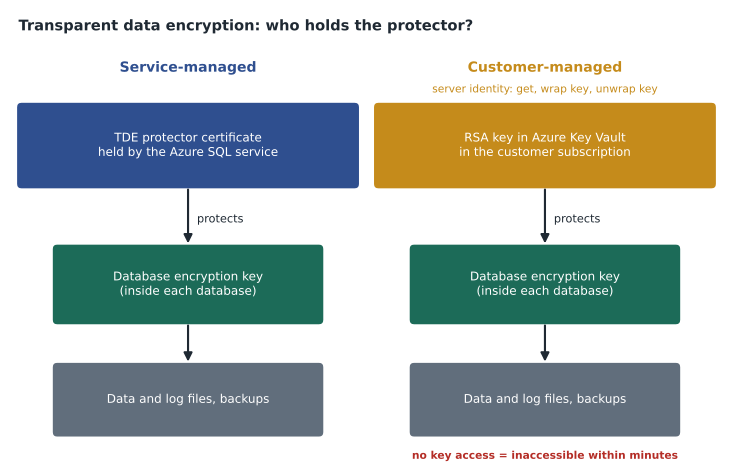
TDE uses a two-level key hierarchy. Each database has a database encryption key, a symmetric key that does the actual encryption of pages. That key is itself protected by a TDE protector, which belongs to the logical server or the Managed Instance. By default the protector is a certificate managed by the service: Microsoft creates it, stores it, rotates it and never shows it to anyone. This service-managed option is what most databases use, and it fully answers Sunil's question about stolen disks.
Customer-managed keys
Some organizations must control the key themselves, either because a regulation or contract requires it, or because they want the ability to make data unreadable by revoking the key. Customer-managed TDE, often called bring your own key, keeps the TDE protector as an RSA key in Azure Key Vault or Azure Key Vault Managed HSM, in the customer's own subscription. The logical server or Managed Instance is given an identity, and that identity is granted permission to get the key and to wrap and unwrap keys with it. Every time a database is opened, the service asks Key Vault to unwrap the database encryption key.
With control comes responsibility. If the key is deleted, disabled or the server's access is removed, the databases become inaccessible within minutes, and they stay that way until access is restored. Key Vault must have soft delete and purge protection turned on, so a mistaken deletion can be undone; Azure requires them for TDE keys. The key should be backed up, and rotating it, either by hand or with automatic rotation in Key Vault, re-wraps the database encryption keys without re-encrypting the data, so rotation is quick. A key can be set at the server level for all databases, and Azure SQL Database also supports customer-managed keys at the database level for cases where one database needs its own key.
Harrow & Finch's decision, written into the security standard Sunil is drafting, is service-managed TDE for all databases except the payment-related database that will hold tokenized card references. That one will use a customer-managed key in a Key Vault owned by Sunil's team, because the payment processor's contract asks for it. Walt notes the operational side for his runbook: a Key Vault alert if the key is near expiry, a second key version ready, and a rule that nobody removes the server identity's access without a change ticket.
az keyvault key create --vault-name kv-hf-security-cus --name tde-payments --kty RSA --size 3072

az sql server tde-key set --resource-group rg-payments-test-cus \
  --server hf-sql-payments-test-cus --server-key-type AzureKeyVault \
--kid https://kv-hf-security-cus.vault.azure.net/keys/tde-paymentsSELECT DB_NAME(database_id) AS database_name, encryption_state_desc,
encryptor_type, key_algorithm, key_length
FROM sys.dm_database_encryption_keys;TDE for SQL Server on Azure VMs
On SQL Server in a virtual machine, TDE works the way it does on premises, and it is not on by default. The DBA creates a database master key and a certificate in master, creates a database encryption key protected by that certificate, and turns encryption on. The certificate must be backed up with its private key and stored safely, because a backup of the database cannot be restored on another server without it. SQL Server can also use Azure Key Vault for the protector through the SQL Server Connector for Key Vault. Separately, the VM's disks are encrypted at rest by Azure storage, but that protects the disks, not the database files if they are copied out by someone with access to the VM.
Encryption in transit
Every connection to Azure SQL Database and Managed Instance is encrypted with TLS. The service refuses unencrypted connections, and a server setting called the minimum TLS version controls the oldest protocol version clients may use. TLS 1.2 is the usual minimum and the default for new servers; versions 1.0 and 1.1 are retired for Azure SQL. Clients should also set Encrypt=True and, ideally, validate the server's certificate rather than trusting it blindly. The setting TrustServerCertificate=True skips that validation and leaves the connection open to an attacker who can impersonate the server, so Elena searches the team's configuration files for it and removes every occurrence.
Recent drivers add a strict encryption mode, which uses TDS 8.0 and starts TLS before any part of the database login protocol, so that even the earliest messages are protected. Managed Instance and SQL Server 2022 support it, and Walt notes that the newest versions of the Microsoft drivers set Encrypt to true by default, which surprised one developer whose test connection to an old server with a self-signed certificate suddenly failed. The failure was correct; the fix was a proper certificate, not turning validation off.
| Connection setting | What it does | Elena's rule |
|---|---|---|
| Encrypt=True (or Mandatory) | Requires TLS for the connection | Always |
| Encrypt=Strict | TLS before the login protocol starts (TDS 8.0) | Use where the client and server support it |
| TrustServerCertificate=False | Validates the server certificate | Always |
| TrustServerCertificate=True | Skips certificate validation | Never in shared code |
| Minimum TLS version 1.2 on the server | Refuses older protocol versions | Set on every server |
Network controls are part of the answer
Encryption in transit stops someone reading traffic; it does not stop someone reaching the server. MSAZ-280 set up the network side: private endpoints, public network access disabled, and server-level and database-level firewall rules for the few cases that need them. DP-300 lists those controls in the same group as encryption, and in an exam scenario they often appear together. A typical answer combines them: TLS for confidentiality on the wire, a private endpoint so the traffic never crosses the internet, and firewall rules only for named exceptions. Service endpoints are an older alternative that keeps traffic on the Azure backbone from a subnet but still uses the public endpoint of the server.
Object-level encryption
Before Always Encrypted existed, SQL Server offered cell-level encryption through T-SQL functions: ENCRYPTBYKEY and DECRYPTBYKEY with a symmetric key, protected in turn by a certificate or a password. It is still available, and DP-300 lists it as object-level encryption. It lets a DBA encrypt individual values, such as a national identifier column, so that a reader without access to the key sees only binary data. Its weaknesses are that the keys live in the database, so a DBA with enough rights can open them, the application must call the functions in its queries, and the encrypted columns cannot be indexed usefully. For new work, Always Encrypted is usually the better answer. StockLine has one old column encrypted this way, an employee identifier added in 2012, and the migration plan keeps it until the HR integration is rewritten.
-- Legacy cell-level encryption, kept for one StockLine column
OPEN SYMMETRIC KEY EmpIdKey DECRYPTION BY CERTIFICATE EmpIdCert;
SELECT EmployeeName,
       CONVERT(varchar(20), DECRYPTBYKEY(EmployeeIdEncrypted)) AS EmployeeId
FROM hr.Employee;
CLOSE SYMMETRIC KEY EmpIdKey;
Checking encryption across an estate
One database is easy to check; forty are not. Azure Policy has built-in definitions that report servers without customer-managed keys, servers that allow TLS versions older than 1.2, and databases without TDE, and Defender for SQL's vulnerability assessment flags the same findings at the database level. Sunil assigns the TLS policy to every subscription and the customer-managed key policy only to the payments resource group, where it is required. The compliance view in the portal then shows, at a glance, which resources meet the standard, and it is the page he will show the auditor in the spring.
Worked problem
How long would a key outage last before stores notice?
The payments test database uses a customer-managed TDE key. Azure documentation describes the database becoming inaccessible within about 10 minutes of losing key access, and Walt assumes the payment service retries for 2 minutes before showing an error at the till. Sunil's team has an alert on Key Vault access failures that fires within 5 minutes, and their on-call engineer is expected to acknowledge within 15 minutes and restore access within a further 20. If someone removes the server identity's permission by mistake at 14:00, roughly when do tills start failing, and when should service return?
Show solution
- The database becomes inaccessible about 10 minutes after the change: around 14:10.
- Tills retry for 2 minutes, so payment errors start at about 14:12.
- The alert fires within 5 minutes of the change, at 14:05, before tills fail.
- The engineer acknowledges by 14:20 at the latest (alert time plus 15 minutes) and restores access by 14:40 (plus 20 minutes).
- \[14{:}05 + 15 + 20 = 14{:}40\]
- After access is restored, the database becomes available again without data loss, although connections must reconnect.
Answer: Tills would start failing around 14:12 and service should return by about 14:40, so a worst case of roughly half an hour of payment errors. Walt's runbook adds a step: a change to Key Vault access policies requires a second person's approval, so the mistake is less likely in the first place.
Common mistakes
MistakeTDE must be turned on after creating an Azure SQL database.
InsteadTDE is on by default for new databases in Azure SQL Database and Managed Instance; SQL Server on VMs needs it configured.
MistakeRotating a customer-managed TDE key re-encrypts every page of the database.
InsteadRotation re-wraps the database encryption key; the data is not re-encrypted, so it is quick.
MistakeTrustServerCertificate=True is fine because the connection is still encrypted.
InsteadWithout validation, an attacker posing as the server can read the encrypted traffic; always validate.
MistakeTDE stops a DBA from reading sensitive columns.
InsteadTDE protects files at rest; anyone who can query the database sees plain values. Use Always Encrypted for that.
Summary and key terms
- Transparent data encryption protects data files, logs and backups at rest and is on by default in Azure SQL Database and Managed Instance.
- Each database's encryption key is protected by a TDE protector: service-managed by default, or a customer-managed RSA key in Key Vault.
- Losing access to a customer-managed key makes databases inaccessible within minutes; soft delete, purge protection and alerts are essential.
- All connections use TLS; set a minimum TLS version of 1.2, use Encrypt=True or Strict, and validate server certificates.
- Private endpoints and firewall rules limit who can reach the server; encryption limits what they can read.
- Object-level encryption with ENCRYPTBYKEY is a legacy option; Always Encrypted is usually better for new work.
- Transparent data encryption (TDE)
- Encryption of data and log files at rest, done by the engine without application changes.
- Database encryption key
- The symmetric key that encrypts a database's pages under TDE.
- TDE protector
- The certificate or asymmetric key that protects each database encryption key.
- Customer-managed key
- A TDE protector kept as an RSA key in the customer's Key Vault or Managed HSM.
- Minimum TLS version
- A server setting that refuses client connections using older protocol versions.
- Strict encryption
- A connection mode that starts TLS before the database login protocol, using TDS 8.0.
Practice problems
Work each problem on paper first, then reveal the answer to check.
What does TDE protect, and what does it not protect?
Show answer
It protects files, logs and backups at rest; it does not hide data from anyone who can query the database.
Which Key Vault settings are required before a key can be a TDE protector?
Show answer
Soft delete and purge protection.
What happens to a database if the server loses access to its customer-managed key?
Show answer
It becomes inaccessible within minutes, until access is restored.
Why remove TrustServerCertificate=True from connection strings?
Show answer
It skips server certificate validation, allowing an impostor server to intercept traffic.
Name one weakness of object-level (cell) encryption compared with Always Encrypted.
Show answer
The keys live in the database, so privileged users can open them; also, applications must call functions and indexing is limited.
Lesson quiz · 5 questions
Score 60% or more to complete this lesson.
Create a free account to save your progress, take quizzes and earn a certificate.