
MSAZ-281 · Lesson 1 of 12 · 23 min
Microsoft Entra authentication for databases
▶ Video coming soon A video version of this lesson is on the way.
In the last week of November 2026, Elena Brandt's DBA clinic at the Des Moines head office changes its focus. MSAZ-280 followed Walt Hadley as he chose, deployed and sized Azure SQL resources for Harrow & Finch Home Supply. Two test environments now exist in the hf-nonprod subscription: a test copy of the Finch Rewards database on an Azure SQL Database logical server, and a test Azure SQL Managed Instance that will receive a copy of StockLine for migration rehearsals in 2027. Nothing in either environment holds live customer data yet, and Elena wants to keep it that way until the security work is done. "A database you can reach is a database someone else can reach," she says. This course covers that work and the work that follows it: securing the databases, watching how they behave and making them fast.
Two learners now attend the clinic. Walt is preparing for exam DP-300, Administering Microsoft Azure SQL Solutions, which he plans to sit in May 2027. Hana Sato, the developer rebuilding the Finch Rewards loyalty app, has joined him. She is preparing for exam DP-800, Developing AI-Enabled Database Solutions, which Microsoft added for the SQL AI Developer Associate certification in 2026, and she plans to sit it in June 2027. The two exams overlap in exactly the ground this course covers: authentication, permissions, encryption, masking, row-level security, auditing, monitoring and query performance. Sunil Rao, the IT security manager, will join the sessions on security, because his team must approve every production database before it goes live.
Why identity comes first
Walt's StockLine server has used SQL Server authentication for seventeen years. The application connects with one SQL login whose password is in a configuration file, the nightly reports use another, and a handful of staff have their own SQL logins for occasional queries. Every password change is a small project, and when someone leaves the company Walt must remember to disable their login by hand. In the past year two former contractors still had working logins for months after their contracts ended. Sunil's audit found them, not a process.
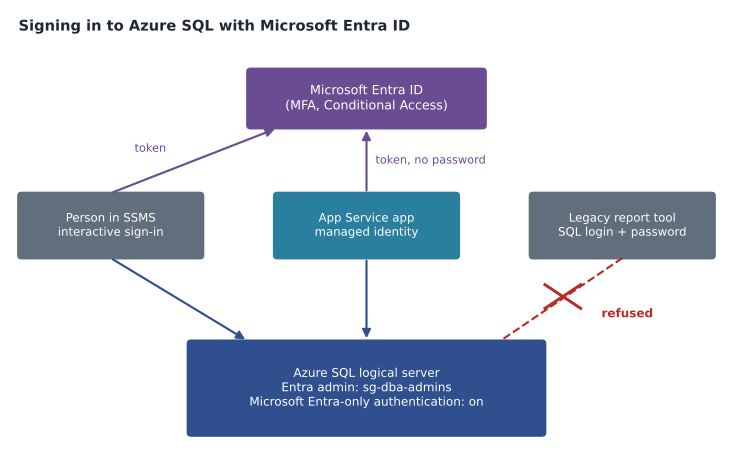
Microsoft Entra authentication replaces that model with the company's central identity system. A person or application signs in to Microsoft Entra ID, receives a token that proves who they are, and presents the token to the database instead of a password. The database never stores the password. When HR disables an account in Entra ID, access to every database that trusts Entra ends with it. Multifactor authentication, Conditional Access policies and sign-in logs apply to database sign-ins as they do to email and Teams. For an application running in Azure, a managed identity removes the stored secret entirely: Azure gives the application an identity, rotates its credentials automatically, and the connection string contains no password at all.
The Microsoft Entra administrator
Every logical server for Azure SQL Database and every Managed Instance can have one Microsoft Entra administrator. That administrator can be a user, a group, a service principal or a managed identity, and it is the first Entra principal the engine trusts. Until it is set, nobody can create users from Entra identities. Microsoft recommends a group, and Harrow & Finch follows that advice: the Entra administrator of both test environments is the group sg-dba-admins, which contains Walt, Elena and one break-glass account kept by Sunil's team. When Elena adds a new DBA to the group, that person gains administrator rights on every server where the group is set, without anyone touching the database.
The Entra administrator is separate from the SQL administrator that Azure asks for when a server is created with SQL authentication allowed. The SQL administrator is a SQL login with a password, and on a server that allows both methods it is a powerful account worth protecting. Both administrators have full rights in every database on the server, but neither is a member of the sysadmin role in the on-premises sense, because Azure SQL Database has no server-level sysadmin role at all. Managed Instance, which is a full instance, does have server roles, and its Entra administrator is added to sysadmin.
az sql server ad-admin create \
  --resource-group rg-rewards-test-cus \
  --server-name hf-sql-rewards-test-cus \
  --display-name sg-dba-admins \
  --object-id 4c1e0b52-7a1d-4f0e-9c33-2b8d6e9a1f77
Microsoft Entra-only authentication
A server can allow SQL authentication and Entra authentication side by side, or it can be set to Microsoft Entra-only authentication. With Entra-only authentication on, the engine refuses every SQL login, including the SQL administrator, even if the password is correct. That one setting closes a whole class of risk: a password left in a script or a spreadsheet stops being a way in. Azure Policy can require the setting, so that nobody can create a new server with SQL authentication allowed in a subscription where the policy applies. Sunil has assigned that policy to the Production management group. The hf-nonprod subscription has it in audit mode for now, so that Walt can see which test servers would break before the rule is enforced.
The setting is not free of consequences. Some tools and third-party applications still cannot request Entra tokens. The nightly sales report at Harrow & Finch runs from an old reporting tool on a virtual machine that only understands SQL logins. Keiko Tanabe's team will replace it when the Finch Data Hub arrives in 2027, but until then the StockLine test instance has to allow SQL authentication for that one login. Elena's rule is that every exception like this goes in a register with an owner and an end date. The reporting tool's exception ends on June 30, 2027.
| Method | What proves identity | Where the secret lives | Typical use at Harrow & Finch |
|---|---|---|---|
| Microsoft Entra user with MFA | Token after interactive sign-in | Nowhere in the database; Entra ID handles it | DBAs and analysts in SSMS or Azure Data Studio |
| Microsoft Entra group | Membership checked when the token is issued | Nowhere in the database | Role-based access for teams |
| Managed identity | Token issued to an Azure resource | Managed by Azure, rotated automatically | Finch Rewards API on App Service |
| Service principal with certificate | Token after proving the certificate | Certificate in Key Vault | Pipelines that run outside Azure |
| SQL login | User name and password | Password hash in the engine; password in the client | Legacy reporting tool, by exception only |
Contained users and logins from Entra identities
Once the Entra administrator is set, that administrator can create database users for other Entra identities. In Azure SQL Database the usual way is a contained database user, created inside the user database with the FROM EXTERNAL PROVIDER clause. A contained user exists only in that database. There is no matching login in master, so the user travels with the database when it is copied or geo-replicated, and nothing outside the database needs to be kept in step. For a group, every member of the group can connect, and adding someone to the group is all it takes to give them access.
-- Run in the finchrewards database, connected as a member of sg-dba-admins
CREATE USER [sg-rewards-developers] FROM EXTERNAL PROVIDER;
CREATE USER [app-finchrewards-test] FROM EXTERNAL PROVIDER;  -- the App Service managed identity
ALTER ROLE db_datareader ADD MEMBER [sg-rewards-developers];
Managed Instance behaves more like SQL Server. It supports server-level logins created from Entra identities with CREATE LOGIN ... FROM EXTERNAL PROVIDER in master, and database users mapped to those logins, as well as contained users. Azure SQL Database also supports server-level logins from Entra identities, created in the virtual master database; they are useful when one identity needs access to many databases on the same server, or for server-level roles such as the roles that manage logins and read server state. For DP-300 the distinction to hold on to is this: a contained user lives in one database and moves with it; a login lives at the server or instance and must be recreated, with the same security identifier, wherever the database goes.
The name inside the square brackets must match the display name of the Entra object, or, for an application, the name of the managed identity or service principal. When two objects share a display name, Entra cannot tell which one is meant and the statement fails. Walt hits this on his first attempt: there are two groups called sg-rewards-developers, one created by Hana's team and one left over from a 2024 pilot. The fix is to rename the old group, or to create the user with the object ID through the WITH OBJECT_ID option, which identifies the principal exactly.
Connecting with a token
Clients connect with Entra in several ways, and the connection string names the method. Interactive authentication opens a browser sign-in with MFA, which is what Walt uses from SQL Server Management Studio. Integrated authentication uses the Windows sign-in of a domain-joined machine whose directory is synchronized with Entra. Managed identity authentication is used by code running in Azure; the Finch Rewards API on App Service asks Azure for a token for its system-assigned identity and passes it to the driver. Service principal authentication with a certificate suits pipelines. The older password method, where a user's Entra password is typed into the client, is discouraged, because it cannot satisfy multifactor authentication.
Server=tcp:hf-sql-rewards-test-cus.database.windows.net,1433;
Database=finchrewards;
Authentication=Active Directory Managed Identity;
Encrypt=True;
Hana asks what happens when a token expires during a long-running query. Tokens last about an hour, and the driver refreshes them for new connections; a connection that is already open is not cut off when its token expires. The more practical concern is connection pooling. Each distinct identity gets its own pool, so an app that connects as many different users through Entra, instead of as one managed identity, can open far more connections than expected. Hana's API will connect as its managed identity and enforce per-customer rules in the application and with row-level security, which lesson 5 explains.
SQL Server on Azure VMs and Arc
The DP-300 skills outline also mentions Entra authentication for SQL Server itself. SQL Server 2022 and later can trust Microsoft Entra ID when the instance runs on an Azure virtual machine or is connected through Azure Arc. On the VM, the SQL IaaS Agent extension can configure it with a managed identity of the VM that reads directory information. Harrow & Finch's warehouse vendor database will run on SQL Server on an Azure VM, because the vendor needs operating system access, so Walt will meet this option there. On that VM, Windows authentication and SQL authentication also remain available, and the DBA is still responsible for the operating system's own accounts and patches.
Worked problem
How many accounts disappear when Entra-only authentication is turned on?
Before the change, the StockLine test instance has these principals for people and programs: 1 SQL administrator, 6 SQL logins for staff, 3 SQL logins for applications (StockLine back end, warehouse interface, nightly report) and 0 Entra principals. Elena's plan replaces the 6 staff logins with members of 2 Entra groups, replaces 2 of the application logins with managed identities, and keeps the nightly report login as a registered exception. How many SQL logins with passwords remain, and how many passwords stop existing once the plan is complete?
Show solution
- Count the SQL logins with passwords before the change: 1 + 6 + 3 = 10.
- Staff logins replaced by groups: 6 passwords removed.
- Application logins replaced by managed identities: 2 passwords removed.
- The SQL administrator is kept but its password is rotated and stored in Key Vault for emergencies, and the nightly report login stays as an exception: 2 remain.
- \[10 - 6 - 2 = 2\]
- When the reporting tool is retired in mid-2027 and the instance is switched to Entra-only authentication, the last two SQL logins stop working: the exception login is dropped and the SQL administrator can no longer sign in, even with the right password.
Answer: Two SQL logins with passwords remain during the exception period (the SQL administrator and the report login); eight passwords stop existing at once, and the remaining two stop working when Entra-only authentication is turned on in 2027.
Troubleshooting sign-in failures
Most Entra sign-in problems fall into a few patterns, and DP-300 asks candidates to troubleshoot them. Error 18456 with a message that the login failed for a token-based principal usually means there is no user for that identity in the target database, or the client connected to master instead of the user database. A message that the principal could not be resolved when running CREATE USER means the statement was run by someone who is not an Entra principal, often the SQL administrator, which cannot look up directory objects. A server with no Entra administrator cannot accept Entra sign-ins at all. And a firewall or private endpoint problem looks like a timeout rather than an authentication error, so Walt learns to check the error number before he checks permissions.
| Symptom | Likely cause | First check |
|---|---|---|
| Login failed for an Entra user | No database user exists, or the wrong database was named | Query sys.database_principals in the target database |
| Principal could not be resolved | CREATE USER run by a SQL login, or the name matches two Entra objects | Connect as an Entra admin; use WITH OBJECT_ID |
| Entra sign-in option missing or rejected | No Entra administrator set on the server | Check the server's Microsoft Entra admin setting |
| SQL login refused with correct password | Microsoft Entra-only authentication is on | Check the setting; use an Entra identity |
| Timeout before any error | Network: firewall rule, private endpoint DNS, NSG | Test name resolution and port 1433 |
Common mistakes
MistakeThe Entra administrator should be Walt's own account so that someone is clearly responsible.
InsteadUse a group, so access survives staff changes and can be reviewed in one place.
MistakeContained users must be created again after a database is copied to another server.
InsteadContained users live in the database and move with it; logins in master do not.
MistakeThe SQL administrator can create users for Entra groups.
InsteadOnly an Entra principal can look up directory objects, so CREATE USER FROM EXTERNAL PROVIDER must be run by one.
MistakeMicrosoft Entra-only authentication can safely be turned on before checking which tools still use SQL logins.
InsteadFind and register every SQL-login dependency first; the setting refuses all SQL logins, including the administrator.
Summary and key terms
- Microsoft Entra authentication replaces stored passwords with tokens, so MFA, Conditional Access and account disabling apply to databases.
- Each logical server and Managed Instance has one Entra administrator; a group is the recommended choice.
- Microsoft Entra-only authentication refuses all SQL logins and can be required by Azure Policy.
- Contained users created FROM EXTERNAL PROVIDER live in one database and move with it; logins live at the server or instance.
- Applications in Azure should use managed identities, which need no stored secret.
- Sign-in errors usually trace to a missing database user, a non-Entra principal running CREATE USER, a missing Entra admin, or a network problem.
- Microsoft Entra administrator
- The one Entra principal that a logical server or Managed Instance trusts first and that can create other Entra-based users.
- Microsoft Entra-only authentication
- A server setting that refuses all SQL authentication, leaving only Entra sign-ins.
- Contained database user
- A user defined inside a database with no matching login in master, so it moves with the database.
- Managed identity
- An identity that Azure creates for a resource and whose credentials Azure manages and rotates.
- FROM EXTERNAL PROVIDER
- The T-SQL clause that creates a user or login for a Microsoft Entra identity.
- Token
- A signed statement from Entra ID that proves who a user or application is, presented instead of a password.
Practice problems
Work each problem on paper first, then reveal the answer to check.
Why is a group a better Entra administrator than a single user?
Show answer
Access survives staff changes, membership can be reviewed in one place, and no one person is a single point of failure.
What does Microsoft Entra-only authentication do to the SQL administrator?
Show answer
It can no longer sign in, even with the correct password.
What clause creates a database user for an Entra identity?
Show answer
CREATE USER [name] FROM EXTERNAL PROVIDER.
Why does the Finch Rewards API's connection string contain no password?
Show answer
It authenticates with the App Service's managed identity, and the driver obtains a token from Azure.
A CREATE USER statement fails because two Entra groups share a display name. Name two fixes.
Show answer
Rename one of the groups, or create the user with the WITH OBJECT_ID option.
Lesson quiz · 5 questions
Score 60% or more to complete this lesson.
Create a free account to save your progress, take quizzes and earn a certificate.