
MSAZ-281 · Lesson 11 of 12 · 21 min
Automatic tuning
▶ Video coming soon A video version of this lesson is on the way.
At the end of the query tuning session, Walt asks the question every DBA asks when they first see a cloud database: "How much of this does Azure do for me?" Elena's answer is: some, and it is worth knowing exactly which part. Automatic tuning can watch for plan regressions and fix them, and in Azure SQL Database it can also create and drop indexes. It does this carefully, with validation and automatic reversal, but it is not a replacement for the judgment practiced in the last two lessons. This session covers what it does, how to configure it and how to keep an eye on it.
The three automatic tuning options
Automatic tuning has three options. FORCE_LAST_GOOD_PLAN, also called automatic plan correction, detects when a query's performance gets worse because the optimizer switched to a new plan, and forces the last plan that performed well. CREATE_INDEX identifies indexes that would improve the workload, creates them, and verifies that they help. DROP_INDEX identifies indexes that are unused or duplicated over a long period and drops them, though it does not drop unique indexes or those created by hints. Azure SQL Database supports all three. Azure SQL Managed Instance and SQL Server 2017 and later support only FORCE_LAST_GOOD_PLAN.
For new Azure SQL Database servers, FORCE_LAST_GOOD_PLAN is on by default and the two index options are off. Microsoft's documentation describes this as the default configuration; it changed over the years, and older databases may show different settings, so Walt checks rather than assumes. On the test Managed Instance, he turns on FORCE_LAST_GOOD_PLAN for the StockLine copy with ALTER DATABASE, because it is not on there unless someone sets it.
| Option | What it does | Azure SQL Database | Managed Instance and SQL Server | Default for new SQL Database servers |
|---|---|---|---|---|
| FORCE_LAST_GOOD_PLAN | Forces the last good plan after a regression | Yes | Yes | On |
| CREATE_INDEX | Creates beneficial indexes and validates them | Yes | No | Off |
| DROP_INDEX | Drops unused or duplicate indexes | Yes | No | Off |
How plan correction decides
Automatic plan correction relies on Query Store, which must be on and in READ_WRITE mode. When a query's current plan performs significantly worse than an earlier plan for the same query, measured on CPU time with enough executions to be meaningful, the engine identifies the regression and records a recommendation in sys.dm_db_tuning_recommendations. With FORCE_LAST_GOOD_PLAN on, it forces the earlier plan automatically, then keeps measuring. If the forced plan turns out not to be better, the engine removes the forcing and lets the optimizer choose again. If the query's schema changes so that the forced plan is no longer valid, the forcing is dropped too.
# Average CPU per execution (ms) and execution counts for two plans of one query,
# as recorded in Query Store over comparable periods
plans = {
    "plan 7 (before the statistics update)": {"avg_cpu_ms": 38.0, "executions": 4120},
    "plan 12 (after the statistics update)": {"avg_cpu_ms": 910.0, "executions": 3980},
}
old = plans["plan 7 (before the statistics update)"]
new = plans["plan 12 (after the statistics update)"]

slowdown = new["avg_cpu_ms"] / old["avg_cpu_ms"]
extra_cpu_s = (new["avg_cpu_ms"] - old["avg_cpu_ms"]) * new["executions"] / 1000
print("new plan is", round(slowdown, 1), "times slower per execution")
print("extra CPU over the period:", round(extra_cpu_s), "seconds")
enough_runs = min(old["executions"], new["executions"]) >= 100
print("regression worth correcting:", slowdown > 2 and enough_runs)new plan is 23.9 times slower per execution extra CPU over the period: 3471 seconds regression worth correcting: True
What this code does
The program compares two plans for the same query: the average processing time each execution took, and how many times each ran. It works out how many times slower the new plan is and how much extra processing time it caused over the period. It then reports a regression only if the new plan is clearly slower and both plans ran often enough for the comparison to be trusted. The real engine uses its own, more careful thresholds, but the reasoning is the same.
The real thresholds are internal and more conservative than the toy rule above, but the principle matters for the exam and for practice: plan correction compares plans of the same query using measured runtime statistics, needs enough executions to be confident, and continues to verify after acting.
-- Managed Instance or SQL Server: turn on automatic plan correction for one database
ALTER DATABASE StockLine SET AUTOMATIC_TUNING (FORCE_LAST_GOOD_PLAN = ON);

-- Azure SQL Database: inherit the server settings, or set options directly
ALTER DATABASE CURRENT SET AUTOMATIC_TUNING = INHERIT;
ALTER DATABASE CURRENT SET AUTOMATIC_TUNING (FORCE_LAST_GOOD_PLAN = ON, CREATE_INDEX = OFF, DROP_INDEX = OFF);

SELECT name, desired_state_desc, actual_state_desc, reason_desc
FROM sys.database_automatic_tuning_options;
Server inheritance and the portal
In Azure SQL Database, automatic tuning can be set on the logical server and inherited by databases, or set on each database. Inheritance is Microsoft's recommendation for estates with many databases, because one change applies everywhere and new databases follow the server automatically. In the portal, the database's Automatic tuning page shows each option as inherited from the server, Azure defaults, or set on the database, and the actual state, which can differ from the desired state: for example, if Query Store is read-only, plan correction cannot run, and the actual state says so with a reason.
The portal's recommendations page lists recent tuning recommendations with their status: active, pending, executing, verifying, success, reverted or expired. A recommendation applied automatically goes through validation. Microsoft describes validation as taking from about 30 minutes to 72 hours, longer for queries that run rarely, and a change that causes a regression during validation is reverted at once. A recommendation applied by hand, by running the suggested T-SQL yourself, does not get that automatic validation and reversal; the recommendation stays visible for a day or two and then is withdrawn. For that reason, Elena prefers that index recommendations in Azure SQL Database be applied by the service, or by the team with its own before-and-after measurement.
Should the index options be on?
The index options are where teams disagree. Turning on CREATE_INDEX in Azure SQL Database can produce real gains for databases where nobody has time to tune, such as dozens of small departmental databases. It also changes the schema without a developer's knowledge, which can surprise deployment pipelines that expect a fixed set of indexes, and the indexes it creates use storage and slow writes like any other. DROP_INDEX is more cautious, because it acts only on indexes that are long unused or duplicates, but a quarterly report that runs once and needs an index can make that index look unused for months.
Harrow & Finch's policy, which Elena writes for Sunil's security standard because schema changes are a change-control matter, is a compromise. Automatic plan correction on everywhere. CREATE_INDEX on for small databases without a dedicated developer team, off for Finch Rewards and StockLine, where index recommendations go to Walt as a weekly report from sys.dm_db_tuning_recommendations and are applied through the deployment pipeline after review. DROP_INDEX off everywhere for now. The pipeline also ignores indexes the service created, identified by their names, so that a deployment does not drop them by accident.
| Database type | FORCE_LAST_GOOD_PLAN | CREATE_INDEX | DROP_INDEX | Why |
|---|---|---|---|---|
| Finch Rewards (Azure SQL Database) | On | Off; review weekly | Off | Schema managed by Hana's pipeline |
| StockLine (Managed Instance) | On | Not available | Not available | Only plan correction exists on Managed Instance |
| Small departmental databases | On (inherited) | On (inherited) | Off | No developer team to tune them |
| Warehouse vendor (SQL Server on VM) | On | Not available | Not available | Vendor controls the schema |
Watching what automatic tuning does
Anything that acts automatically needs to be watched. Recommendations and their outcomes are in sys.dm_db_tuning_recommendations as JSON details, and the same information can be sent through diagnostic settings to Log Analytics as the automatic tuning resource log. Walt's weekly report lists every recommendation, its type, its state, the estimated gain and, for forced plans, the query and the plan. He also keeps forced plans in the register from lesson 10, because a plan forced automatically today might still be in place a year from now after the data has grown, and a human should look at it. Notifications by email are not built into the feature, but a scheduled Azure Automation runbook or a Logic App can query the recommendations and send a summary, which MSAZ-282 builds.
SELECT name, type, reason, valid_since, last_refresh,
       JSON_VALUE(state, '$.currentValue') AS state,
       JSON_VALUE(details, '$.implementationDetails.script') AS script
FROM sys.dm_db_tuning_recommendations
ORDER BY last_refresh DESC;
What automatic tuning does not do
It is worth being clear about the limits, because a team that thinks the database tunes itself stops looking. Automatic tuning does not rewrite queries, so the non-sargable report predicate from lesson 10 would have stayed slow; it does not change the service tier, the compatibility level or database-scoped configurations; it does not fix blocking or long transactions; and it does not know about business deadlines, such as a report that must finish before stores open. Plan correction fixes one kind of problem well, a plan that got worse, and index automation finds indexes a workload is clearly missing. Everything else in lessons 7 to 10 remains the DBA's job.
Plan correction can also mask a deeper issue. If a query regresses every week after the Sunday statistics update and is corrected every Monday, the forced plan hides a symptom: the statistics or the query are fragile. Walt's weekly report therefore flags queries with more than one forcing event in a month for a closer look, and in the first such case finds a stored procedure whose parameter sensitivity, covered in lesson 10, was the real cause.
Automatic tuning and deployments
Forced plans and automatically created indexes interact with deployments in ways that surprise teams. A forced plan refers to specific indexes; if a deployment drops or renames one of them, the forcing fails and is removed, and the query may regress again. An index created by the service is not in the team's source code, so a deployment tool that compares the database with the source may try to drop it. Hana's pipeline uses a filter to ignore indexes whose names start with the prefix the service uses, and her release checklist includes a look at Queries With Forced Plans before and after each release, so that any forcing lost in a release is noticed.
Worked problem
How much CPU did automatic plan correction save?
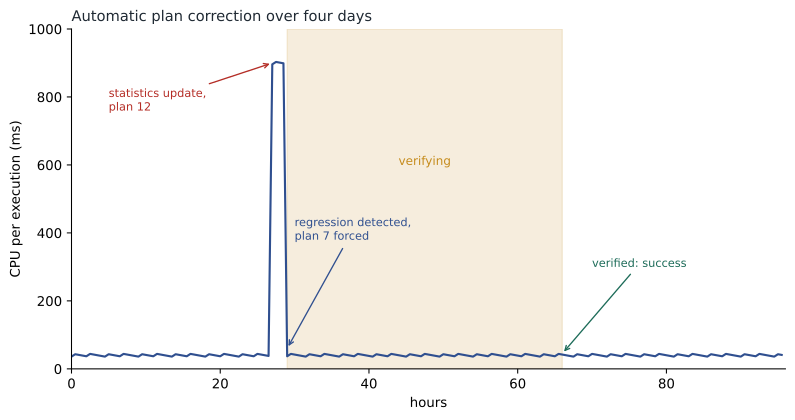
After the statistics update in the figure, plan 12 ran 3,980 times at an average of 910 ms of CPU, against 38 ms for plan 7. The regression lasted two hours before plan correction forced plan 7, at the same execution rate. Without plan correction, Walt thinks it would have taken until the morning stand-up, about 6 hours after the change, for someone to notice. How much CPU time did the regression cost, and how much did automatic correction save compared with waiting for the stand-up?
Show solution
- The 3,980 executions happened over the 2-hour regression: about 1,990 an hour.
- Extra CPU per execution: 910 − 38 = 872 ms.
- \[3{,}980 \times 872 \text{ ms} \approx 3{,}471 \text{ s} \approx 58 \text{ minutes of CPU}\]
- Waiting 6 hours instead of 2 would add 4 more hours: 4 × 1,990 = 7,960 more executions.
- \[7{,}960 \times 872 \text{ ms} \approx 6{,}941 \text{ s} \approx 116 \text{ minutes of CPU}\]
Answer: The two-hour regression cost about 58 minutes of extra CPU; waiting for the stand-up would have cost about 116 minutes more, close to two more hours of CPU on an instance that was already busy at that time of the morning.
Common mistakes
MistakeAutomatic tuning can create indexes on Managed Instance.
InsteadManaged Instance supports only automatic plan correction.
MistakeApplying a recommendation's script by hand gives the same safety as automatic application.
InsteadManual application skips the service's validation and automatic reversal.
MistakePlan correction works even if Query Store is read-only.
InsteadIt depends on Query Store collecting data in READ_WRITE mode.
MistakeOnce a plan is forced automatically it stays forced forever.
InsteadThe engine removes forcing if the plan is not better or becomes invalid; review the rest periodically.
Summary and key terms
- Automatic tuning has three options: FORCE_LAST_GOOD_PLAN, CREATE_INDEX and DROP_INDEX.
- Azure SQL Database supports all three; Managed Instance and SQL Server support only plan correction.
- For new Azure SQL Database servers, plan correction is on by default and the index options are off.
- Plan correction uses Query Store to detect regressions, forces the last good plan and verifies the result.
- Settings can be inherited from the server; validation takes about 30 minutes to 72 hours and failed changes are reverted.
- Recommendations are visible in sys.dm_db_tuning_recommendations and resource logs and should be reviewed regularly.
- Automatic tuning
- Built-in features that detect and fix some performance problems without manual action.
- FORCE_LAST_GOOD_PLAN
- The option that forces an earlier, better plan when a query regresses.
- Automatic plan correction
- Another name for FORCE_LAST_GOOD_PLAN.
- Tuning recommendation
- A suggested change, such as forcing a plan or creating an index, recorded by the engine.
- Validation
- The period after an automatic change during which the service measures whether it helped.
- Inheritance
- Taking automatic tuning settings from the logical server instead of setting them per database.
Practice problems
Work each problem on paper first, then reveal the answer to check.
Which automatic tuning option is available on Managed Instance?
Show answer
Only FORCE_LAST_GOOD_PLAN.
What must be true of Query Store for plan correction to work?
Show answer
It must be on and collecting in READ_WRITE mode.
Why does Elena prefer that index recommendations not be applied by hand without measurement?
Show answer
Manual application skips the service's validation and automatic reversal.
Where can recommendations be read with T-SQL?
Show answer
sys.dm_db_tuning_recommendations.
Why might DROP_INDEX remove an index that is actually needed?
Show answer
An index used only by an infrequent job, such as a quarterly report, can look unused for a long time.
Lesson quiz · 5 questions
Score 60% or more to complete this lesson.
Create a free account to save your progress, take quizzes and earn a certificate.