
MSAZ-280 · Lesson 9 of 12 · 22 min
Scaling compute and storage
▶ Video coming soon A video version of this lesson is on the way.
Every spring, Harrow & Finch has its busiest weeks of the year. Gardening stock arrives, paint sales double, and the Saturday before the May long weekend is the single busiest day for the tills. On HF-SQL01 the only way to prepare was to buy a server big enough for that Saturday and let it sit half idle for the rest of the year. In Azure, Walt can size for an ordinary week and scale up for the spring rush. That flexibility is one of the main reasons the board approved Project Skylight, and the DP-300 study guide expects a DBA to know how each Azure SQL option scales, how long it takes, what users notice and when scaling is not the answer.
Scaling up and scaling out
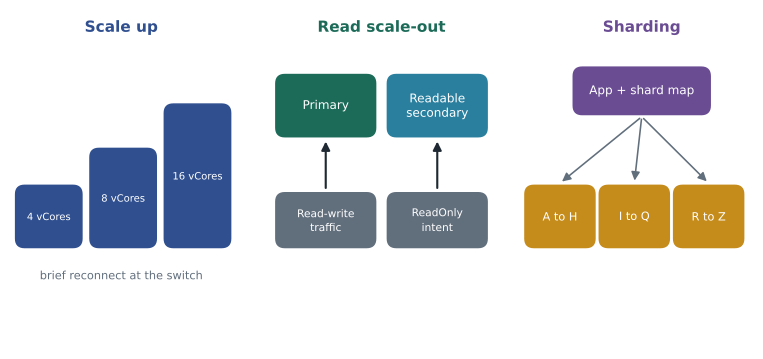
There are two directions of scaling. Scaling up, or vertically, gives a database more resources: more vCores, a faster tier, more memory, a larger maximum size. Scaling out, or horizontally, spreads work across more copies or more databases: read-only replicas for reporting, or shards that each hold part of the data. Scaling up is simpler and changes nothing in the application. Scaling out can go further, but usually needs the application to know where to send each request.
Scaling Azure SQL Database
Changing the size or tier of an Azure SQL database is an online operation. Azure prepares a new compute replica with the new size in the background, copies or attaches the data, keeps it in sync, and then switches connections to it. Users notice only the switch at the end: open connections drop and must reconnect, and transactions in flight are rolled back, which is why applications should use retry logic for transient errors. How long the preparation takes depends on the tier and the amount of data. In General Purpose, where data sits on remote storage, a change of vCores usually completes in minutes because the new compute simply attaches to the same storage. In Business Critical, where data sits on local SSD, Azure must copy the data to new replicas, so time grows with database size. Hyperscale scales compute in minutes regardless of size, because its storage is separate.
Storage is changed separately. In the vCore model you raise the maximum data size, which is a quick metadata change in most tiers. Space that has been allocated but not used can be given back by shrinking files, although shrinking fragments indexes and should be rare. Walt sets an alert when data space used passes 85 in every 100 of the maximum, so the team raises the limit before inserts fail.
az sql db update --name finchrewards --server hf-sql-rewards-prod-cus --resource-group rg-rewards-prod-cus --edition GeneralPurpose --family Gen5 --capacity 8

az sql db update --name finchrewards --server hf-sql-rewards-prod-cus --resource-group rg-rewards-prod-cus --max-size 250GB-- The same change from T-SQL, run in master on the logical server.
ALTER DATABASE finchrewards MODIFY (SERVICE_OBJECTIVE = 'GP_Gen5_8');
-- Watch the operation until it completes.
SELECT operation, state_desc, percent_complete, start_time, last_modify_time
FROM sys.dm_operation_status
WHERE major_resource_id = 'finchrewards'
ORDER BY start_time DESC;Scaling Managed Instance
Managed Instance also scales online, but more slowly, because the change happens to a whole virtual cluster. Changing the number of vCores or the storage on a General Purpose instance, or moving between General Purpose and Business Critical, can take from tens of minutes to a few hours, depending on the tier, the amount of data to seed and whether a new virtual cluster must be built. The instance stays available until a short failover at the end. Microsoft documents typical durations for each kind of change, and Walt reads that page rather than guessing, because the spring scale-up has to finish before Saturday's tills open, not during them.
The consequence is planning. For StockLine, Walt schedules the spring scale-up, from 8 to 16 vCores, for the Wednesday night before the busy week, so the slow part runs while stores are closed and the switch happens early on Thursday morning. He schedules the scale-down for the Tuesday after the long weekend.
Worked problem
What does the spring scale-up cost?
StockLine's production instance runs on 8 vCores for 50 weeks of the year and 16 vCores for 2 weeks in spring. Use an illustrative compute price of 0.55 dollars per vCore hour and 168 hours per week. Compare this with buying 16 vCores all year, which is what sizing for the busiest day would mean.
Show solution
- Ordinary weeks: 50 × 168 hours × 8 vCores × 0.55 = 36,960 dollars.
- Spring weeks: 2 × 168 × 16 × 0.55 = 2,956.80 dollars.
- Total with scaling: 36,960 + 2,956.80 = 39,916.80 dollars.
- Sized for the peak all year: 52 × 168 × 16 × 0.55 = 76,876.80 dollars.
- Difference: 76,876.80 − 39,916.80 = 36,960 dollars.
Answer: Scaling for the spring rush costs about 39,917 dollars of compute a year instead of about 76,877, saving 36,960 dollars at these illustrative prices. Storage and licensing are left out.
Scaling SQL Server on Azure VMs
A SQL Server virtual machine scales by resizing the virtual machine, which requires a restart, so it is an outage for a single machine. With an Always On availability group of two or more replicas, the team can resize the secondary first, fail over to it, then resize the old primary, which limits the outage to the failover. Storage scales by adding disks to the storage pool, by enlarging disks, or, with Premium SSD v2, by raising the provisioned input-output operations and throughput without changing the disk size, which takes effect within minutes. The warehouse server will use that last option for its nightly import if monitoring shows the log disk is the bottleneck.
Read scale-out
Reporting and transactions compete for the same resources. Read scale-out separates them. In the Business Critical and Premium tiers of SQL Database and in Business Critical Managed Instance, one of the hidden secondary replicas is readable at no extra charge. An application, or a report, that adds ApplicationIntent=ReadOnly to its connection string is routed to that replica, while normal connections go to the primary. Hyperscale offers high-availability replicas that can serve reads in the same way, plus named replicas that can each be sized independently.
Read replicas lag slightly behind the primary, usually by well under a second, so they suit reports and dashboards but not code that writes a row and immediately reads it back. Keiko's morning sales report is a perfect fit. Today it runs against HF-SQL01 at 7:00 and slows the tills as stores open. On the Business Critical instance it will connect with read-only intent and run on the secondary, leaving the primary to the tills.
-- Connection string for the morning report (shown on separate lines for reading):
-- Server=hf-mi-stockline.a1b2c3d4e5f6.database.windows.net;
-- Database=StockLine; Authentication=Active Directory Default;
-- ApplicationIntent=ReadOnly;

-- Inside the session, confirm that it landed on a read-only replica:
SELECT DATABASEPROPERTYEX(DB_NAME(), 'Updateability') AS updateability;
Choosing what to scale
Scaling is the fastest fix for a slow database, and also the most expensive one if the cause is something else. Before he scales anything, Walt checks which resource is actually under pressure. In Azure SQL Database and Managed Instance, the view sys.dm_db_resource_stats reports processor, data input-output, log write and memory use every 15 seconds as a share of the current limit, and the portal shows the same figures as charts. If processor use sits near its limit while input-output is low, more vCores will help. If log write is at its limit during a bulk load, a tier with higher log throughput, or batching the load, will help more than extra processor. If data input-output is the limit on General Purpose, Business Critical's local storage or better indexing may be the answer. And if all the figures are low but users still wait, the cause is probably blocking, a poor query plan or the application itself, and scaling will only add cost. MSAZ-281 covers the monitoring and tuning side in depth; for planning, the point is that every scale-up should be justified by a measured limit.
Partitioning a large table
Some performance problems come from one very large table rather than from too little compute. Table partitioning splits a table into partitions inside one database, according to the value of one column, usually a date. Each partition can be compressed, rebuilt, switched out or truncated on its own. Queries that filter on the partitioning column can skip partitions that cannot contain matching rows, which is called partition elimination. The study guide asks you to plan and configure partitioning, so the steps matter: create a partition function that defines the boundaries, a partition scheme that maps partitions to filegroups, and then create or rebuild the table or index on the scheme. In Azure SQL Database and Managed Instance, all partitions map to the PRIMARY filegroup, because files are managed by the service.
CREATE PARTITION FUNCTION pf_SalesMonth (date)
    AS RANGE RIGHT FOR VALUES ('2026-01-01', '2026-02-01', '2026-03-01', '2026-04-01');

CREATE PARTITION SCHEME ps_SalesMonth
    AS PARTITION pf_SalesMonth ALL TO ([PRIMARY]);

CREATE CLUSTERED INDEX cix_SalesLine_SaleDate
    ON dbo.SalesLine (SaleDate, SaleID)
    WITH (DROP_EXISTING = ON, ONLINE = ON)
    ON ps_SalesMonth (SaleDate);
Worked problem
How many partitions, and where does a date go?
The partition function above lists four boundary values with RANGE RIGHT. How many partitions does it create, and in which partition does a sale dated February 1, 2026 land?
Show solution
- Four boundary values create 4 + 1 = 5 partitions.
- Partition 1 holds dates before 2026-01-01; partition 2 holds 2026-01-01 up to but not including 2026-02-01; partition 3 starts at 2026-02-01.
- With RANGE RIGHT, a boundary value belongs to the partition on its right, so 2026-02-01 is the first date of partition 3.
Answer: Five partitions, and a sale dated February 1, 2026 goes into partition 3.
Partitioning is a maintenance and management tool more than a speed-up. It makes it cheap to archive a month, compress old months with page or columnstore compression, or rebuild only the latest partition. Queries that do not filter on the partitioning column gain nothing, and badly chosen boundaries can make them slower. Each month a job must add a new boundary with ALTER PARTITION FUNCTION ... SPLIT RANGE before the month begins, so that new rows do not pile into the last partition.
Sharding
When one database can no longer hold the data or serve the load, or when tenants must be separated, the data can be sharded: split across several databases that share a schema, each holding a subset of rows chosen by a shard key such as a customer number or region. Azure SQL Database supports this pattern with elastic database tools, a client library that keeps a shard map in a separate database and routes each connection to the right shard, and with elastic queries for reporting across shards. Sharding scales almost without limit, but it moves complexity into the application: cross-shard transactions are harder, rebalancing shards needs tooling, and every schema change must reach every shard, typically with elastic jobs.
Harrow & Finch does not need sharding today. StockLine fits comfortably on one managed instance, and Hyperscale, covered in the next lesson, can grow a single database much further than the company expects to need. Walt records the reasoning in his decision log anyway, because the exam, like the board, expects a DBA to recommend a sharding solution only when the requirements call for it: very large scale, many independent tenants, or data that must stay in different regions.
Common mistakes
MistakeScaling an Azure SQL database requires a planned outage.
InsteadScaling is online; only open connections drop briefly at the switch, so applications need retry logic.
MistakeManaged Instance scales as quickly as a General Purpose SQL database.
InsteadManaged Instance scaling can take tens of minutes to hours; plan it ahead of busy periods.
MistakeReadable secondaries are an extra paid option in Business Critical.
InsteadOne readable secondary is included in Business Critical and Premium at no extra cost.
MistakePartitioning a table always makes queries faster.
InsteadOnly queries that filter on the partitioning column benefit; partitioning is mainly a maintenance tool.
Summary and key terms
- Scale up by adding vCores, a faster tier or more storage; scale out with read replicas or shards.
- Scaling Azure SQL Database is online with a brief reconnect; General Purpose and Hyperscale change compute quickly, Business Critical time grows with size.
- Managed Instance scaling is online but slower; schedule it before peaks and check documented durations.
- SQL Server VMs resize with a restart; availability groups and Premium SSD v2 performance changes reduce the impact.
- Read scale-out sends ApplicationIntent=ReadOnly connections to a readable secondary at no extra cost in Business Critical and Premium.
- Partitioning splits a table inside one database for easier maintenance; sharding splits data across databases for very large scale or tenant isolation.
- Scale up
- Give a database more resources, such as vCores, a faster tier or more storage.
- Scale out
- Spread work across more replicas or databases.
- Read scale-out
- Routing read-only connections to a readable secondary replica.
- ApplicationIntent=ReadOnly
- A connection string setting that asks to be routed to a read-only replica.
- Partition function
- An object that defines the boundary values used to split a table into partitions.
- Partition scheme
- An object that maps the partitions of a partition function to filegroups.
- Shard map
- A database that records which shard holds each range of shard key values.
Practice problems
Work each problem on paper first, then reveal the answer to check.
What does an application need to cope with an online scaling operation?
Show answer
Retry logic, because open connections drop and must reconnect at the switch.
Why does scaling Business Critical take longer as the database grows?
Show answer
Its data sits on local SSD, so the data must be copied to the new replicas.
How does a report reach the readable secondary?
Show answer
By adding ApplicationIntent=ReadOnly to its connection string.
How many partitions do three boundary values create?
Show answer
Four.
Name one cost of sharding.
Show answer
For example: cross-shard transactions are harder, rebalancing needs tooling, or every schema change must reach every shard.
Lesson quiz · 5 questions
Score 60% or more to complete this lesson.
Create a free account to save your progress, take quizzes and earn a certificate.