
MSAZ-280 · Lesson 10 of 12 · 24 min
Hyperscale
▶ Video coming soon A video version of this lesson is on the way.
Not every Harrow & Finch database is small. SalesHistory, the database behind every multi-year sales report the company produces, holds every till line since 2012: about 3.2 TB today, growing by about 350 GB a year, and expected to grow faster once online orders and loyalty data are added. On HF-SQL01 it lives on the SAN whose support contract ends in June 2027. Restoring it from backup takes most of a day, which is why Walt has never actually tested a full restore. Keiko and Ines want to query it for the planned Finch Data Hub. And it is too large for comfort in General Purpose or Business Critical, whose maximum sizes are measured in single-digit terabytes. Elena proposes Hyperscale, and this lesson explains why.
A different architecture
In the other service tiers, compute and storage are tied together: General Purpose attaches remote storage to one compute node, and Business Critical copies all the data to every replica's local SSD. Hyperscale splits the database engine into separately scaled parts. Compute nodes run the query processor and hold a large local cache, using fast local SSD as an extension of memory called the resilient buffer pool extension. Page servers each own a range of the database's data pages, keep them up to date, and serve them to compute nodes on request. A log service receives the transaction log from the primary compute node, makes it durable, and feeds it to the page servers and the secondary replicas. Underneath everything, the data files live in Azure Storage, which also holds the snapshots used for backups.
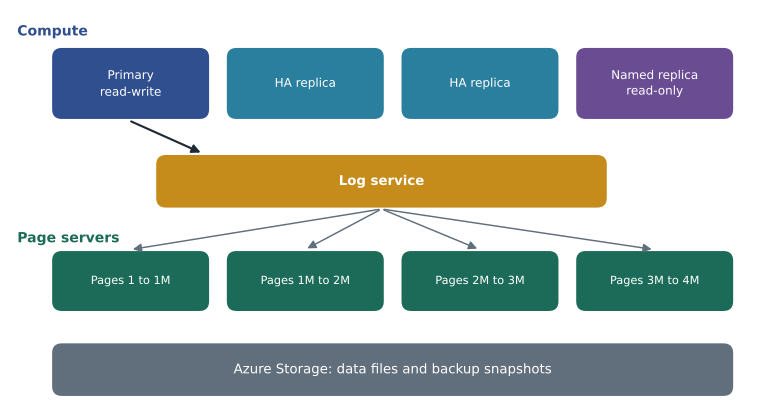
Because the parts are separate, Hyperscale behaves differently from the other tiers in ways that matter to a DBA. The database can grow to 128 TB, adding page servers as it grows. Compute can be scaled up or down in minutes, whatever the database size, because the new compute node does not need its own copy of the data. Backups are snapshots of the files in Azure Storage, taken almost instantly with no load on compute, and restores of very large databases complete in minutes to a few hours rather than a day, because a restore creates new files from snapshots in parallel. And replicas can be added quickly, since they also read from the shared page servers.
Replicas in Hyperscale
Hyperscale offers three kinds of secondary replica, and the exam expects you to tell them apart. High-availability replicas are hot standbys in the same region that share the primary's page servers. You can have up to four; if the primary fails, one of them takes over in seconds, and they can serve read-only connections with ApplicationIntent=ReadOnly. Named replicas also share the primary's page servers, but they appear as separate databases with their own names, their own sizes and their own security, so a reporting team can have an isolated replica sized for its workload; a database can have many named replicas. Geo-replicas live in another region and have their own page servers there, providing disaster recovery like active geo-replication in the other tiers, which MSAZ-282 covers.
| Replica type | Shares page servers? | Own name and size? | Purpose |
|---|---|---|---|
| High-availability replica | Yes | No, same size as primary | Fast failover; read scale-out |
| Named replica | Yes | Yes, sized and secured separately | Isolated read workloads such as reporting |
| Geo-replica | No, has its own in the other region | Yes | Disaster recovery in another region |
For SalesHistory, Elena's design uses one high-availability replica for resilience and one named replica, SalesHistory_reports, sized separately for Keiko's reporting and the Data Hub's extraction jobs. The heavy month-end queries then run on the named replica, with their own compute, and never touch the primary that receives each night's load from StockLine.
-- Run in master on the logical server that will hold the named replica.
ALTER DATABASE SalesHistory
    ADD SECONDARY ON SERVER [hf-sql-history-prod-cus]
    WITH (SECONDARY_TYPE = NAMED, DATABASE_NAME = [SalesHistory_reports]);

-- The named replica can then be scaled on its own:
ALTER DATABASE SalesHistory_reports MODIFY (SERVICE_OBJECTIVE = 'HS_Gen5_8');
Pricing and sizing
Hyperscale compute is billed per vCore like the other vCore tiers, for the primary and for each replica. Storage is billed for the space actually used, not for a maximum you reserve, because the database grows automatically. Backup storage is billed for the snapshot and log space beyond what the service includes. Microsoft simplified Hyperscale pricing in recent years so that it is often comparable with General Purpose for the same vCores, which has made it a common choice even for medium-sized databases that may grow; Walt checks the current rates in the pricing calculator rather than relying on older blog posts. Hyperscale also offers serverless compute, which scales between a minimum and a maximum like serverless General Purpose; auto-pause for Hyperscale serverless was still a preview feature when Walt checked in November 2026.
Worked problem
Estimating the SalesHistory storage bill
SalesHistory is 3.2 TB today and grows about 350 GB a year. Walt wants the used storage at the end of each of the next three years, and the monthly storage charge at the end of year 3 at an illustrative 0.25 dollars per GB per month. Use 1 TB = 1,024 GB.
Show solution
- Today: 3.2 TB × 1,024 = 3,276.8 GB.
- End of year 1: 3,276.8 + 350 = 3,626.8 GB.
- End of year 2: 3,626.8 + 350 = 3,976.8 GB.
- End of year 3: 3,976.8 + 350 = 4,326.8 GB, about 4.2 TB.
- Monthly charge at the end of year 3: 4,326.8 × 0.25 = 1,081.70 dollars.
Answer: About 4,327 GB (4.2 TB) after three years, costing about 1,082 dollars a month for storage at the illustrative rate. If online orders double the growth rate, the same steps give about 5,377 GB.
Moving into and out of Hyperscale
An existing Azure SQL database moves to Hyperscale with a normal scaling command, and the move is online: data is copied into the Hyperscale storage while the database keeps working, and a short switch happens at the end. Large databases take hours to copy, so the operation should run during a quiet period. For a long time, moving to Hyperscale was one way. Today a database that moved from another tier can be moved back to General Purpose within 45 days of its migration to Hyperscale, which gives a safety net if testing goes badly. A database created directly in Hyperscale cannot move to another tier; it must be exported or copied with other tools.
az sql db update --name SalesHistory --server hf-sql-history-prod-cus --resource-group rg-history-prod-cus --edition Hyperscale --family Gen5 --capacity 8 --ha-replicas 1SalesHistory, though, is on premises, and Azure SQL Database cannot restore a native SQL Server backup. Walt's migration plan for it uses the Database Migration Service in offline mode, which copies the schema and data into a new Hyperscale database over a weekend, followed by a short catch-up of the days loaded since. Downtime matters less here than for StockLine, because SalesHistory is loaded once a night and read by reports; a weekend without fresh history reports is acceptable to the business.
Worked problem
How long will the initial copy take?
Walt measures a test copy of a 200 GB slice of SalesHistory: it takes 2 hours 30 minutes through the migration service over the VPN. If the full 3.2 TB database copies at the same rate, how long will the copy take? Use 1 TB = 1,024 GB.
Show solution
- Rate: 200 GB in 150 minutes, which is 200 ÷ 150 ≈ 1.33 GB per minute.
- Full size: 3.2 × 1,024 = 3,276.8 GB.
- Time: 3,276.8 ÷ 1.33 ≈ 2,458 minutes. More exactly, 3,276.8 × 150 ÷ 200 = 2,457.6 minutes.
- In hours: 2,457.6 ÷ 60 ≈ 41 hours.
Answer: About 41 hours, which fits a long weekend but not an ordinary one, so Walt schedules the copy to start on the Friday evening before the May long weekend in 2027, a time when reporting is quiet.
Testing a restore
Walt's first Hyperscale task after the migration will be the full restore test he has never managed on premises. A point-in-time restore of an Azure SQL database always creates a new database, on the same logical server or another one in the region, rather than overwriting the original, so the test does no harm. For Hyperscale, the restore copies storage snapshots and replays only the log needed to reach the chosen moment, so its duration depends far more on the amount of log than on the size of the data. Walt's plan is to restore SalesHistory to the state it was in at 6:00 one morning, as a new database called SalesHistory_restoretest, record how long the restore takes, run a set of row counts and checksums on the five largest tables against the original, and then delete the copy so it stops costing money.
Worked problem
Did the restore meet the target?
The recovery objective for SalesHistory says a full restore must complete within 4 hours. In the planned test, Walt will note the request time and the time the restored database comes online. Suppose the restore is requested at 9:12 and the database is online at 10:03, and the row-count checks then take 25 minutes. How long does the restore itself take, how long until the copy is verified, and does it meet the target?
Show solution
- Restore time: from 9:12 to 10:03 is 51 minutes.
- Verification ends at 10:03 + 25 minutes = 10:28, which is 76 minutes after the request.
- Target: 4 hours is 240 minutes; 76 is well within it.
Answer: The restore takes 51 minutes and the copy is verified 76 minutes after the request, comfortably inside the 4-hour target. Walt plans to repeat the test every quarter and record each result.
What is different in Hyperscale
Hyperscale supports the same T-SQL and most of the same features as the other tiers, but a few behaviors differ and appear in exam questions. Backups are snapshot-based, so point-in-time restore is fast and does not depend on database size, and long-term retention is supported. Because storage grows automatically, there is no maximum data size to manage, although the space used is billed. Very large single transactions are limited by the log service's throughput, which is high but not unlimited, so a massive data load should be done in batches. And a few features, such as some cross-database options available on Managed Instance, do not apply because Hyperscale is part of SQL Database.
Hyperscale elastic pools let several Hyperscale databases share compute, which suits a software provider with many large tenants. Harrow & Finch has only one Hyperscale candidate, so it uses a single database.
Choosing Hyperscale
Elena gives Walt a short checklist for recommending Hyperscale. Choose it when a database is already large, or likely to become large, so that General Purpose and Business Critical size limits would become a problem. Choose it when fast restores of a large database matter for recovery objectives, because snapshot restores are much faster than restoring a full backup. Choose it when compute needs change often and must change quickly, or when reporting needs independent replicas. Prefer another tier when the database is small and will stay small, when it needs Managed Instance features such as SQL Server Agent or cross-database queries, or when the application depends on the lowest possible commit latency of Business Critical's local storage.
SalesHistory meets the first three tests and fails none of the last ones. Walt writes Hyperscale into the plan, with the named replica for reports, and puts a full restore test into the first month after migration, the test he has never been able to run on premises.
Common mistakes
MistakeHyperscale is a Managed Instance tier.
InsteadHyperscale is a service tier of Azure SQL Database only.
MistakeScaling Hyperscale compute takes longer the bigger the database is.
InsteadCompute scales in minutes regardless of size, because storage is separate.
MistakeA database can always be moved out of Hyperscale at any time.
InsteadA database migrated from another tier can return to General Purpose within 45 days; one created in Hyperscale cannot move tiers.
MistakeNamed replicas are copies of the data with their own storage.
InsteadNamed replicas share the primary's page servers and storage; geo-replicas have their own storage in another region.
Summary and key terms
- Hyperscale separates compute nodes, page servers, a log service and Azure Storage, so each part scales independently.
- A Hyperscale database can grow to 128 TB; compute scales in minutes; backups are snapshots and restores are fast.
- High-availability replicas give fast failover and read scale-out; named replicas give isolated, separately sized read workloads; geo-replicas protect another region.
- Storage is billed for space used; compute is billed per vCore for each replica; serverless compute is available.
- Moving into Hyperscale is online; a migrated database can return to General Purpose within 45 days.
- Recommend Hyperscale for large or fast-growing databases, fast restore needs, changing compute needs and isolated reporting replicas.
- Hyperscale
- An Azure SQL Database service tier with a distributed architecture that separates compute, log and storage.
- Page server
- A Hyperscale component that owns a range of data pages and serves them to compute nodes.
- Log service
- The Hyperscale component that receives, stores and distributes the transaction log.
- Resilient buffer pool extension
- Local SSD on Hyperscale compute nodes used as an extension of memory for caching pages.
- High-availability replica
- A Hyperscale secondary in the same region, used for failover and read scale-out.
- Named replica
- A Hyperscale secondary with its own name, size and security, sharing the primary's storage.
- Geo-replica (Hyperscale)
- A Hyperscale secondary in another region with its own page servers, for disaster recovery.
Practice problems
Work each problem on paper first, then reveal the answer to check.
Why does Hyperscale compute scale quickly for very large databases?
Show answer
New compute nodes read from shared page servers, so no data has to be copied to them.
What is the maximum size of a Hyperscale database?
Show answer
128 TB.
Which replica type would you give a reporting team that needs its own size and permissions?
Show answer
A named replica.
Within how many days can a database migrated to Hyperscale move back to General Purpose?
Show answer
45 days.
Why are Hyperscale restores fast for large databases?
Show answer
Backups are storage snapshots, so a restore creates new files from snapshots in parallel instead of replaying a full backup.
Lesson quiz · 5 questions
Score 60% or more to complete this lesson.
Create a free account to save your progress, take quizzes and earn a certificate.