
MSAZ-280 · Lesson 6 of 12 · 23 min
Migrating databases to Azure
▶ Video coming soon A video version of this lesson is on the way.
Grace Oduya, the store operations director, has one question about the StockLine migration, and she asks it the moment she sits down at the DBA clinic as a guest: how long will the tills be unable to look up stock? StockLine's point-of-sale back end serves all 23 stores. Stores open at 7:00 and the last ones close at 22:00, and online orders arrive all night. Every minute of downtime is a minute in which a cashier cannot check whether a paint color is in stock at the next store. Walt's answer will depend on the migration strategy, and choosing one is the skill this lesson teaches.
Evaluating requirements
Every migration plan begins with four questions. What is the source: version, edition, size, features in use and how much the data changes each hour? What is the target: SQL Server on a virtual machine, Managed Instance or SQL Database, already chosen in lesson 1? How much downtime can the business accept at cutover? And what connectivity exists between the source and Azure: bandwidth, a VPN or ExpressRoute, and whether backups can be copied to Azure storage?
For StockLine the answers are clear. The source is SQL Server 2016 Enterprise on HF-SQL01 at head office, a version whose extended support ended on July 14, 2026, which adds urgency (lesson 12 shows how the server keeps receiving security fixes until it is retired), 410 GB for StockLine plus 3 GB for Pricing, generating about 6 GB of transaction log on a normal day and 11 GB on a busy Saturday in spring. The target is the Business Critical managed instance planned for 2027. The business will accept at most 30 minutes of downtime, scheduled for a Sunday between 1:00 and 5:00. And the site-to-site VPN that went live in October 2026 gives about 200 Mbit/s of usable bandwidth to Azure outside business hours.
Assessing the source
Before choosing a method, the team needs to know whether anything in the database will block the move. Assessment tools look for features the target does not support, behavior that will change, and objects that need rewriting. Until early 2026 the Azure SQL migration extension for Azure Data Studio was a common choice, but Azure Data Studio, and the extension with it, was retired on February 28, 2026. Microsoft now points to three routes. The SQL Server migration experience in Azure Arc discovers instances, checks readiness for each target, recommends a right-sized target and projects its cost. Azure Migrate does the same as part of a wider discovery of servers and applications. And the Azure Database Migration Service can run assessments from PowerShell or the Azure CLI when a team wants to script them across many servers.
Harrow & Finch connected HF-SQL01 to Azure Arc in November 2026 for exactly this reason, as lesson 12 describes. The Arc assessment for StockLine reports the target as ready for Managed Instance with two warnings. One stored procedure uses xp_cmdshell to copy a nightly price file, which Managed Instance does not allow; Liam Ferreira will rewrite it to read the file from Azure Blob Storage instead. And the database still has compatibility level 130, from SQL Server 2016, which will be kept at first and raised after testing, as lesson 7 explains. For Azure SQL Database the same assessment shows blockers, including the SQL Server Agent jobs and the cross-database query to Pricing, which confirms the decision to use Managed Instance.
Offline and online migrations
Migration methods fall into two families. In an offline migration, the application stops writing, a final copy of the data is taken and moved, and the application is pointed at the new database. Downtime lasts from the moment writes stop until the application reconnects, so it grows with the size of the final copy. In an online migration, the target is first seeded with a full copy while the source keeps running, then kept up to date by continuously replaying changes, and the application is switched over only when the target is nearly identical. Downtime shrinks to the few minutes needed to stop writes, let the last changes arrive and reconnect.
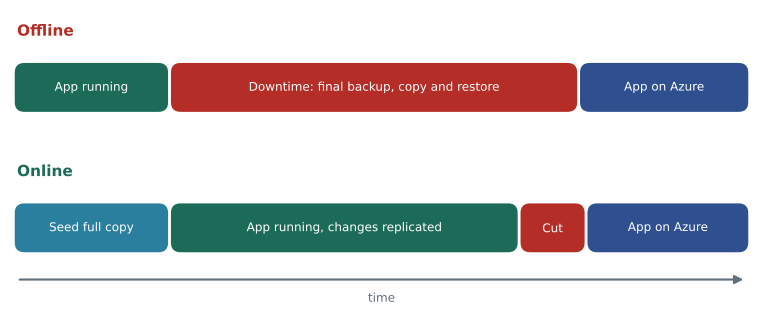
Which family is possible depends on the target. For Managed Instance, two online methods stand out. The Managed Instance link uses distributed availability group technology to replicate a database from SQL Server to the managed instance in near real time, with the target readable during replication, and supports a planned failover at cutover; Azure Arc's migration experience uses the link to offer a guided, near-zero-downtime migration. The Log Replay Service restores a full backup and then a chain of log backups from Azure Blob Storage, and completes when the last log backup is applied. The offline methods for Managed Instance are a native backup to URL followed by a RESTORE FROM URL on the instance, and the Database Migration Service in offline mode.
For Azure SQL Database, which cannot restore a native SQL Server backup, the choices are different. The Database Migration Service migrates schema and data offline, using Azure Data Factory with a self-hosted integration runtime. A BACPAC file, exported from the source and imported to the target, moves schema and data together, but it is slow for large databases and is an offline method. Transactional replication with the Azure SQL database as a subscriber can provide an online path, and partner tools offer continuous replication for near-zero downtime. For SQL Server on a virtual machine, everything that works on premises works in Azure: backup and restore, log shipping, availability groups, or the Database Migration Service in online or offline mode.
| Target | Online options | Offline options |
|---|---|---|
| SQL Server on Azure VMs | Database Migration Service (online), availability group replica, log shipping | Backup and restore, Database Migration Service (offline), detach and copy |
| Azure SQL Managed Instance | Managed Instance link (also through Azure Arc), Log Replay Service | Backup to URL and RESTORE FROM URL, Database Migration Service (offline) |
| Azure SQL Database | Transactional replication, partner replication tools | Database Migration Service (offline), BACPAC import, bulk copy |
Worked problem
How long would an offline migration take?
Walt estimates an offline migration of StockLine to Managed Instance with backup to URL. A compressed full backup of the 410 GB database is about 120 GB. Over the VPN the copy averages 200 Mbit/s. The restore on the managed instance is expected to run at about 1.5 GB per minute of original data size. Ignore the time to take the backup. Does the method fit the 30-minute window?
Show solution
- Convert the bandwidth: 200 Mbit/s ÷ 8 = 25 MB/s.
- Copy time: 120 GB is 120,000 MB, so 120,000 ÷ 25 = 4,800 seconds, which is 80 minutes.
- Restore time: 410 GB ÷ 1.5 GB per minute ≈ 273 minutes.
- Total: 80 + 273 ≈ 353 minutes, almost six hours, before testing and reconnecting.
Answer: No. An offline migration would take close to six hours of downtime, far beyond the 30-minute target, so StockLine needs an online method.
Worked problem
Will an online method keep up?
With the Managed Instance link, the initial seeding happens while StockLine runs, and then the instance must keep up with the change rate. On a busy Saturday StockLine writes 11 GB of log over its 15 trading hours. The link can use the VPN at up to 25 MB/s. Can it keep up, and how much does the busy day use of the available capacity?
Show solution
- Log rate on a busy day: 11 GB is 11,000 MB over 15 hours, which is 54,000 seconds: 11,000 ÷ 54,000 ≈ 0.20 MB/s.
- Available rate: 25 MB/s.
- Share of capacity used: 0.20 ÷ 25 ≈ 0.008, less than one hundredth.
Answer: Yes. Even the busiest day uses less than one hundredth of the VPN capacity for log, so the link stays close to real time and the cutover needs only the minutes to stop writes, let the last transactions arrive and fail over.
Running the online migration
Walt's plan for StockLine follows the link-based method. First he checks the prerequisites: the source must be a supported SQL Server version with the latest cumulative update, availability group features must be enabled on the source, the database must use the full recovery model and have a full backup, and the network must allow the endpoints the link needs, port 5022 for database mirroring traffic in both directions as well as port 1433. SQL Server 2016 supports the link only with a recent service pack and cumulative update, so applying them to HF-SQL01 becomes task one in January 2027.
Then he creates the link through the Arc migration experience, which seeds the database on the managed instance and starts replicating. During the weeks of replication, the copy on Managed Instance is readable, so Keiko can test her reports against it and Liam can test the rewritten price-file procedure. On cutover night the team stops the StockLine application service, waits for the link to show that the replica is synchronized, performs the planned failover, which makes the managed instance the primary, and points the application's connection string at the managed instance. If anything goes wrong in the first hours, the link can be reversed so that the on-premises server becomes primary again, which is one reason for keeping the SQL Server 2022 update policy described in lesson 4.
-- On the source, before creating the link: confirm the recovery model and last full backup.
SELECT d.name, d.recovery_model_desc,
       MAX(b.backup_finish_date) AS last_full_backup
FROM sys.databases AS d
LEFT JOIN msdb.dbo.backupset AS b
       ON b.database_name = d.name AND b.type = 'D'
WHERE d.name IN ('StockLine', 'Pricing')
GROUP BY d.name, d.recovery_model_desc;
Migrations between Azure SQL services
Not every migration starts on premises. The study guide also covers moving between Azure SQL services and between instances. A SQL database can be copied to another logical server with CREATE DATABASE AS COPY OF, which produces a transactionally consistent copy; changing the service tier, including moving to Hyperscale, is a scaling operation rather than a migration. Managed Instance has a database copy and move feature that copies or moves a database to another managed instance online, using the same replication technology as the link, and completes with a short cutover. Moving from SQL Database to Managed Instance, or the reverse, is a real migration, usually done with BACPAC export and import, the Database Migration Service, or transactional replication.
-- Make a copy of the Finch Rewards test database on another logical server.
CREATE DATABASE finchrewards_qa
    AS COPY OF [hf-sql-rewards-test-cus].finchrewards;

-- Check progress from master on the target server.
SELECT d.name, d.state_desc, c.percent_complete
FROM sys.databases AS d
JOIN sys.dm_database_copies AS c ON c.database_id = d.database_id;
Troubleshooting a migration
The last skill in this part of the study guide is troubleshooting. Most migration problems fall into a few groups. Connectivity: the link or the migration service cannot reach the source or the storage account because a firewall, network security group or DNS entry is wrong; the fix is to test each path from the right place, for example with Test-NetConnection to port 5022 and 1433. Permissions: the account doing the migration lacks rights on the source, on the storage account or on the target. Backups: a log backup taken by another tool breaks the chain that the Log Replay Service is replaying, so a regular backup job must be paused or coordinated during the migration. Features: an object flagged by the assessment, such as the xp_cmdshell procedure, fails after cutover because it was not fixed. And performance: the target is sized too small, or statistics are stale, so the first busy morning is slow; lesson 7 covers the settings to check, and MSAZ-281 covers tuning.
Walt adds one rule of his own to the runbook. Every migration rehearsal ends with a written result: start and end times, the size moved, the downtime measured, the problems met and how each was fixed. Three rehearsals with written results, he says, are worth more than any number of confident estimates. Grace gets her answer at the end of the clinic: if the rehearsals behave like the estimate, the tills will be unable to look up stock for about fifteen minutes, early on a Sunday morning.
Common mistakes
MistakeAzure SQL Database can restore a native SQL Server backup file.
InsteadNative restore works on Managed Instance and SQL Server VMs; SQL Database needs methods such as DMS, BACPAC or replication.
MistakeAn offline migration's downtime depends only on the network.
InsteadOffline downtime includes taking, copying and restoring the final copy, and it grows with database size.
MistakeThe Azure Data Studio migration extension is the recommended assessment tool.
InsteadAzure Data Studio and the extension were retired on February 28, 2026; use Azure Arc, Azure Migrate or DMS instead.
MistakeOther backup jobs can keep running during a Log Replay Service migration.
InsteadExtra log backups break the chain being replayed; coordinate or pause them.
Summary and key terms
- Evaluate the source, target, acceptable downtime and connectivity before choosing a migration method.
- Assess with the SQL Server migration experience in Azure Arc, Azure Migrate or the Database Migration Service; the Azure Data Studio extension retired in February 2026.
- Offline migrations move the final copy during downtime; online migrations seed the target and replay changes until a short cutover.
- For Managed Instance, the Managed Instance link and the Log Replay Service are online methods; backup to URL and restore is offline.
- For SQL Database, use DMS offline, BACPAC, transactional replication or partner tools.
- Troubleshoot connectivity, permissions, broken backup chains, unsupported features and sizing.
- Offline migration
- A migration in which the application stops while the final copy of the data is moved.
- Online migration
- A migration in which the target is seeded and kept in sync while the source runs, with a short cutover.
- Managed Instance link
- A feature that replicates databases from SQL Server to Managed Instance in near real time using distributed availability groups.
- Log Replay Service
- A Managed Instance service that restores a full backup and a chain of log backups from Blob Storage to migrate a database online.
- BACPAC
- A file containing a database schema and data, used to export and import Azure SQL databases.
- Cutover
- The moment the application stops using the source and starts using the target.
- Database Migration Service
- An Azure service that runs online and offline migrations to Azure SQL targets.
Practice problems
Work each problem on paper first, then reveal the answer to check.
Why does StockLine need an online migration?
Show answer
An offline migration would take about six hours of downtime, far beyond the 30-minute limit.
Which port does the Managed Instance link need besides 1433?
Show answer
Port 5022, for database mirroring endpoint traffic.
Name an offline method for migrating to Managed Instance.
Show answer
Native backup to URL followed by RESTORE FROM URL, or DMS in offline mode.
How do you copy an Azure SQL database to another logical server?
Show answer
With CREATE DATABASE ... AS COPY OF, run on the target server.
What tools replaced the Azure Data Studio migration extension for assessments?
Show answer
The SQL Server migration experience in Azure Arc, Azure Migrate, and DMS through PowerShell or the Azure CLI.
Lesson quiz · 5 questions
Score 60% or more to complete this lesson.
Create a free account to save your progress, take quizzes and earn a certificate.